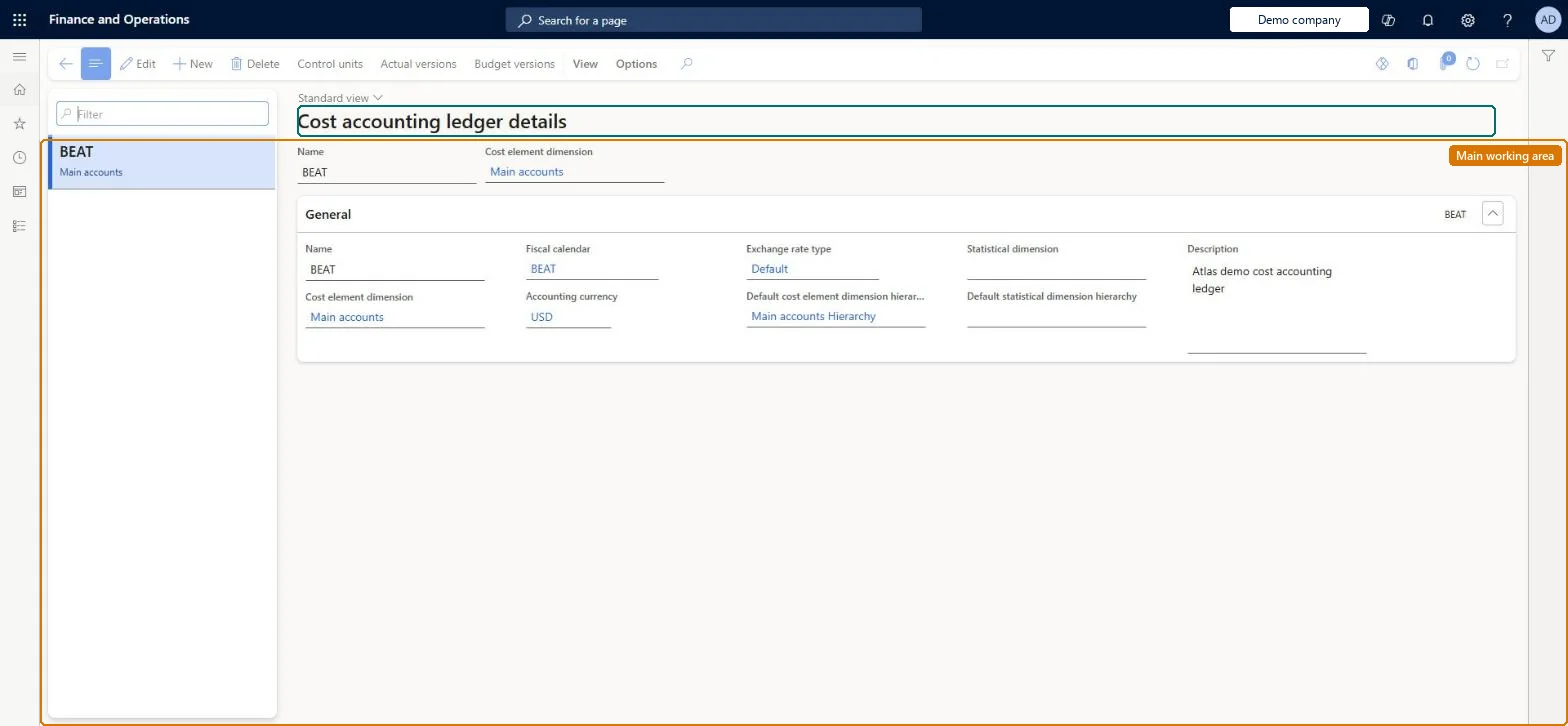
Setup step on the Cost accounting ledgers page · Cost accounting
Set up Cost accounting ledgers
Use this page to create the ledger that collects cost and statistical entries from one or more legal entities, then define its control units, set up data sources (general ledger entries, budgets, statistical measures) on the actual and budget versions, and run source data processing.
SETUP GUIDEHow to set it up8 sections. Choose a role to highlight what matters to you.
Everyone
1What it is and why
What it is
A setup page where you create cost accounting ledgers, each defined by a cost element dimension, a statistical dimension, a fiscal calendar, an accounting currency and an exchange rate type, and from which you manage the ledger's versions, control units and data sources.
What you do here
Use this page to create the ledger that collects cost and statistical entries from one or more legal entities, then define its control units, set up data sources (general ledger entries, budgets, statistical measures) on the actual and budget versions, and run source data processing.
Example
For example, data from legal entities with different local currencies is converted into the ledger's accounting currency using the exchange rate type chosen on the ledger.
The page in Dynamics 365. page title tab to open what to set or check
About the examples: Examples and screenshots in this guide use BEAT, a demo company in a Dynamics 365 test environment. Use your own company's codes and values instead of copying them.
Setup steps on this page
Set up Cost accounting ledgers
Use this page to create the ledger that collects cost and statistical entries from one or more legal entities, then define its control units, set up data sources (general ledger entries, budgets, statistical measures) on the actual and budget versions, and run source data processing.
Steps from Microsoft
Go to Cost accounting > Ledger setup > Cost accounting ledgers.
Click New.
In the Name field, type a value.
In the Cost element dimension field, enter or select a value.
In the Fiscal calendar field, enter or select a value.
In the Accounting currency field and the Exchange rate type field, enter or select values.
In the Statistical dimension field, enter or select a value.
The dimension whose members (for example main accounts) are the cost elements the ledger records costs against.Microsoft Learn
CostElementDimension
Fiscal calendar
The calendar whose years and periods the ledger uses; its periods appear in the Cost control workspace configuration.Microsoft Learn
FiscalCalendar
Accounting currency
The currency in which all entries in the ledger are stated.Microsoft Learn
AccountingCurrencyCode
Exchange rate type
The exchange rate type used to convert each legal entity's currency to the ledger's accounting currency.Microsoft Learn
ExchangeRateType
Statistical dimension
The dimension whose members hold nonmonetary measures for the ledger; a statistical dimension can serve more than one ledger.Microsoft Learn
StatisticalDimension
Control units (button)
Opens the cost control units of the ledger, where you pick the cost object dimension whose members become cost objects.Microsoft Learn
Actual versions (button)
Opens the ledger's actual version, where Manage sets up data sources and Source data processing runs the import jobs.Microsoft Learn
Common errors and fixes
Message
What to do
A number sequence has not been set up for the reference Journal
Go to Cost accounting > Setup > Parameters > Number sequences and set a number sequence for the Journal reference, then run the processing again. Checked in Dynamics 365
Corrected source figures don't show in Cost accounting
Cost accounting keeps its own copy of the source data. Import the data again and process the source data for the period. Microsoft Learn
A changed policy doesn't change the figures in the Cost control workspace
Policies take effect when you run the overhead calculation again. Run it for the period and point the report at the new calculation version. Microsoft Learn
Test checklist
Create a ledger with Name, Cost element dimension, Fiscal calendar, Accounting currency, Exchange rate type and Statistical dimension, then save it.
Open Actual versions > Manage > General ledger and add a data source with the Dynamics 365 Finance - General ledger entries provider. Configure the legal entity with Posting layer Current.
Run Source data processing > General ledger for one fiscal calendar period.
Open the General ledger entry transfer journal, select a line, and use Cost entries > Source entry to trace the cost entry back to its ledger transaction.
Check that the cost entry amounts are in the ledger's accounting currency.
One ledger per management reporting unit, with the fiscal calendar, accounting currency and exchange rate type chosen for management reporting, and a shared cost element dimension and statistical dimensionA cost accounting ledger is the overall reporting unit and isn't tied to a legal entity. One legal entity's data can feed several ledgers. Data from each legal entity is converted into the ledger's accounting currency with the ledger's exchange rate type.
Cost accounting has four roles: Cost accounting manager (Activity licence), Cost accountant and Cost accountant clerk (Operations licence), and Cost object controller (Team members licence). Cost accountants and cost accounting managers set up ledgers. No Feature management feature needs to be turned on for this page.
Shared: Cost accounting setup isn't kept per legal entity. It is the same from every company, and one cost accounting ledger can collect data from several legal entities. Checked in Dynamics 365
Can it be undone
Hard to reverse: The fiscal calendar drives the periods that source data processing, the overhead calculation and the Cost control workspace use. Overhead calculation entries are dated at the fiscal period end. Learn doesn't describe changing these fields after entries exist, so settle them before the first processing run.
If you change it later
The ledger's fiscal calendar, accounting currency, exchange rate type and cost element dimension decide how every entry is dated and converted. Policies, versions and reports are built on the ledger, so settle these values before the first processing run. Microsoft Learn
Technical architect
6Technical
Menu item
CAMCostAccountingLedgerChecked in Dynamics 365
Form
CAMCostAccountingLedgerChecked in Dynamics 365
Table
CAMDataCostAccountingLedgerShown as “COST ACCOUNTING LEDGERS” in Record infoKey field: LedgerNameChecked in Dynamics 365
Who can open it
3 security roles. Select a role to see its duties and privileges.
RoleCost accountantCAMCostAccountant
DutyInquire into all cost object entries in excelCAMAllCostObjectEntriesInExcelInquire
To set it up or change itMaintain cost accounting ledgers CAMCostAccountingLedgersMaintainCalculations perform CAMPerformCalculationsRefresh entries CAMRefreshEntriesTo use itInquire into cost accounting ledgers CAMCostAccountingLedgersInquireGive people a role that holds these duties. On this system, 3 roles give access to this page.Checked in Dynamics 365
Actions on the page
View(Action Pane without tabs): Control units, Actual versions, Budget versionsChecked in Dynamics 365
Load order: A cost accounting ledger has no data entity in Data management, so it can't be loaded from a file or a configuration template. Set it up by hand or with the Get started wizard in each environment, then process the source data there.Microsoft Learn
Checked in a working Dynamics 365 system, version 10.0.49: the menu item, form, table and security, the page.
To cite this step: CA-LEDGER-010, Set up Cost accounting ledgers. Beyond ERP Atlas Hub, 2026-11-11. https://www.beyonderp.cloud/atlas/step/CA-LEDGER-010