BeyondERP.Newsletter
Menu

Setup page · Cost accounting

Fiscal calendars

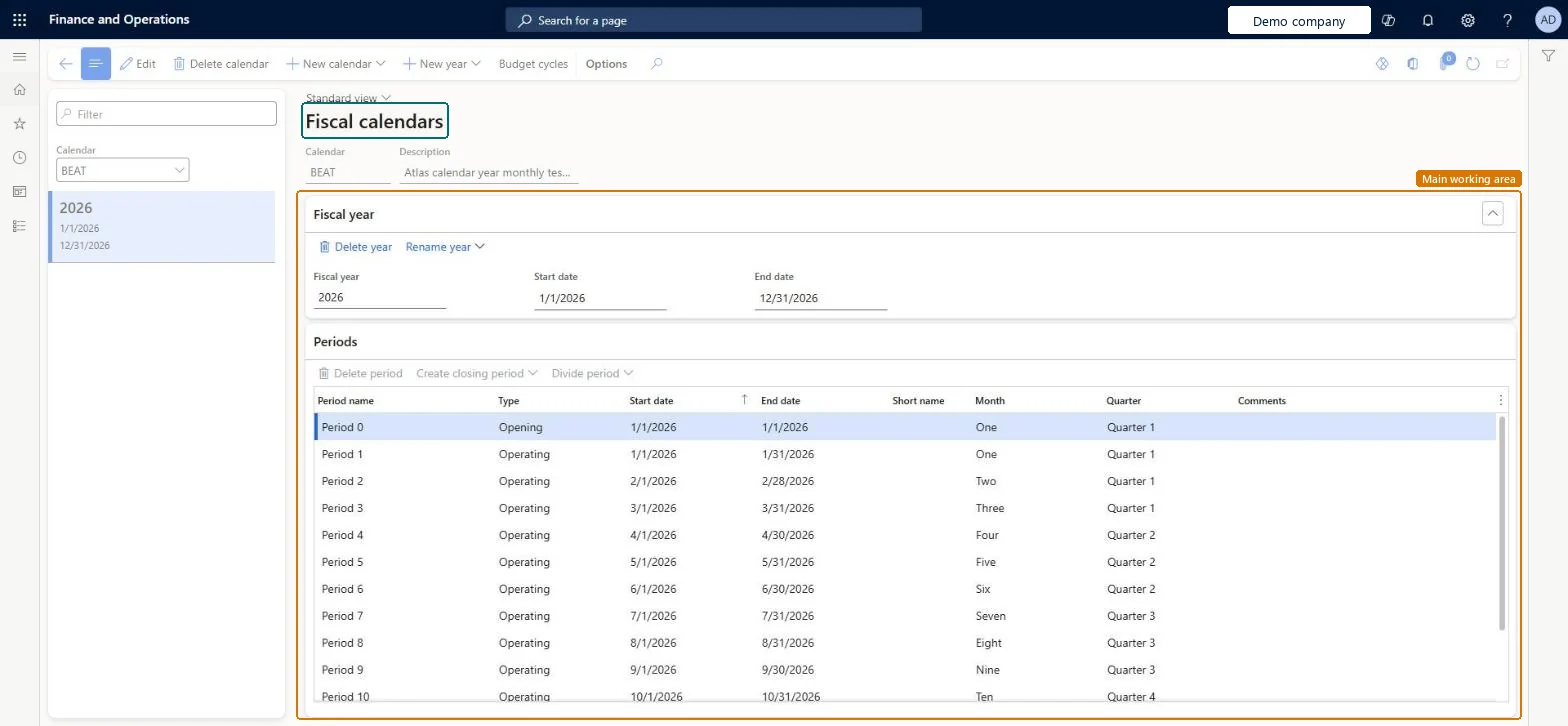
The page for fiscal calendars, each of which contains fiscal years made up of periods.

Used by
Auditor, Budget manager, Chief executive officer and 8 more roles
Business process
Develop financial period strategy
Menu item
FiscalCalendars
Main table
FiscalCalendar
Data entity
FiscalYearEntity
Setup steps
1 on this page
Show what matters for
PAGE GUIDEWhat the page does and how to use it8 sections. Choose a role to highlight what matters to you.
Everyone

1What it is and why

What it isThe page for fiscal calendars, each of which contains fiscal years made up of periods.
What you do hereUse this page to create and delete fiscal calendars, years, and periods, divide periods, and create closing periods; a calendar can be used by ledgers, fixed asset books, and budget cycles.
ExampleFor example, a cost accounting ledger that reports on a July to June year uses a fiscal calendar that starts on 1 July, so the overhead calculation runs and is dated per July-to-June period.
Fiscal calendars page in Dynamics 365
The page in Dynamics 365. page title tab to open what to set or check
Functional consultant · Solution architect

2Where it fits

End user · Functional consultant

3How to do it

About the examples: Examples and screenshots in this guide use BEAT, a demo company in a Dynamics 365 test environment. Use your own company's codes and values instead of copying them.

Step by step, with screenshots

Set up Fiscal calendars1 screen

Use this page to create and delete fiscal calendars, years, and periods, divide periods, and create closing periods; a calendar can be used by ledgers, fixed asset books, and budget cycles.

  1. Screen 1

    Create the fiscal calendar and year

    Go to General ledger > Calendars > Fiscal calendars

    1. Select New calendar and enter the calendar code
    2. Select New year to add fiscal year 2026
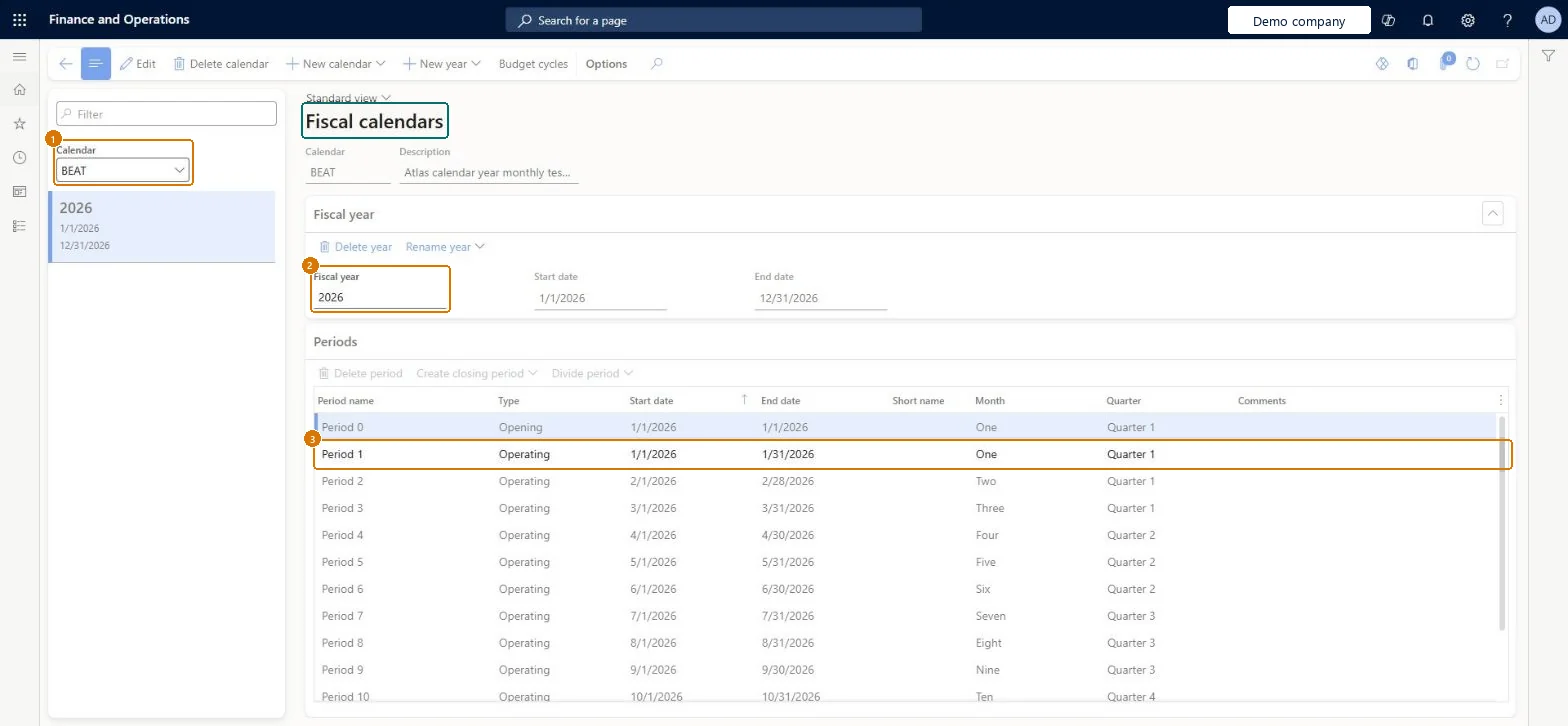
    3. Check the monthly periods on the Periods FastTab
    1CalendarBEAT
    2Fiscal year2026
    Start date1/1/2026
    End date12/31/2026
    Create the fiscal calendar and year (zoomed on the outlined fields)
    Show the full screenCreate the fiscal calendar and year
    page title tab to open what to set or check

Steps from Microsoft

  1. Go to Cost accounting > Ledger setup > Fiscal calendars.
  2. Select New calendar.
  3. In the Calendar field, enter a name for the calendar.
  4. In the Description field, enter a description that can appear on reports.
  5. Enter the Start and End dates of the first fiscal year.
  6. Enter a Fiscal year name for that first year.
  7. Enter the Length of period and the Unit, which together set how many periods are created.
  8. Select Create.

Source: Microsoft Learn

Fields on the page

FieldWhat it meansExampleTable column
CalendarThe name of the new fiscal calendar.Microsoft Learn Fiscal
DescriptionA description of the calendar that can be printed on reports.Microsoft Learn Description
Fiscal year nameThe name of the first fiscal year created in the calendar.Microsoft Learn
Length of periodHow long each period is; together with Unit it decides how many periods the year gets.Microsoft Learn
UnitThe unit of time for the period length, such as months or days.Microsoft Learn
Fiscal yearThe name of a fiscal year in the calendar, for example 2026.Microsoft Learn 2026Name
Start dateThe first day of the fiscal year or period.Microsoft Learn 1/1/2026
End dateThe last day of the fiscal year or period. Overhead calculation entries are dated on the period's end date.Microsoft Learn 12/31/2026

Common errors and fixes

MessageWhat to do
The period dates can't be changedPeriod dates can be changed only while no transactions are posted in the period, and a year's start and end dates can't be changed. Microsoft Learn

Test checklist

  1. Create or pick a fiscal calendar with the years and periods Cost accounting will report on.
  2. Create a cost accounting ledger that uses it (Cost accounting > Ledger setup > Cost accounting ledgers).
  3. In the Cost control workspace configuration, check the fiscal calendar periods offered are the ones from this calendar.

Source: Microsoft Learn

Functional consultant

4Setup decisions

Setup stepRecommended value and whyDecision, common mistake and test
Set up Fiscal calendarsOne fiscal calendar for all legal entities that share the same fiscal year, with a closing period created from the last period of each yearOne calendar can serve many legal entities, fixed asset books and budget cycles. A separate closing period keeps year-end closing entries apart so statements can include or exclude them.Do legal entities share one fiscal calendar or have their own?Giving legal entities different calendars when they close together. Only legal entities with the same fiscal calendar can be grouped in one year-end close template.Test: Calendar periods drive the cost ledger

Feature management and licence

Licence or add-inCost accounting has four roles: Cost accounting manager (Activity licence), Cost accountant and Cost accountant clerk (Operations licence), and Cost object controller (Team members licence). In Cost accounting, the fiscal calendar is chosen on the cost accounting ledger by cost accountants. No Feature management feature needs to be turned on for this page.

Microsoft Learn

Solution architect

5Design impact

Shared or per companyShared: the same records are used by every legal entity. Microsoft data model
Can it be undoneHard to reverse: Period start and end dates can be changed only while no transactions are posted in the period, and a year's start and end dates can't be changed. After any period change, run Recalculate ledger periods in every company that uses the calendar. Cost accounting ledgers that use the calendar take their fiscal periods from it. Microsoft Learn
If you change it laterPeriod dates can be changed only while no transactions are posted in the period, and a year's start and end dates can't be changed. After any period change, Recalculate ledger periods must be run in every company that uses the calendar. Microsoft Learn
Technical architect

6Technical

Menu itemFiscalCalendars Checked in Dynamics 365
FormFiscalCalendars Checked in Dynamics 365
TableFiscalCalendarShown as “FISCAL CALENDAR” in Record infoKey field: CalendarIdChecked in Dynamics 365
Data entitiesFiscalYearEntityFiscal calendar Microsoft data model FiscalCalendarEntityFiscal calendar integration entity Microsoft data model
Who can open it

11 security roles. Select a role to see its duties and privileges.

  • RoleAuditorAuditPolicyManager
    • DutyReview budget control process performanceBudgetBudgetControlProcessPerfReview
      • PrivilegeView fiscal calendarsFiscalCalendarsView
    • DutyReview budget process performanceBudgetBudgetProcessPerfReview
      • PrivilegeView fiscal calendarsFiscalCalendarsView
  • RoleBudget managerBudgetBudgetManager
    • DutyReview budget control process performanceBudgetBudgetControlProcessPerfReview
      • PrivilegeView fiscal calendarsFiscalCalendarsView
    • DutyReview budget process performanceBudgetBudgetProcessPerfReview
      • PrivilegeView fiscal calendarsFiscalCalendarsView
    • DutyInquire into general ledger reference dataLedgerGeneralLedgerReferenceDataInquire
      • PrivilegeView fiscal calendarsFiscalCalendarsView
  • RoleChief executive officerCompanyChiefExecutiveOfficer
    • DutyReview budget control process performanceBudgetBudgetControlProcessPerfReview
      • PrivilegeView fiscal calendarsFiscalCalendarsView
    • DutyReview budget process performanceBudgetBudgetProcessPerfReview
      • PrivilegeView fiscal calendarsFiscalCalendarsView
  • RoleChief financial officerCompanyChiefFinancialOfficer
    • DutyReview budget control process performanceBudgetBudgetControlProcessPerfReview
      • PrivilegeView fiscal calendarsFiscalCalendarsView
    • DutyReview budget process performanceBudgetBudgetProcessPerfReview
      • PrivilegeView fiscal calendarsFiscalCalendarsView
    • DutyInquire into general ledger reference dataLedgerGeneralLedgerReferenceDataInquire
      • PrivilegeView fiscal calendarsFiscalCalendarsView
  • RoleAccountantLedgerAccountant
    • DutyInquire into general ledger reference dataLedgerGeneralLedgerReferenceDataInquire
      • PrivilegeView fiscal calendarsFiscalCalendarsView
  • RoleAccounting managerLedgerAccountingManager
    • DutyReview budget control process performanceBudgetBudgetControlProcessPerfReview
      • PrivilegeView fiscal calendarsFiscalCalendarsView
    • DutyReview budget process performanceBudgetBudgetProcessPerfReview
      • PrivilegeView fiscal calendarsFiscalCalendarsView
    • DutyEnable general ledger processLedgerGeneralLedgerProcessEnable
      • PrivilegeMaintain fiscal calendarsFiscalCalendarsMaintain
    • DutyInquire into general ledger reference dataLedgerGeneralLedgerReferenceDataInquire
      • PrivilegeView fiscal calendarsFiscalCalendarsView
  • RoleAccounting supervisorLedgerAccountingSupervisor
    • DutyReview budget control process performanceBudgetBudgetControlProcessPerfReview
      • PrivilegeView fiscal calendarsFiscalCalendarsView
    • DutyReview budget process performanceBudgetBudgetProcessPerfReview
      • PrivilegeView fiscal calendarsFiscalCalendarsView
    • DutyEnable general ledger processLedgerGeneralLedgerProcessEnable
      • PrivilegeMaintain fiscal calendarsFiscalCalendarsMaintain
    • DutyInquire into general ledger reference dataLedgerGeneralLedgerReferenceDataInquire
      • PrivilegeView fiscal calendarsFiscalCalendarsView
  • RoleFinancial controllerLedgerFinancialController
    • DutyReview budget control process performanceBudgetBudgetControlProcessPerfReview
      • PrivilegeView fiscal calendarsFiscalCalendarsView
    • DutyReview budget process performanceBudgetBudgetProcessPerfReview
      • PrivilegeView fiscal calendarsFiscalCalendarsView
    • DutyInquire into general ledger reference dataLedgerGeneralLedgerReferenceDataInquire
      • PrivilegeView fiscal calendarsFiscalCalendarsView
  • RoleRental managerRentalManager
    • DutyEnable general ledger processRentalLedgerGeneralLedgerProcessEnable
      • PrivilegeMaintain fiscal calendarsFiscalCalendarsMaintain
  • RoleRental purchasing managerRentalPurchasingManager
    • DutyEnable general ledger processRentalLedgerGeneralLedgerProcessEnable
      • PrivilegeMaintain fiscal calendarsFiscalCalendarsMaintain
  • RoleRental sales managerRentalSalesManager
    • DutyEnable general ledger processRentalLedgerGeneralLedgerProcessEnable
      • PrivilegeMaintain fiscal calendarsFiscalCalendarsMaintain
Checked in Dynamics 365
Roles to set it up and use itTo set it up or change itMaintain fiscal calendars duty. FiscalCalendarsMaintainTo use itReview budget control process performance BudgetBudgetControlProcessPerfReviewReview budget process performance BudgetBudgetProcessPerfReviewView fiscal calendars duty. FiscalCalendarsViewInquire into general ledger reference data LedgerGeneralLedgerReferenceDataInquireGive people a role that holds these duties. On this system, 11 roles give access to this page.Checked in Dynamics 365
Actions on the page(Action Pane without tabs): Delete calendar, New calendar, New year, Budget cyclesChecked in Dynamics 365
Developer

7Developer

Open it by URLhttps://<your-environment>/?mi=FiscalCalendars
Integrate withFiscalYearEntity data entity Microsoft data model
Data migrationFiscalYearEntity (Fiscal calendar): shared by all companies, in Microsoft's default template 020 - GL Shared.FiscalCalendarEntity (Fiscal calendar integration entity): shared by all companies.Load order: Microsoft's default template 020 - GL Shared loads Fiscal calendar at execution unit 1, level 20, sequence 10. Lower levels load first, and entities at the same level load in sequence order.Load first: the default templates at lower levels (System setup to Global address book)Microsoft Learn
Table definitionFiscalCalendar columns and relations Microsoft data model
Everyone

8Sources