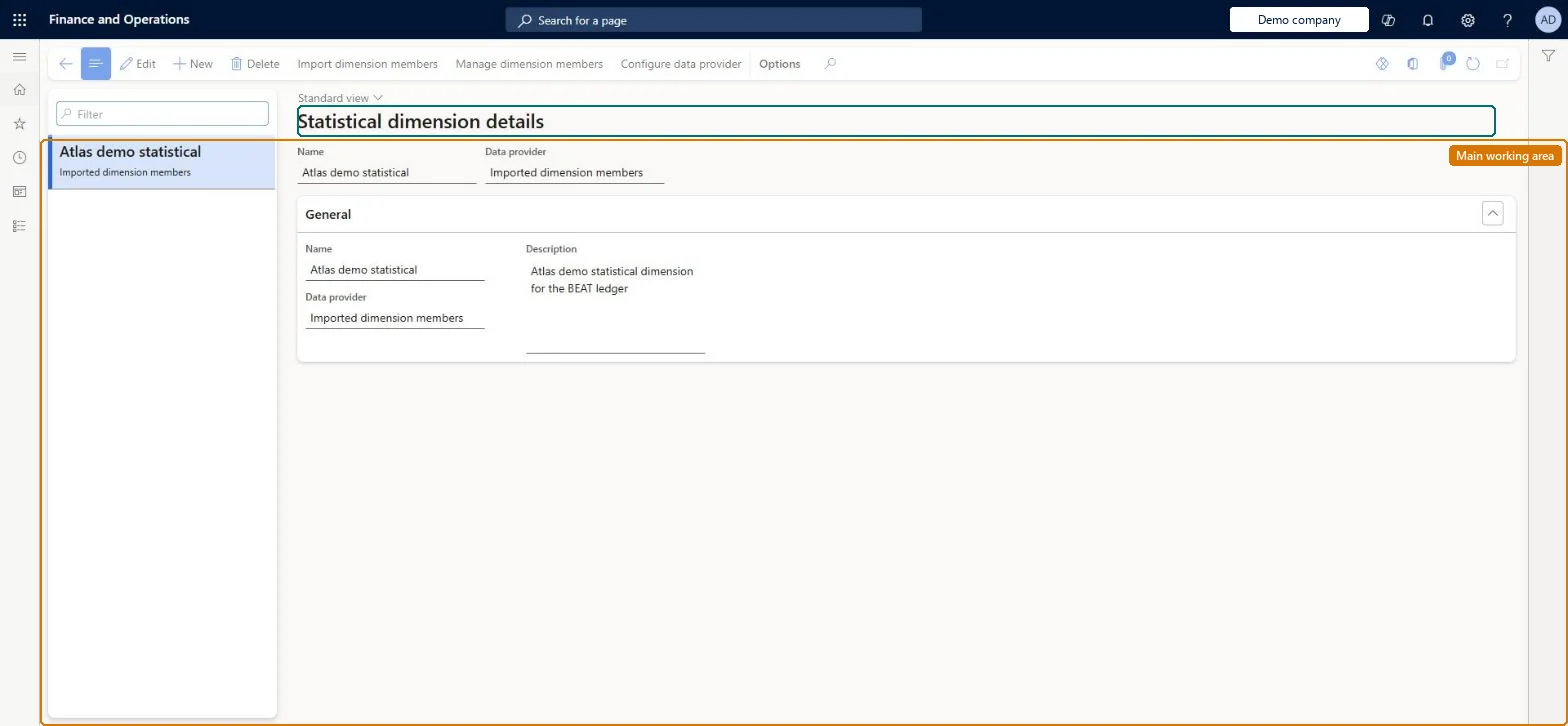
A setup page where you define statistical dimensions and their members, the non-monetary measures (such as employees, kilowatt hours or hours) that Cost accounting records as statistical entries.
PAGE GUIDEWhat the page does and how to use it8 sections. Choose a role to highlight what matters to you.
Everyone
1What it is and why
What it is
A setup page where you define statistical dimensions and their members, the non-monetary measures (such as employees, kilowatt hours or hours) that Cost accounting records as statistical entries.
What you do here
Use this page to create the statistical dimension that a cost accounting ledger uses and to maintain its members, either manually or by import. Each member automatically becomes a predefined allocation base, so it can drive cost distribution and cost allocation rules or simply report non-monetary consumption.
Example
For example, you create a statistical dimension member named Electricity so that electricity consumption in kWh per cost center can be used as the allocation base when the electricity bill is distributed.
The page in Dynamics 365. page title tab to open what to set or check
About the examples: Examples and screenshots in this guide use BEAT, a demo company in a Dynamics 365 test environment. Use your own company's codes and values instead of copying them.
Setup steps on this page
Set up Statistical dimensions
Use this page to create the statistical dimension that a cost accounting ledger uses and to maintain its members, either manually or by import. Each member automatically becomes a predefined allocation base, so it can drive cost distribution and cost allocation rules or simply report non-monetary consumption.
Steps from Microsoft
Go to Cost accounting > Dimensions > Statistical dimensions.
Select New.
Enter the Name and a Description.
Select the Data provider, for example Imported dimension members.
Select Save.
Use Configure data source, Import dimension members and Manage dimension members on the Action Pane to fill the dimension.
The data connector used to bring statistical dimension members in; the example uses imported dimension members.Microsoft Learn
Statistical elements
The ID of each statistical dimension member, for example FTE or Electricity.Microsoft Learn
Description
The description of the member, for example Full time employees.Microsoft Learn
Description
Unit
The unit the member is measured in, for example Ea., kWh or Hrs.Microsoft Learn
Common errors and fixes
Message
What to do
Statistical dimension members can't be brought in through the Dynamics 365 Finance data connector
Statistical dimension members can only come from the Imported transactions data connector. Enter them by hand or load them with the Imported statistical dimension members entity. Microsoft Learn
Test checklist
Create a statistical dimension and add the members FTE (unit Ea.) and Electricity (unit kWh).
Open Predefined dimension member allocation bases and check that FTE and Electricity appear with this statistical dimension.
Assign the statistical dimension to a cost accounting ledger.
Load measures for Electricity (for example with the Imported statistical measures entity), process them, and check the statistical entries per cost center.
One shared statistical dimension (for example 'Shared Statistical elements'), assigned to every cost accounting ledger that needs the same nonmonetary measuresYou can assign a statistical dimension to more than one cost accounting ledger. Each member becomes a predefined allocation base automatically, so measures such as FTE or kWh are defined once and reused.
Cost accounting has four roles: Cost accounting manager (Activity licence), Cost accountant and Cost accountant clerk (Operations licence), and Cost object controller (Team members licence). Cost accountants and cost accounting managers maintain dimensions. No Feature management feature needs to be turned on for this page.
Shared: Cost accounting setup isn't kept per legal entity. It is the same from every company, and one cost accounting ledger can collect data from several legal entities. Checked in Dynamics 365
Can it be undone
Hard to reverse: You can add members at any time. Each saved member immediately becomes a predefined allocation base that policies and formula or hierarchy bases can use. Once rules use a member, changing it affects every allocation built on it. Microsoft Learn
If you change it later
A statistical dimension is tied to the cost accounting ledger it is assigned to, so all its statistical entries are created in that ledger's context; the same dimension can be shared by several ledgers. Microsoft Learn
Technical architect
6Technical
Menu item
CAMStatisticalDimensionChecked in Dynamics 365
Form
CAMDimensionChecked in Dynamics 365
Table
CAMDataDimensionShown as “DIMENSIONS” in Record infoKey field: NameChecked in Dynamics 365
Data entities
CAMImportedStatisticalDimensionMemberEntityImported statistical dimension members Microsoft data model
Who can open it
3 security roles. Select a role to see its duties and privileges.
To set it up or change itMaintain dimension members CAMDimensionMembersMaintainMaintain dimensions CAMDimensionsMaintainTo use itInquire into dimensions CAMDimensionsInquireGive people a role that holds these duties. On this system, 3 roles give access to this page.Checked in Dynamics 365
Actions on the page
(Action Pane without tabs): Import dimension members, Manage dimension members, Configure data source, Configure data providerChecked in Dynamics 365
CAMImportedStatisticalDimensionMemberEntity (Imported statistical dimension members): loads statistical dimension members, the only way to import them; shared by all companies.Load order: Not part of Microsoft's default configuration templates. Load the dimension members first (cost element, cost object, statistical), then the general ledger entries, budget entries and statistical measures that refer to them, and then process the source data on the cost accounting ledger.Load first: the statistical dimension, created on this pageMicrosoft Learn