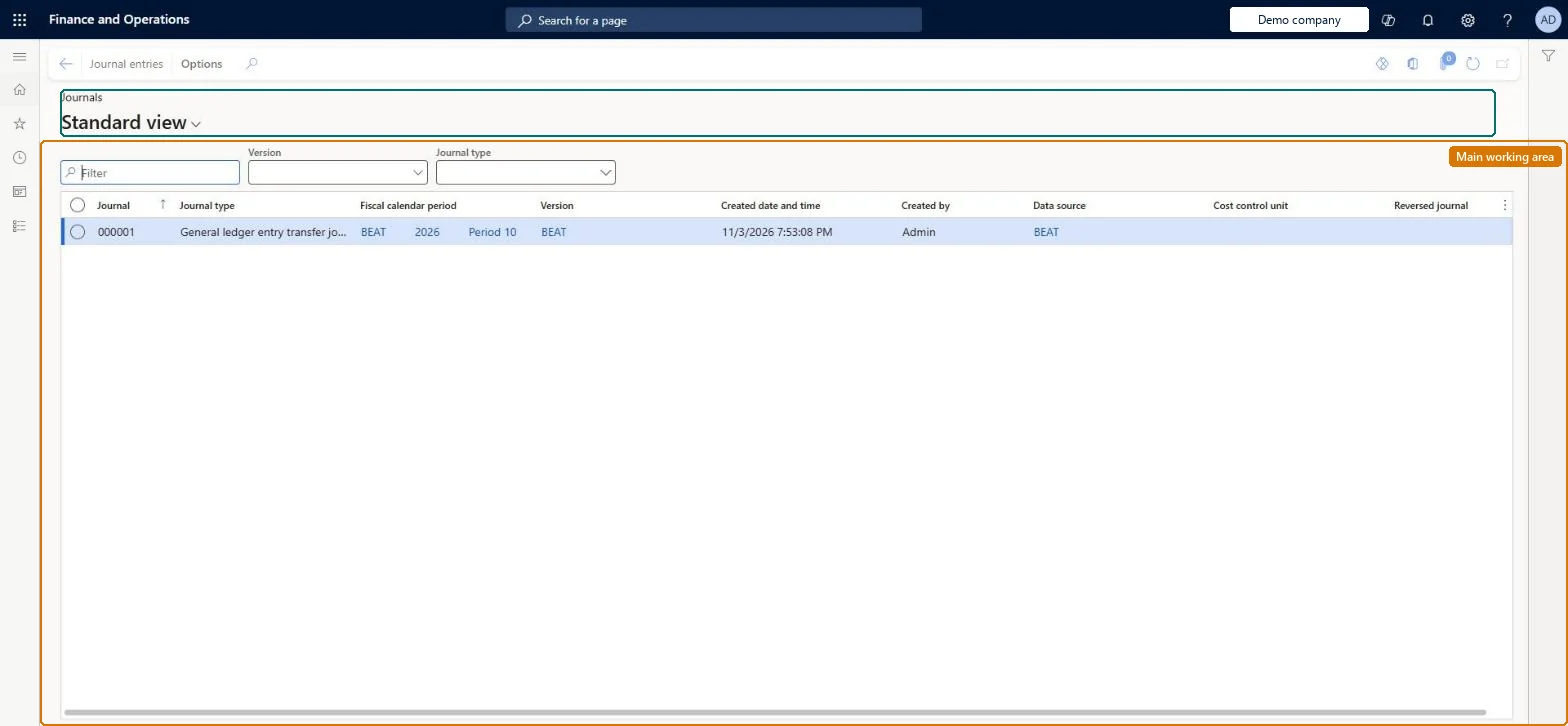
An inquiry page listing the journals that Cost accounting creates for every data processing job and every overhead calculation step, each with its journal entries and the cost or statistical entries generated from them.
PAGE GUIDEWhat the page does and how to use it8 sections. Choose a role to highlight what matters to you.
Everyone
1What it is and why
What it is
An inquiry page listing the journals that Cost accounting creates for every data processing job and every overhead calculation step, each with its journal entries and the cost or statistical entries generated from them.
What you do here
Use this page to see what has been processed into a cost accounting ledger version and period, and to trace any cost entry back through its journal entry to the source transaction. Journal types include the general ledger and statistical entry transfer journals and the cost behavior, cost distribution, overhead rate and cost allocation calculation journals.
Example
For example, you open a General ledger entry transfer journal, select a journal entry, view its cost entries and then select Source entry to see the original general ledger transaction.
The page in Dynamics 365. page title tab to open what to set or check
About the examples: Examples and screenshots in this guide use BEAT, a demo company in a Dynamics 365 test environment. Use your own company's codes and values instead of copying them.
Setup steps on this page
Trace a cost entry through its journal
Use the journal of a processing job or calculation step to check what was processed and where an entry came from.
Steps from Microsoft
Go to Cost accounting > Inquiries and reports > Journals.
In the list, find and select the journal you want to trace (for example a General ledger entry transfer journal).
Select Journal entries.
In the list, mark the selected row.
Select Cost entries.
Select Source entry to see the originating transaction.
The kind of job that created the journal: for example Cost behavior calculation journal, Cost distribution calculation journal, Overhead rate calculation journal, Cost allocation journal or Statistical entry transfer journal.Microsoft Learn
The ledger version (for example the actual version or an overhead calculation version ID made of version type, date and time, ledger, fiscal year and period).Microsoft Learn
Data connector source entries
For transfer journals, the data source (such as a statistical measure) whose entries were processed.Microsoft Learn
Accounting date (journal entries)
The date of each journal entry; entries generated by overhead calculation carry the end date of the fiscal period.Microsoft Learn
Common errors and fixes
Message
What to do
A number sequence has not been set up for the reference Journal
Go to Cost accounting > Setup > Parameters > Number sequences and set a number sequence for the Journal reference, then run the processing again. Checked in Dynamics 365
Corrected source figures don't show in Cost accounting
Cost accounting keeps its own copy of the source data. Import the data again and process the source data for the period. Microsoft Learn
Test checklist
Process general ledger source data for one period.
Open Journals and find the general ledger entry transfer journal for the period.
Open Journal entries, then Cost entries, then Source entry.
Check that the source entry is the general ledger transaction you expected.
Filter on Fiscal calendar period and Version first, then Journal type, so you read one processing run or one calculation step at a time.Every processing job and every overhead calculation step creates its own journal, and reruns create new versions; without the period and version filter, results from several runs are mixed.
Set on Cost accounting > Setup > Parameters. Every journal on this page takes its number from it. Checked in Dynamics 365
Feature management and licence
Licence or add-in
Cost accounting has four roles: Cost accounting manager (Activity licence), Cost accountant and Cost accountant clerk (Operations licence), and Cost object controller (Team members licence). Cost accountants and cost accountant clerks read journals. No Feature management feature needs to be turned on for this page.
Shared: Cost accounting setup isn't kept per legal entity. It is the same from every company, and one cost accounting ledger can collect data from several legal entities. Checked in Dynamics 365
Can it be undone
Reversible: The page changes nothing. To replace results, process the data or run the calculation again. Microsoft Learn
If you change it later
Journals are created by processing jobs and overhead calculations and aren't edited here. A rerun of the overhead calculation creates new journals under a new version, so earlier runs stay for comparison. Microsoft Learn
Technical architect
6Technical
Menu item
CAMJournalChecked in Dynamics 365
Form
CAMJournalChecked in Dynamics 365
Table
CAMDataJournalShown as “JOURNALS” in Record infoKey field: JournalNumberChecked in Dynamics 365
Who can open it
3 security roles. Select a role to see its duties and privileges.
To use itInquire into journals CAMJournalsInquireGive people a role that holds these duties. On this system, 3 roles give access to this page.Checked in Dynamics 365
Actions on the page
(Action Pane without tabs): Journal entriesChecked in Dynamics 365
Developer
7Developer
Open it by URL
https://<your-environment>/?mi=CAMJournal
Data migration
Load order: A Cost accounting journal has no data entity in Data management, so it can't be loaded from a file or a configuration template. Journals are created by processing, so process the source data again in the new environment.Microsoft Learn