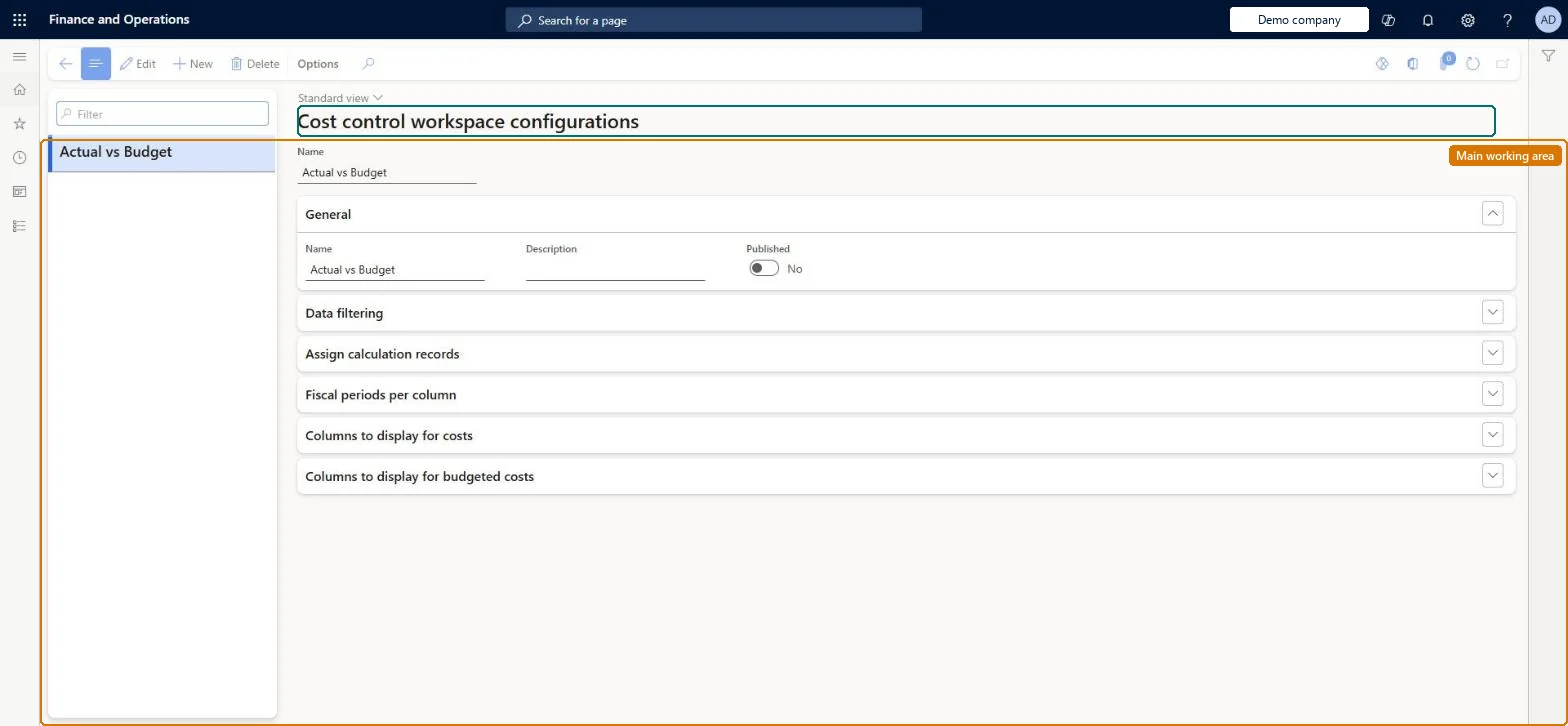
A setup page where cost accountants define the report layouts that appear in the Cost control workspace: which cost control unit, hierarchies, budget versions, overhead calculations, period columns and cost or budget columns each report uses, and who can see it.
PAGE GUIDEWhat the page does and how to use it8 sections. Choose a role to highlight what matters to you.
Everyone
1What it is and why
What it is
A setup page where cost accountants define the report layouts that appear in the Cost control workspace: which cost control unit, hierarchies, budget versions, overhead calculations, period columns and cost or budget columns each report uses, and who can see it.
What you do here
Use this page to create a report configuration, publish it to managers, and choose the data filtering, calculation records, fiscal periods per column, and columns for costs and budgeted costs that the report shows.
Example
For example, you set a variance period threshold so that any line where actual cost exceeds budget by more than that amount is highlighted in red for the manager.
The page in Dynamics 365. page title tab to open what to set or check
About the examples: Examples and screenshots in this guide use BEAT, a demo company in a Dynamics 365 test environment. Use your own company's codes and values instead of copying them.
Setup steps on this page
Set up Cost control workspace configuration
Use this page to create a report configuration, publish it to managers, and choose the data filtering, calculation records, fiscal periods per column, and columns for costs and budgeted costs that the report shows.
Steps from Microsoft
Go to Cost accounting > Setup > Cost control workspace configuration.
Select New.
On the General FastTab, enter a Name and Description and set Published to Yes to make the report visible to cost object controllers.
On the Data filtering FastTab, select the Cost control unit, Budget original version, Cost element dimension hierarchy (or Statistical dimension hierarchy) and Cost object dimension hierarchy.
On the Assign calculation records FastTab, select New, then choose the Fiscal calendar period and the Actual version (overhead calculation ID).
On the Fiscal periods per column FastTab, set Current period (and any other period columns) to Yes.
On the Columns to display for costs FastTab, set Fixed cost, Variable cost and Total cost to Yes; on Columns to display for budgeted costs, choose budget and variance columns and thresholds.
The unique name of the report layout that users see in the Cost control workspace.Microsoft Learn
Name
Published
Yes makes the report visible to cost object controllers as well as cost accounting roles; No keeps it internal to cost accounting roles.Microsoft Learn
IsPublished
Cost control unit
Determines the cost accounting ledger and the cost objects the report is based on.Microsoft Learn
DefaultCostControlUnit
Cost element dimension hierarchy / Statistical dimension hierarchy
Pick a cost element hierarchy to report monetary values or a statistical hierarchy to report nonmonetary values; one configuration cannot do both.Microsoft Learn
Cost object dimension hierarchy
The hierarchy of cost objects that defines the reporting and aggregation levels users can select.Microsoft Learn
DefaultCostObjectDimensionHierarchy
Budget original version
The budget version treated as the original budget in this report.Microsoft Learn
BudgetVersion
Fiscal calendar period (Assign calculation records)
The period to which an overhead calculation ID is assigned; the periods come from the ledger's fiscal calendar.Microsoft Learn
Variance period threshold
A monetary limit for the current-period variance; lines above it are shown in red in the workspace.Microsoft Learn
Common errors and fixes
Message
What to do
The statement shows no amounts for the period
Process the source data for the fiscal period, run the overhead calculation, and assign that calculation to the period under Assign calculation records in Cost control workspace configuration. Microsoft Learn
A manager can't find the report in the workspace
Set Published to Yes. With No, only Cost accounting manager, Cost accountant and Cost accountant clerk users see it. Microsoft Learn
Test checklist
Create a configuration, select a Cost control unit, a Cost element dimension hierarchy and a Cost object dimension hierarchy, and set Published to Yes.
Under Assign calculation records, select the fiscal calendar period and the Actual version overhead calculation ID.
Add Total cost, Fixed cost and Unclassified cost columns, plus Budget and Budget variance with a Variance period threshold.
Open the Cost control workspace as a Cost object controller user and check that the report is listed and that Fixed cost shows a balance.
Set Published to No and check that the Cost object controller user no longer sees the report.
One configuration for each reporting purpose: one with a Cost element dimension hierarchy for monetary reports, and a separate one with a Statistical dimension hierarchy for nonmonetary reportsA configuration can report monetary or nonmonetary values, but not both in the same layout. Cost accountants can create as many configurations as they need. To see both kinds of values side by side, export to Excel or use the Power BI content pack.
Cost accounting has four roles: Cost accounting manager (Activity licence), Cost accountant and Cost accountant clerk (Operations licence), and Cost object controller (Team members licence). Cost accountants and cost accounting managers maintain the configurations; published reports are read by Cost object controllers. No Feature management feature needs to be turned on for this page.
Shared: Cost accounting setup isn't kept per legal entity. It is the same from every company, and one cost accounting ledger can collect data from several legal entities. Checked in Dynamics 365
Can it be undone
Reversible: You can change layout, columns, thresholds, Published and assigned calculation IDs at any time. The change only alters what the Cost control workspace shows. Cost entries are not changed. Microsoft Learn
If you change it later
Changing Published changes which roles can open the report, and switching between a cost element hierarchy and a statistical hierarchy changes the report from monetary to nonmonetary values, because one layout cannot show both. Microsoft Learn
Technical architect
6Technical
Menu item
CAMCostControlWorkspaceConfigurationChecked in Dynamics 365
Form
CAMCostControlWorkspaceConfigurationChecked in Dynamics 365
Table
CAMDataCostControlWorkspaceConfigurationShown as “COST CONTROL WORKSPACE CONFIGURATIONS” in Record infoChecked in Dynamics 365
Who can open it
3 security roles. Select a role to see its duties and privileges.
DutyInquire into workspace configurationCAMWorkspaceConfigurationInquire
PrivilegeView cost control workspace configurationCAMCostControlWorkspaceConfigurationView
Checked in Dynamics 365
Roles to set it up and use it
To set it up or change itMaintain workspace configuration CAMWorkspaceConfigurationMaintainTo use itInquire into workspace configuration CAMWorkspaceConfigurationInquireGive people a role that holds these duties. On this system, 3 roles give access to this page.Checked in Dynamics 365
Load order: A Cost control workspace configuration has no data entity in Data management, so it can't be loaded from a file or a configuration template. Re-create the configurations in each environment after the ledger, hierarchies and versions exist.Microsoft Learn