Budget clerk, Budget manager, Chief financial officer and 12 more roles
Business process
Develop currency policies
Menu item
Currency
Main table
Currency
Data entity
CurrencyEntity
Setup steps
1 on this page
Show what matters for
PAGE GUIDEWhat the page does and how to use it8 sections. Choose a role to highlight what matters to you.
Everyone
1What it is and why
What it is
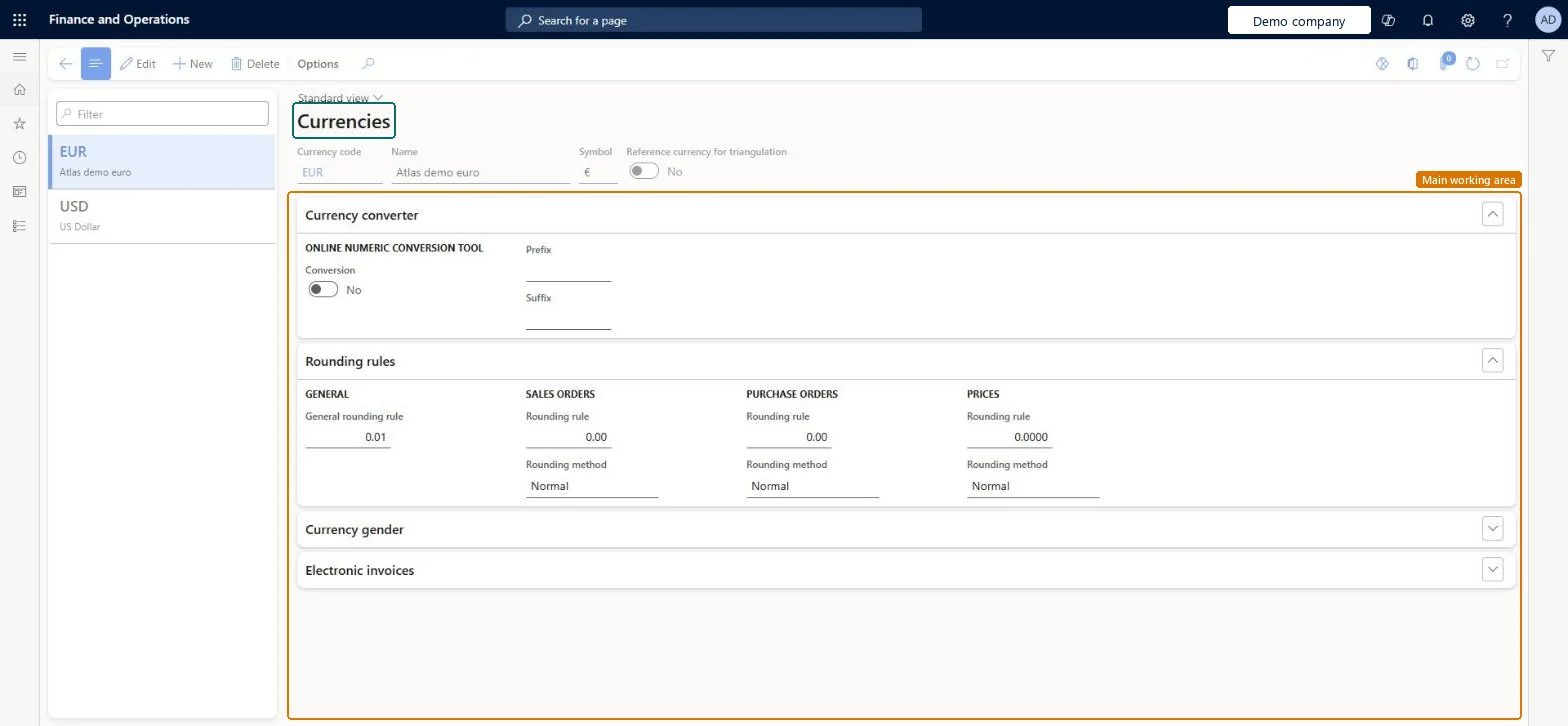
The list of currencies, each with its own name, symbol, and currency code.
What you do here
Use this page to maintain currency attributes, such as which currency is the reference currency for triangulation and the currency gender printed on checks and reports.
Example
For example, the cost accounting ledger records amounts in USD, so USD must exist here with its rounding rule before the ledger's accounting currency can be chosen.
The page in Dynamics 365. page title tab to open what to set or check
About the examples: Examples and screenshots in this guide use BEAT, a demo company in a Dynamics 365 test environment. Use your own company's codes and values instead of copying them.
Step by step, with screenshots
Set up Currencies1 screen
Use this page to maintain currency attributes, such as which currency is the reference currency for triangulation and the currency gender printed on checks and reports.
Screen 1
Set up the currency
Go to General ledger > Currencies > Currencies
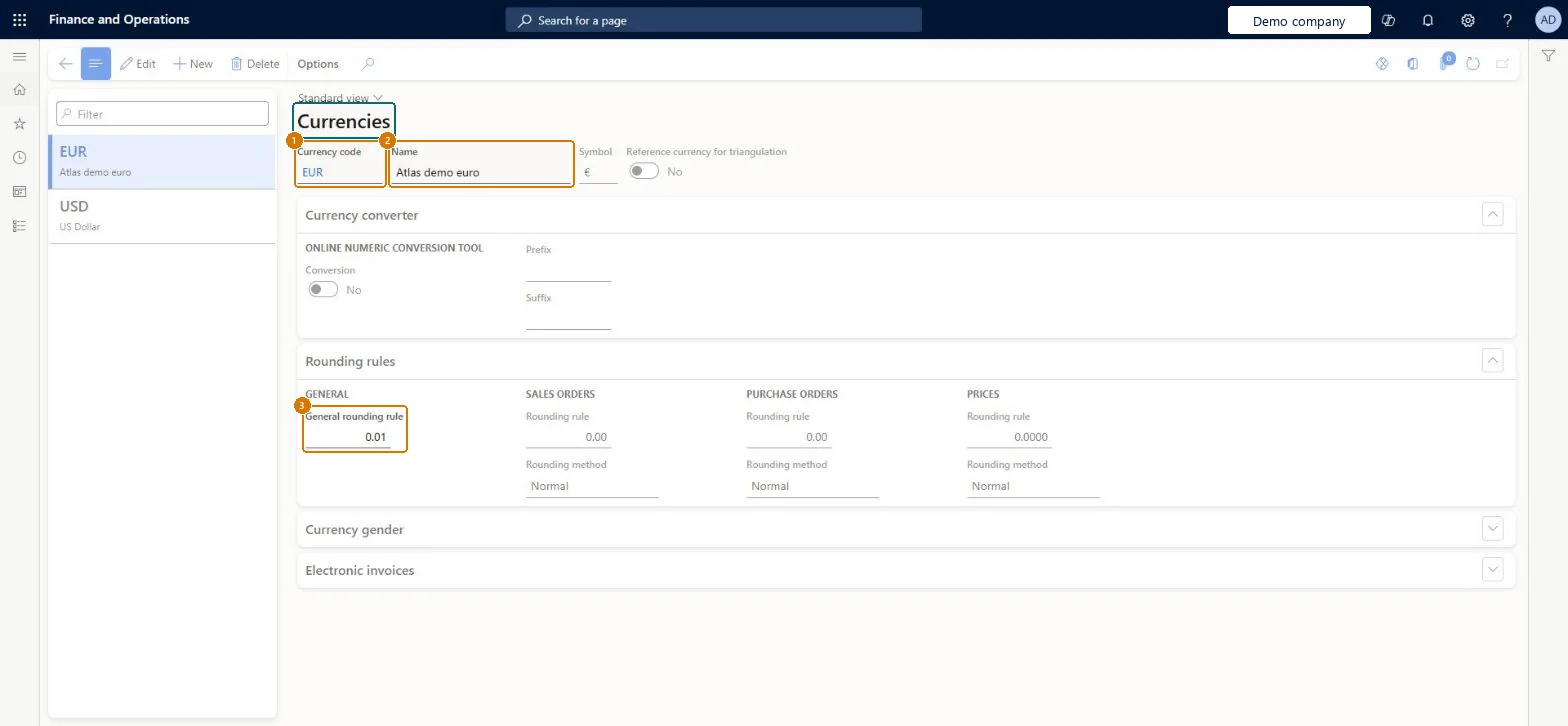
Select New and enter the currency code and name
On the Rounding rules FastTab, enter the general rounding rule
1Currency code
EUR
2Name
Euro
3General rounding rule
0.01
Show the full screen page title tab to open what to set or check
Steps from Microsoft
Go to Cost accounting > Ledger setup > Currencies > Currencies.
Select the currency the cost accounting ledger will use, or select New to add it.
Enter the Currency code, Name and Symbol.
Set the General rounding rule.
Set Reference currency for triangulation only on the one currency used for triangulation.
Exactly one currency marked Reference currency for triangulation (EUR by default)Only one currency can be the triangulation currency; EUR is selected by default.
Cost accounting has four roles: Cost accounting manager (Activity licence), Cost accountant and Cost accountant clerk (Operations licence), and Cost object controller (Team members licence). In Cost accounting the currency is chosen on the cost accounting ledger by cost accountants. No Feature management feature needs to be turned on for this page.
Reversible: Currency settings can be changed. Only one currency can be the reference currency for triangulation; to move it, first clear Reference currency for triangulation on the current currency (EUR by default) and then select it on the new one. Microsoft Learn
If you change it later
Currencies are shared by every legal entity. A cost accounting ledger converts each legal entity's amounts into its own accounting currency, so the ledger currency applies to every converted entry. Microsoft Learn
Technical architect
6Technical
Menu item
CurrencyChecked in Dynamics 365
Form
CurrencyChecked in Dynamics 365
Table
CurrencyShown as “CURRENCY TABLE” in Record infoKey field: CurrencyCodeChecked in Dynamics 365
DutyEnable general ledger processRentalLedgerGeneralLedgerProcessEnable
PrivilegeMaintain currenciesCurrencyMaintain
RoleRental sales managerRentalSalesManager
DutyEnable general ledger processRentalLedgerGeneralLedgerProcessEnable
PrivilegeMaintain currenciesCurrencyMaintain
Checked in Dynamics 365
Roles to set it up and use it
To set it up or change itMaintain budget register entries BudgetBudgetTransactionsMaintainTo use itInquire into general ledger reference data LedgerGeneralLedgerReferenceDataInquireGive people a role that holds these duties. On this system, 15 roles give access to this page.Checked in Dynamics 365
CurrencyEntity (Currencies): shared by all companies, in Microsoft's default template 010 - System Setup.Load order: Microsoft's default template 010 - System Setup loads Currencies at execution unit 1, level 10, sequence 10. Lower levels load first, and entities at the same level load in sequence order.Microsoft Learn
Checked in a working Dynamics 365 system, version 10.0.49: the menu item, form, table and security, the page, the demo records and the values in the screenshots.