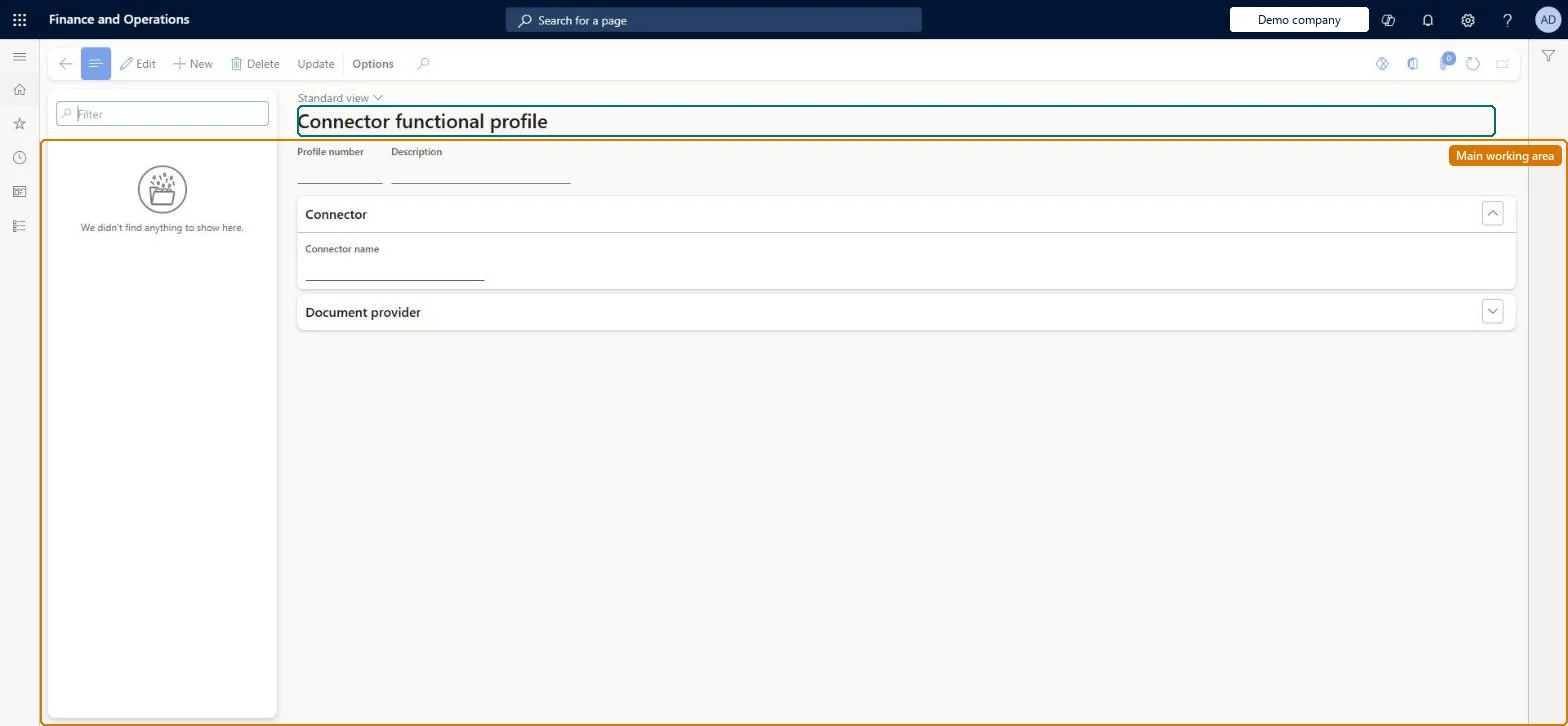
Setup step on the Connector functional profiles page · Retail and Commerce
Set up Connector functional profiles
Use this page to select the connector name and document provider for each profile, adjust the data mapping parameters, and restore the provider defaults with Update; the profiles are then grouped in fiscal connector groups.
Retail and CommerceChannel setupFiscal integration
RetailFiscalIntegrationFunctionalityProfile
Used by
Retail service
Business process
Manage sales channels
Menu item
RetailFiscalIntegrationFunctionalityProfile
Main table
RetailFiscalIntegrationFunctionalityProfile
Data entity
RetailFiscalIntegrationFunctionalityProfileEntity
Setup steps
1 on this page
Show what matters for
SETUP GUIDEHow to set it up8 sections. Choose a role to highlight what matters to you.
Everyone
1What it is and why
What it is
A setup page where you create a functional profile for each pairing of a fiscal connector with a fiscal document provider, holding the company-specific data mapping parameters such as VAT rate and tender type mappings.
What you do here
Use this page to select the connector name and document provider for each profile, adjust the data mapping parameters, and restore the provider defaults with Update; the profiles are then grouped in fiscal connector groups.
Example
For example, the profile maps VAT codes such as vat20 to the printer's rate index and tender types such as Cash and Card to the device's values.
The page in Dynamics 365. page title tab to open what to set or check
About the examples: Examples and screenshots in this guide use BEAT, a demo company in a Dynamics 365 test environment. Use your own company's codes and values instead of copying them.
Setup steps on this page
Set up Connector functional profiles
Use this page to select the connector name and document provider for each profile, adjust the data mapping parameters, and restore the provider defaults with Update; the profiles are then grouped in fiscal connector groups.
Steps from Microsoft
Go to Retail and Commerce > Channel setup > Fiscal integration > Connector functional profiles.
Create a new profile for each connector and document provider combination.
Select a connector name.
Select a document provider.
Adjust the data mapping parameters (VAT rates, VAT codes, tender types) if needed, or select Update to restore defaults.
One functional profile per connector and document provider pair, per legal entity, with VAT rates, VAT codes and tender types mapped to the device's codesConnector functional profiles are company-specific, so the same connector/provider pair needs a profile in each company.
Reusing one profile across companies or leaving default mappings that don't match the device, so taxes or tenders register under the wrong fiscal code.
Solution architect
5Design impact
Can it be undone
Reversible: Mappings can be edited or reset with Update; re-validate the process if the change affects connector selection.
If you change it later
Enabling, adding or changing a functional profile in a connector group can change which connector is selected at runtime, so the fiscal registration process must be validated and jobs 1070 and 1090 run afterwards. Microsoft Learn
Technical architect
6Technical
Menu item
RetailFiscalIntegrationFunctionalityProfileChecked in Dynamics 365
Form
RetailFiscalIntegrationFunctionalityProfileChecked in Dynamics 365
Table
RetailFiscalIntegrationFunctionalityProfileShown as “FISCAL INTEGRATION FUNCTIONAL PROFILE” in Record infoKey field: ProfileIdChecked in Dynamics 365
Data entities
RetailFiscalIntegrationFunctionalityProfileEntityFiscal integration functional profile Checked in Dynamics 365
Who can open it
PrivilegesRetailFiscalIntegrationFunctionalityProfileMaintainDutiesRetailFiscalIntegrationMaintain1 security roleRetail service RetailServiceChecked in Dynamics 365
Roles to set it up and use it
To set it up or change itRetail service RetailServiceGive people one of these roles. On this system, 1 role can open this page.Checked in Dynamics 365
Actions on the page
(Action Pane without tabs): UpdateChecked in Dynamics 365
Checked in a working Dynamics 365 system, version 10.0.49: the menu item, form, table and security, the page.
To cite this step: RC-FISCAL-030, Set up Connector functional profiles. Beyond ERP Atlas Hub, 2026-11-11. https://www.beyonderp.cloud/atlas/step/RC-FISCAL-030