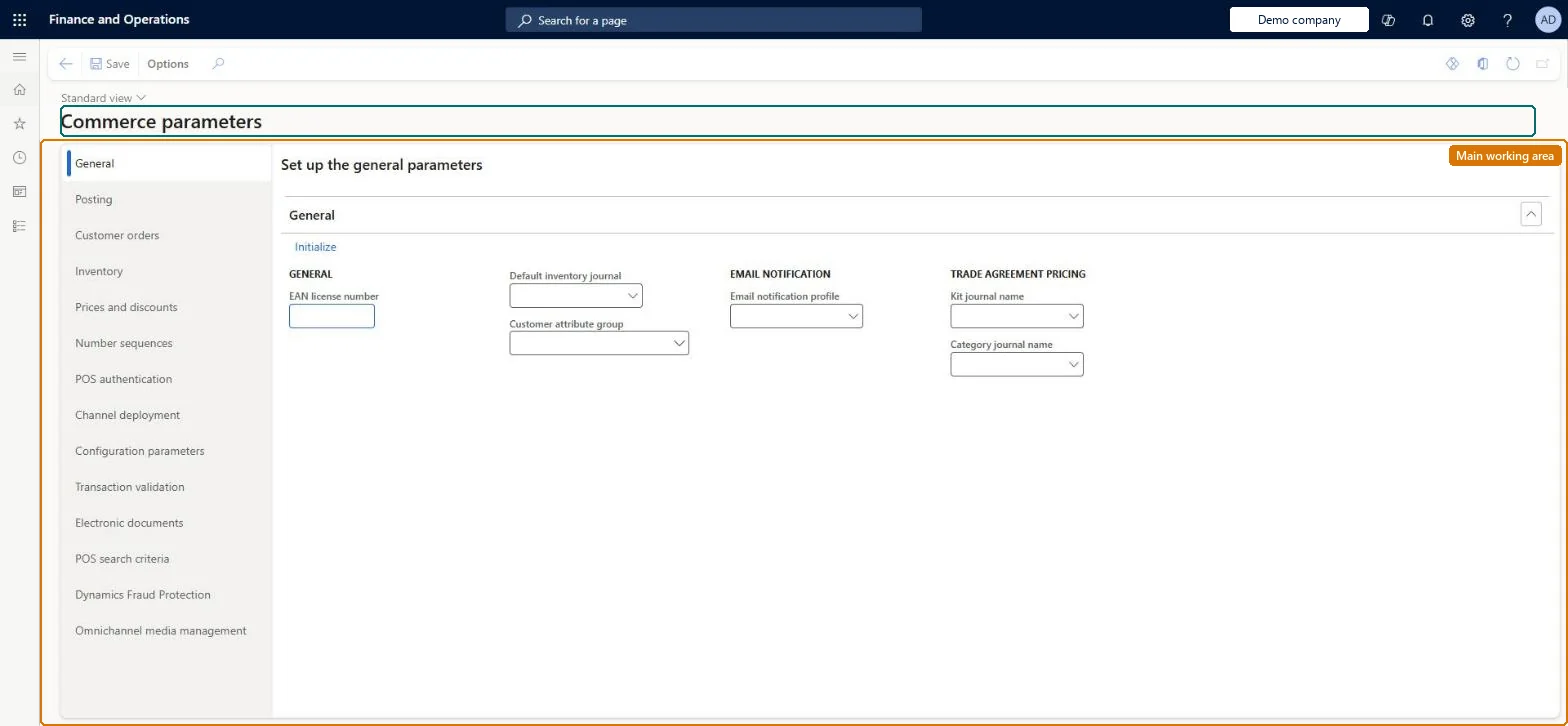
A setup page that holds the company-wide Commerce settings, grouped by tabs such as General, Posting, Configuration parameters and Omnichannel media management, and that carries the Initialize action which creates the base Commerce configuration data.
Retail operations manager, Retail store IT, Retail store manager
Business process
Manage sales channels
Menu item
RetailParameters
Main table
RetailParameters
Data entity
RetailParameterEntity
Setup steps
1 on this page
Show what matters for
PAGE GUIDEWhat the page does and how to use it8 sections. Choose a role to highlight what matters to you.
Everyone
1What it is and why
What it is
A setup page that holds the company-wide Commerce settings, grouped by tabs such as General, Posting, Configuration parameters and Omnichannel media management, and that carries the Initialize action which creates the base Commerce configuration data.
What you do here
Use this page to initialize a new Commerce environment and to maintain the parameters that control statement posting of retail transactions, feature configuration keys and other headquarters-wide behaviour.
Example
For example, after a new environment is deployed you select Initialize on this page to create the default scheduler jobs, channel schema, distribution schedules and screen layouts.
The page in Dynamics 365. page title tab to open what to set or check
About the examples: Examples and screenshots in this guide use BEAT, a demo company in a Dynamics 365 test environment. Use your own company's codes and values instead of copying them.
Setup steps on this page
Set up Commerce parameters
Use this page to initialize a new Commerce environment and to maintain the parameters that control statement posting of retail transactions, feature configuration keys and other headquarters-wide behaviour.
Steps from Microsoft
Go to Retail and Commerce > Headquarters setup > Parameters > Commerce parameters.
Make sure each legal entity that will have stores has a language and a postal address.
Select Initialize.
After initialization completes, configure Commerce scheduler parameters, channels, registers and devices, and assortments.
Select Initialize once each legal entity has a language and postal address; on the Posting tab set Sales transactions aggregation to Yes and Inventory update Detail level to SummaryLearn says to set language and address for each legal entity before initializing, recommends enabling Sales transactions aggregation, and recommends Summary detail level for statement posting.
BEAT uses number sequence Comm_23. Checked in Dynamics 365
Mix and match group
Per company
BEAT uses number sequence Comm_27. Checked in Dynamics 365
Quantity discount number
Per company
BEAT uses number sequence Comm_31. Checked in Dynamics 365
Threshold discount number
Per company
BEAT uses number sequence Comm_35. Checked in Dynamics 365
Variant number
Per company
BEAT uses number sequence Comm_39. Checked in Dynamics 365
Credit memo number
Per company
BEAT uses number sequence Comm_43. Checked in Dynamics 365
Gift card number
Per company
BEAT uses number sequence Comm_47. Checked in Dynamics 365
Worksheet number
Per company
BEAT uses number sequence Comm_51. Checked in Dynamics 365
Price label journal
Per company
BEAT uses number sequence Comm_55. Checked in Dynamics 365
Coupon number
Per company
BEAT uses number sequence Comm_59. Checked in Dynamics 365
Coupon code ID
Per company
BEAT uses number sequence Comm_63. Checked in Dynamics 365
Fiscal functional profile number
Per company
BEAT uses number sequence Comm_67. Checked in Dynamics 365
Tax information name
Per company
BEAT uses number sequence Comm_71. Checked in Dynamics 365
Client book identifier
Per company
BEAT uses number sequence Comm_75. Checked in Dynamics 365
Discount
Per company
BEAT uses number sequence Comm_79. Checked in Dynamics 365
Buyer's push
Per company
BEAT uses number sequence Fash_3. Checked in Dynamics 365
Import journal
Per company
BEAT uses number sequence Fash_7. Checked in Dynamics 365
Name
Per company
BEAT uses number sequence Fash_11. Checked in Dynamics 365
Receiving number
Per company
BEAT uses number sequence Reta_3. Checked in Dynamics 365
Picking number
Per company
BEAT uses number sequence Reta_7. Checked in Dynamics 365
Solution architect
5Design impact
Can it be undone
Hard to reverse: Parameters can be edited, but posted statements aren't recalculated. Initialize creates scheduler jobs, schemas, layouts, permissions and reports; the scheduler alone can be reset separately. Microsoft Learn
If you change it later
Some parameters change posting outcomes; for example, turning off the Sales transactions aggregation can create return lines with an empty return lot ID and a different cost price than the original sale. Microsoft Learn
Technical architect
6Technical
Menu item
RetailParametersChecked in Dynamics 365
Form
RetailParametersChecked in Dynamics 365
Table
RetailParametersShown as “RETAIL HEADQUARTERS PARAMETERS” in Record infoChecked in Dynamics 365
PrivilegesMaintain retail parameters RetailParametersMaintainMaintain Commerce Data Exchange: Synch Service parameters RetailStoreConnectParametersMaintainDutiesMaintain retail parameters RetailParametersMaintain3 security rolesRetail operations manager RetailOperationsManagerRetail store IT RetailStoreITRetail store manager RetailStoreManagerChecked in Dynamics 365
Roles to set it up and use it
To set it up or change itRetail operations manager RetailOperationsManagerRetail store manager RetailStoreManagerRetail store IT RetailStoreITGive people one of these roles. On this system, 3 roles can open this page.Checked in Dynamics 365