Chief financial officer, Accounts receivable clerk, Accounts receivable manager and 3 more roles
Business process
Manage supplier letters of guarantee for payment in Dynamics 365 Finance
Menu item
BankLGGuarantee
Main table
BankLGGuarantee
Setup steps
1 on this page
Show what matters for
SETUP GUIDEHow to set it up8 sections. Choose a role to highlight what matters to you.
Everyone
1What it is and why
What it is
A page where you record letters of guarantee and track their status, balances and expiration.
What you do here
Use this page to submit guarantee requests to the bank, receive them, give them to the beneficiary, and change, extend, cancel or liquidate them.
Example
For example, a 250,000.00 performance bond requested from a sales order is submitted to the bank on the operating account, received from the bank with the margin and expense the facility agreement calculates, and given to the beneficiary. If the customer later asks for 300,000.00, Increase value adds 50,000.00 and posts the extra margin.
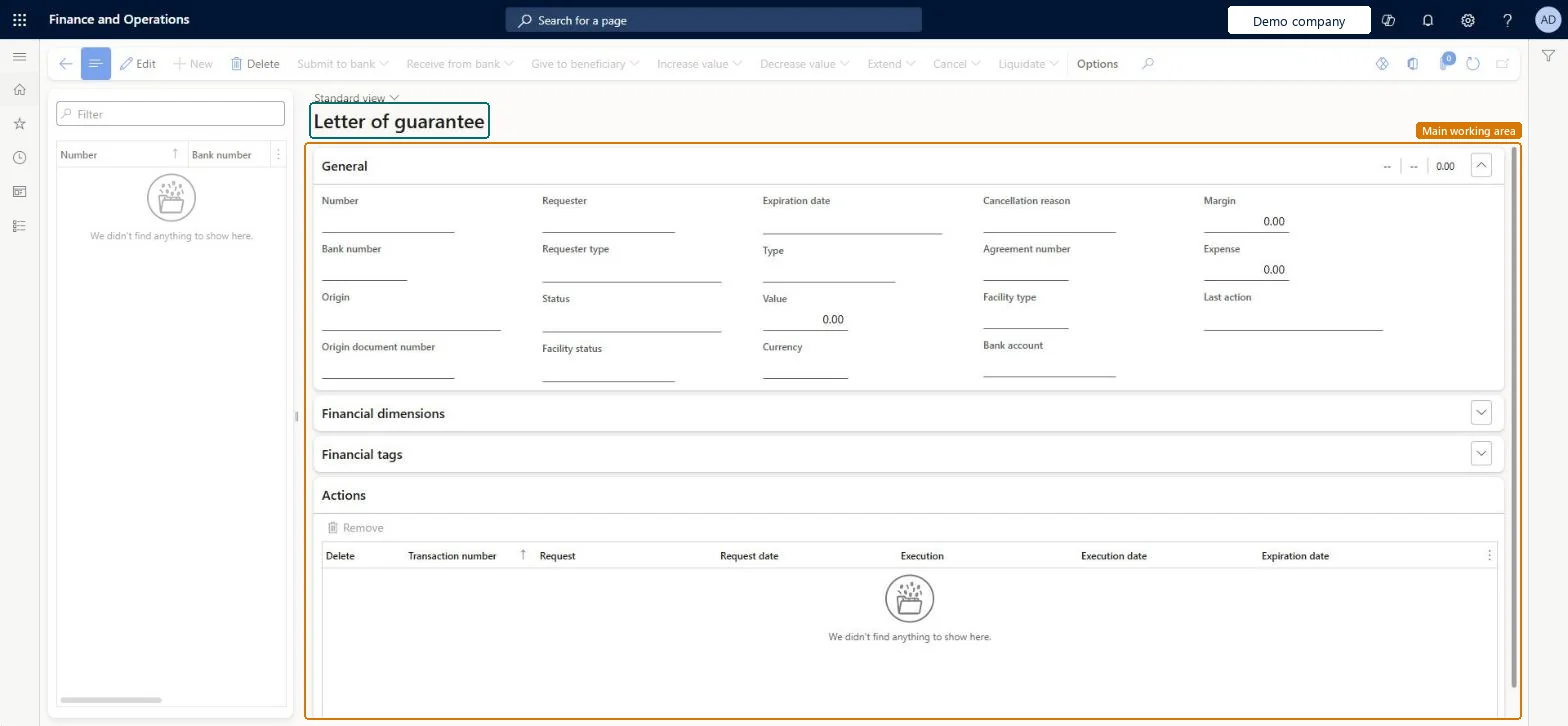
The page in Dynamics 365. page title tab to open what to set or check
About the examples: Examples and screenshots in this guide use BEAT, a demo company in a Dynamics 365 test environment. Use your own company's codes and values instead of copying them.
Setup steps on this page
Process a letter of guarantee
Use this page to move each letter of guarantee through submit, receive, give to beneficiary, value changes, extension, cancellation or liquidation.
Steps from Microsoft
Go to Cash and bank management > Letters of guarantee > Letters of guarantee.
Select the letter of guarantee.
Select Submit to bank, select the bank account, and select OK.
Select Receive from bank, enter the Bank number, check the Margin and Expense amounts, and select OK.
Select Give to beneficiary and select OK.
If the value changes, select Increase value or Decrease value.
When the beneficiary presents the letter, select Liquidate.
Open the Journal batch number link to check the posted journal lines.
Where the letter of guarantee is: requested, submitted to the bank, received, given to the beneficiary, cancelled or liquidated.Microsoft Learn
Value
The amount the bank guarantees to the beneficiary.Microsoft Learn
250,000.00
Expiration date
The date by which the beneficiary must present the letter to liquidate it.Microsoft Learn
Margin
The amount the bank reserves, calculated on Receive from bank from the facility agreement.Microsoft Learn
Expense
The bank's commission, calculated on Receive from bank from the facility agreement.Microsoft Learn
Journal batch number
The journal posted by an action; open it to see the ledger lines.Microsoft Learn
Common errors and fixes
Message
What to do
Letter of guarantee isn't available as a bank document type on the sales order
Turn on Enable letter of guarantee and select a Transaction journal in the Bank document section of Cash and bank management parameters. Microsoft Learn
Receive from bank can't post the margin and expense
The Bank documents posting profile for the facility group or type needs a settle, charges and margin account; liquidation also needs the liquidation account. Microsoft Learn
The letter of guarantee can't be liquidated after its expiration date
The beneficiary must present the letter before it expires. Extend it in time, or cancel it with a bank reason when its purpose no longer applies. Microsoft Learn
Test checklist
Create a sales order with Bank document type Letter of guarantee and request a letter of guarantee with a value and expiration date.
Submit it to the bank, then Receive from bank and check the calculated Margin and Expense.
Open the journal batch number and check the posted lines against the Bank documents posting profile accounts.
Give it to the beneficiary, then Liquidate, and check the liquidation journal.
Request it from the sales order, then do every bank step on this page on the day it happens, so the margin, expense and facility balance are posted when the bank acts.Each action posts a journal and changes the facility use; recording them late leaves the ledger and the facility balance wrong in between.
Set on the Number sequences tab of Cash and bank management parameters before the first letter of guarantee. Microsoft Learn
Letter of guarantee transaction reference
Per company
Set on the same tab; used for the journal of each letter of guarantee action. Microsoft Learn
Feature management and licence
Licence or add-in
In this system 6 roles can open this page, among them Chief financial officer, Accounts receivable clerk, Accounts receivable manager and Accounting manager.
Hard to reverse: Actions post journals; use Decrease value or Cancel rather than expecting a reversal.
If you change it later
Receive from bank, Increase value, Decrease value and Liquidate post journals to the accounts of the Bank documents posting profile and use up or free the facility limit of the bank facility agreement. Letters of guarantee must be turned on per legal entity: on Cash and bank management parameters, Bank document section, select Enable letter of guarantee and a Transaction journal, and on the Number sequences tab set the letter of guarantee number and transaction reference sequences. Microsoft Learn
Technical architect
6Technical
Menu item
BankLGGuaranteeChecked in Dynamics 365
Form
BankLGGuaranteeChecked in Dynamics 365
Table
BankLGGuaranteeShown as “Letter of guarantee” in Record infoChecked in Dynamics 365
Who can open it
PrivilegesMaintain letters of guarantee BankLGMaintainView letters of guarantee BankLGViewDutiesInquire into bank letter of guarantee BankLetterOfGuaranteeInquireMaintain bank letter of guarantee BankLetterOfGuaranteeMaintain6 security rolesChief financial officer CompanyChiefFinancialOfficerAccounts receivable clerk CustInvoiceAccountsReceivableClerkAccounts receivable manager CustInvoiceAccountsReceivableManagerAccounting manager LedgerAccountingManagerFinancial controller LedgerFinancialControllerTreasurer PaymTreasurerChecked in Dynamics 365
Roles to set it up and use it
To set it up or change itTreasurer PaymTreasurerAccounts receivable manager CustInvoiceAccountsReceivableManagerAccounts receivable clerk CustInvoiceAccountsReceivableClerkTo use itChief financial officer CompanyChiefFinancialOfficerAccounting manager LedgerAccountingManagerFinancial controller LedgerFinancialControllerGive people one of these roles. On this system, 6 roles can open this page.Checked in Dynamics 365
Actions on the page
Options: Personalize, Page options, ShareChecked in Dynamics 365
Developer
7Developer
Open it by URL
https://<your-environment>/?mi=BankLGGuarantee
Data migration
Load order: A letter of guarantee has no data entity in Data management, so it can't be loaded from a file or a configuration template. Open letters of guarantee are entered again in the new environment through the sales order and the Submit to bank and Receive from bank actions, after facilities, posting profiles and facility agreements exist.Microsoft Learn