Transaction page · Cash and bank management
Letters of guarantee
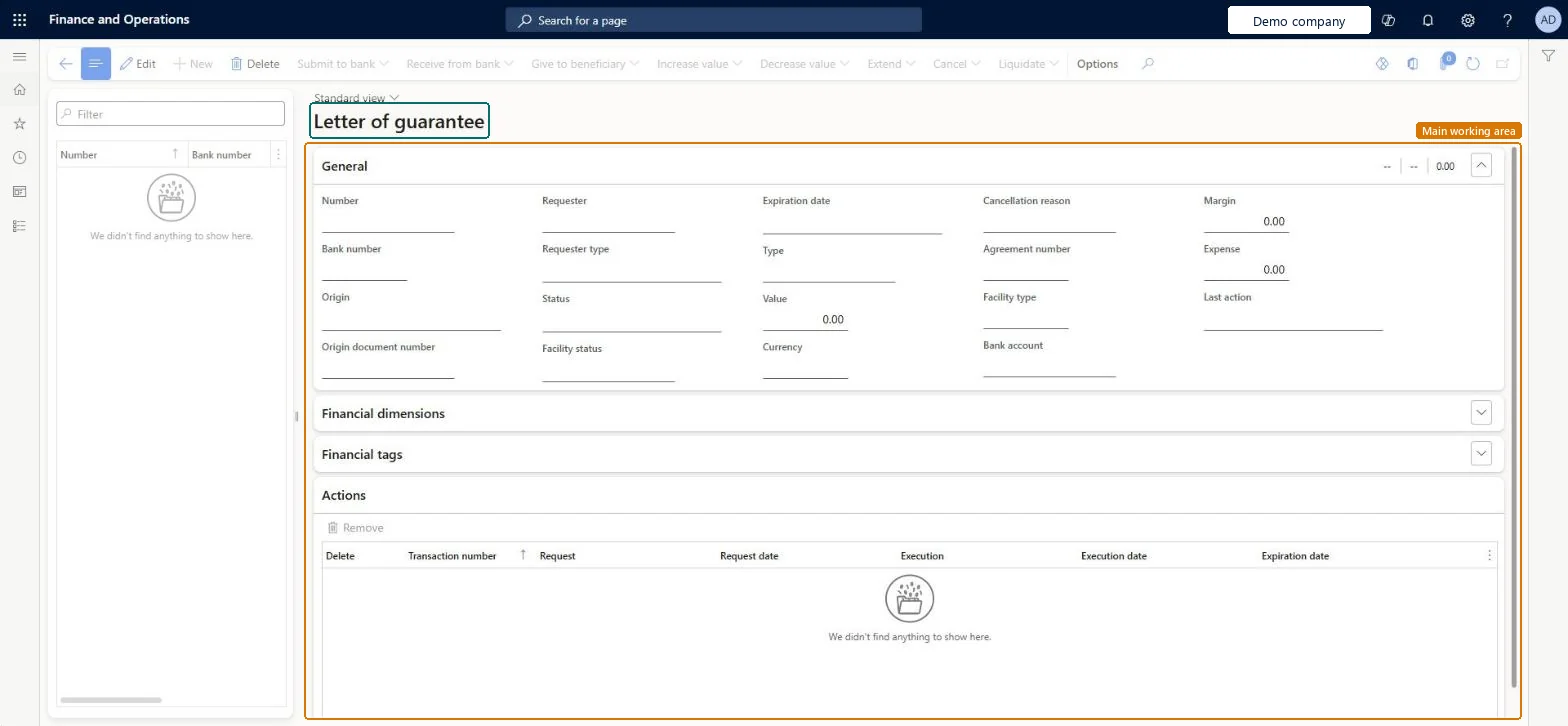
A page where you record letters of guarantee and track their status, balances and expiration.
- Used by
- Chief financial officer, Accounts receivable clerk, Accounts receivable manager and 3 more roles
- Business process
- —
- Menu item
BankLGGuarantee- Main table
BankLGGuarantee- Data entity
- —
- Setup steps
- —
Show what matters for
Everyone
1What it is and why
| What it is | A page where you record letters of guarantee and track their status, balances and expiration. |
|---|---|
| What you do here | Used to submit guarantee requests to the bank, receive them, give them to the beneficiary, and change, extend, cancel or liquidate them. |
| Example | For example, if the principal defaults, the beneficiary hands the original letter to the bank before it expires, and the bank pays the amount due. |
Functional consultant · Solution architect
2Where it fits
| Business process | — |
|---|---|
| Menu path | Cash and bank management › Letters of guarantee › Letters of guarantee |
| Set up first | Bank facility agreements Microsoft Learn ↗Bank facilities Microsoft Learn ↗Bank documents posting profile Microsoft Learn ↗Cash and bank management parameters Microsoft Learn ↗ |
| Used next by | — |
| Related pages | Payment purpose codes Microsoft Learn ↗Bank reasons Microsoft Learn ↗ |
End user · Functional consultant
3How to do it
Microsoft's steps
- Go to Cash and bank management > Letters of guarantee > Letters of guarantee.
- Select the letter of guarantee.
- Select Submit to bank, select the bank account, and select OK.
- Select Receive from bank, enter the Bank number, check the Margin and Expense amounts, and select OK.
- Select Give to beneficiary and select OK.
- If the value changes, select Increase value or Decrease value.
- When the beneficiary presents the letter, select Liquidate.
- Open the Journal batch number link to check the posted journal lines.
Source: Microsoft Learn ↗
Field guide
| Field | What it means | Worked example | Table column |
|---|---|---|---|
| — | |||
Functional consultant
4Setup decisions
| Setup step | Recommended value and why | Decision · common mistake · test |
|---|---|---|
| — No setup is made on this page. | ||
Solution architect
5Design impact
| Shared or per company | Per company: each legal entity has its own records. Microsoft data model ↗ |
|---|---|
| Can it be undone | — |
| Feature or country | — |
| If you change it later | — |
Technical architect
6Technical
| Menu item | BankLGGuarantee Checked in Dynamics 365 |
|---|---|
| Form | BankLGGuarantee Checked in Dynamics 365 |
| Table | BankLGGuaranteeShown as “Letter of guarantee” in Record infoChecked in Dynamics 365 |
| Data entities | — |
| Who can open it | PrivilegesMaintain letters of guarantee BankLGMaintainView letters of guarantee BankLGViewDutiesInquire into bank letter of guarantee BankLetterOfGuaranteeInquireMaintain bank letter of guarantee BankLetterOfGuaranteeMaintain6 security rolesChief financial officerCompanyChiefFinancialOfficerAccounts receivable clerk CustInvoiceAccountsReceivableClerkAccounts receivable manager CustInvoiceAccountsReceivableManagerAccounting manager LedgerAccountingManagerFinancial controller LedgerFinancialControllerTreasurer PaymTreasurer |
| Actions on the page | Options: Personalize, Page options, ShareChecked in Dynamics 365 |
Developer
7Developer
| Open it directly | https://<your-environment>/?mi=BankLGGuarantee |
|---|---|
| Integrate with | — |
| Table definition | BankLGGuarantee columns and relations Microsoft data model ↗ |
Everyone
8Sources and checks
- learn.microsoft.com/dynamics365/finance/cash-bank-management/letters-of-guarantee
- learn.microsoft.com/dynamics365/finance/cash-bank-management/tasks/letter-guarantee-transaction
- learn.microsoft.com/common-data-model/schema/core/operationscommon/tables/finance/bank/worksheetheader/banklgguarantee
- learn.microsoft.com/dynamics365/finance/cash-bank-management/tasks/set-up-bank-facilities-posting-profiles
- Checked in a working Dynamics 365 system, version 10.0.49: the menu item, form, table and security, the page.