Transaction page · Accounts receivable
All sales orders
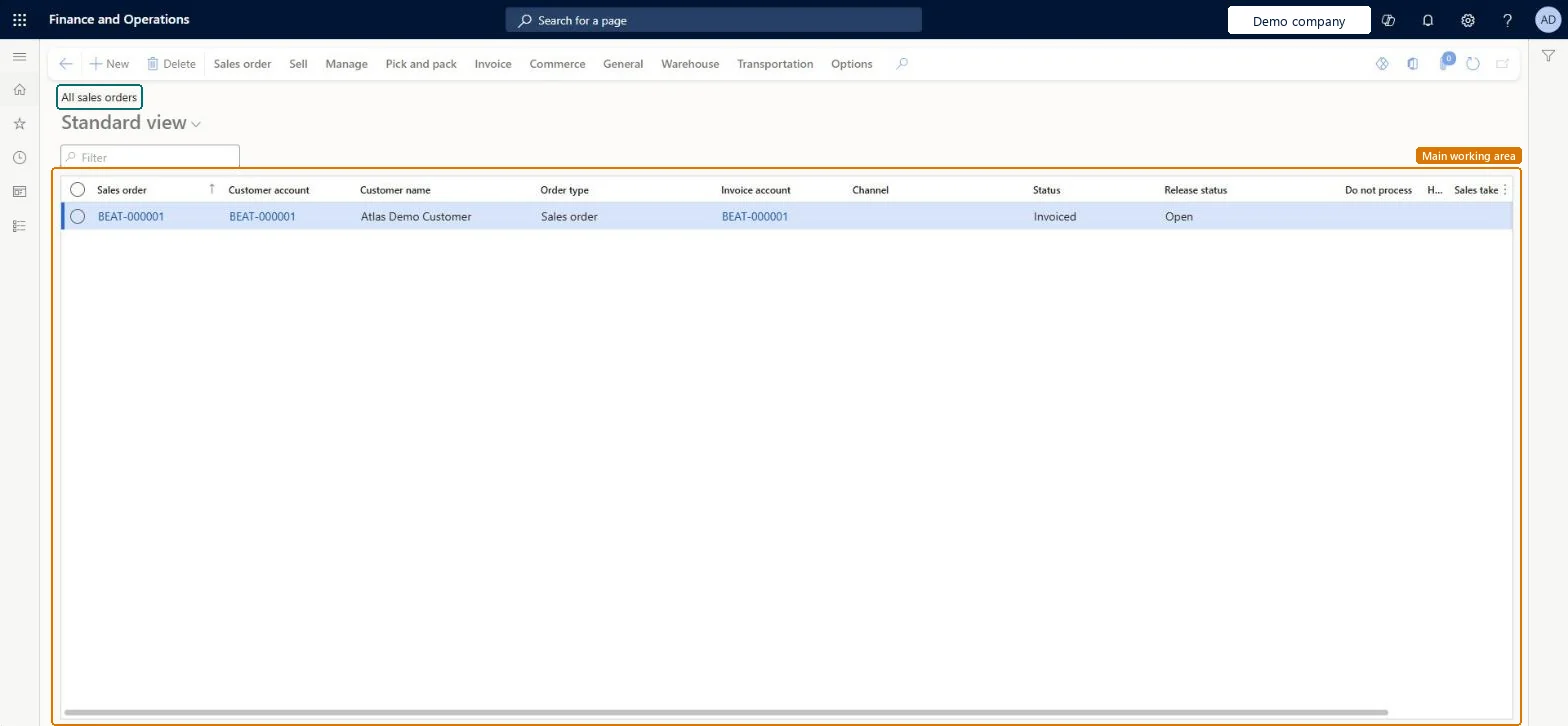
The list page of sales orders.
- Used by
- Accounts receivable clerk, Accounts receivable manager, and 27 more roles
- Business process
- —
- Menu item
SalesTableListPage- Main table
SalesTable- Data entity
ReturnOrderHeaderEntity- Setup steps
- —
Show what matters for
Everyone
1What it is and why
| What it is | The list page of sales orders. |
|---|---|
| What you do here | Used to view sales orders and their status; several orders can also be selected there and invoiced together with Generate invoices. |
| Example | After posting an invoice for a sales order, check on the All sales orders list page whether the order status has changed to Invoiced. |
Functional consultant · Solution architect
2Where it fits
| Business process | — |
|---|---|
| Menu path | Accounts receivable › Orders › All sales orders |
| Set up first | All customers Microsoft Learn ↗ |
| Used next by | Shipped but not invoiced sales orders Microsoft Learn ↗Open customer invoices Microsoft Learn ↗ |
| Related pages | Create sales order Microsoft Learn ↗ |
End user · Functional consultant
3How to do it
Microsoft's steps
- Go to All sales orders and, on the Action Pane, select New.
- In the Customer account field, select the customer, and then select OK.
- In the Sales order lines section, select Dimensions to add any product or storage dimensions you need to the grid, and then select OK.
- In the Item number field, select the product.
- In the Quantity field, enter the quantity.
- Check the Unit price, Discount and Discount percent values, and enter them if they're empty.
- On the Action Pane, select Sales order > Totals to review the order totals, and then select OK.
Source: Microsoft Learn ↗
Field guide
| Field | What it means | Worked example | Table column |
|---|---|---|---|
| Customer account | The customer the sales order is for.Microsoft Learn ↗ | — | — |
| Item number | The product being sold on the order line.Microsoft Learn ↗ | — | — |
| Unit price | The price per unit, copied from a valid trade agreement or the product record when one exists.Microsoft Learn ↗ | — | — |
| Discount | A discount amount per unit, multiplied by the line quantity to get the line discount.Microsoft Learn ↗ | — | — |
| Discount percent | A percentage that reduces the line's gross amount.Microsoft Learn ↗ | — | — |
| Net amount | The line amount after quantity, unit price and discounts; you can override it.Microsoft Learn ↗ | — | — |
Functional consultant
4Setup decisions
| Setup step | Recommended value and why | Decision · common mistake · test |
|---|---|---|
| — No setup is made on this page. | ||
Solution architect
5Design impact
| Shared or per company | Per company: each legal entity has its own records. Microsoft data model ↗ |
|---|---|
| Can it be undone | — |
| Feature or country | — |
| If you change it later | Posting an invoice updates the invoice remainder on each line; when nothing is left to deliver or invoice, the order status changes to Invoiced. Microsoft Learn ↗ |
Technical architect
6Technical
| Menu item | SalesTableListPage Checked in Dynamics 365 |
|---|---|
| Form | SalesTableListPage Checked in Dynamics 365 |
| Table | SalesTableShown as “Sales orders” in Record infoKey field: SalesIdChecked in Dynamics 365 |
| Data entities | ReturnOrderHeaderEntityReturn order headers Microsoft data model ↗SalesOrderHeaderV2EntitySales order headers V2 Microsoft data model ↗SalesOrderHeaderV2ExistAddrReadOnlyEntitySales order headers V2 readonly with the delivery address Microsoft data model ↗CustCollectionsBISalesOnHoldSales orders on hold for customers Microsoft data model ↗ |
| Who can open it | PrivilegesMaintain sales order details SalesTableDetailsMaintainView sales order details SalesTableDetailsViewDutiesCash flow position details drill down CashflowPositionDetailsDrillDownInquire into collections status CollectionLetterCollectionsStatusInquirMaintain cash register RentalCashRegisterMaintainMaintain rental sales orders RentalSalesOrderMaintainInquire into rental sales order progress RentalSalesOrderProgressInquireMaintain sales return order ReturnSalesReturnOrderMaintainMaintain sales order SalesOrderMaintainInquire into sales order progress SalesOrderProgressInquire30 security rolesCollections agentCollectionLetterCollectionsAgentCollections manager CollectionLetterCollectionsManagerCredit management clerk CredManClerkCredit management manager CredManManagerAccounts receivable clerk CustInvoiceAccountsReceivableClerkAccounts receivable manager CustInvoiceAccountsReceivableManager CustTableCopilotSummaryInsufficientAccessTestRoleAccountant LedgerAccountantAccounting manager LedgerAccountingManagerFinancial controller LedgerFinancialController MCRTestUserRoleAccounts receivable centralized payments clerk PaymAccountsReceivableCentralPaymClerkAccounts receivable payments clerk PaymAccountsReceivablePaymentsClerkTreasurer PaymTreasurerProject assistant ProjProjectClerkProject manager ProjProjectManagerRental clerk RentalClerkRental coordinator agent RentalCoordinatorAgentRental manager RentalManagerRental purchasing manager RentalPurchasingManagerRental representative RentalRepresentativeRental sales manager RentalSalesManagerProduction planner ReqProductionPlannerRetail service RetailServiceRetail store manager RetailStoreManagerRevenue recognition manager RevRecManagerCustomer service representative TradeCustomerServiceRepresentativeSales clerk TradeSalesClerkSales manager TradeSalesManagerSales representative TradeSalesRepresentative |
| Actions on the page | Sales order: New, Maintain, Payments, Copy, View, Functions, Attachments, Clean up, Engineering change requestSell: Credit note, Charges, Tax, Calculate, Generate, Actions, Process, Apply, Journals, PrepaymentManage: Customer, Intercompany tracing, CouponsPick and pack: Generate, JournalsInvoice: Generate, Bill, Settle, Journals, DeductionsCommerce: Attributes, Inquiries, AffiliationsGeneral: Set up, Customer, Maintain, Related information, CAPAWarehouse: Related information, Loads, ActionsTransportation: Rating, InvoiceChecked in Dynamics 365 |
Developer
7Developer
| Open it directly | https://<your-environment>/?mi=SalesTableListPage |
|---|---|
| Integrate with | ReturnOrderHeaderEntity data entity Microsoft data model ↗ |
| Table definition | SalesTable columns and relations Microsoft data model ↗ |
Everyone
8Sources and checks
- learn.microsoft.com/dynamics365/finance/accounts-receivable/configure-customer-invoices
- learn.microsoft.com/dynamics365/supply-chain/sales-marketing/tasks/create-sales-orders
- learn.microsoft.com/common-data-model/schema/core/operationscommon/tables/supplychain/salesandmarketing/worksheetheader/salestable
- learn.microsoft.com/dynamics365/finance/accounts-receivable/configure-customer-invoices
- learn.microsoft.com/dynamics365/finance/accounts-receivable/tasks/create-sales-order-invoices
- Checked in a working Dynamics 365 system, version 10.0.49: the menu item, form, table and security, the page.