Master data page · Accounts payable
All vendors
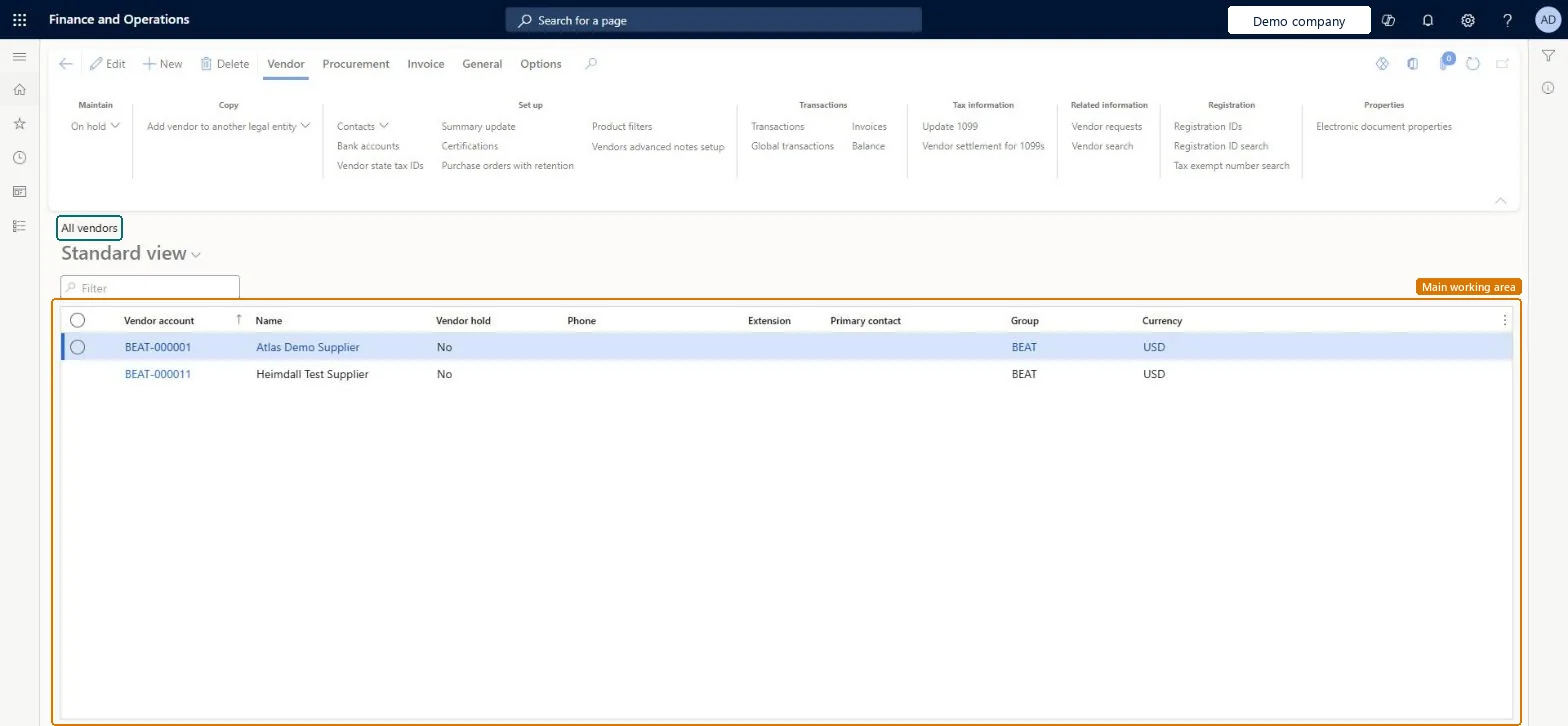
The list page of vendor accounts, where each vendor record holds the information the system uses to fill in documents and track activity with that vendor.
- Used by
- Accounts payable clerk, Accounts payable manager, Purchasing agent and 19 more roles
- Business process
- —
- Menu item
VendTableListPage- Main table
VendTable- Data entity
VendVendorV2Entity- Setup steps
- —
Show what matters for
Everyone
1What it is and why
| What it is | The list page of vendor accounts, where each vendor record holds the information the system uses to fill in documents and track activity with that vendor. |
|---|---|
| What you do here | Used to create, edit, and manage vendor accounts, including the vendor group, hold status, bank information, tax, delivery, invoice and payment settings, and default financial dimensions. |
| Example | Set up banking information for a vendor so that payments can be sent to it electronically. |
Functional consultant · Solution architect
2Where it fits
| Business process | — |
|---|---|
| Menu path | Accounts payable › Vendors › All vendors |
| Set up first | Vendor groups Microsoft Learn ↗ |
| Used next by | All purchase orders Microsoft Learn ↗Purchase agreements Microsoft Learn ↗Invoice journal Microsoft Learn ↗ |
| Related pages | Terms of payment Microsoft Learn ↗Methods of payment Microsoft Learn ↗Vendor posting profiles Microsoft Learn ↗Accounts payable parameters Microsoft Learn ↗Vendors on hold Microsoft Learn ↗ |
End user · Functional consultant
3How to do it
Microsoft's steps
- Go to All vendors.
- On the Action Pane, select New.
- In the Vendor account field, enter a unique value, unless it fills in automatically.
- In the Name field, enter or select the vendor name.
- In the Group field, select a vendor group.
- Enter the Number of employees and the Organization number.
- In the Addresses section, select Add, choose a Purpose, enter the address and select OK.
- In the Contact information section, select Add and enter the contact details.
- Select Save.
Source: Microsoft Learn ↗
Field guide
| Field | What it means | Worked example | Table column |
|---|---|---|---|
| Vendor account | The unique number that identifies the vendor; it can be numbered automatically.Microsoft Learn ↗ | — | — |
| Name | The vendor's name; picking an existing party copies its address and contact details.Microsoft Learn ↗ | — | — |
| Group | The vendor group, which supplies shared settings such as payment terms and posting accounts.Microsoft Learn ↗ | — | VendGroup |
| Organization number | The vendor's legal organization number.Microsoft Learn ↗ | — | OrganizationNumber |
| Purpose | What an address is used for, such as Invoice, Remit-to or SWIFT.Microsoft Learn ↗ | — | — |
| Vendor hold | Blocks the vendor for chosen transaction types, such as invoices, payments, purchase orders or all.Microsoft Learn ↗ | — | — |
| Invoice account | The account credited with the invoice amount when it differs from the vendor, for example a third party.Microsoft Learn ↗ | — | InvoiceAccount |
Functional consultant
4Setup decisions
| Setup step | Recommended value and why | Decision · common mistake · test |
|---|---|---|
| — No setup is made on this page. | ||
Solution architect
5Design impact
| Shared or per company | Per company: each legal entity has its own records. Microsoft data model ↗ |
|---|---|
| Can it be undone | — |
| Feature or country | — |
| If you change it later | A vendor can't be deleted once other records, such as contacts or products, are linked to it. Microsoft Learn ↗ |
Technical architect
6Technical
| Menu item | VendTableListPage Checked in Dynamics 365 |
|---|---|
| Form | VendTable Checked in Dynamics 365 |
| Table | VendTableShown as “Vendors” in Record infoKey field: AccountNumChecked in Dynamics 365 |
| Data entities | VendVendorV2EntityVendors V2 Microsoft data model ↗VendPaymentBIVendTableVendors Microsoft data model ↗VendPaymentBIVendTableV2Vendors Microsoft data model ↗DimAttributeVendTableEntityVendors Microsoft data model ↗ |
| Who can open it | PrivilegesMaintain vendors VendTableMaintainView vendors VendTableViewDutiesInvoiceCaptureMaintain InvoiceCaptureMaintainInquire into vendor positive payments PaymVendPositivePayInquireInquire into vendor master VendVendorMasterInquireMaintain vendor master VendVendorMasterMaintain22 security rolesAuditorAuditPolicyManagerChief executive officer CompanyChiefExecutiveOfficerChief financial officer CompanyChiefFinancialOfficerInvoice capture operator InvoiceCaptureOperatorLanded cost agent ITMAgentLanded cost manager ITMManagerAccountant LedgerAccountantAccounting manager LedgerAccountingManagerAccounting supervisor LedgerAccountingSupervisorFinancial controller LedgerFinancialControllerAccounts payable centralized payments clerk PaymAccountsPayableCentralPaymClerkAccounts payable payments clerk PaymAccountsPayablePaymentsClerkAccounts payable positive payment clerk PaymPositivePaymentClerkTreasurer PaymTreasurerProject assistant ProjProjectClerkBuying agent TradeBuyingAgentPurchasing manager TradePurchasingManagerAccounts payable clerk VendInvoiceAccountsPayableClerkAccounts payable manager VendInvoiceAccountsPayableManagerPurchasing agent VendPurchasingAgentPurchasing Agent - Public Sector VendPurchasingAgent_PSNVendor account manager VendVendorAccountManager |
| Actions on the page | Vendor: Maintain, Copy, Set up, Transactions, Tax information, Related information, Registration, PropertiesProcurement: New, Related information, Agreements, Set upInvoice: New, Set up, Settle, Related information, PrepaymentGeneral: Activities, Set up, New, Accounts, Market, StatisticsChecked in Dynamics 365 |
Developer
7Developer
| Open it directly | https://<your-environment>/?mi=VendTableListPage |
|---|---|
| Integrate with | VendVendorV2Entity data entity Microsoft data model ↗ |
| Table definition | VendTable columns and relations Microsoft data model ↗ |
Everyone
8Sources and checks
- learn.microsoft.com/dynamics365/supply-chain/procurement/set-up-vendor-accounts
- learn.microsoft.com/dynamics365/supply-chain/procurement/tasks/create-vendor-account
- learn.microsoft.com/common-data-model/schema/core/operationscommon/tables/supplychain/vendor/main/vendtable
- learn.microsoft.com/dynamics365/supply-chain/procurement/set-up-vendor-accounts
- learn.microsoft.com/training/modules/configure-accounts-payable-dyn365-finance/6-vendor-groups
- learn.microsoft.com/dynamics365/supply-chain/procurement/tasks/create-purchase-order
- learn.microsoft.com/dynamics365/finance/accounts-payable/accounts-payable-overview
- learn.microsoft.com/dynamics365/finance/accounts-payable/vendor-invoices-workspace
- Checked in a working Dynamics 365 system, version 10.0.49: the menu item, form, table and security, the page.