Transaction page · Accounts payable
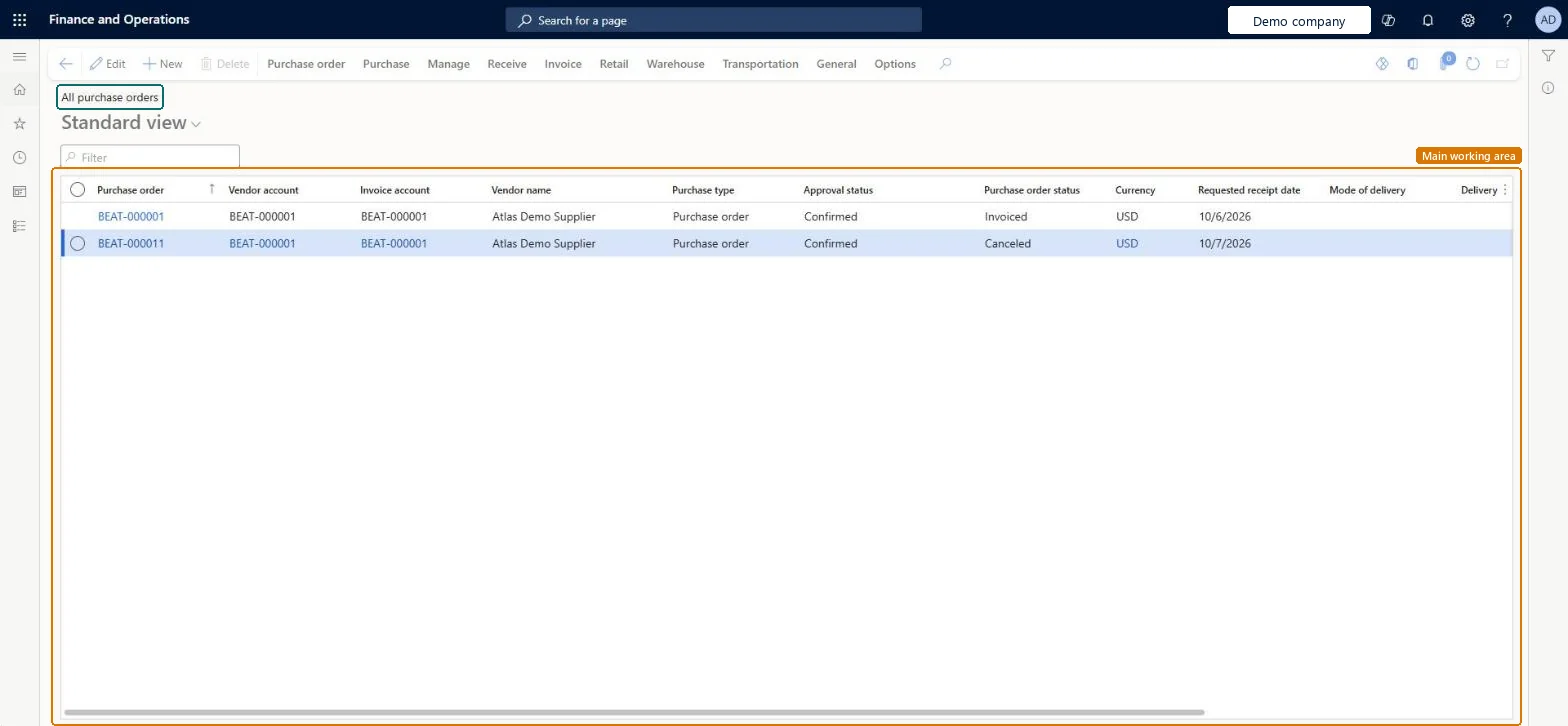
All purchase orders
The Purchase orders list page, which gives an overview of available purchase orders; a purchase order is a document that represents an agreement with a vendor to buy goods or services.
- Used by
- Accounts payable clerk, Accounts payable manager, Purchasing agent and 15 more roles
- Business process
- —
- Menu item
PurchTableListPage- Main table
PurchTable- Data entity
PurchPurchaseOrderHeaderV2Entity- Setup steps
- —
Show what matters for
Everyone
1What it is and why
| What it is | The Purchase orders list page, which gives an overview of available purchase orders; a purchase order is a document that represents an agreement with a vendor to buy goods or services. |
|---|---|
| What you do here | Used to view and modify purchase orders, switching between a Header view (vendor details and other once-per-order data) and a Lines view (order lines). |
| Example | — |
Functional consultant · Solution architect
2Where it fits
| Business process | — |
|---|---|
| Menu path | Accounts payable › Purchase orders › All purchase orders |
| Set up first | All vendors Microsoft Learn ↗Purchase agreements Microsoft Learn ↗ |
| Used next by | Purchase orders received but not invoiced Microsoft Learn ↗Open vendor invoices Microsoft Learn ↗Pending vendor invoices Microsoft Learn ↗ |
| Related pages | Open prepayments Microsoft Learn ↗ |
End user · Functional consultant
3How to do it
Microsoft's steps
- Go to Accounts payable > Purchase orders > All purchase orders.
- Select New.
- In the Vendor account field, select the vendor, then select OK.
- In the Item number field, select the item to buy.
- Enter the quantity and check the unit price on the line.
- Expand the Line details FastTab and, on the Setup tab, change the Matching policy if needed.
- On the Action Pane, select Purchase, then select Confirm.
Source: Microsoft Learn ↗
Field guide
| Field | What it means | Worked example | Table column |
|---|---|---|---|
| Purchase order status | Shows how far the quantities on the order have got: open, received, invoiced or canceled.Microsoft Learn ↗ | — | — |
| Document status | Shows the most recent document processed for the order, such as the confirmation, product receipt or invoice.Microsoft Learn ↗ | — | DocumentStatus |
| Approval status | Shows where the order is in review or workflow, from Draft to Confirmed.Microsoft Learn ↗ | — | — |
| Receipt date | When the goods or services need to be delivered; lines can have their own dates.Microsoft Learn ↗ | — | — |
| Orderer | The person placing the order.Microsoft Learn ↗ | — | — |
| Matching policy | Overrides the invoice matching used for the line: no matching, two-way or three-way.Microsoft Learn ↗ | — | — |
| Unit price | The price per unit, usually taken from a purchase agreement or trade agreement.Microsoft Learn ↗ | — | — |
Functional consultant
4Setup decisions
| Setup step | Recommended value and why | Decision · common mistake · test |
|---|---|---|
| — No setup is made on this page. | ||
Solution architect
5Design impact
| Shared or per company | Per company: each legal entity has its own records. Microsoft data model ↗ |
|---|---|
| Can it be undone | — |
| Feature or country | — |
| If you change it later | A purchase agreement can only be chosen while the order is being created, not added afterwards. Microsoft Learn ↗ |
Technical architect
6Technical
| Menu item | PurchTableListPage Checked in Dynamics 365 |
|---|---|
| Form | PurchTable Checked in Dynamics 365 |
| Table | PurchTableShown as “Purchase orders” in Record infoKey field: PurchIdChecked in Dynamics 365 |
| Data entities | PurchPurchaseOrderHeaderV2EntityPurchase order headers V2 Microsoft data model ↗ |
| Who can open it | PrivilegesMaintain purchase order details PurchTableDetailsMaintainView purchase order details PurchTableDetailsViewManage vendor orders tab VendProfileVendorOrdersMaintainDutiesCash flow position details drill down CashflowPositionDetailsDrillDownInvoiceCaptureMaintain InvoiceCaptureMaintainMaintain service receipts kanban execution KanbanExecutionServiceReceiptsMaintainMaintain kanban purchase orders schedule KanbanSchedulePurchaseOrdersMaintainApprove purchase order PurchOrderApproveMaintain purchase orders PurchOrderMaintainInquire into purchase order to invoice progress PurchOrderToInvoiceProgressInquireApprove rental purchase order RentalPurchOrderApproveMaintain rental purchase orders RentalPurchOrderMaintain18 security rolesInvoice capture operatorInvoiceCaptureOperatorLanded cost agent ITMAgentAccountant LedgerAccountantTreasurer PaymTreasurerProduction supervisor ProdProductionSupervisorProject assistant ProjProjectClerkProject manager ProjProjectManagerRental coordinator agent RentalCoordinatorAgentRental manager RentalManagerRental purchasing manager RentalPurchasingManagerRetail service RetailServiceRetail store manager RetailStoreManagerBuying agent TradeBuyingAgentPurchasing manager TradePurchasingManagerAccounts payable clerk VendInvoiceAccountsPayableClerkAccounts payable manager VendInvoiceAccountsPayableManagerPurchasing agent VendPurchasingAgentPurchasing Agent - Public Sector VendPurchasingAgent_PSN |
| Actions on the page | Purchase order: New, Maintain, Copy, View, Clean up, Engineering change requestPurchase: Create, Charges, Tax, Calculate, Prepay, Generate, Actions, Accounting, Journals, Vendor collaborationManage: View, Budget, Intercompany tracing, HistoryReceive: Generate, JournalsInvoice: Generate, Bill, Settle, Introduce, JournalsRetail: Functions, Print labelsWarehouse: ActionsTransportation: Post, Rate/RouteGeneral: Set up, Vendor, Maintain, Related information, CAPAOptions: Personalize, Page options, ShareChecked in Dynamics 365 |
Developer
7Developer
| Open it directly | https://<your-environment>/?mi=PurchTableListPage |
|---|---|
| Integrate with | PurchPurchaseOrderHeaderV2Entity data entity Microsoft data model ↗ |
| Table definition | PurchTable columns and relations Microsoft data model ↗ |
Everyone
8Sources and checks
- learn.microsoft.com/dynamics365/supply-chain/procurement/purchase-order-overview
- learn.microsoft.com/dynamics365/finance/accounts-payable/tasks/key-invoice-data-ap-system-vendor-invoice
- learn.microsoft.com/common-data-model/schema/core/operationscommon/tables/supplychain/procurementandsourcing/worksheetheader/purchtable
- learn.microsoft.com/dynamics365/supply-chain/procurement/purchase-agreements
- learn.microsoft.com/dynamics365/supply-chain/procurement/purchase-order-overview
- learn.microsoft.com/dynamics365/supply-chain/procurement/tasks/create-purchase-order
- learn.microsoft.com/dynamics365/supply-chain/procurement/tasks/create-purchase-agreement
- learn.microsoft.com/dynamics365/finance/accounts-payable/vendor-invoices-overview
- learn.microsoft.com/dynamics365/finance/accounts-payable/vendor-invoices-workspace
- Checked in a working Dynamics 365 system, version 10.0.49: the menu item, form, table and security, the page.