Setup page · Accounts payable
Methods of payment
A setup page for all the methods of payment that the company uses to pay vendors.
- Used by
- Accounts payable manager, Auditor, Accounting manager and 2 more roles
- Business process
- Issue and settle supplier payments
- Menu item
VendPaymMode- Main table
VendPaymModeTable- Data entity
VendorPaymentMethodEntity- Setup steps
- 1 on this page
Everyone
1What it is and why
| What it is | A setup page for all the methods of payment that the company uses to pay vendors. |
|---|---|
| What you do here | Used to define, for each method, how payments are summarized and posted, the payment type, grace period and the export, return and remittance file formats. |
| Example | Setting the Period field to Week combines the payment for all invoices for vendors with a due date within the same week. |
Functional consultant · Solution architect
2Where it fits
| Business process | Manage accounts payable › Issue and settle supplier payments |
|---|---|
| Menu path | Accounts payable › Payment setup › Methods of payment |
| Set up first | Bank accounts Microsoft Learn ↗ |
| Used next by | Payment fee Microsoft Learn ↗ |
| Related pages | Terms of payment Microsoft Learn ↗Cash discounts Microsoft Learn ↗Payment schedules Microsoft Learn ↗Payment days Microsoft Learn ↗Payment fee Microsoft Learn ↗ |
End user · Functional consultant
3How to do it
Step by step, with screenshots
Define vendor methods of payment6 screens
Control how supplier payments are posted and generated for each approved instrument.
Screen 1
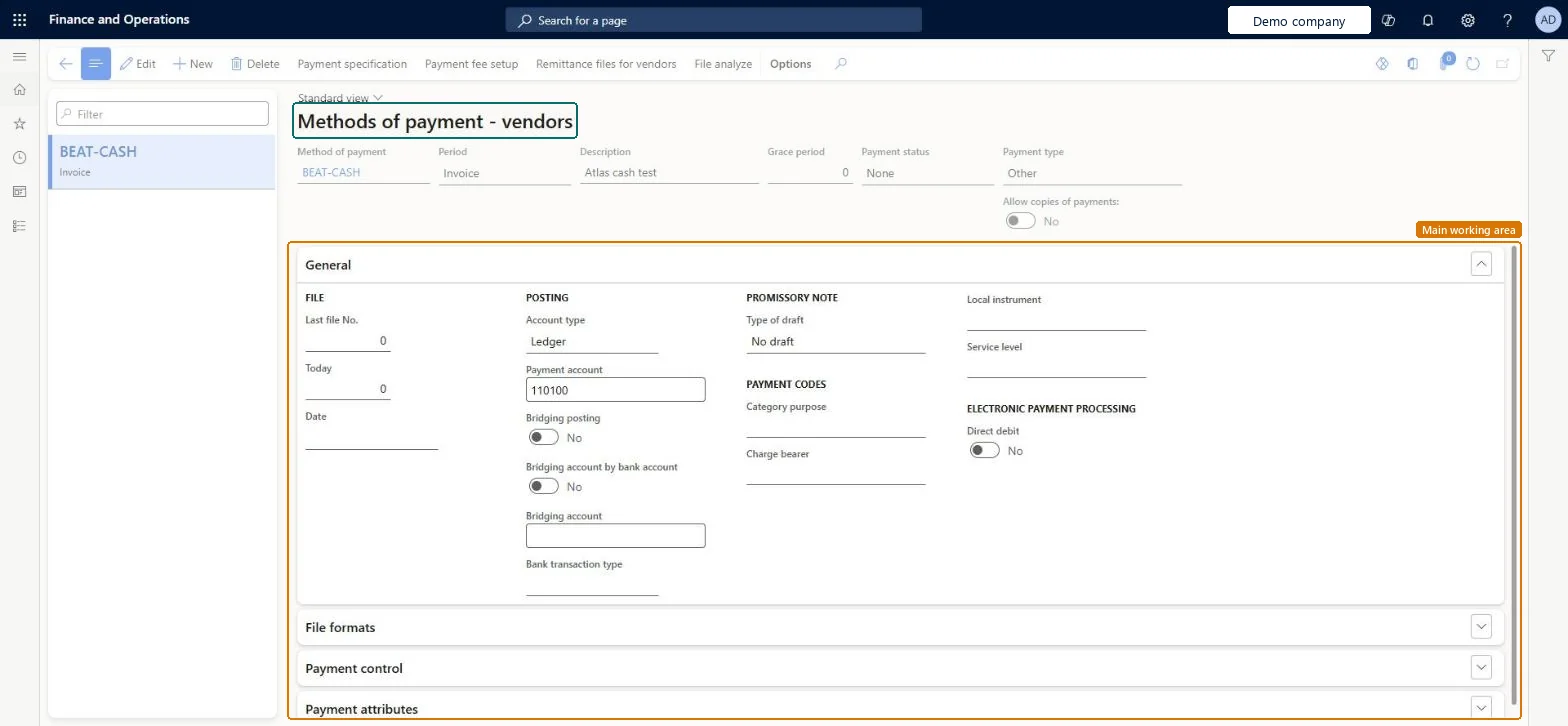
Create the vendor method of payment
Go to Accounts payable > Payment setup > Methods of payment
- Select New
- Enter Method of payment and Description
- Set Period, Payment status and Payment type
1Method of payment BEAT-CASH Description Atlas cash test Period Invoice Grace period 0 Payment status None Payment type Other 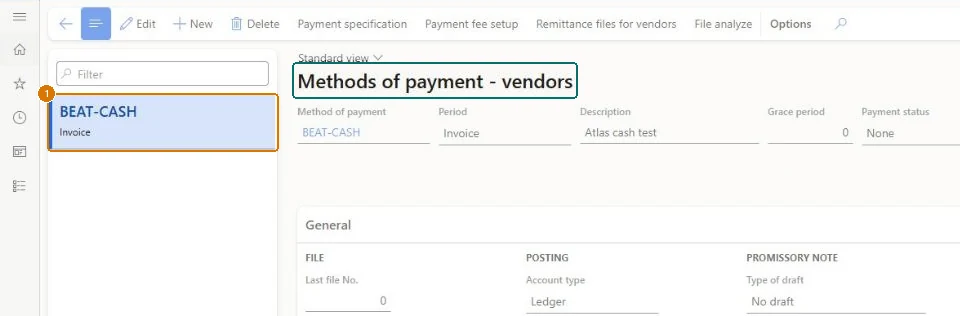
Show the full screen
page title tab to open what to set or check Screen 2
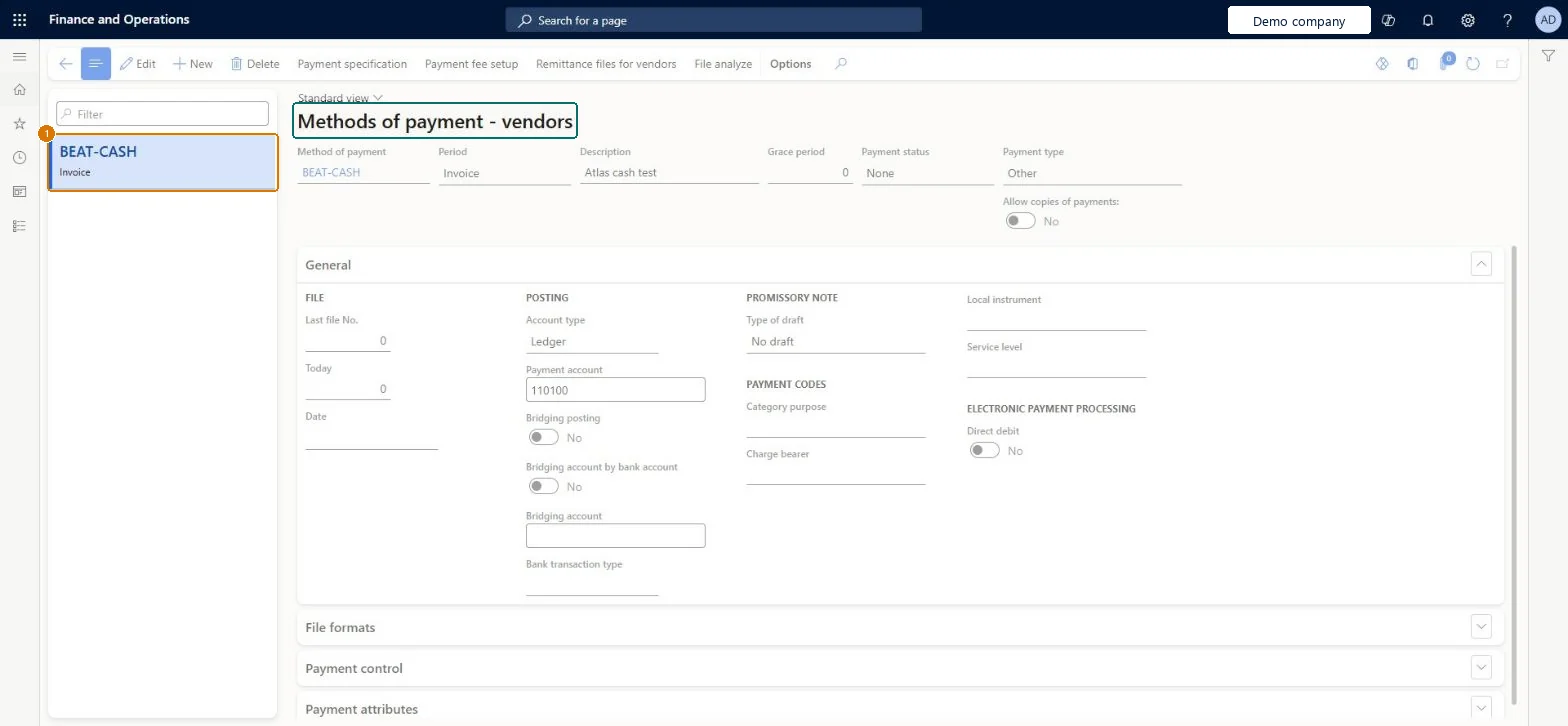
Set the payment posting account
Go to Accounts payable > Payment setup > Methods of payment, General section
- Select the BEAT-CASH method
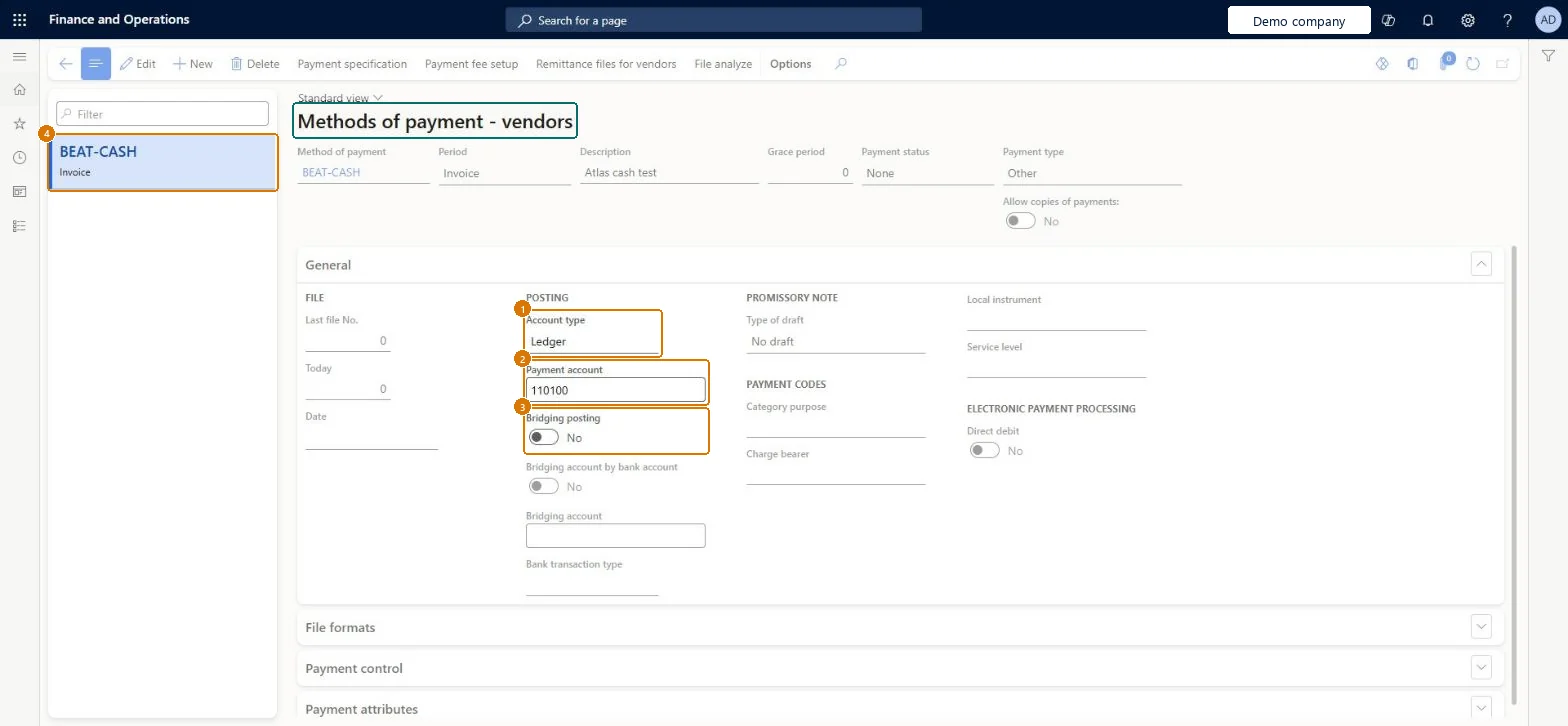
- In the General section under Posting, set Account type and Payment account
- Leave Bridging posting off
1Account type Ledger 2Payment account 110100 3Bridging posting No 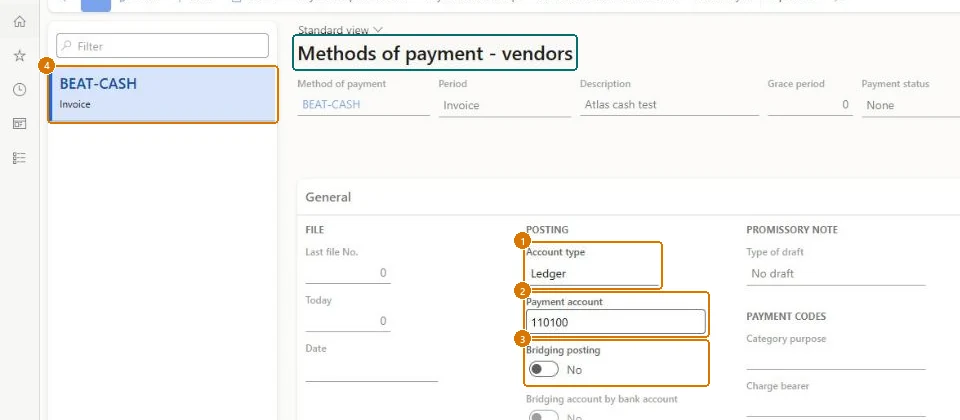
Show the full screen
page title tab to open what to set or check Screen 3
Post a test vendor payment with the method
Go to Accounts payable > Payments > Vendor payment journal
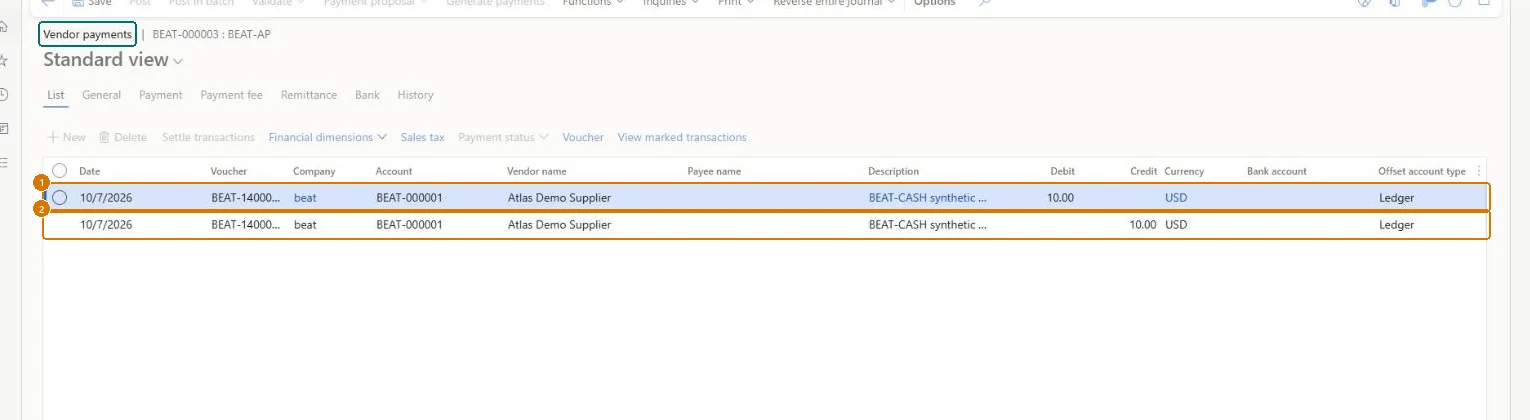
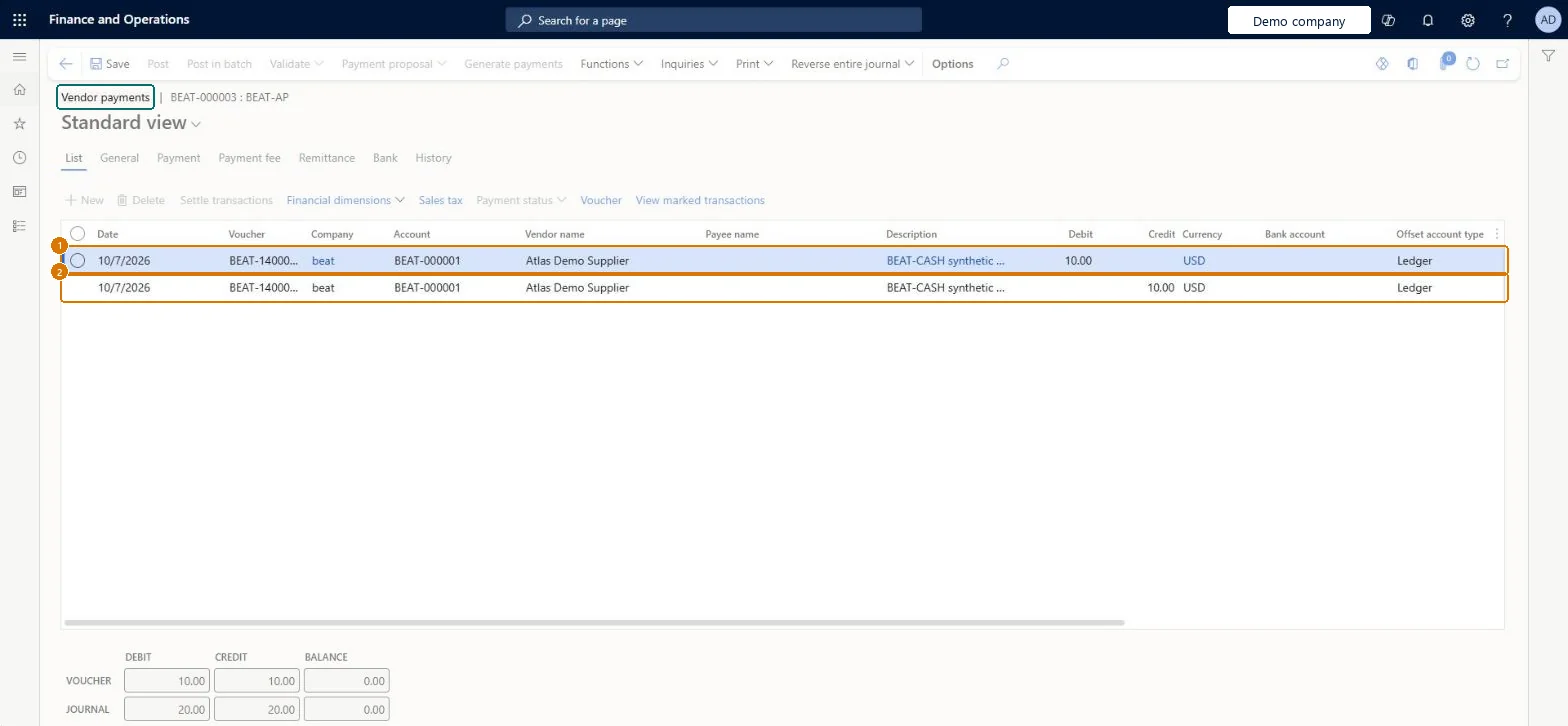
- Open journal BEAT-000003 and go to the List tab
- Add a debit line and a credit line for vendor BEAT-000001 using BEAT-CASH
- Select Post
Check Journal BEAT-000003 shows BEAT-140000002 debit 10.00 and BEAT-140000003 credit 10.00 USD for BEAT-000001, with voucher totals 10.00 = 10.00, journal totals 20.00 = 20.00 and balance 0.00.
Show the full screen
page title tab to open what to set or check Screen 4
Check the debit payment voucher
Go to Accounts payable > Payments > Vendor payment journal, Voucher
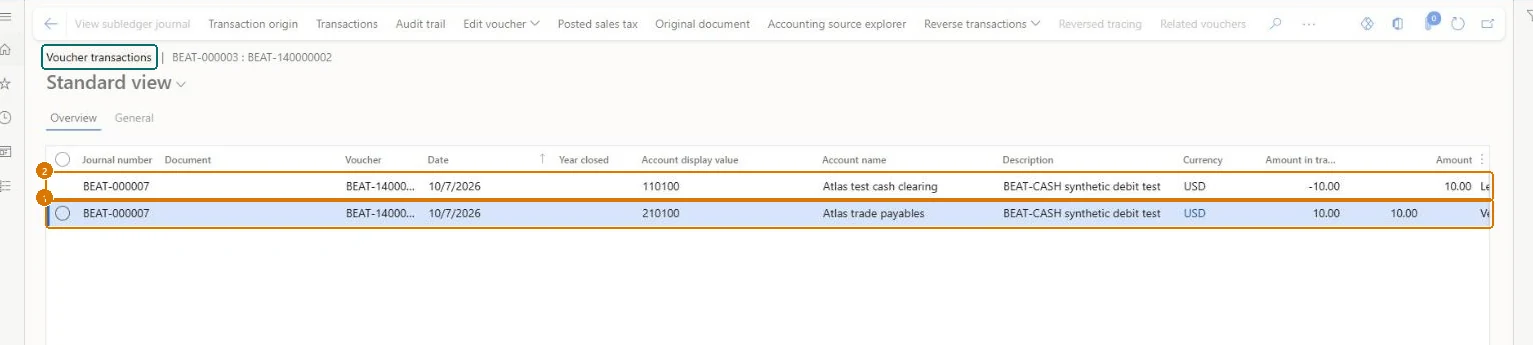
- Select the BEAT-140000002 line
- Select Voucher
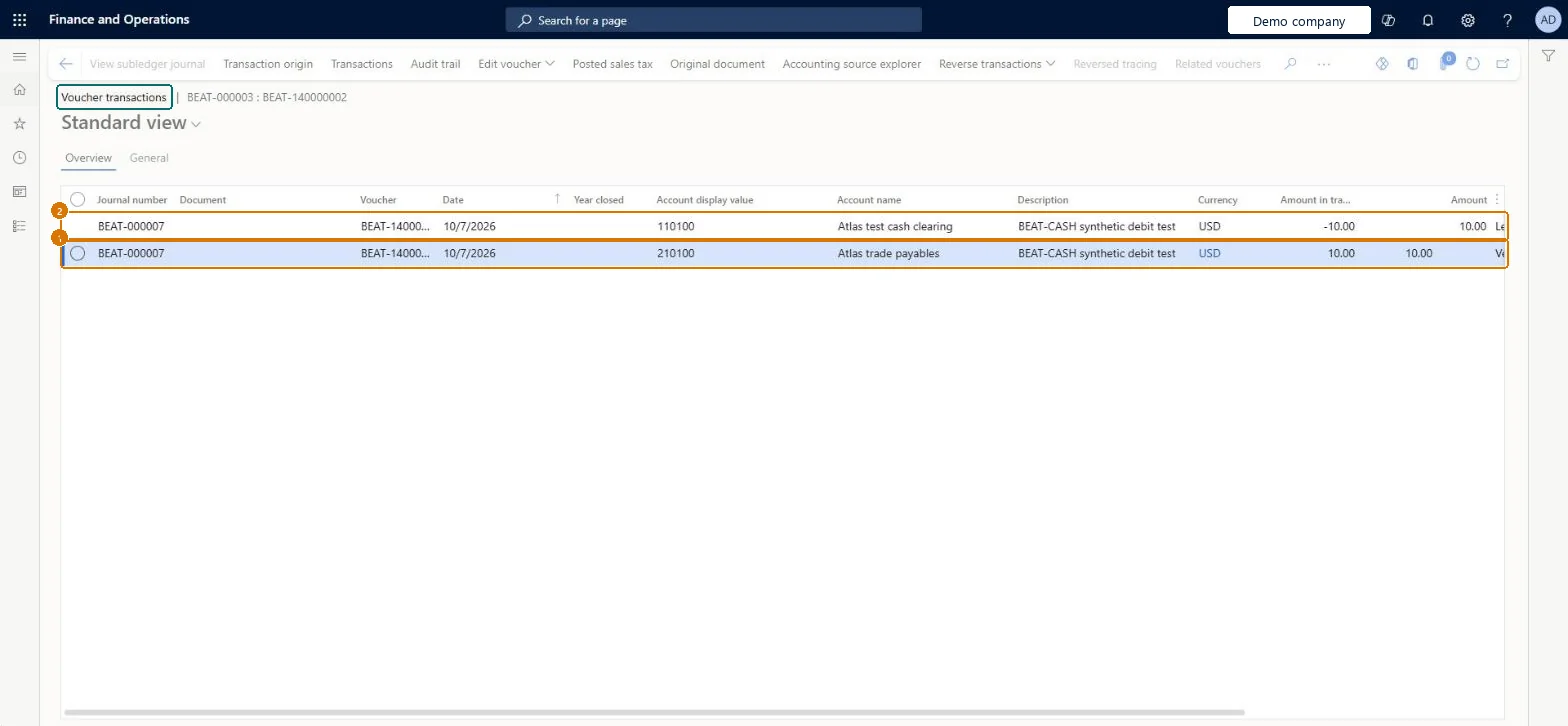
Check Voucher BEAT-140000002 dated 10/7/2026 shows 210100 trade payables 10.00 and 110100 cash clearing -10.00 USD.
Show the full screen
page title tab to open what to set or check Screen 5
Check the credit payment voucher
Go to Accounts payable > Payments > Vendor payment journal, Voucher
- Select the BEAT-140000003 line
- Select Voucher
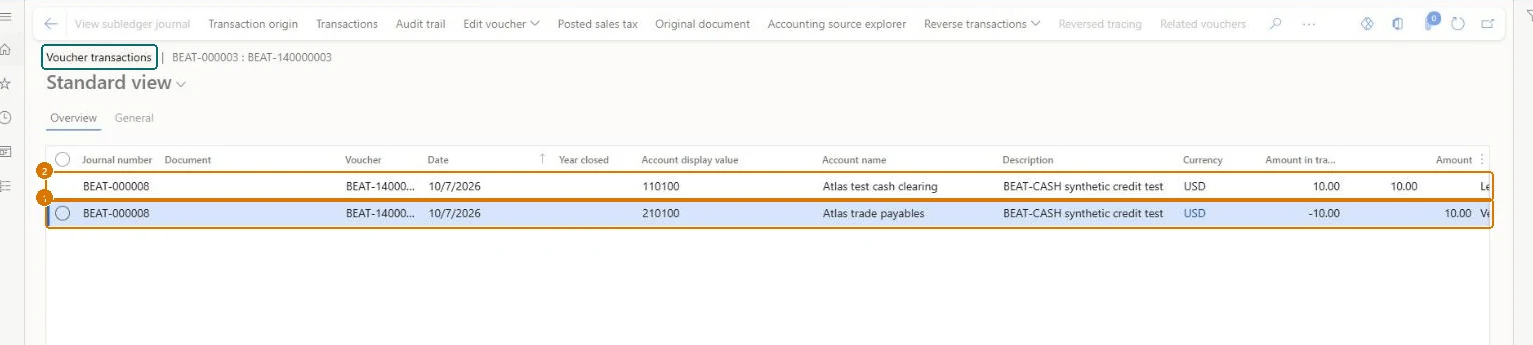
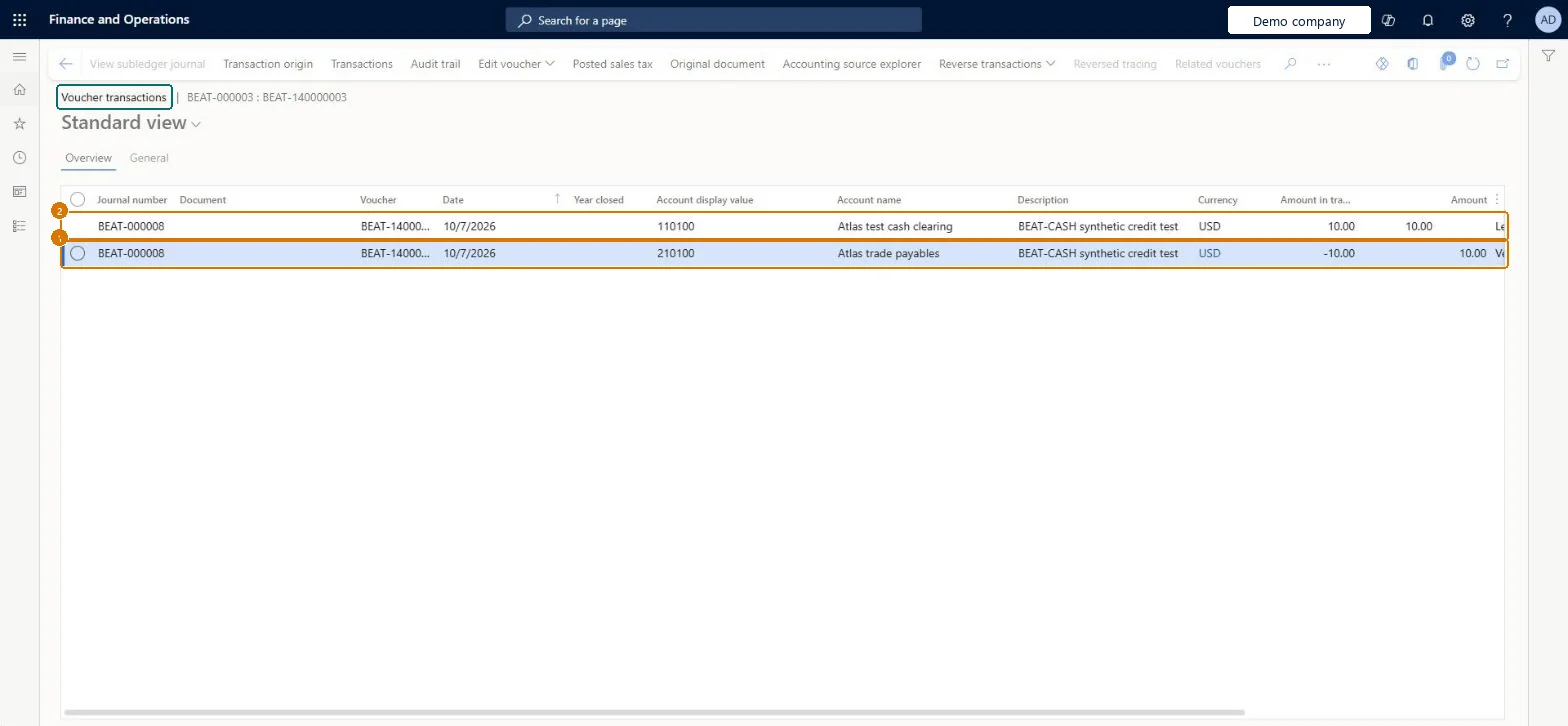
Check Voucher BEAT-140000003 dated 10/7/2026 shows 210100 trade payables -10.00 and 110100 cash clearing 10.00 USD, the exact opposite of BEAT-140000002.
Show the full screen
page title tab to open what to set or check Screen 6
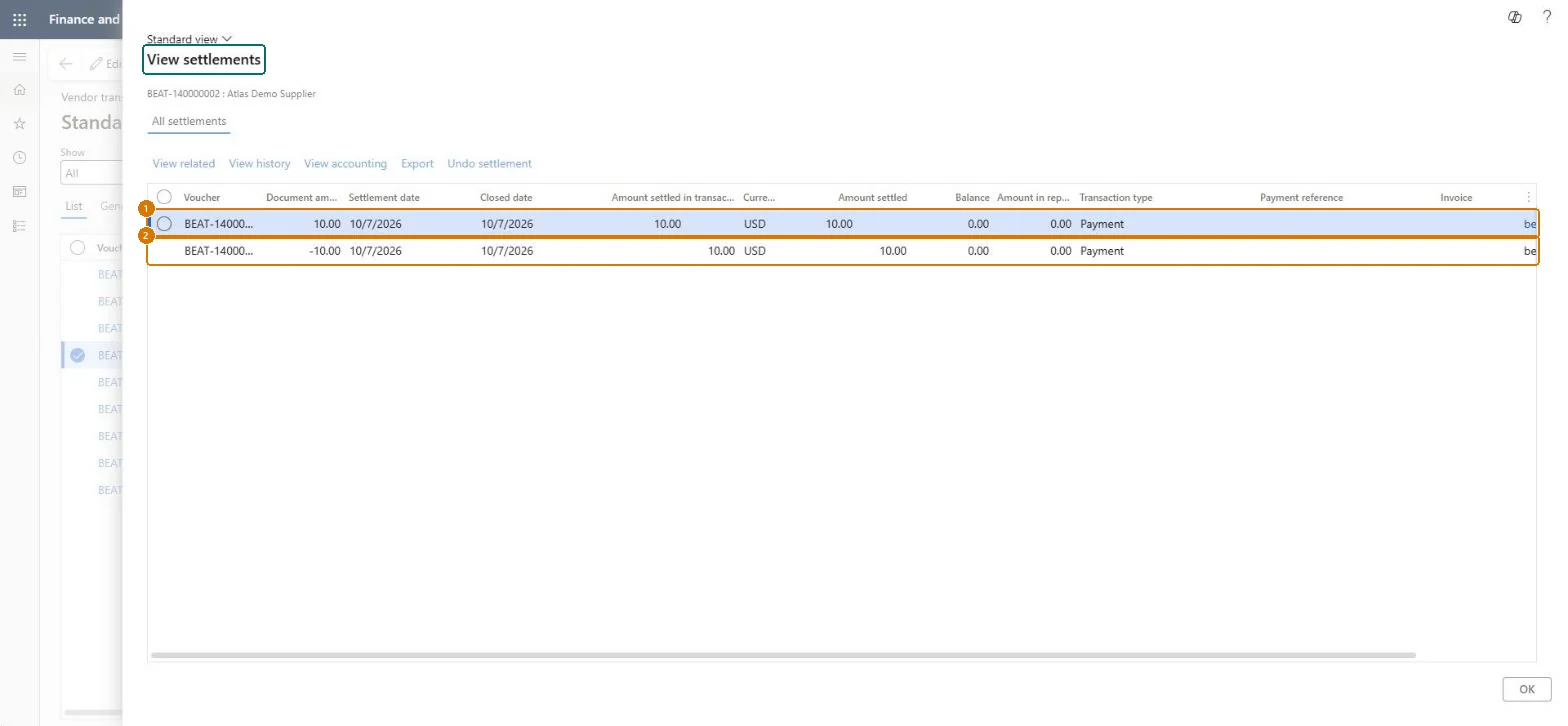
Check that the two payments settled
Go to Accounts payable > Vendors > All vendors > Vendor transactions, View settlements
- Open the vendor transactions for BEAT-000001
- Select payment BEAT-140000002
- Open View settlements
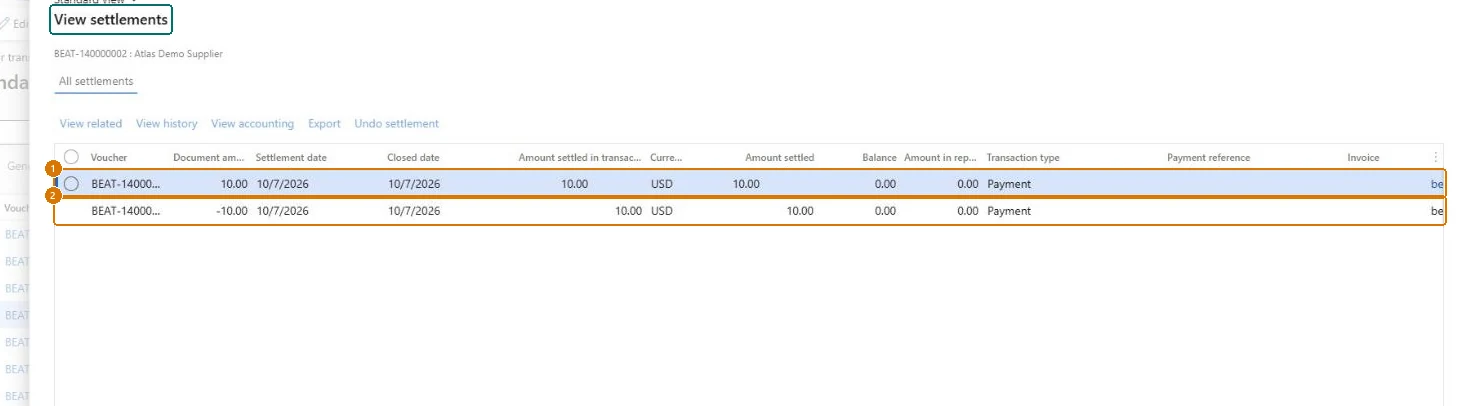
Check BEAT-140000002 (10.00) and BEAT-140000003 (-10.00 USD) are each settled for 10.00 on 10/7/2026, closed on 10/7/2026, with a balance of 0.00.
Show the full screen
page title tab to open what to set or check
Microsoft's steps
—
Field guide
| Field | What it means | Worked example | Table column |
|---|---|---|---|
| Grace period | Extra days after the due date or cash discount date in which a payment can still get the cash discount.Microsoft Learn ↗ | 0 | — |
| Payment type | The kind of payment, such as check, electronic payment or promissory note; electronic payments get extra bank checks.Microsoft Learn ↗ | Other | PaymentType |
| Allow copies of payments | Lets users print non-negotiable copies of payments made with this method.Microsoft Learn ↗ | — | — |
| Export format | The file format used to send payments to the bank.Microsoft Learn ↗ | — | — |
| Return format | The format of the electronic return file from the bank, when the bank supports one.Microsoft Learn ↗ | — | — |
| Remittance format | The format of the remittance sent for the bank.Microsoft Learn ↗ | — | — |
| Generic electronic Return format | Uses electronic reporting formats instead of the separate return, remittance and export formats.Microsoft Learn ↗ | — | UseGERConfigurationForReturn |
| Method of payment | — | BEAT-CASH | — |
| Description | — | Atlas cash test | — |
| Period | — | Invoice | — |
| Payment status | — | None | — |
| Account type | — | Ledger | AccountType |
| Payment account | — | 110100 | PaymentLedgerDimension |
| Bridging posting | — | No | — |
Functional consultant
4Setup decisions
| Setup step | Recommended value and why | Decision · common mistake · test |
|---|---|---|
| Define vendor methods of payment | — | —Assuming a method's posting account also proves its electronic file format and bank approval are correct.Test: AP baseline defaults flow from setup to invoice and payment |
Solution architect
5Design impact
| Shared or per company | Per company: each legal entity has its own records. Microsoft data model ↗ |
|---|---|
| Can it be undone | — |
| Feature or country | — |
| If you change it later | — |
Technical architect
6Technical
| Menu item | VendPaymMode Checked in Dynamics 365 |
|---|---|
| Form | VendPaymMode Checked in Dynamics 365 |
| Table | VendPaymModeTableShown as “Methods of payment - vendors” in Record infoKey field: PaymModeChecked in Dynamics 365 |
| Data entities | VendorPaymentMethodEntityVendor payment method Microsoft data model ↗ |
| Who can open it | PrivilegesMaintain vendor methods of payment VendPaymModeMaintainView vendor methods of payment VendPaymModeViewDutiesMaintain vendor payments PaymVendorPaymentsMaintainInquire into invoice and payment policies VendInvoiceInvoicePaymentPoliciesInquirEnable invoice and payment process VendInvoiceInvoicePaymentProcessEnable5 security rolesAuditorAuditPolicyManagerAccounting manager LedgerAccountingManagerAccounting supervisor LedgerAccountingSupervisorAccounts payable payments clerk PaymAccountsPayablePaymentsClerkAccounts payable manager VendInvoiceAccountsPayableManager |
| Actions on the page | Options: Personalize, Page options, ShareChecked in Dynamics 365 |
Developer
7Developer
| Open it directly | https://<your-environment>/?mi=VendPaymMode |
|---|---|
| Integrate with | VendorPaymentMethodEntity data entity Microsoft data model ↗ |
| Table definition | VendPaymModeTable columns and relations Microsoft data model ↗ |
Everyone
8Sources and checks
- learn.microsoft.com/training/modules/configure-accounts-payable-dyn365-finance/9-method-payment
- learn.microsoft.com/dynamics365/finance/general-ledger/accts-payble-posting
- learn.microsoft.com/common-data-model/schema/core/operationscommon/tables/finance/bank/group/vendpaymmodetable
- learn.microsoft.com/training/modules/configure-accounts-payable-dyn365-finance/9-method-payment
- learn.microsoft.com/dynamics365/finance/accounts-payable/accounts-payable-overview
- learn.microsoft.com/dynamics365/finance/accounts-payable/tasks/define-vendor-payment-fees
- Checked in a working Dynamics 365 system, version 10.0.49: the menu item, form, table and security, the page, the demo records and the values in the screenshots.