SETUP GUIDEHow to set it up8 sections. Choose a role to highlight what matters to you.
Everyone
1What it is and why
What it is
A workspace that shows cash flow forecasts and bank account balances for all companies, in the system currency.
What you do here
Use this workspace to review future cash inflows and outflows and forecasted currency balances across the whole organization.
Example
For example, after the forecast calculation and the entity store refresh, BEAT's chief financial officer sees inflows of 2,400,000.00 and outflows of 1,900,000.00 for the next 30 days across all companies in the system currency, and today's actual balance against the forecast for each bank account.
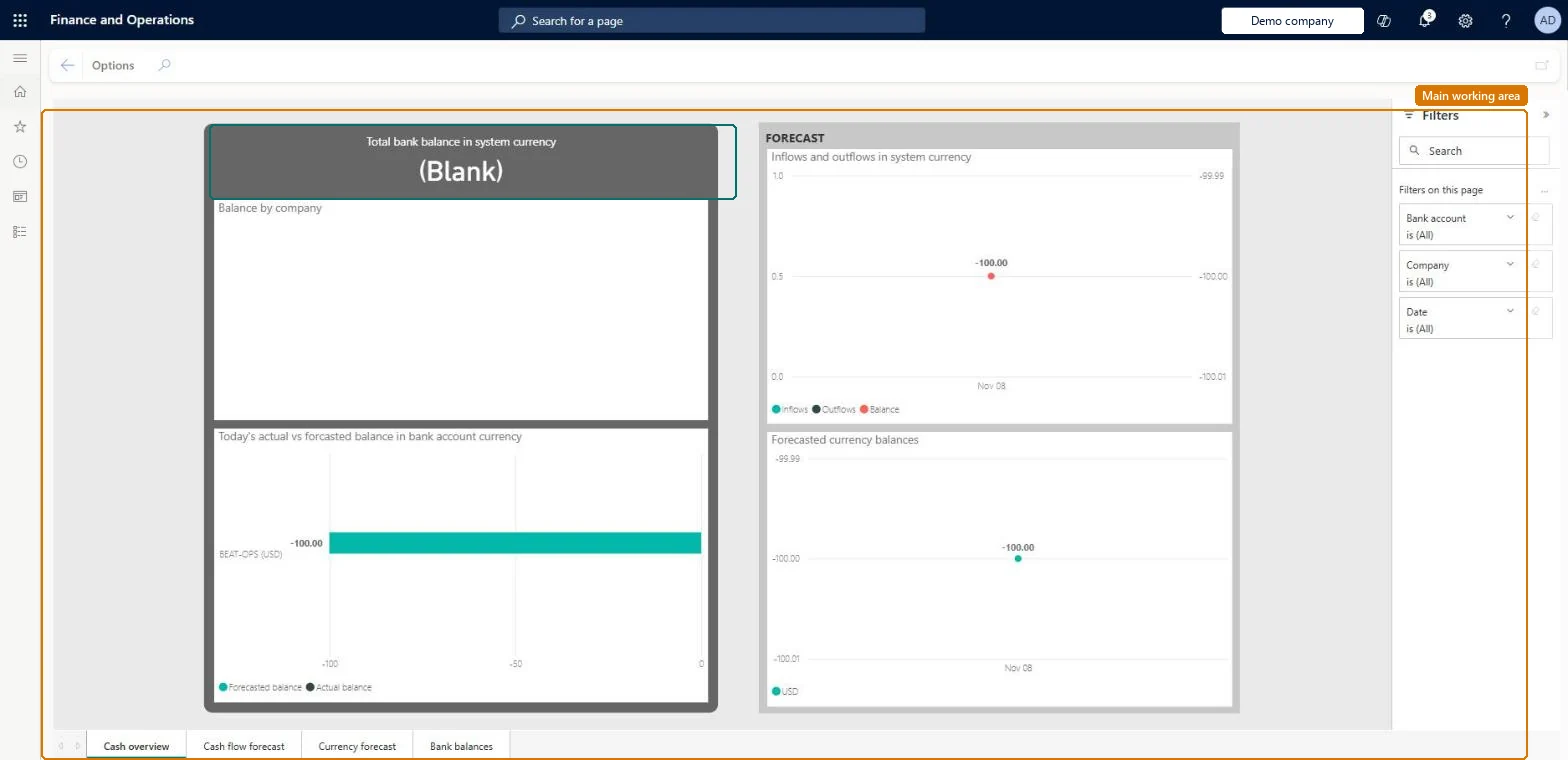
The page in Dynamics 365. page title tab to open what to set or check
About the examples: Examples and screenshots in this guide use BEAT, a demo company in a Dynamics 365 test environment. Use your own company's codes and values instead of copying them.
Setup steps on this page
Use the Cash overview - all companies workspace
Review forecast inflows, outflows and bank balances for all companies in the system currency.
Steps from Microsoft
Set System currency and System exchange rate on System parameters, and Accounting currency and Exchange rate type on the Ledger page.
Define exchange rates between the transaction, accounting, system and bank currencies on Currency exchange rates.
Run Calculate cash flow forecasts for each company included in the forecast, or schedule it with Cash flow forecast automation.
Go to System administration > Setup > Entity store and refresh the LedgerCovLiquidityMeasurementV2 aggregate measurement.
Go to Cash and bank management > Workspaces > Cash overview - all companies and review inflows and outflows, forecasted currency balances and bank balances.
Run the cash flow forecast calculation for each company first, then refresh the LedgerCovLiquidityMeasurementV2 aggregate measurement on the Entity store page. Microsoft Learn
Amounts are converted with the wrong currency or rate
The all-companies view uses the System currency and System exchange rate on System parameters; check both and the exchange rates from the accounting currency to the system currency. Microsoft Learn
Test checklist
Run Calculate cash flow forecasts with method Total for the company.
Refresh LedgerCovLiquidityMeasurementV2 on the Entity store page.
Open the workspace and check that inflows and outflows appear for the next periods.
Compare today's actual bank balance with the balance on the Bank management workspace.
Schedule the forecast calculation with Cash flow forecast automation and refresh LedgerCovLiquidityMeasurementV2 after it, so the workspace is current each morning.The workspace reads the aggregate measurement only; without a fresh calculation and refresh it shows old or no figures.
In this system 3 roles can open this page, among them Chief executive officer, Chief financial officer and Financial controller.
Checked in Dynamics 365
Solution architect
5Design impact
Shared or per company
Across companies: the workspace shows cash flow forecasts and bank balances for all companies in the system currency, set with System currency and System exchange rate on System parameters. Microsoft Learn
Can it be undone
Reversible: The workspace changes no data.
If you change it later
The figures only change after the forecast calculation runs again and the entity store measurement is refreshed. Access is given through the View cash flow all companies workspace duty, by default to the Chief executive officer, Chief financial officer and Financial controller roles. Microsoft Learn
Technical architect
6Technical
Menu item
LedgerCovEnterpriseWorkspaceEmbeddedReportChecked in Dynamics 365
Form
PowerBIReportFormChecked in Dynamics 365
Who can open it
PrivilegesView cash flow all companies workspace LedgerCovEnterpriseWorkspaceViewDutiesView cash flow all companies workspace LedgerCovEnterpriseWorkspaceView3 security rolesChief executive officer CompanyChiefExecutiveOfficerChief financial officer CompanyChiefFinancialOfficerFinancial controller LedgerFinancialControllerChecked in Dynamics 365
Roles to set it up and use it
To use itChief financial officer CompanyChiefFinancialOfficerFinancial controller LedgerFinancialControllerChief executive officer CompanyChiefExecutiveOfficerGive people one of these roles. On this system, 3 roles can open this page.Checked in Dynamics 365
Actions on the page
Options: Page options, Share, Power BIChecked in Dynamics 365
Load order: The Cash overview workspace has no data entity in Data management, so it can't be loaded from a file or a configuration template. It reads the LedgerCovLiquidityMeasurement aggregate measurement, which is rebuilt from the cash flow forecast calculation in each environment.Microsoft Learn
Checked in a working Dynamics 365 system, version 10.0.49: the menu item, form, table and security, the page.
To cite this step: CB-WS-020, Use the Cash overview - all companies workspace. Beyond ERP Atlas Hub, 2026-11-11. https://www.beyonderp.cloud/atlas/step/CB-WS-020