Setup page · General ledger
Currency exchange rates
The page that holds exchange rates for currency pairs under each exchange rate type.
- Used by
- Accountant, Accounting manager, Accounting supervisor and 7 more roles
- Business process
- Develop currency policies
- Menu item
ExchangeRate- Main table
ExchangeRateCurrencyPair- Data entity
ExchangeRateCurrencyPairEntity- Setup steps
- 1 on this page
Show what matters for
Everyone
1What it is and why
| What it is | The page that holds exchange rates for currency pairs under each exchange rate type. |
|---|---|
| What you do here | Used to select an exchange rate type, add currency pairs, and enter the rates that apply for each period. |
| Example | Add a currency pair from a generic pricing currency to each transaction currency so that the pricing engine can convert prices. |
Functional consultant · Solution architect
2Where it fits
| Business process | Define accounting policies › Develop currency policies |
|---|---|
| Menu path | General ledger › Currencies › Currency exchange rates |
| Set up first | Currencies Microsoft Learn ↗Exchange rate types Microsoft Learn ↗ |
| Used next by | Foreign currency revaluation Microsoft Learn ↗Foreign currency revaluation Microsoft Learn ↗ |
| Related pages | Import currency exchange rates Microsoft Learn ↗ |
End user · Functional consultant
3How to do it
Step by step, with screenshots
Set up Currency exchange rates1 screen
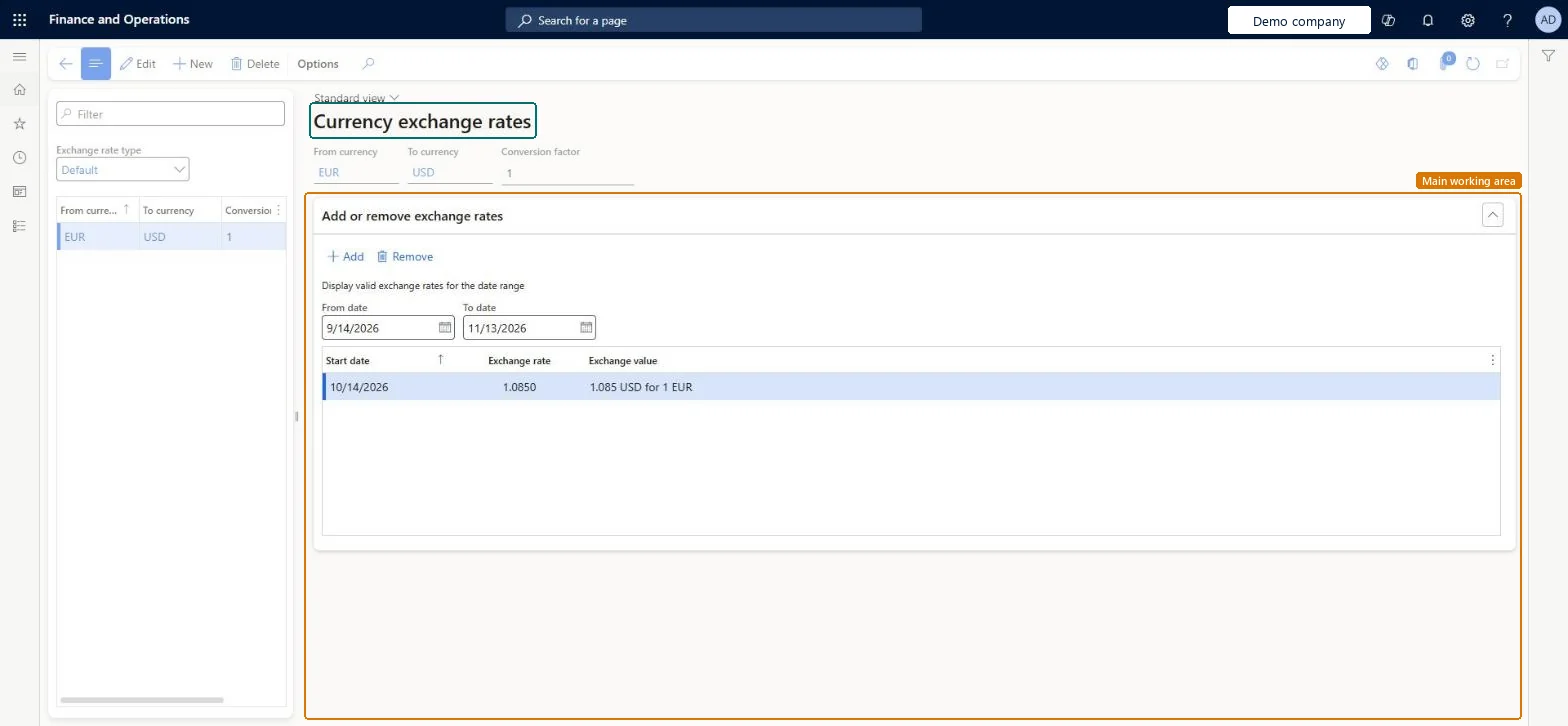
Used to select an exchange rate type, add currency pairs, and enter the rates that apply for each period.
Screen 1
Enter the exchange rate
Go to General ledger > Currencies > Currency exchange rates
- Select the Default exchange rate type
- Select New and enter the from and to currencies
- Under Add or remove exchange rates, select Add and enter the rate for 10/14/2026
1From currency EUR 2To currency USD Exchange rate type Default Exchange rate 1.0850 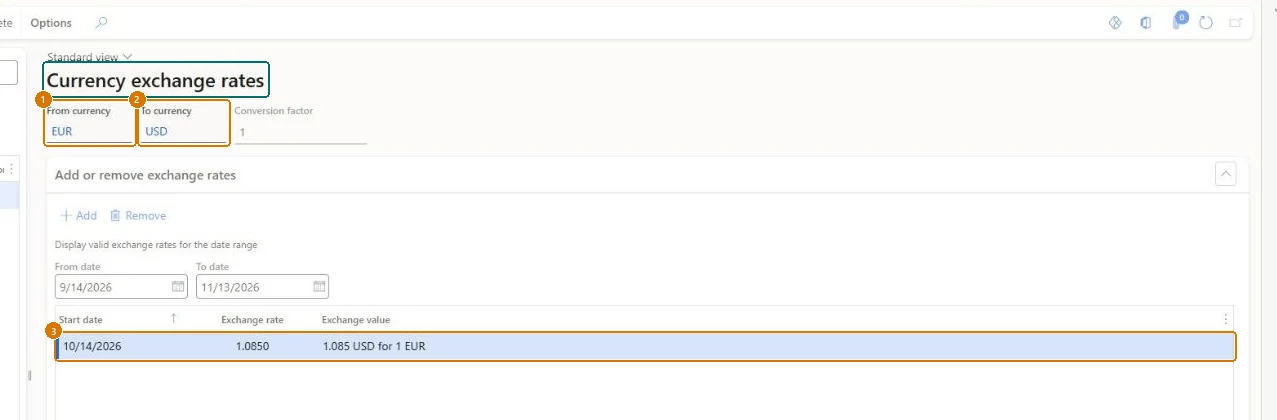
Show the full screen
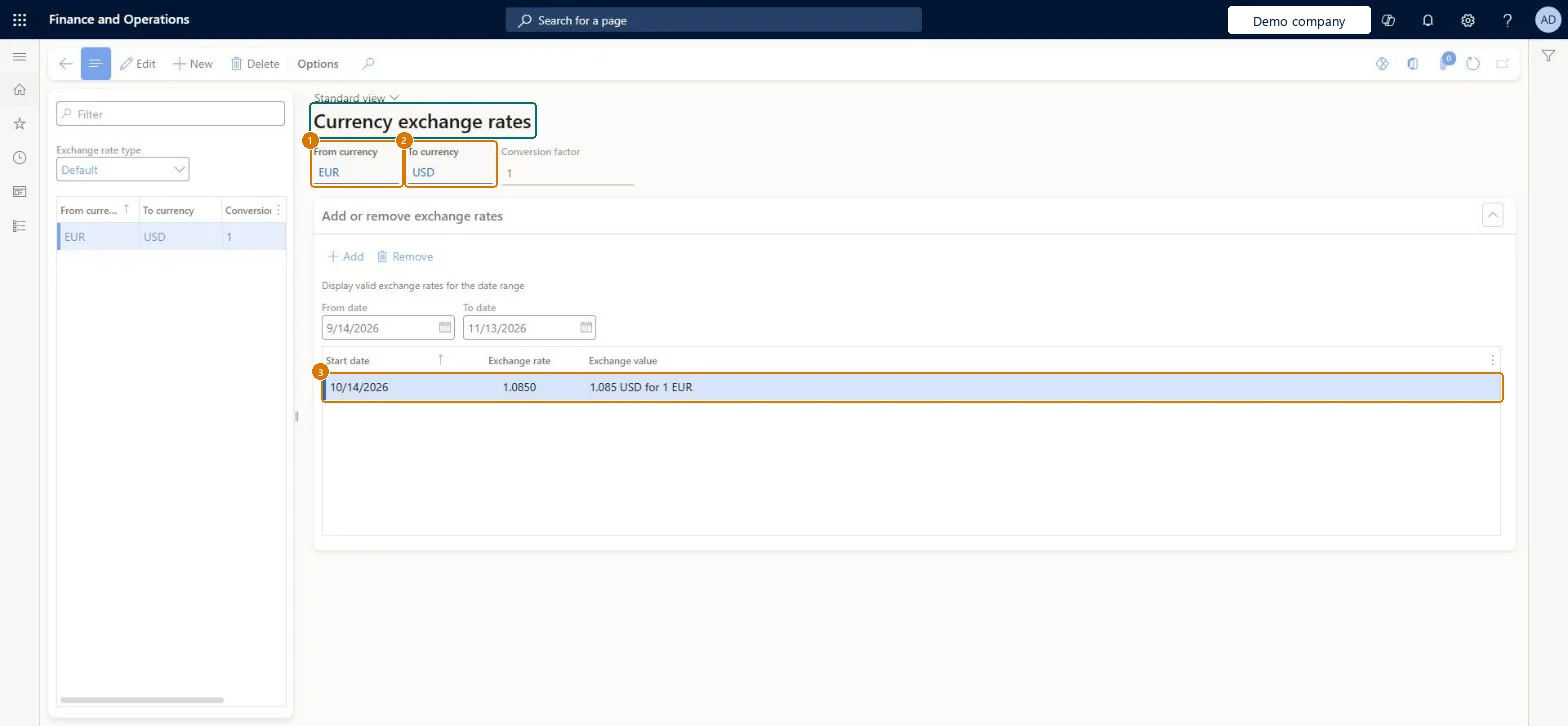
page title tab to open what to set or check
Microsoft's steps
- Go to General ledger > Currencies > Currency exchange rates.
- Select the Exchange rate type.
- Enter a new currency pair, or select the pair to change.
- Add a new line with a Start date and the rate, instead of changing an existing rate.
- In the Conversion factor field, enter how many units of the From currency the rate converts, usually 1 or 100.
Source: Microsoft Learn ↗
Field guide
| Field | What it means | Worked example | Table column |
|---|---|---|---|
| Exchange rate type | The group of rates being maintained, such as buy, sell, spot or budget.Microsoft Learn ↗ | Default | ExchangeRateType |
| Start date | The date a rate starts to apply; each transaction uses the latest rate dated on or before it.Microsoft Learn ↗ | — | — |
| Conversion factor | How many units of the From currency the rate converts to the To currency.Microsoft Learn ↗ | — | — |
| From currency | — | EUR | FromCurrencyCode |
| To currency | — | USD | ToCurrencyCode |
| Exchange rate | — | 1.0850 | — |
Functional consultant
4Setup decisions
| Setup step | Recommended value and why | Decision · common mistake · test |
|---|---|---|
| Set up Currency exchange rates | — | — |
Solution architect
5Design impact
| Shared or per company | Shared: the same records are used by every legal entity. Microsoft data model ↗ |
|---|---|
| Can it be undone | — |
| Feature or country | — |
| If you change it later | A saved rate is used at once for transactions in its date range, in every legal entity. A reverse pair, such as EUR to USD when USD to EUR exists, can't be entered for the same rate type. Microsoft Learn ↗ |
Technical architect
6Technical
| Menu item | ExchangeRate Checked in Dynamics 365 |
|---|---|
| Form | ExchangeRate Checked in Dynamics 365 |
| Table | ExchangeRateCurrencyPairShown as “Exchange rate currency pair” in Record infoChecked in Dynamics 365 |
| Data entities | ExchangeRateCurrencyPairEntityExchange rate currency pair Microsoft data model ↗ |
| Who can open it | PrivilegesMaintain currency exchange rates CurrencyExchangeRatesMaintainexchange rate report -ViewCurrencyCurrentExchangeRates: CurrencyExchangeRatesViewDutiesEnable budget process BudgetBudgetProcessEnableEnable compensation process HcmCompensationProcessEnableEnable general ledger process LedgerGeneralLedgerProcessEnableInquire into general ledger reference data LedgerGeneralLedgerReferenceDataInquireEnable general ledger process RentalLedgerGeneralLedgerProcessEnable10 security rolesBudget managerBudgetBudgetManagerChief financial officer CompanyChiefFinancialOfficerCompensation and benefits manager HcmCompensationAndBenefitsManagerAccountant LedgerAccountantAccounting manager LedgerAccountingManagerAccounting supervisor LedgerAccountingSupervisorFinancial controller LedgerFinancialControllerRental manager RentalManagerRental purchasing manager RentalPurchasingManagerRental sales manager RentalSalesManager |
| Actions on the page | — |
Developer
7Developer
| Open it directly | https://<your-environment>/?mi=ExchangeRate |
|---|---|
| Integrate with | ExchangeRateCurrencyPairEntity data entity Microsoft data model ↗ |
| Table definition | ExchangeRateCurrencyPair columns and relations Microsoft data model ↗ |
Everyone
8Sources and checks
- learn.microsoft.com/dynamics365/supply-chain/unified-pricing-management/upm-generic-base-currency
- learn.microsoft.com/training/modules/configure-currencies-dyn365-finance/3-currency-exchange-rate
- learn.microsoft.com/common-data-model/schema/core/operationscommon/tables/common/currency/group/exchangeratecurrencypair
- learn.microsoft.com/training/modules/configure-periodic-processes-dyn365-finance/04-run-foreign-currency-revaluation
- Checked in a working Dynamics 365 system, version 10.0.49: the menu item, form, table and security, the page, the demo records and the values in the screenshots.