Workspace page · Cash and bank management
Bank management
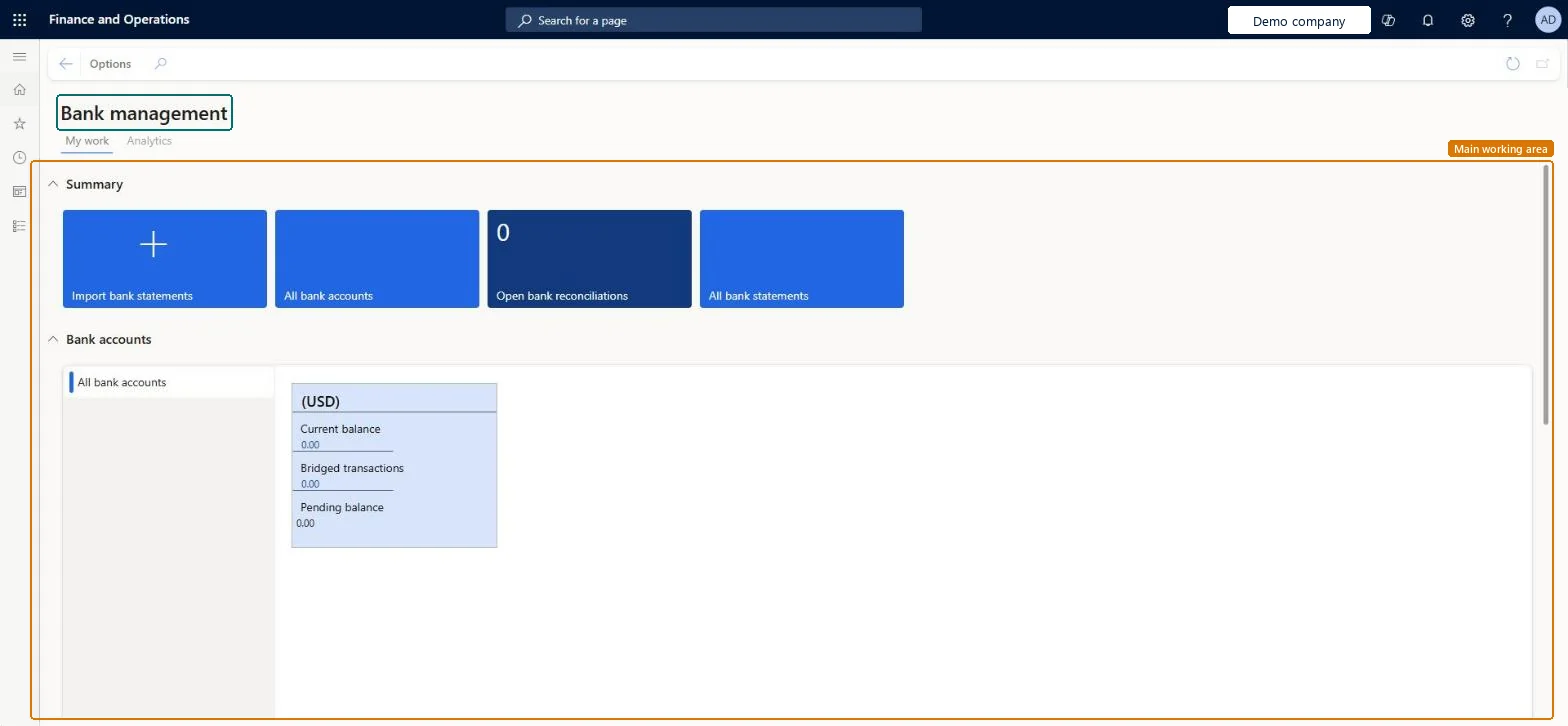
A workspace that shows information about the company's bank accounts, with a Summary view and an Analytics page.
- Used by
- Chief financial officer, Treasurer
- Business process
- —
- Menu item
BankTreasurerWorkspace- Main table
- —
- Data entity
- —
- Setup steps
- —
Show what matters for
Everyone
1What it is and why
| What it is | A workspace that shows information about the company's bank accounts, with a Summary view and an Analytics page. |
|---|---|
| What you do here | Used to see bank balances, bridged amounts and reconciliation status at a glance, import electronic bank files, and open the bank pages used most often. |
| Example | — |
Functional consultant · Solution architect
2Where it fits
| Business process | — |
|---|---|
| Menu path | Cash and bank management › Workspaces › Bank management |
| Set up first | Bank accounts Microsoft Learn ↗ |
| Used next by | — |
| Related pages | Bank transactions Microsoft Learn ↗Bridged transactions Microsoft Learn ↗Cash overview - all companies Microsoft Learn ↗Bank account transfers Microsoft Learn ↗ |
End user · Functional consultant
3How to do it
Microsoft's steps
- Go to Cash and bank management > Workspaces > Bank management.
- In the Balance section, in the Select bank account field, select All bank accounts.
- Select the Refresh icon next to the Last update field to refresh the chart.
- Select the All bank accounts tile to open the bank accounts list.
- Select Related information > Bank Transactions to see the posted transactions.
- In the Related information section, select Bridged transactions to see pending bridged payments.
- Select Bank account transfers to review posted transfer journals.
Source: Microsoft Learn ↗
Field guide
| Field | What it means | Worked example | Table column |
|---|---|---|---|
| Bridged transactions | Payments posted through bridging that haven't cleared the bank yet.Microsoft Learn ↗ | — | — |
| Pending balance | The current balance minus the bridged, or pending, transactions.Microsoft Learn ↗ | — | — |
| Balance | A chart of historic balances, in the bank account currency for one account or the accounting currency for all accounts.Microsoft Learn ↗ | — | — |
Functional consultant
4Setup decisions
| Setup step | Recommended value and why | Decision · common mistake · test |
|---|---|---|
| — No setup is made on this page. | ||
Solution architect
5Design impact
| Shared or per company | — |
|---|---|
| Can it be undone | — |
| Feature or country | — |
| If you change it later | — |
Technical architect
6Technical
| Menu item | BankTreasurerWorkspace Checked in Dynamics 365 |
|---|---|
| Form | BankTreasurerWorkspace Checked in Dynamics 365 |
| Table | — |
| Data entities | — |
| Who can open it | PrivilegesView manage bank accounts workspace BankTreasurerWorkspaceViewDutiesView manage bank accounts workspace BankTreasurerWorkspaceView2 security rolesChief financial officerCompanyChiefFinancialOfficerTreasurer PaymTreasurer |
| Actions on the page | Options: Personalize, Page options, ShareChecked in Dynamics 365 |
Developer
7Developer
| Open it directly | https://<your-environment>/?mi=BankTreasurerWorkspace |
|---|---|
| Integrate with | — |
| Table definition | — |
Everyone
8Sources and checks
- learn.microsoft.com/dynamics365/finance/cash-bank-management/bank-management-workspace
- learn.microsoft.com/training/modules/work-cash-bank-dyn365-dyn365-finance/5-exercise-2
- Checked in a working Dynamics 365 system, version 10.0.49: the menu item, form, table and security, the page.