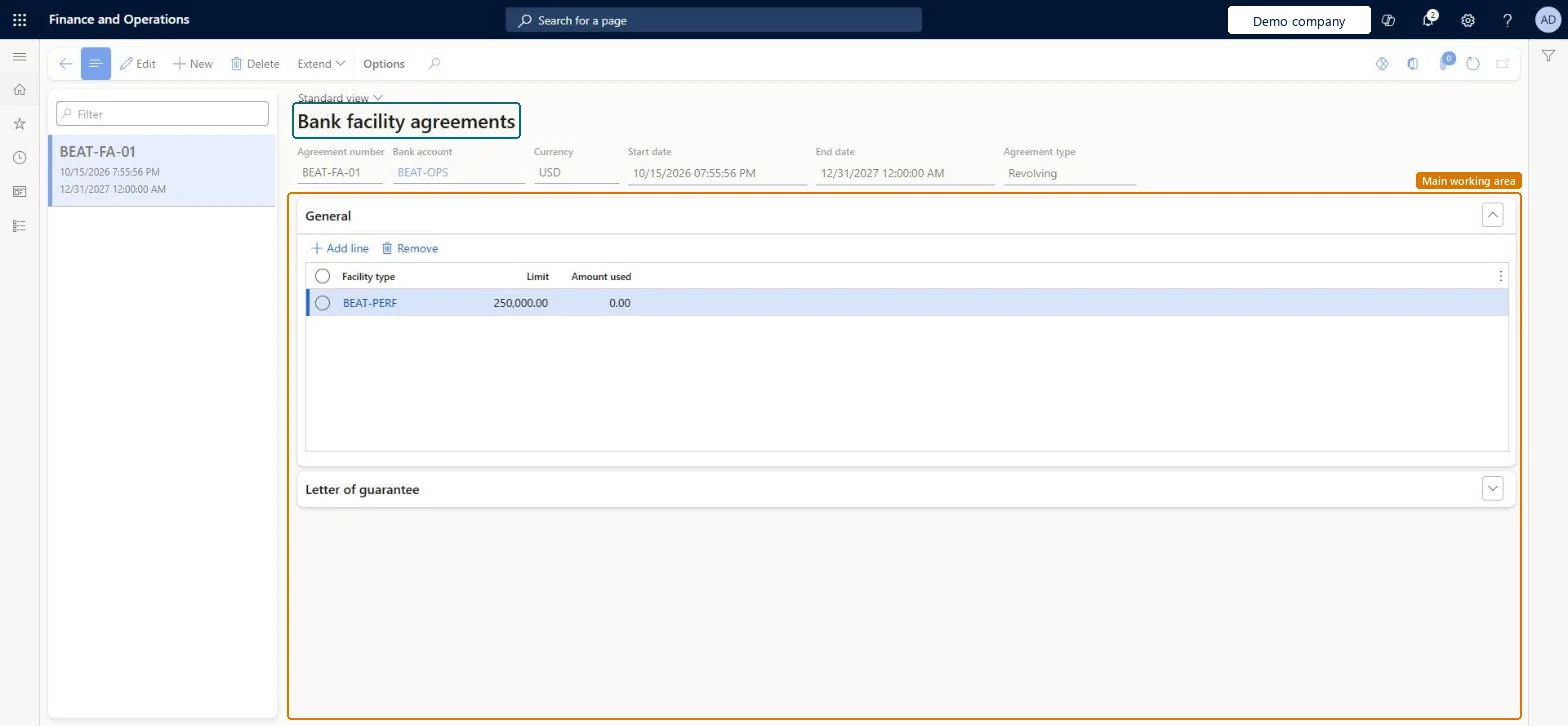
About the examples: Examples and screenshots in this guide use BEAT, a demo company in a Dynamics 365 test environment. Use your own company's codes and values instead of copying them.
Setup steps on this page
Set up bank facility agreements for letters of credit
Use this page to record the bank's letter of credit facility, with a limit per facility type, so confirmed letters of credit draw on it.
Steps from Microsoft
Go to Cash and bank management > Letters of credit > Bank facility agreements.
Select New.
In the Agreement number field, enter the number from the bank agreement.
In the Bank account field, enter the account at the issuing bank.
Enter the Start date and End date.
In the General section, select Add line, select the Facility type and enter the Limit.
Select Save.
To extend, select Extend, enter the New agreement number and End date, and select Extend.
The last date the agreement can be used; extend it with Extend, which records a new agreement number and end date.Microsoft Learn
12/31/2027 12:00:00 AM
ValidTo
Facility type / Limit
One line per facility type with the facility amount negotiated with the issuing bank.Microsoft Learn
PERFBOND / 250,000.00
Common errors and fixes
Message
What to do
The facility type can't be selected on the agreement line
Create the facility type with the right facility nature on Cash and bank management > Setup > Bank facilities. Microsoft Learn
The facility balance doesn't drop when the purchase order is confirmed
Confirm the letter of credit itself (Manage > Letter of credit / import collection > Process > Confirm); the facility balance follows the confirmed letter of credit. Microsoft Learn
Test checklist
Check that Enable import letter of credit and Enable export letter of credit are set to Yes in Cash and bank management parameters.
Check that the facility type exists on Bank facilities and has a bank documents posting profile.
Create an agreement with the issuing bank account, start and end dates, and a facility type line with the negotiated Limit.
Select Extend with a new agreement number and end date, and check the new agreement is created.
One agreement per agreement number with the issuing bank, on the company's account at that bank, with a line per facility type holding the negotiated limit.Learn creates the agreement after bank facilities and posting profiles, and shows each confirmed import letter of credit reducing the facility balance.
Reversible: Limits can be changed; a longer term is handled with Extend (new agreement number and end date).
If you change it later
The limit lines cap what confirmed import letters of credit on this bank account can use; each confirmation and amendment changes the facility balance. Changes to the limit apply from then on. Microsoft Learn
Technical architect
6Technical
Menu item
BankDocumentFacilityAgreementChecked in Dynamics 365
Form
BankDocumentFacilityAgreementChecked in Dynamics 365
Table
BankDocumentFacilityAgreementShown as “Bank facility agreements” in Record infoKey field: AgreementNumberChecked in Dynamics 365
Data entities
BankDocumentFacilityAgreementEntityBank facility agreements (The agreement and its lines; the same entity holds letter of guarantee agreements.) Microsoft data model
Who can open it
PrivilegesMaintain bank document facility agreements BankDocumentFacilityAgreementMaintainView bank document facility agreements BankDocumentFacilityAgreementViewDutiesInquire into bank accounts master BankBankAccountsInquireMaintain bank accounts master BankBankAccountsMaintain9 security rolesChief financial officer CompanyChiefFinancialOfficerAccounts receivable manager CustInvoiceAccountsReceivableManagerPayroll administrator HcmPayrollAdministratorAccountant LedgerAccountantAccounting manager LedgerAccountingManagerAccounting supervisor LedgerAccountingSupervisorFinancial controller LedgerFinancialControllerTreasurer PaymTreasurerAccounts payable manager VendInvoiceAccountsPayableManagerChecked in Dynamics 365
Roles to set it up and use it
To set it up or change itTreasurer PaymTreasurerTo use itChief financial officer CompanyChiefFinancialOfficerAccounting manager LedgerAccountingManagerFinancial controller LedgerFinancialControllerAccountant LedgerAccountantAccounting supervisor LedgerAccountingSupervisorGive people one of these roles. On this system, 9 roles can open this page.Checked in Dynamics 365
Actions on the page
Options: Personalize, Page options, ShareChecked in Dynamics 365
Checked in a working Dynamics 365 system, version 10.0.49: the menu item, form, table and security, the page.
To cite this step: CB-LC-030, Set up bank facility agreements for letters of credit. Beyond ERP Atlas Hub, 2026-11-11. https://www.beyonderp.cloud/atlas/step/CB-LC-030