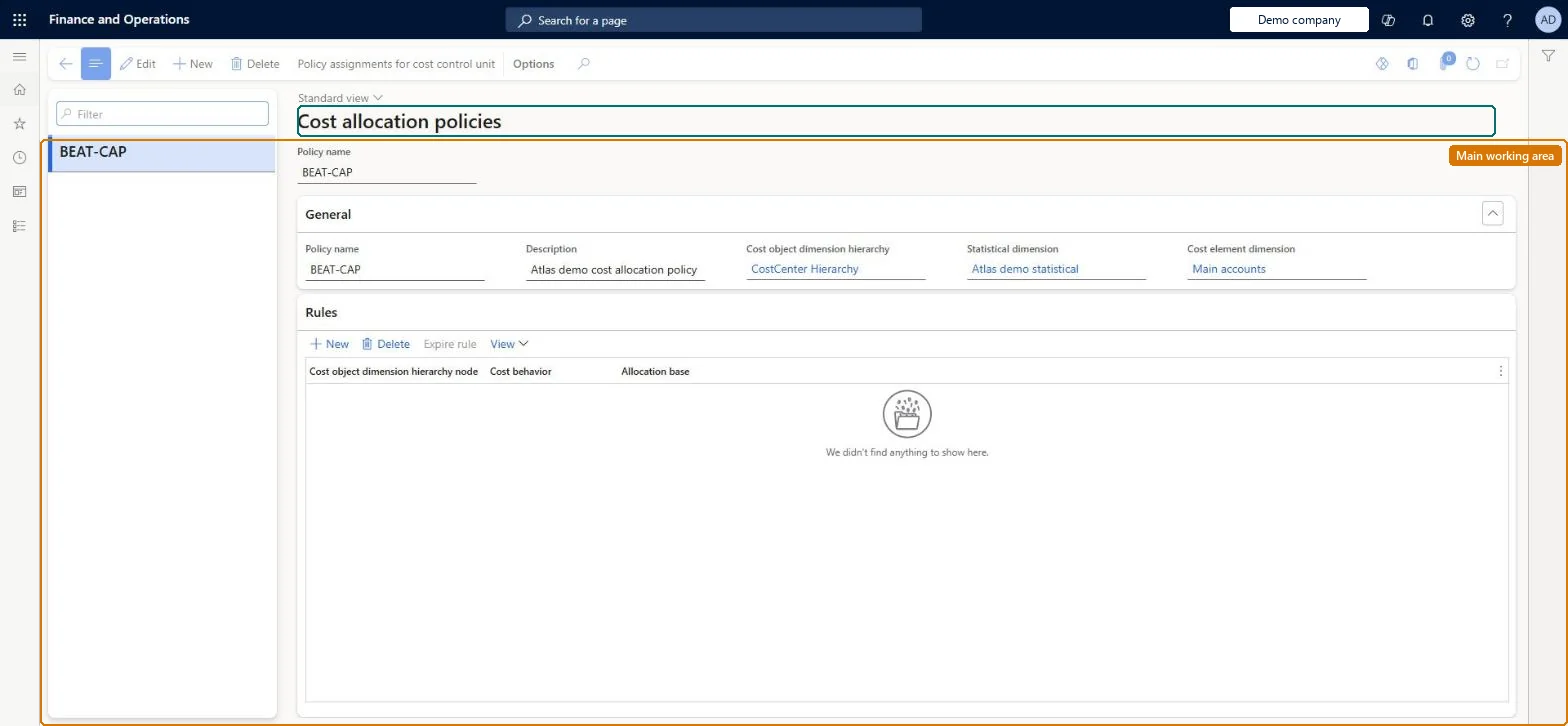
Setup step on the Cost allocation policies page · Cost accounting
Set up Cost allocation policies
Use this page to define, per cost object node and cost behavior, which allocation base moves the total, fixed or variable balance of an auxiliary cost object to the cost objects it serves. The system handles reciprocal services between cost objects and determines the allocation order itself; the rules run in step 4 of the overhead calculation.
SETUP GUIDEHow to set it up8 sections. Choose a role to highlight what matters to you.
Everyone
1What it is and why
What it is
A setup page where you create cost allocation policies and rules that allocate the balance of a cost object (for example a service cost center) to other cost objects using an allocation base, and assign the policy to a cost control unit.
What you do here
Use this page to define, per cost object node and cost behavior, which allocation base moves the total, fixed or variable balance of an auxiliary cost object to the cost objects it serves. The system handles reciprocal services between cost objects and determines the allocation order itself; the rules run in step 4 of the overhead calculation.
Example
For example, the HR cost center's balance is allocated to Finance, Assembly and Packaging in the ratio 35:55:10 of the HR services they consumed, and Finance's balance (including what it received from HR) is then allocated onward.
The page in Dynamics 365. page title tab to open what to set or check
About the examples: Examples and screenshots in this guide use BEAT, a demo company in a Dynamics 365 test environment. Use your own company's codes and values instead of copying them.
Setup steps on this page
Set up Cost allocation policies
Use this page to define, per cost object node and cost behavior, which allocation base moves the total, fixed or variable balance of an auxiliary cost object to the cost objects it serves. The system handles reciprocal services between cost objects and determines the allocation order itself; the rules run in step 4 of the overhead calculation.
Steps from Microsoft
Go to Cost accounting > Policies > Cost allocation policies.
Select New and type a Policy name.
Select the Cost object dimension hierarchy (for example Organization) and the Statistical dimension, then select Save.
Select New in the rules list and pick the Cost object dimension hierarchy node whose balance is allocated.
In the Cost behavior field select Total (or Fixed cost / Variable cost) and select the Allocation base; repeat until all rules are created.
Select Policy assignments for cost control unit, then select New.
Enter the Valid from accounting date and select the Cost control unit.
The cost object hierarchy whose nodes the rules refer to, for example Organization.Microsoft Learn
CostAllocationPolicyCostObjectDimensionHierarchy
Statistical dimension
The statistical dimension whose members may serve as allocation bases.Microsoft Learn
CostAllocationStatisticalDimension
Cost element dimension
The cost element dimension the policy applies to.Microsoft Learn
CostAllocationCostElementDimension
Cost object dimension hierarchy node
In a rule, the cost object whose balance is allocated away.Microsoft Learn
Cost behavior
In a rule, whether the Total balance or only the fixed or variable part is allocated.Microsoft Learn
Allocation base
In a rule, the single allocation base that sets the ratio to the receiving cost objects.Microsoft Learn
Valid from accounting date / Cost control unit
On the policy assignment, the date from which the policy applies and the cost control unit it applies to.Microsoft Learn
Common errors and fixes
Message
What to do
A changed policy doesn't change the figures in the Cost control workspace
Policies take effect when you run the overhead calculation again. Run it for the period and point the report at the new calculation version. Microsoft Learn
A validation message says a dimension member is missing from a classification hierarchy
Add the member to a node of the hierarchy. A classification hierarchy must hold every member of its dimension. Microsoft Learn
Test checklist
Create a policy with the Organization cost object hierarchy and the statistical dimension.
Add rules with Cost behavior Total: CC001 with allocation base HR services, and CC002 with Finance services.
Assign the policy to the cost control unit with a Valid from accounting date.
Run the overhead calculation and open the Cost allocation journal.
Check that CC001 and CC002 end with zero balances and that the receiving cost objects are charged in proportion to the service magnitudes.
One rule per service cost center node with Cost behavior Total and a statistical service measure as the allocation base (for example HR services for CC001)Cost allocation moves the balance of a cost object to others by one allocation base. The system uses the reciprocal method and works out the allocation order itself, so you don't sequence the rules.
Cost accounting has four roles: Cost accounting manager (Activity licence), Cost accountant and Cost accountant clerk (Operations licence), and Cost object controller (Team members licence). Cost accountants and cost accounting managers maintain policies. No Feature management feature needs to be turned on for this page.
Shared: Cost accounting setup isn't kept per legal entity. It is the same from every company, and one cost accounting ledger can collect data from several legal entities. Checked in Dynamics 365
Can it be undone
Reversible: Rules are date-effective, and a user or the system can expire them when a newer version is created. The change takes effect when you rerun the overhead calculation.
If you change it later
Rules are date-effective and can be expired by a user or by the system when a newer version is created; a changed policy takes effect only when the overhead calculation is rerun, and the separate rollup policy is unaffected. Microsoft Learn
Technical architect
6Technical
Menu item
CAMCostAllocationRuleChecked in Dynamics 365
Form
CAMCostAllocationRuleChecked in Dynamics 365
Table
CAMDataCostAllocationPolicyShown as “COST BEHAVIOR POLICIES” in Record infoChecked in Dynamics 365
Who can open it
3 security roles. Select a role to see its duties and privileges.
To set it up or change itMaintain cost accounting policies CAMCostAccountingPoliciesMaintainMaintain cost accounting rules CAMCostAccountingRulesMaintainTo use itInquire into cost accounting policies CAMCostAccountingPoliciesInquireGive people a role that holds these duties. On this system, 3 roles give access to this page.Checked in Dynamics 365
Actions on the page
(Action Pane without tabs): Policy assignments for cost control unitChecked in Dynamics 365
Load order: A cost allocation policy has no data entity in Data management, so it can't be loaded from a file or a configuration template. Re-create the policy and its rules by hand in each environment after the hierarchies and allocation bases exist, and assign it to the cost control unit.Microsoft Learn
Checked in a working Dynamics 365 system, version 10.0.49: the menu item, form, table and security, the page.
To cite this step: CA-POLICY-040, Set up Cost allocation policies. Beyond ERP Atlas Hub, 2026-11-11. https://www.beyonderp.cloud/atlas/step/CA-POLICY-040