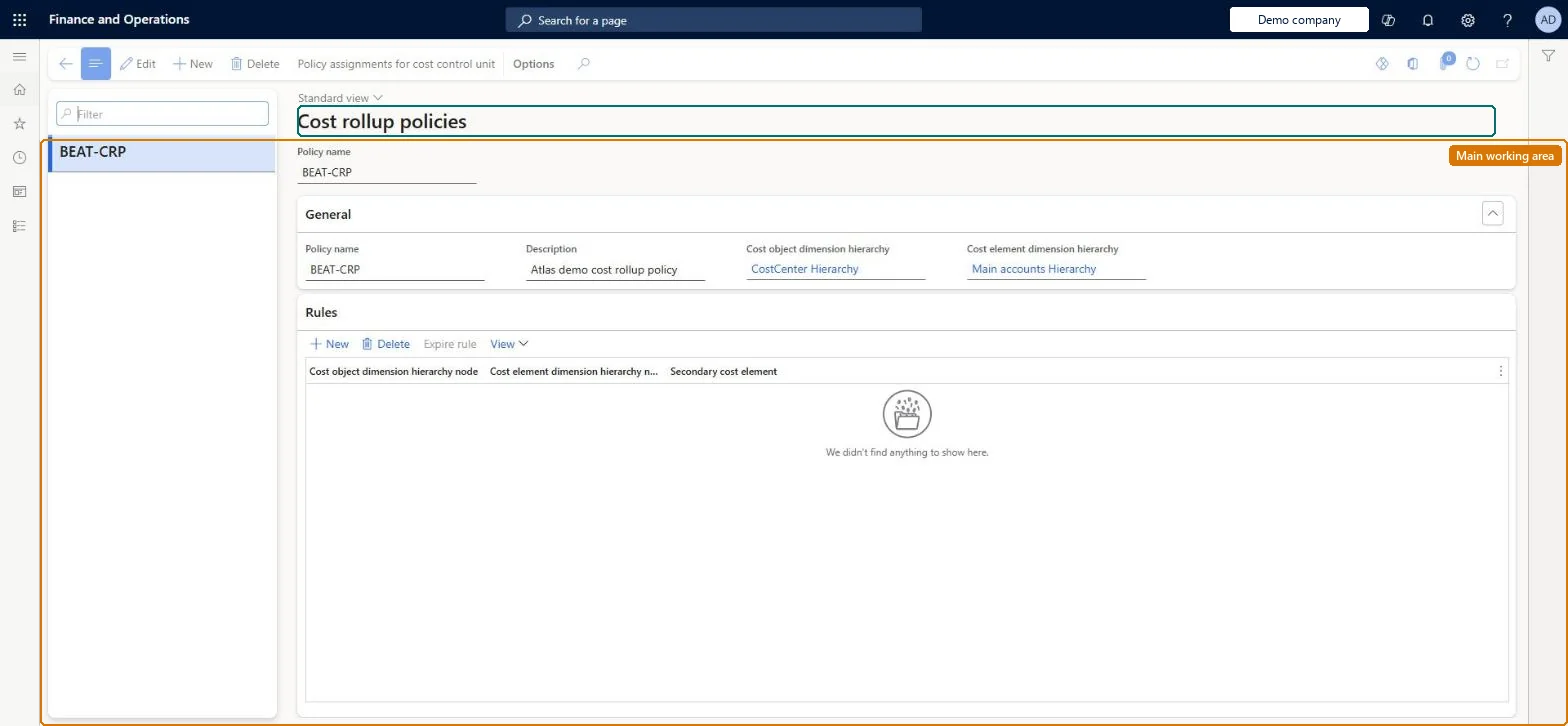
A setup page where you create cost rollup policies and rules that map each cost object (such as a cost center) and cost element node to a secondary cost element, so that allocated balances are transferred under that secondary element instead of the original primary cost elements.
PAGE GUIDEWhat the page does and how to use it8 sections. Choose a role to highlight what matters to you.
Everyone
1What it is and why
What it is
A setup page where you create cost rollup policies and rules that map each cost object (such as a cost center) and cost element node to a secondary cost element, so that allocated balances are transferred under that secondary element instead of the original primary cost elements.
What you do here
Use this page to decide at which level costs are aggregated before allocation, so that the primary cost per cost object is preserved for reporting and the flow of cost between cost objects can be traced. Without a rollup policy, every primary cost element is allocated separately and auxiliary cost objects end with zero balances.
Example
For example, you create secondary cost elements SC-CC001 to SC-CC004 and map each cost center to its own secondary element, so the HR cost center's 10,100.00 is passed to Finance, Assembly and Packaging as cost element SC-CC001.
The page in Dynamics 365. page title tab to open what to set or check
About the examples: Examples and screenshots in this guide use BEAT, a demo company in a Dynamics 365 test environment. Use your own company's codes and values instead of copying them.
Setup steps on this page
Set up Cost rollup policies
Use this page to decide at which level costs are aggregated before allocation, so that the primary cost per cost object is preserved for reporting and the flow of cost between cost objects can be traced. Without a rollup policy, every primary cost element is allocated separately and auxiliary cost objects end with zero balances.
Steps from Microsoft
Go to Cost accounting > Policies > Cost rollup policies.
Select New, type a Policy name and a Description.
Select the Cost object dimension hierarchy and the Cost element dimension hierarchy, then select Save.
Select New in the rules list and pick the Cost object dimension hierarchy node (for example a cost center).
Select the Cost element dimension hierarchy node and the Secondary cost element to map the cost center to.
Repeat until all cost centers are mapped to their secondary cost elements.
The cost object hierarchy whose nodes the rules refer to.Microsoft Learn
CostRollupPolicyCostObjectDimensionHierarchy
Cost element dimension hierarchy
The cost element hierarchy whose nodes the rules refer to.Microsoft Learn
CostRollupPolicyCostElementDimensionHierarchy
Cost object dimension hierarchy node
In a rule, the cost object (for example cost center 007) whose balance is rolled up.Microsoft Learn
Cost element dimension hierarchy node
In a rule, the cost element node whose primary costs are aggregated.Microsoft Learn
Secondary cost element
In a rule, the secondary cost element that carries the aggregated balance during allocation.Microsoft Learn
Common errors and fixes
Message
What to do
A changed policy doesn't change the figures in the Cost control workspace
Policies take effect when you run the overhead calculation again. Run it for the period and point the report at the new calculation version. Microsoft Learn
A validation message says a dimension member is missing from a classification hierarchy
Add the member to a node of the hierarchy. A classification hierarchy must hold every member of its dimension. Microsoft Learn
Test checklist
Create secondary cost elements SC-CC001 to SC-CC004 and add them to a Secondary cost node in the Profit & Loss statement hierarchy.
Create a rollup policy with the Organization and Profit & Loss statement hierarchies, and map each cost center node to its secondary cost element.
Run the overhead calculation with the cost allocation policy assigned.
Open the Cost object balance journal entries and check that each cost center's balance appears under its secondary cost element.
In the Excel or Cost control report, check that the primary cost stays on each cost center and that the secondary cost lines net to zero in total.
One secondary cost element per auxiliary cost center (for example SC-CC001 for HR), mapped to that cost center in the rollup rulesWith a rollup policy and secondary cost elements, each cost object keeps its primary cost for reporting, and you can trace how cost flows between cost centers. Without one, auxiliary cost objects end at zero for every primary cost element and the flow can't be traced.
Cost accounting has four roles: Cost accounting manager (Activity licence), Cost accountant and Cost accountant clerk (Operations licence), and Cost object controller (Team members licence). Cost accountants and cost accounting managers maintain policies. No Feature management feature needs to be turned on for this page.
Shared: Cost accounting setup isn't kept per legal entity. It is the same from every company, and one cost accounting ledger can collect data from several legal entities. Checked in Dynamics 365
Can it be undone
Reversible: Learn states that you can change the configuration if reporting requirements change. Rollup rules change only how allocated balances are labelled and traced, not the allocation, and the change appears in the next overhead calculation. Microsoft Learn
If you change it later
Rollup rules change only how allocated balances are labelled and traced, not the allocation amounts, and they can be revised independently of the allocation policies when reporting needs change. Microsoft Learn
Technical architect
6Technical
Menu item
CAMCostRollupRuleChecked in Dynamics 365
Form
CAMCostRollupRuleChecked in Dynamics 365
Table
CAMDataCostRollupPolicyShown as “COST ROLLUP POLICIES” in Record infoChecked in Dynamics 365
Who can open it
3 security roles. Select a role to see its duties and privileges.
To set it up or change itMaintain cost accounting policies CAMCostAccountingPoliciesMaintainMaintain cost accounting rules CAMCostAccountingRulesMaintainTo use itInquire into cost accounting policies CAMCostAccountingPoliciesInquireGive people a role that holds these duties. On this system, 3 roles give access to this page.Checked in Dynamics 365
Actions on the page
(Action Pane without tabs): Policy assignments for cost control unitChecked in Dynamics 365
Developer
7Developer
Open it by URL
https://<your-environment>/?mi=CAMCostRollupRule
Data migration
Load order: A cost rollup policy has no data entity in Data management, so it can't be loaded from a file or a configuration template. Re-create the policy and its rules by hand in each environment after the hierarchies and allocation bases exist, and assign it to the cost control unit.Microsoft Learn