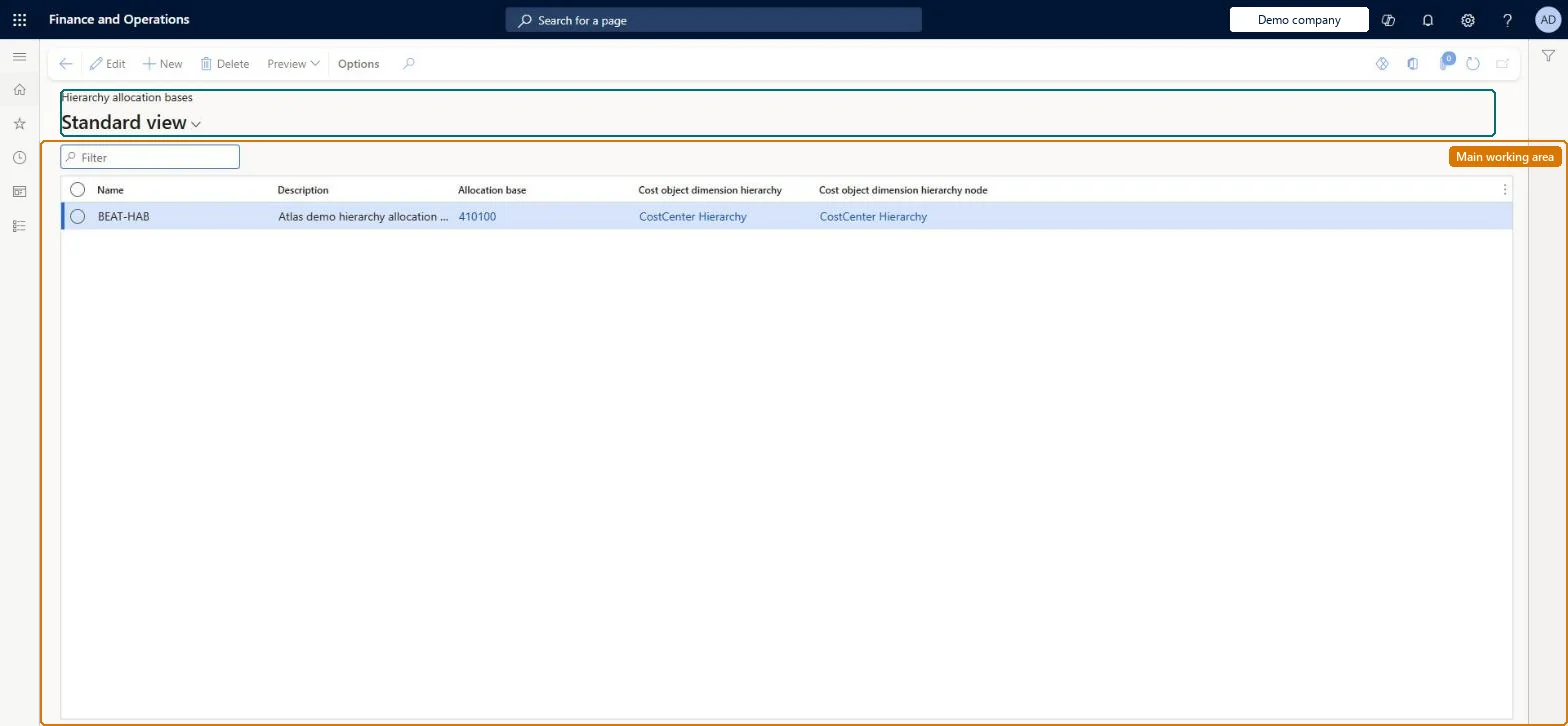
A setup page where you create an allocation base by limiting an existing allocation base to the cost objects under one node of a cost object dimension hierarchy.
PAGE GUIDEWhat the page does and how to use it8 sections. Choose a role to highlight what matters to you.
Everyone
1What it is and why
What it is
A setup page where you create an allocation base by limiting an existing allocation base to the cost objects under one node of a cost object dimension hierarchy.
What you do here
Use this page to narrow a predefined allocation base, such as full-time employees, to a part of the organisation so that a cost is spread only among the cost objects in that branch. One predefined base can serve several hierarchy bases, and Preview shows the resulting magnitudes.
Example
For example, a cost must be distributed only between the cost centers that report to the CFO, so you create the hierarchy allocation base Number of FTEs in CFO from the FTE's base and the CFO node of the Organization hierarchy.
The page in Dynamics 365. page title tab to open what to set or check
About the examples: Examples and screenshots in this guide use BEAT, a demo company in a Dynamics 365 test environment. Use your own company's codes and values instead of copying them.
Setup steps on this page
Set up Hierarchy allocation bases
Use this page to narrow a predefined allocation base, such as full-time employees, to a part of the organisation so that a cost is spread only among the cost objects in that branch. One predefined base can serve several hierarchy bases, and Preview shows the resulting magnitudes.
Steps from Microsoft
Go to Cost accounting > Allocation bases > Hierarchy allocation bases.
Select New and enter a Name.
In the Allocation base field, select the existing allocation base to restrict (for example FTE's).
Select the Cost object dimension hierarchy and the Cost object dimension hierarchy node that defines the range.
Select Save.
Select Preview to check the magnitude per cost object.
The name of the hierarchy allocation base, for example Number of FTEs in CFO.Microsoft Learn
Name
Allocation base
The existing (predefined) allocation base whose range is limited.Microsoft Learn
Name
Cost object dimension hierarchy
The cost object hierarchy used to define the range.Microsoft Learn
Name
Cost object dimension hierarchy node
The node whose cost objects are kept in the base; all others are excluded.Microsoft Learn
NodeName
Common errors and fixes
Message
What to do
A cost is spread to cost objects outside the intended branch
Check the hierarchy node on the base and the member ranges under it in Dimension hierarchies. Microsoft Learn
A changed policy doesn't change the figures in the Cost control workspace
Policies take effect when you run the overhead calculation again. Run it for the period and point the report at the new calculation version. Microsoft Learn
Test checklist
Create a hierarchy base named Number of FTEs in CFO with allocation base FTE's, cost object hierarchy Organization, and node CFO.
Select Preview and check that only the cost centers under CFO appear, with their FTE magnitudes.
Use the base in a cost distribution rule and run the overhead calculation.
Check that the cost is split only among the CFO cost centers, in proportion to their FTEs.
One predefined base (for example FTE's) reused in several hierarchy bases, one for each cost object hierarchy node that shares a cost (for example 'Number of FTEs in CFO')A hierarchy base limits an existing base to the cost objects under one node. You can create several hierarchy bases from one predefined base, and the member ranges are maintained in the linked cost object hierarchy.
Cost accounting has four roles: Cost accounting manager (Activity licence), Cost accountant and Cost accountant clerk (Operations licence), and Cost object controller (Team members licence). Cost accountants and cost accounting managers maintain allocation bases. No Feature management feature needs to be turned on for this page.
Shared: Cost accounting setup isn't kept per legal entity. It is the same from every company, and one cost accounting ledger can collect data from several legal entities. Checked in Dynamics 365
Can it be undone
Reversible: Change the allocation base, hierarchy or node at any time. Changes made through the cost object hierarchy take effect immediately because hierarchies aren't date-effective. Microsoft Learn
If you change it later
The base follows the member ranges maintained in the linked cost object hierarchy, so editing that hierarchy or this base changes every rule that uses it; rerun the overhead calculation afterwards. Microsoft Learn
Technical architect
6Technical
Menu item
CAMHierarchyAllocationBaseChecked in Dynamics 365
Form
CAMHierarchyAllocationBaseChecked in Dynamics 365
Table
CAMDataHierarchyAllocationBaseShown as “HIERARCHY ALLOCATION BASES” in Record infoKey field: AllocationBase_Name, DimensionHierarchy_Name, DimensionHierarchyNode_NodeName, DimensionHierarchyNode_DimensionHierarchy_Name, DimensionHierarchyNode_ParentDimensionHierarchyNode_NodeName, DimensionHierarchyNode_ParentDimensionHierarchyNode_DimensionHierarchy_NameChecked in Dynamics 365
Who can open it
2 security roles. Select a role to see its duties and privileges.
RoleCost accountantCAMCostAccountant
DutyInquire into allocation basesCAMAllocationBasesInquire
To set it up or change itMaintain allocation bases CAMAllocationBasesMaintainTo use itInquire into allocation bases CAMAllocationBasesInquireGive people a role that holds these duties. On this system, 2 roles give access to this page.Checked in Dynamics 365
Actions on the page
(Action Pane without tabs): PreviewChecked in Dynamics 365
Load order: A hierarchy allocation base has no data entity in Data management, so it can't be loaded from a file or a configuration template. Re-create it by hand in each environment after the hierarchy and the predefined base exist.Microsoft Learn