SETUP GUIDEHow to set it up8 sections. Choose a role to highlight what matters to you.
Everyone
1What it is and why
What it is
A page that lists the purchase orders the customer has sent to the vendor that are still waiting for the vendor's response, and opens each one as a Received purchase order.
What you do here
Use this page to open purchase orders sent to you and accept them, reject them, or accept them with changes.
Example
For example, the vendor opens BEAT's purchase order BEAT-000061 version 1, selects Accept with changes, moves line 1 to a receipt date one week later with Update receipt date, and suggests a price change in a note, because prices and charges can't be changed in the response.
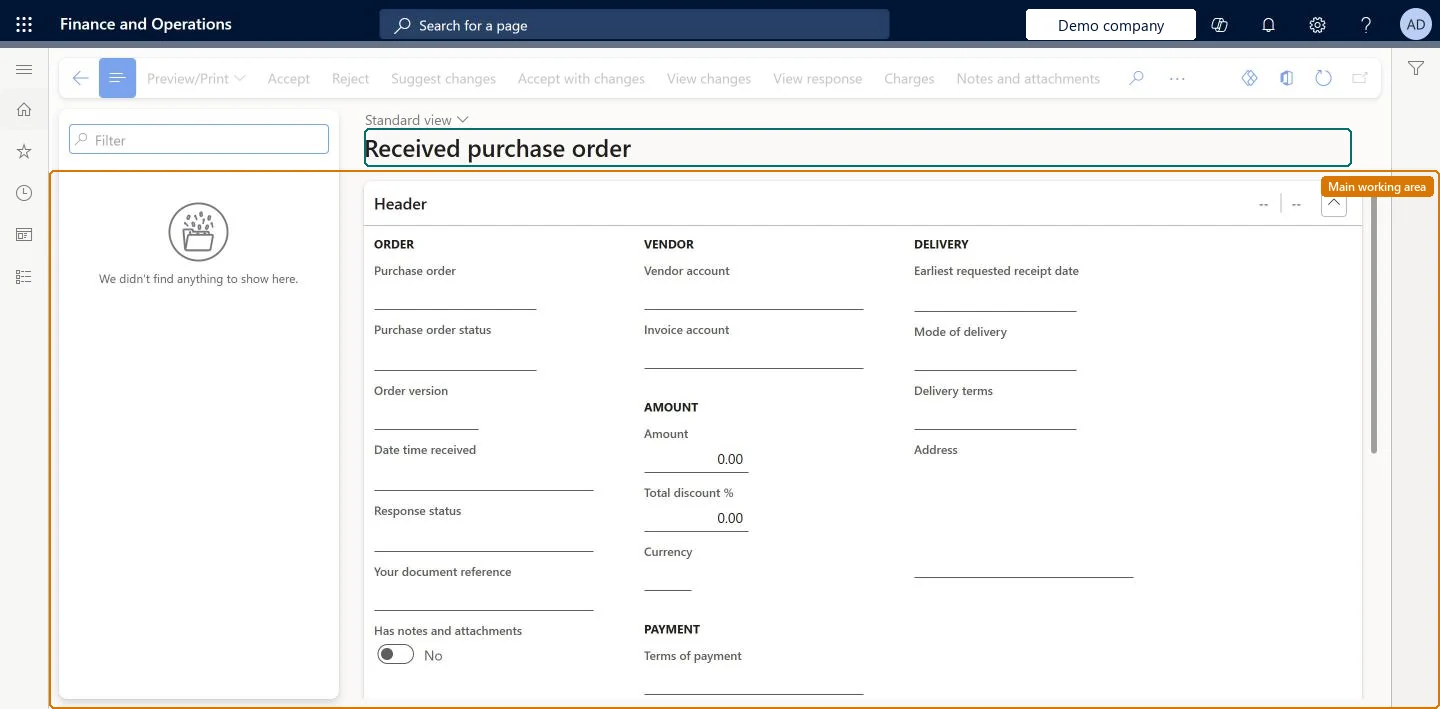
The page in Dynamics 365. page title tab to open what to set or check
About the examples: Examples and screenshots in this guide use BEAT, a demo company in a Dynamics 365 test environment. Use your own company's codes and values instead of copying them.
Setup steps on this page
Respond to a purchase order sent for review
Accept, reject or accept with changes a purchase order the customer sent.
Steps from Microsoft
Go to Vendor collaboration > Purchase orders > Purchase orders for review.
Open the purchase order.
Select accept, reject, or Accept with changes.
For Accept with changes, accept or reject individual lines, change dates or quantities, split lines, or substitute an item.
Use Update receipt date on the header to update the confirmed receipt date on all lines.
Add notes or attachments to the header or lines if needed.
Header option that updates the confirmed receipt date on all lines.Microsoft Learn
Move all lines to 11/20/2026.
External
Line detail field where the vendor enters the item number of a substitute item.Microsoft Learn
BEAT-ITEM-002 as a substitute for a discontinued item.
ExternalItemId
Display dimensions
Action that shows or hides site, warehouse, color, size, style and configuration columns.Microsoft Learn
Show Site and Warehouse.
Preview/Print
Action that previews and prints the purchase order as a PDF file.Microsoft Learn
Print BEAT-000061 as a PDF file.
Order version
The version of the purchase order the vendor is answering; a new version from the customer has a version suffix.Microsoft Learn
BEAT-000061, version 2
Response status
The vendor's answer recorded for this version: Accepted, Rejected or Accepted with changes.Microsoft Learn
Accepted with changes
Your document reference
The vendor's own reference for the order; the vendor can change it in a response.Microsoft Learn
SO-88231
Mode of delivery / Delivery terms
Header values the vendor can change in an Accept with changes response.Microsoft Learn
Common errors and fixes
Message
What to do
The vendor can't change the price on a line
Prices and charges can't be changed in a response. Suggest the change in a note; the buyer updates the purchase order and sends a new version. Microsoft Learn
An attachment on the purchase order isn't visible to the vendor
Only attachments of the External type are visible to the vendor. Change the attachment type and send the order again. Microsoft Learn
Test checklist
In the customer company, send an Approved purchase order with Send for confirmation and check its status is In external review.
As the vendor user, open it here, select Accept with changes, change one line's quantity and split another, and send the response.
In the customer company, open Purchase orders sent for vendor collaboration, response requires action and check the line statuses Accepted with changes and Split into schedule.
Select Process PO update and check that the quantity changed on the purchase order while the split is marked Manual update.
Use Accept with changes for date, quantity, split or substitute changes, and notes for price or charge changesOnly header updates and date and quantity changes on lines can be applied to the purchase order automatically with Process PO update; splits, substitutes and prices must be changed by the buyer.
Microsoft provides two external roles for vendor collaboration: Vendor admin (external), for contacts and user requests, and Vendor (external), for purchase orders, invoices, consignment inventory, RFQs and vendor information. External users created through a user request also get the SystemExternalUser role. On the live system, Vendor contact (external) can open this page.
The page lists the orders of the vendor accounts the signed-in contact works for, from every customer legal entity where the contact has Vendor collaboration access allowed set to Yes. Microsoft Learn
Can it be undone
Hard to reverse: A sent response can't be withdrawn; the customer sends a new version.
If you change it later
Price and charge information cannot be changed in the response; the vendor can only suggest such changes in notes, and the customer processes the suggested changes on its side. Microsoft Learn
Technical architect
6Technical
Menu item
PurchVendorPortalOrdersForReviewChecked in Dynamics 365
Form
PurchVendorPortalOriginalOrderChecked in Dynamics 365
Data entities
PurchaseOrderResponseHeaderEntityPurchase order response headers (the vendor's response headers; the purchase orders themselves are the customer's) Microsoft data model PurchaseOrderResponseLineEntityPurchase order response lines (the response lines)
Roles to set it up and use it
To use itVendor contact (external) VendVendorContactGive people one of these roles. On this system, 1 role can open this page.Checked in Dynamics 365
Actions on the page
(Action Pane without tabs): Preview/Print, Accept, Reject, Suggest changes, Accept with changes, View changes, View response, Charges, Notes and attachmentsChecked in Dynamics 365
PurchaseOrderResponseHeaderEntity (Purchase order response headers): loaded for each company.PurchaseOrderResponseLineEntity (Purchase order response lines): loaded for each company.Load order: Responses are created by vendors answering orders, so they are usually not migrated. Migrate open purchase orders in the customer company and send them for confirmation again.Load first: purchase ordersChecked in Dynamics 365
Checked in a working Dynamics 365 system, version 10.0.49: the menu item, form, table and security, the page.
To cite this step: VC-PO-010, Respond to a purchase order sent for review. Beyond ERP Atlas Hub, 2026-11-11. https://www.beyonderp.cloud/atlas/step/VC-PO-010