Accounts payable clerk, Accounts payable manager, Purchasing agent and 15 more roles
Business process
Procure goods and services
Menu item
PurchTableListPage
Main table
PurchTable
Data entity
PurchPurchaseOrderHeaderV2Entity
Show what matters for
PAGE GUIDEWhat the page does and how to use it7 sections. Choose a role to highlight what matters to you.
Everyone
1What it is and why
What it is
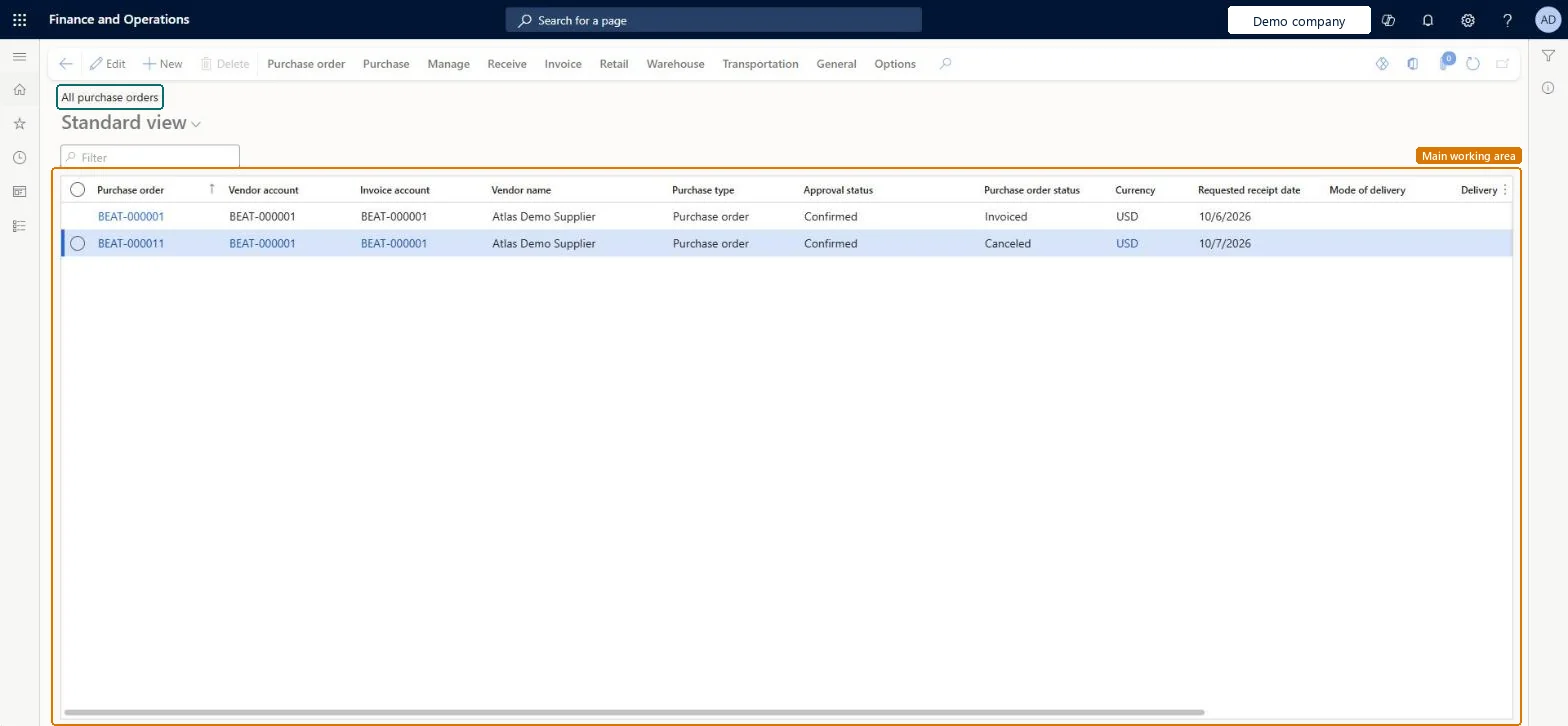
View the available purchase orders. Each purchase order records an agreement with a vendor to buy goods or services.
What you do here
Use this page to view and modify purchase orders, switching between a Header view (vendor details and other information that applies to the whole order) and a Lines view (order lines).
The page in Dynamics 365. page title tab to open what to set or check
About the examples: Examples and screenshots in this guide use BEAT, a demo company in a Dynamics 365 test environment. Use your own company's codes and values instead of copying them.
Steps from Microsoft
Go to Procurement and sourcing > Purchase orders > All purchase orders.
Select New.
In the Vendor account field, select the vendor, then select OK.
In the Item number field, select the item to buy.
Enter the quantity and check the unit price on the line.
Expand the Line details FastTab and, on the Setup tab, change the Matching policy if needed.
On the Action Pane, select Purchase, then select Confirm.
PrivilegesMaintain purchase order details PurchTableDetailsMaintainView purchase order details PurchTableDetailsViewManage vendor orders tab VendProfileVendorOrdersMaintainDutiesCash flow position details drill down CashflowPositionDetailsDrillDownInvoiceCaptureMaintainMaintain service receipts kanban execution KanbanExecutionServiceReceiptsMaintainMaintain kanban purchase orders schedule KanbanSchedulePurchaseOrdersMaintainApprove purchase order PurchOrderApproveMaintain purchase orders PurchOrderMaintainInquire into purchase order to invoice progress PurchOrderToInvoiceProgressInquireApprove rental purchase order RentalPurchOrderApproveMaintain rental purchase orders RentalPurchOrderMaintain18 security rolesInvoice capture operator InvoiceCaptureOperatorLanded cost agent ITMAgentAccountant LedgerAccountantTreasurer PaymTreasurerProduction supervisor ProdProductionSupervisorProject assistant ProjProjectClerkProject manager ProjProjectManagerRental coordinator agent RentalCoordinatorAgentRental manager RentalManagerRental purchasing manager RentalPurchasingManagerRetail service RetailServiceRetail store manager RetailStoreManagerBuying agent TradeBuyingAgentPurchasing manager TradePurchasingManagerAccounts payable clerk VendInvoiceAccountsPayableClerkAccounts payable manager VendInvoiceAccountsPayableManagerPurchasing agent VendPurchasingAgentPurchasing Agent - Public Sector VendPurchasingAgent_PSNChecked in Dynamics 365
Roles to set it up and use it
To set it up or change itPurchasing agent VendPurchasingAgentPurchasing Agent - Public Sector VendPurchasingAgent_PSNRental manager RentalManagerRental coordinator agent RentalCoordinatorAgentBuying agent TradeBuyingAgentTo use itPurchasing manager TradePurchasingManagerAccounts payable manager VendInvoiceAccountsPayableManagerProject manager ProjProjectManagerAccountant LedgerAccountantAccounts payable clerk VendInvoiceAccountsPayableClerkGive people one of these roles. On this system, 18 roles can open this page.Checked in Dynamics 365