Retail and CommerceHeadquarters setupCommerce scheduler
RetailConnSchedulerJobTable
Used by
Retail operations manager, Retail service, Information technology manager
Business process
Manage sales channels
Menu item
RetailConnSchedulerJobTable
Main table
RetailConnSchedulerJobTable
Setup steps
1 on this page
Show what matters for
SETUP GUIDEHow to set it up8 sections. Choose a role to highlight what matters to you.
Everyone
1What it is and why
What it is
A setup page listing the Commerce Data Exchange jobs (for example 1040 Products, 1110 Global configuration, P-0001) that move data between headquarters and channel databases; each job groups a set of subjobs and is tied to a channel schema.
What you do here
Use this page to review which tables each job synchronizes, to add or adjust custom jobs, and to flag a job as excluded from offline databases.
Example
For example, you can set Exclude from offline databases to Yes on the 1010 customer job so customer data is not copied to store offline databases.
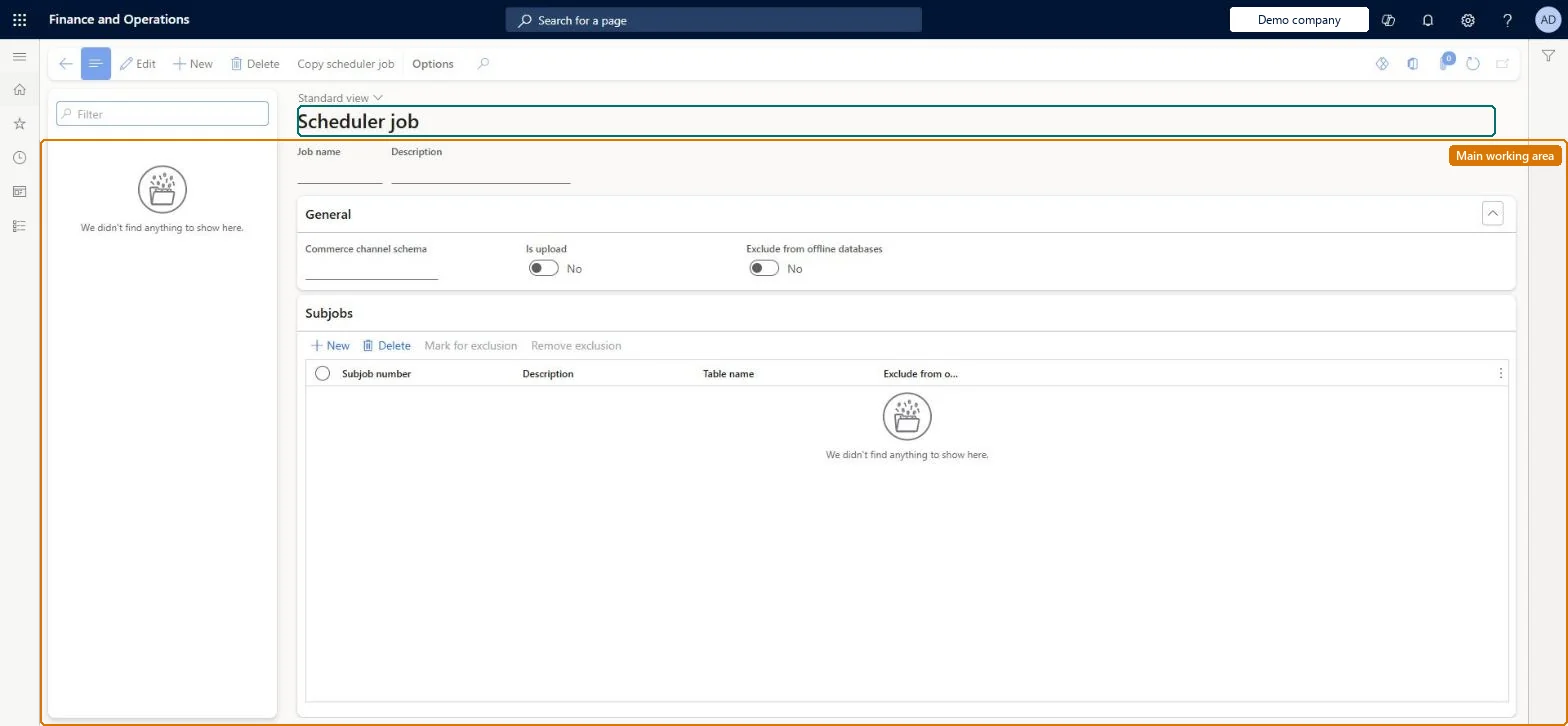
The page in Dynamics 365. page title tab to open what to set or check
About the examples: Examples and screenshots in this guide use BEAT, a demo company in a Dynamics 365 test environment. Use your own company's codes and values instead of copying them.
Setup steps on this page
Set up Scheduler jobs
Use this page to review which tables each job synchronizes, to add or adjust custom jobs, and to flag a job as excluded from offline databases.
How to use it
Go to Retail and Commerce > Headquarters setup > Commerce scheduler > Scheduler jobs.
Use the Filter box to find a job; the list is filled by Initialize commerce scheduler.
Select New and enter the Job name and Description, then under General pick the Commerce channel schema and set Is upload and Exclude from offline databases.
Under Subjobs, select New to add the subjobs the job runs, or Mark for exclusion and Remove exclusion to control them.
Select Copy scheduler job to copy a job, and Save.
Source: Checked in Dynamics 365
Fields on the page
Field
What it means
Exclude from offline databases
When Yes, no data package generated for this job is applied to Store Commerce offline databases.Microsoft Learn
Channel schema
The channel schema (normally AX7) that defines how headquarters data is read for this job.Microsoft Learn
Test checklist
In a sandbox, set Exclude from offline databases to Yes on job 1010.
Run the job and check on Download sessions that packages for the offline database group no longer include it.
Sign in to Store Commerce in offline mode and check that customer search returns no customers.
Check that only one P-job distribution schedule runs at a time.
Exclude from offline databases = No, except for jobs whose data isn't needed offline (for example the 1010 customer job when transactions don't need a customer offline)Smaller offline databases are faster and stay within SQL Express limits. Microsoft gives excluding customers as the example when a customer doesn't need to be attached to a transaction, and 1010 is the only customer data job by default.
Excluding a job and then running Full data sync for it from Channel database. That empties the related tables in the offline databases.
Solution architect
5Design impact
Can it be undone
Hard to reverse: Excluded data stops syncing to offline databases. If a full data sync runs for the excluded job, the related tables in offline databases are emptied and data has to be regenerated after the job is included again.
If you change it later
Excluding a job from offline databases and then running a full data sync clears the affected tables in the offline databases; running more than one upload (P) job in parallel can cause table locks and slowdowns. Microsoft Learn
Technical architect
6Technical
Menu item
RetailConnSchedulerJobTableChecked in Dynamics 365
Form
RetailConnSchedulerJobTableChecked in Dynamics 365
Table
RetailConnSchedulerJobTableShown as “SCHEDULER JOBS” in Record infoKey field: jobIdChecked in Dynamics 365
Who can open it
PrivilegesMaintain Retail scheduler RetailSchedulerMaintainDutiesManage Commerce Data Exchange: Synch Service RetailSchedulerManage3 security rolesRetail operations manager RetailOperationsManagerRetail service RetailServiceInformation technology manager SysServerITManagerChecked in Dynamics 365
Roles to set it up and use it
To set it up or change itRetail service RetailServiceRetail operations manager RetailOperationsManagerInformation technology manager SysServerITManagerGive people one of these roles. On this system, 3 roles can open this page.Checked in Dynamics 365
Actions on the page
(Action Pane without tabs): Copy scheduler jobChecked in Dynamics 365