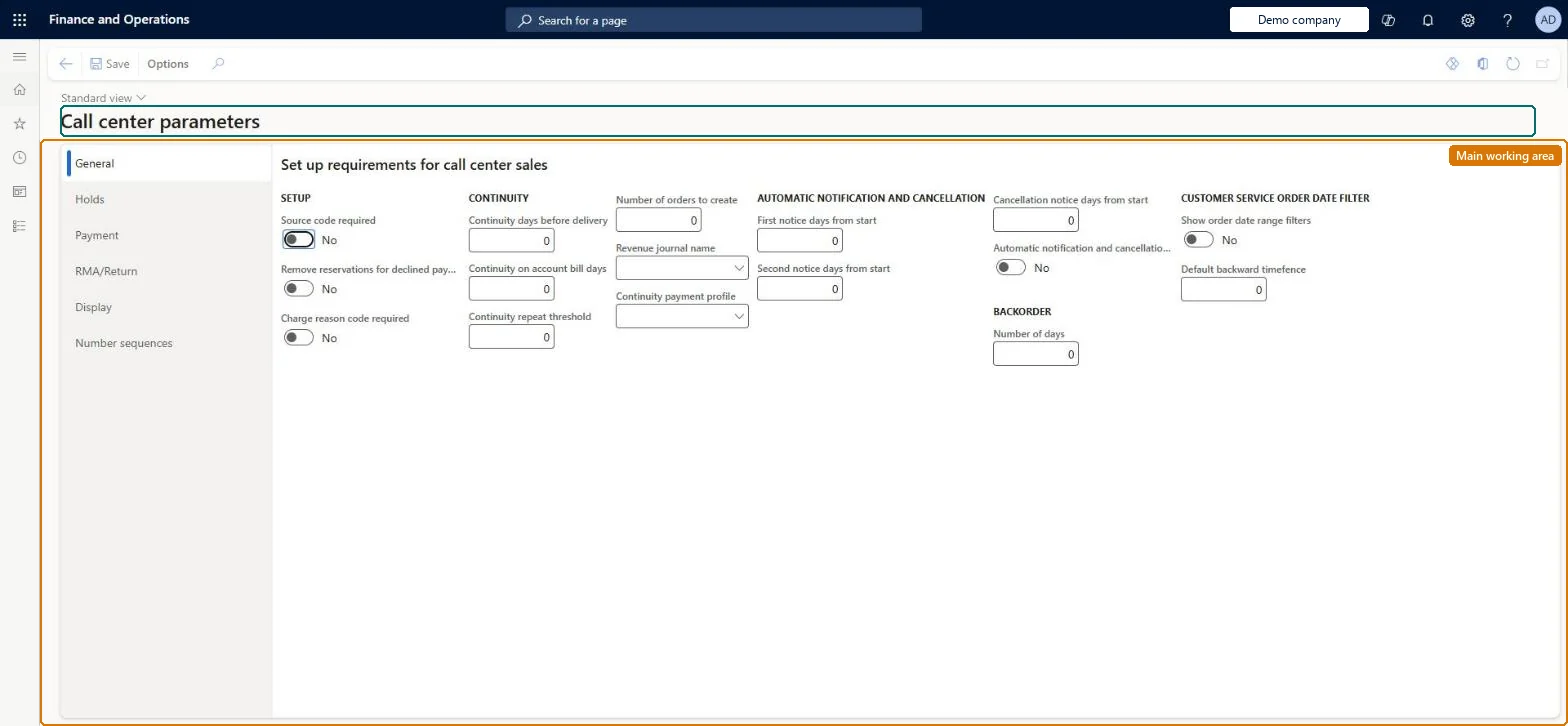
Setup step on the Call center parameters page · Retail and Commerce
Set up Call center parameters
Use this page to complete call center setup after the channel and its users exist, for example to turn on the fraud check and set hold codes and the minimum fraud score, and to set the default return payment method and payment override options. Related number sequences must also be defined.
Accounting manager, Customer service manager, Customer service representative and 2 more roles
Business process
Manage sales channels
Menu item
MCROrderParameters
Main table
MCROrderParameters
Data entity
RetailParameterEntity
Setup steps
1 on this page
Show what matters for
SETUP GUIDEHow to set it up8 sections. Choose a role to highlight what matters to you.
Everyone
1What it is and why
What it is
A parameters page where you define the company-wide default settings that govern call center order processing, including holds and fraud checking, payments, and returns (RMA/Return).
What you do here
Use this page to complete call center setup after the channel and its users exist, for example to turn on the fraud check and set hold codes and the minimum fraud score, and to set the default return payment method and payment override options. Related number sequences must also be defined.
Example
For example, on the Holds tab you set the Minimum score that an order's total fraud score must exceed before the order is automatically put on hold.
The page in Dynamics 365. page title tab to open what to set or check
About the examples: Examples and screenshots in this guide use BEAT, a demo company in a Dynamics 365 test environment. Use your own company's codes and values instead of copying them.
Setup steps on this page
Set up Call center parameters
Use this page to complete call center setup after the channel and its users exist, for example to turn on the fraud check and set hold codes and the minimum fraud score, and to set the default return payment method and payment override options. Related number sequences must also be defined.
Steps from Microsoft
Go to Retail and Commerce > Channel setup > Call center setup > Call center parameters.
On the Holds tab, set Fraud check to Yes.
Set the Manual fraud hold code and Fraud hold code fields.
Set the Minimum score field (and optionally the email, phone and ZIP/postal code default scores).
Set the Fraud comment type field (usually Note).
On the RMA/Return tab, set the default return Payment method and any payment override options.
Turns on automatic fraud checking when call center orders are submitted.Microsoft Learn
MCRFraudCheck
Manual fraud hold code / Fraud hold code
The hold codes applied to orders put on hold manually or automatically for fraud review.Microsoft Learn
Minimum score
The total fraud score above which an order is automatically put on hold.Microsoft Learn
MCRMinScore
Fraud comment type
The document type users must use for comments when they manually put an order on fraud hold.Microsoft Learn
MCRFraudCommentTypeId
Payment method (RMA/Return tab)
The default refund payment method used when the original payment type is unknown, when several methods were used, or for external gift cards.Microsoft Learn
Advance credit
When set to Yes, the refund is issued immediately when the return order is submitted rather than when it is invoiced.Microsoft Learn
AdvanceCredit
Apply credit / Apply credits payment method
When Apply credit is Yes, a customer-account payment method is applied to both a return order and its replacement order so that no external refund is issued.Microsoft Learn
Allow payment override / Security Override Code
Lets users without override permissions change a return's refund payment method by entering an externally managed security code.Microsoft Learn
Test checklist
Set Fraud check = Yes, a Minimum score and both fraud hold codes on the Holds tab.
Add a phone number on Static fraud data with a score above the minimum.
As a user linked to the call center, create an order with that phone number, select Complete and Submit.
Check the order shows Detailed status Fraud hold, the Do not process flag, and is listed under Retail and Commerce > Customers > Order holds.
Fraud check = Yes with a Minimum score, two different hold codes in Manual fraud hold code and Fraud hold code, and Submit when cleared = YesLearn says the Minimum score decides when an order goes on hold, suggests two unique hold codes so manual and automatic holds can be told apart, and says Submit when cleared makes a released order go through payment validation.
Turning on Fraud check while the call center channel has Enable order completion off. Fraud checks run when the order is submitted through Complete, so no order is checked.
Number sequences
Reference
Shared or per company
Note
Refund check batch
Per company
BEAT uses number sequence Orde_3. Checked in Dynamics 365
Letter ID
Per company
BEAT uses number sequence Orde_7. Checked in Dynamics 365
Continuity customer line ID
Per company
BEAT uses number sequence Orde_11. Checked in Dynamics 365
Catalog log ID
Per company
BEAT uses number sequence Orde_15. Checked in Dynamics 365
Order credit voucher ID
Per company
BEAT uses number sequence Orde_19. Checked in Dynamics 365
Order credit table ID
Per company
BEAT uses number sequence Orde_23. Checked in Dynamics 365
Coupon ID
Per company
BEAT uses number sequence Orde_27. Checked in Dynamics 365
List
Per company
BEAT uses number sequence Orde_31. Checked in Dynamics 365
Feature management and licence
Licence or add-in
Multiple ship-to configuration key (Trade) must be enabled to use call center functionality
Reversible: Parameters can be changed; fraud checks and holds apply to orders submitted afterwards.
If you change it later
Changing these parameters changes how every call center order is validated and refunded; for example a lost security override code can only be replaced by defining a new one here, and users not linked to a call center channel are not subject to these parameters at all. Microsoft Learn
Technical architect
6Technical
Menu item
MCROrderParametersChecked in Dynamics 365
Form
MCROrderParametersChecked in Dynamics 365
Table
MCROrderParametersShown as “CALL CENTER PARAMETERS” in Record infoChecked in Dynamics 365
PrivilegesMaintain call center parameters MCROrderParametersMaintainDutiesMaintain call center parameters MCRCallCenterParametersEnableMaintain customer service MCRCustomerServiceMaintainEnable sales MCRSalesEnable5 security rolesAccounting manager LedgerAccountingManagerCustomer service manager TradeCustomerServiceManagerCustomer service representative TradeCustomerServiceRepresentativeSales manager TradeSalesManagerSales representative TradeSalesRepresentativeChecked in Dynamics 365
Roles to set it up and use it
To set it up or change itSales manager TradeSalesManagerSales representative TradeSalesRepresentativeCustomer service representative TradeCustomerServiceRepresentativeCustomer service manager TradeCustomerServiceManagerAccounting manager LedgerAccountingManagerGive people one of these roles. On this system, 5 roles can open this page.Checked in Dynamics 365