Retail operations manager, Retail service, Retail store IT and 2 more roles
Business process
Manage sales channels
Menu item
RetailCDXSchedule
Main table
RetailConnSchedule
Show what matters for
PAGE GUIDEWhat the page does and how to use it7 sections. Choose a role to highlight what matters to you.
Everyone
1What it is and why
What it is
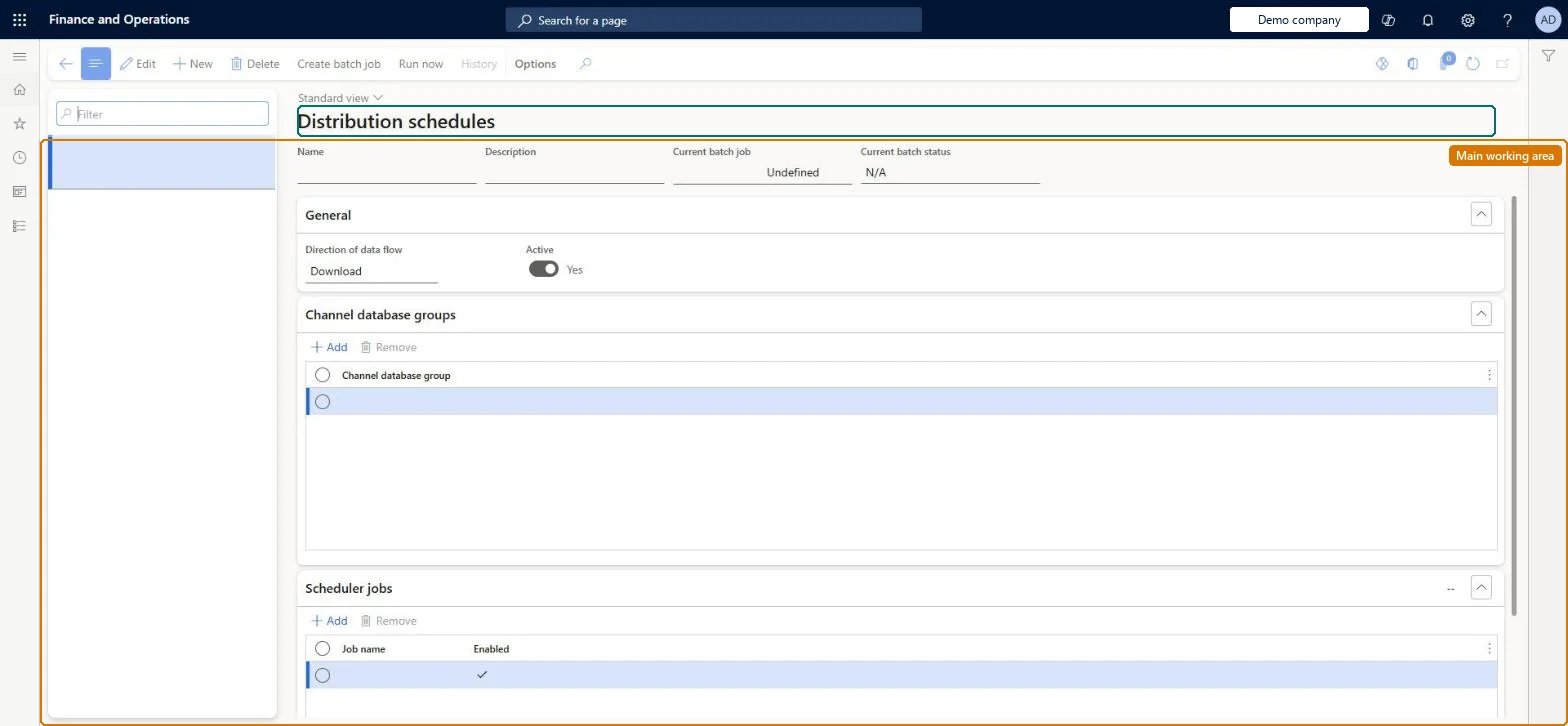
A page that runs the Commerce scheduler jobs that move data between headquarters and channel databases, either on demand or as a scheduled batch job.
What you do here
Use this page to send master data changes from headquarters to channels (download jobs) and to pull sales transactions from channels into headquarters (P jobs), grouping channel data groups and scheduler jobs into schedules.
Example
For example, run the P-0001 job on a recurring batch every few minutes so that online orders reach headquarters for posting.
The page in Dynamics 365. page title tab to open what to set or check
About the examples: Examples and screenshots in this guide use BEAT, a demo company in a Dynamics 365 test environment. Use your own company's codes and values instead of copying them.
Steps from Microsoft
Go to Retail and Commerce > Retail and Commerce IT > Distribution schedule.
Select the job to run, for example P-0001.
Adjust channel database groups, if required.
Select Run now and confirm with Yes, or select Create batch job to schedule it.
For a batch job, enable Batch processing, select Recurrence, set the interval, and select OK.
The distribution schedule '<ScheduleName>' doesn't have any recurrent Batch jobs to apply the uploaded sessions.
Open the named schedule (usually P-0001), select Run now and set a recurrence on Run in the background, then check the batch job is Waiting or Executing. Microsoft Learn
Test checklist
Select P-0001, select Create batch job, turn on Batch processing and set a recurrence with No end date.
Complete an online or POS sale.
After the next P-job run, check the upload session moves to Applied.
Run Synchronize orders and check a sales order is created in headquarters for the online sale.
Change a register, run the Registers and Channel configuration schedules, and check the change in POS.
Reversible: Schedules and their batch jobs can be changed or rerun at any time. Download jobs send changed data again on the next run. P-jobs upload only records with a replication counter above the last one received and don't update data that was already uploaded. Microsoft Learn
If you change it later
Running several P-job upload batch jobs in parallel can cause table locks and slow the system; Microsoft recommends only one P-job at a time, run frequently. Microsoft Learn
Technical architect
5Technical
Menu item
RetailCDXScheduleChecked in Dynamics 365
Form
RetailCDXScheduleChecked in Dynamics 365
Table
RetailConnScheduleShown as “DISTRIBUTION SCHEDULE” in Record infoKey field: NameChecked in Dynamics 365
Who can open it
PrivilegesMaintain Retail Commerce Data Exchange RetailCDXMaintainMaintain the runtime of scale units. ScaleUnitRuntimeMaintainDutiesManage Commerce Data Exchange: Synch Service RetailCDXMaintainMaintain the runtime of scale units. ScaleUnitRuntimeMaintain5 security rolesRetail operations manager RetailOperationsManagerRetail service RetailServiceRetail store IT RetailStoreITRetail store manager RetailStoreManagerScale unit administrator ScaleUnitRuntimeAdminChecked in Dynamics 365
Roles to set it up and use it
To set it up or change itRetail service RetailServiceRetail operations manager RetailOperationsManagerRetail store manager RetailStoreManagerRetail store IT RetailStoreITTo use itScale unit administrator ScaleUnitRuntimeAdminGive people one of these roles. On this system, 5 roles can open this page.Checked in Dynamics 365
Actions on the page
(Action Pane without tabs): Create batch job, Run now, HistoryChecked in Dynamics 365