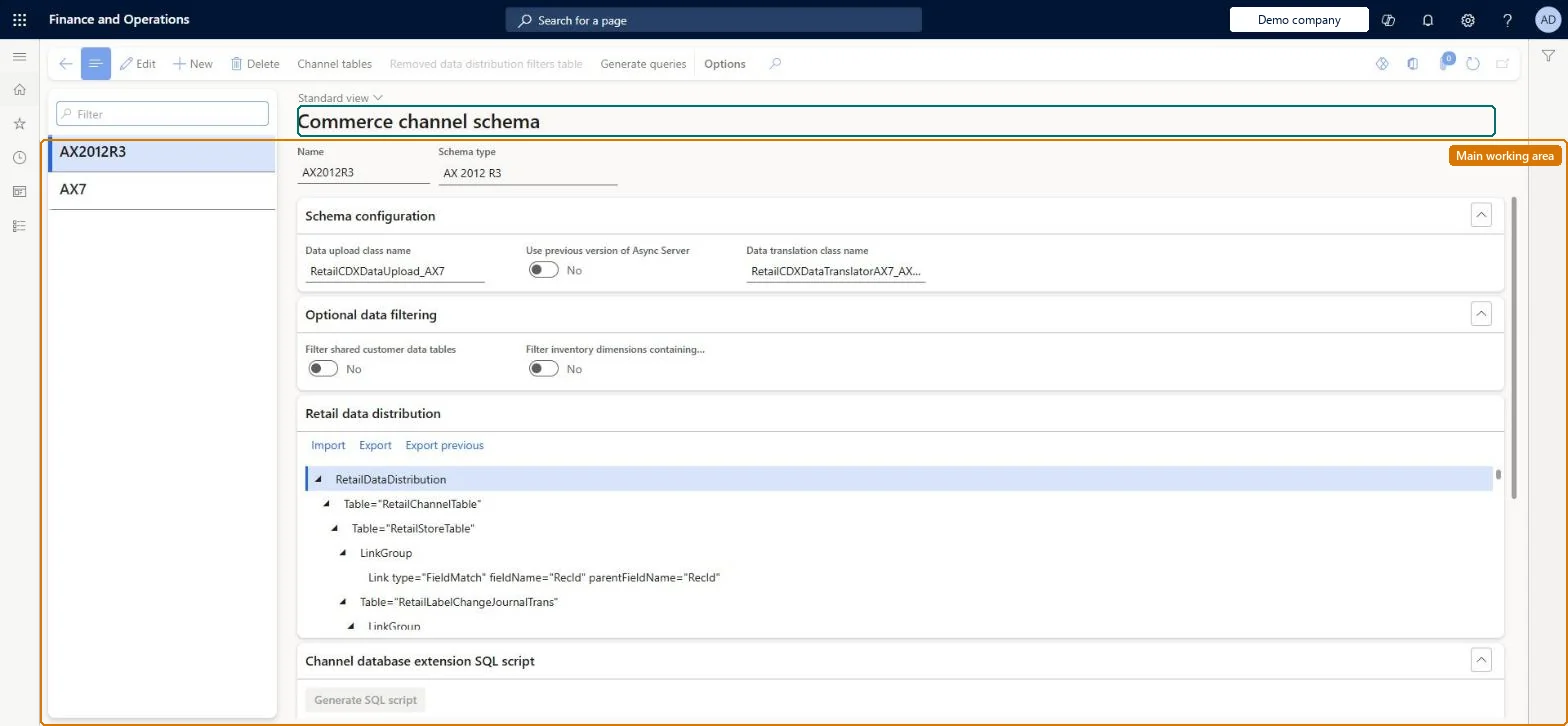
A setup page holding the channel schemas (by default a single schema named AX7) that define how the headquarters database is read for Commerce data, together with options that filter customer and license-plate data out of offline databases.
Retail and CommerceHeadquarters setupCommerce scheduler
RetailConnChannelSchema
Used by
Retail operations manager, Retail service, Information technology manager
Business process
Manage sales channels
Menu item
RetailConnChannelSchema
Main table
RetailConnChannelSchema
Setup steps
1 on this page
Show what matters for
PAGE GUIDEWhat the page does and how to use it8 sections. Choose a role to highlight what matters to you.
Everyone
1What it is and why
What it is
A setup page holding the channel schemas (by default a single schema named AX7) that define how the headquarters database is read for Commerce data, together with options that filter customer and license-plate data out of offline databases.
What you do here
Use this page to review the AX7 schema that scheduler jobs reference and to switch on the Optional data filtering options that keep shared customer data and license-plate inventory dimensions out of offline databases.
Example
For example, a retailer that does not need customers on offline registers sets Filter shared customer data tables to Yes and also excludes the 1010 customer job from offline databases.
The page in Dynamics 365. page title tab to open what to set or check
About the examples: Examples and screenshots in this guide use BEAT, a demo company in a Dynamics 365 test environment. Use your own company's codes and values instead of copying them.
Setup steps on this page
Set up Commerce channel schema
Use this page to review the AX7 schema that scheduler jobs reference and to switch on the Optional data filtering options that keep shared customer data and license-plate inventory dimensions out of offline databases.
Steps from Microsoft
Go to Retail and Commerce > Headquarters setup > Commerce scheduler > Commerce channel schema (or open it from the Commerce channel schema field on the Channel database group page).
Select the schema, normally AX7.
In the Optional data filtering section, set Filter shared customer data tables to Yes if customer data should not reach offline databases, and confirm the message.
Set Filter inventory dimensions containing a license plate ID to Yes if those records should not reach offline databases.
Also set Exclude from offline databases to Yes on the customer data jobs (by default job 1010).
Keep the default AX7 schema; set Filter shared customer data tables = Yes only when offline registers don't need customers, together with Exclude from offline databases on job 1010Learn says the filter only flags customer rows and must be paired with excluding the customer jobs (by default only 1010) from offline sync, and suggests excluding customers when transactions don't need one.
Expecting the filters to reduce the Commerce Scale Unit database. They apply to offline databases only; the channel database still gets the full data set.
Solution architect
5Design impact
Can it be undone
Hard to reverse: You can turn the filters off again, but a full data sync of an excluded job empties those tables in offline databases, so data has to be regenerated and resynced. Microsoft Learn
If you change it later
The filtering options affect only offline databases; the Commerce Scale Unit channel database still receives the full data set, so a different mechanism is needed to restrict channel data. Microsoft Learn
Technical architect
6Technical
Menu item
RetailConnChannelSchemaChecked in Dynamics 365
Form
RetailConnChannelSchemaChecked in Dynamics 365
Table
RetailConnChannelSchemaShown as “COMMERCE CHANNEL SCHEMA” in Record infoChecked in Dynamics 365
Who can open it
PrivilegesMaintain Retail scheduler RetailSchedulerMaintainDutiesManage Commerce Data Exchange: Synch Service RetailSchedulerManage3 security rolesRetail operations manager RetailOperationsManagerRetail service RetailServiceInformation technology manager SysServerITManagerChecked in Dynamics 365
Roles to set it up and use it
To set it up or change itRetail service RetailServiceRetail operations manager RetailOperationsManagerInformation technology manager SysServerITManagerGive people one of these roles. On this system, 3 roles can open this page.Checked in Dynamics 365
Actions on the page
(Action Pane without tabs): Channel tables, Removed data distribution filters table, Generate queriesChecked in Dynamics 365