BeyondERP.Newsletter
Menu

Setup step on the Packing material fees page · Inventory management

Set up Packing material fees

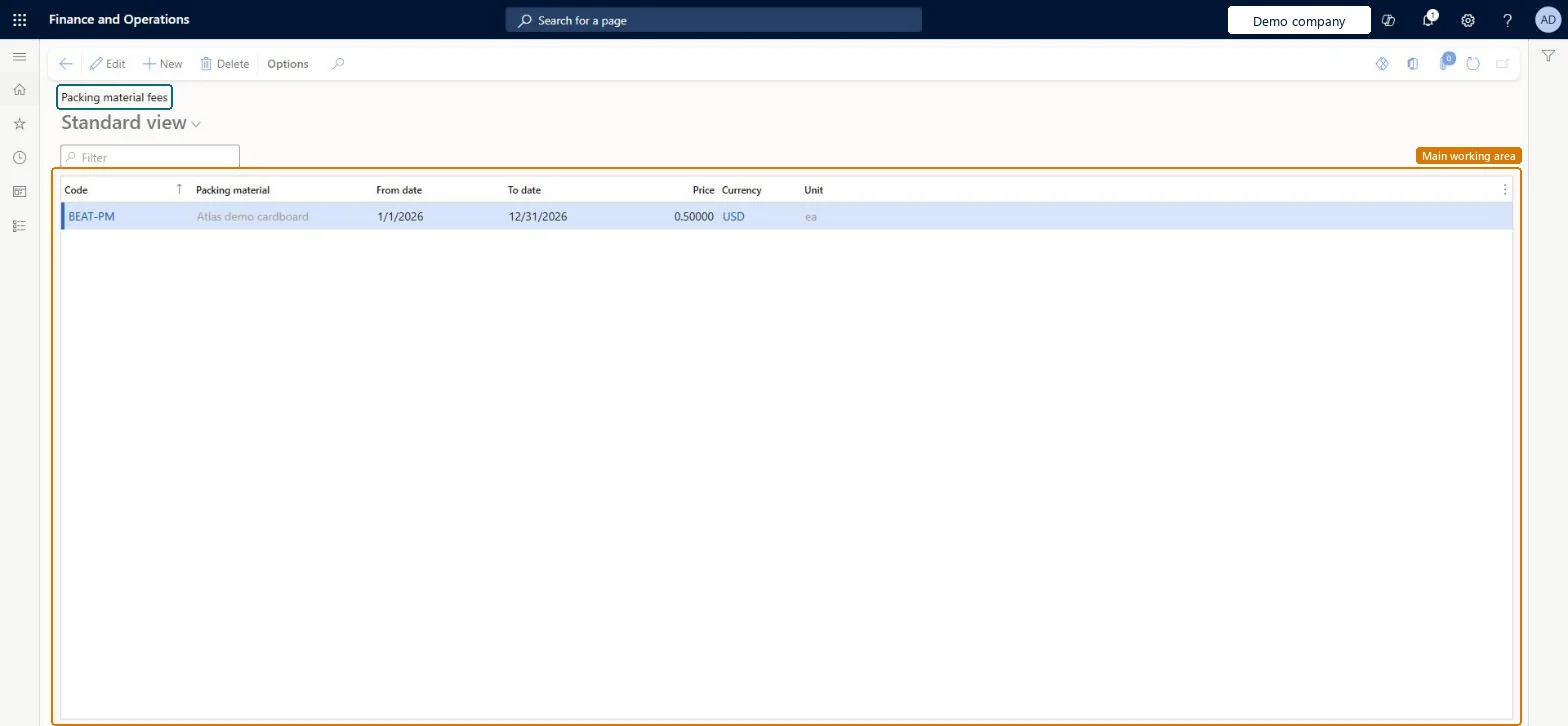
Use this page to calculate packing material fees from the price per unit of packing material that is consumed.

Used by
Product design manager, Materials manager, Production supervisor and 2 more roles
Business process
Maintain inventory levels
Menu item
InventPackagingMaterialFee
Main table
InventPackagingMaterialFee
Data entity
InventPackingMaterialFeeEntity
Setup steps
1 on this page
Show what matters for
SETUP GUIDEHow to set it up8 sections. Choose a role to highlight what matters to you.
Everyone

1What it is and why

What it isA setup page where you set a fee for each packing material code for a specific period.
What you do hereUse this page to calculate packing material fees from the price per unit of packing material that is consumed.
ExampleFor example, a company pays packing material fees to a recycling company at set intervals, as an amount per unit of weight for each material.
Packing material fees page in Dynamics 365
The page in Dynamics 365. page title tab to open what to set or check
Functional consultant · Solution architect

2Where it fits

End user · Functional consultant

3How to do it

About the examples: Examples and screenshots in this guide use BEAT, a demo company in a Dynamics 365 test environment. Use your own company's codes and values instead of copying them.

Step by step, with screenshots

Set up Packing material fees1 screen

Use this page to calculate packing material fees from the price per unit of packing material that is consumed.

  1. Screen 1

    Set a packing material fee

    Go to Inventory management > Setup > Packing material > Packing material fees

    1. Make sure the packing material code exists (here demo code BEAT-PM)
    2. Select New
    3. Select the packing material code
    4. Enter the from and to dates of the period the price applies to
    5. Enter the price per unit and select the currency
    6. Select Save
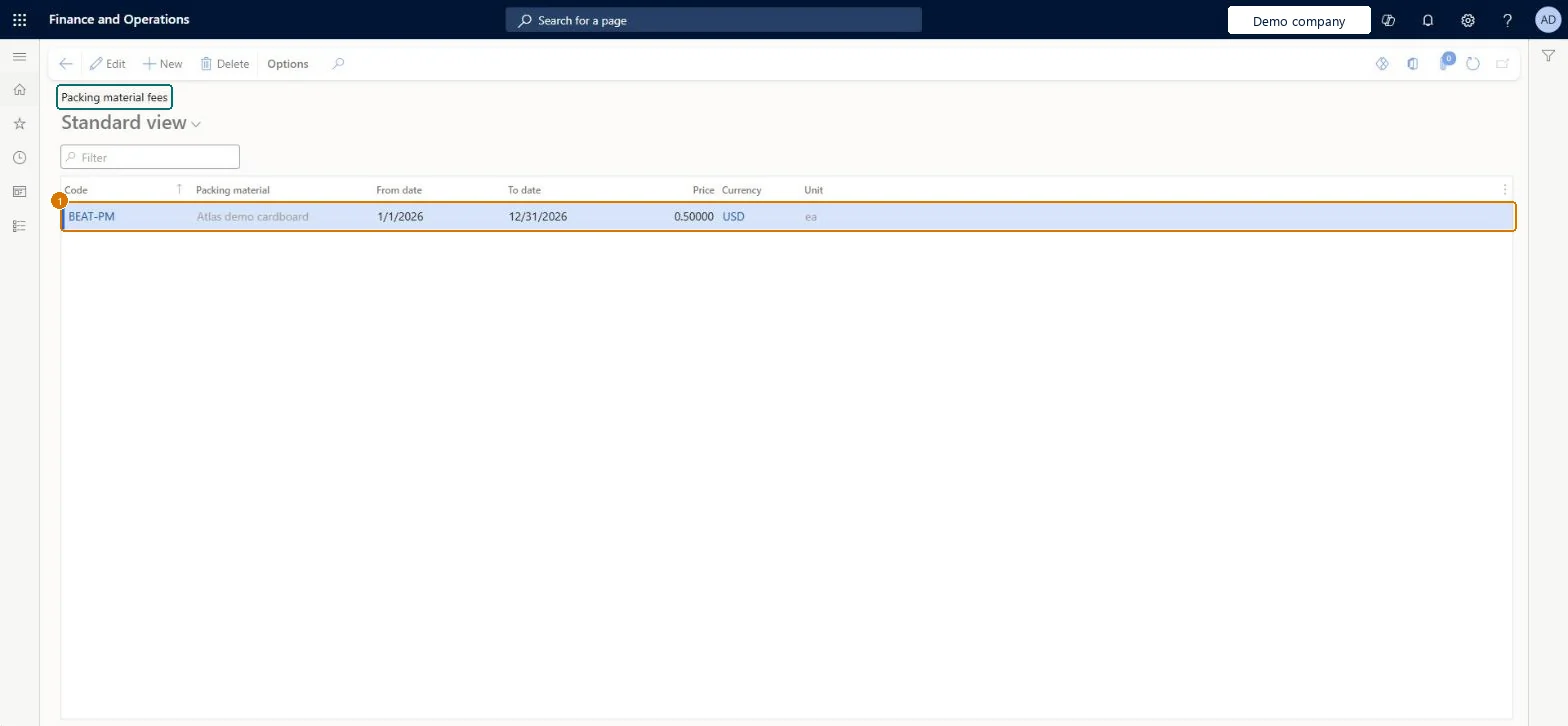
    1CodeBEAT-PM
    From date1/1/2026
    To date12/31/2026
    Price0.50000
    CurrencyUSD
    Set a packing material fee (zoomed on the outlined fields)
    Show the full screenSet a packing material fee
    page title tab to open what to set or check

How to use it

  1. Go to Inventory management > Setup > Packing material > Packing material fees.
  2. Select New to add a fee.
  3. Enter the Code, From date, To date, Price and Currency.
  4. Check the Packing material and Unit columns for the selected code.
  5. Select Save.

Source: Checked in Dynamics 365

Fields on the page

FieldWhat it meansExampleTable column
CodeThe packing material that the fee applies to.Microsoft Learn CARDBOARDPackMaterialCode
From dateThe first date that the fee applies.Microsoft Learn 1/1/2026FromDate
To dateThe last date that the fee applies.Microsoft Learn 12/31/2026ToDate
PriceThe fee charged for each unit of the packing material.Microsoft Learn 0.50000PriceCur
CurrencyUSDCurrencyCode

Test checklist

  1. Set Calculate packing material fees to Yes and create packing material codes
  2. Enter a fee per code with From date and To date
  3. Create a packaging material allocation for an item and invoice a sales order for it
  4. Run Packing material fee calculation for the period and check the fee

Source: Microsoft Learn

Functional consultant

4Setup decisions

Setup stepRecommended value and whyDecision, common mistake and test
Set up Packing material feesOne fee per packing material code for each validity period, with Calculate packing material fees set to Yes in Inventory and warehouse management parametersLearn calculates fees from the price per unit of packing material consumed, using the fee valid for the period, and only when the parameter is turned on.Expecting the fees to post to the ledger. Learn states fees are calculated and reported, but no ledger transactions are posted.
Solution architect

5Design impact

Shared or per companyPer company: each legal entity has its own records. Microsoft data model
Can it be undoneReversible: Fees and periods can be changed at any time; packing material transactions created on invoicing can also be modified afterwards.
If you change it laterPacking material fees are calculated and reported, but they don't create ledger transactions. Microsoft Learn
Technical architect

6Technical

Menu itemInventPackagingMaterialFee Checked in Dynamics 365
FormInventPackagingMaterialFee Checked in Dynamics 365
TableInventPackagingMaterialFeeShown as “Packing material fee” in Record infoKey field: PackMaterialCode, FromDate, ToDateChecked in Dynamics 365
Data entitiesInventPackingMaterialFeeEntityPacking material fees Microsoft data model
Who can open itPrivilegesMaintain packing material fees InventPackagingMaterialFeeMaintainView packing material fees InventPackagingMaterialFeeViewDutiesInquire into packing material management policies InventPackMaterialManagementPoliciesInqEnable packing material management process InventPackMaterialManagementProcessEnab
5 security rolesProduct design manager BOMProductDesignManagerMaterials manager InventMaterialsManagerProduction supervisor ProdProductionSupervisorProcess engineer RouteProcessEngineerProcess engineering manager RouteProcessEngineeringManager
Checked in Dynamics 365
Roles to set it up and use itTo set it up or change itMaterials manager InventMaterialsManagerProcess engineer RouteProcessEngineerTo use itProduction supervisor ProdProductionSupervisorProduct design manager BOMProductDesignManagerProcess engineering manager RouteProcessEngineeringManagerGive people one of these roles. On this system, 5 roles can open this page.Checked in Dynamics 365
Actions on the pageOptions: Personalize, Page options, ShareChecked in Dynamics 365
Developer

7Developer

Open it by URLhttps://<your-environment>/?mi=InventPackagingMaterialFee
Integrate withInventPackingMaterialFeeEntity data entity Microsoft data model
Data migrationInventPackingMaterialFeeEntity (Packing material fees): loaded for each company, in Microsoft's default template 300 - Inventory.Load order: Microsoft's default template 300 - Inventory loads Packing material fees at execution unit 1, level 30, sequence 30. Lower levels load first, and entities at the same level load in sequence order.Load first: the default templates at lower levels (System setup to General ledger)Microsoft Learn
Table definitionInventPackagingMaterialFee columns and relations Microsoft data model
Everyone

8Sources

To cite this step: IM-SETUP-360, Set up Packing material fees. Beyond ERP Atlas Hub, 2026-11-11. https://www.beyonderp.cloud/atlas/step/IM-SETUP-360