Cash and bank managementPayment reversal approvals
LedgerJournalTable_BankDepositPaymCancel
Used by
Chief financial officer, Accountant, Accounting manager and 5 more roles
Business process
Process customer payments
Menu item
LedgerJournalTable_BankDepositPaymCancel
Main table
LedgerJournalTable
Setup steps
1 on this page
Show what matters for
SETUP GUIDEHow to set it up8 sections. Choose a role to highlight what matters to you.
Everyone
1What it is and why
What it is
The journal list where deposit slip payment cancellations wait for a reviewer when cancellations must be reviewed before they post.
What you do here
Use this page to approve a deposit slip payment cancellation by posting its journal, or to reject it, so the payment leaves the Pending cancellation status and the bank account can be reconciled.
Example
For example, a clerk cancels a customer check of 800.00 that the bank returned. The cancellation waits here; the treasurer opens the lines, checks the reason NSF and posts the journal, and only then can the statement be reconciled.
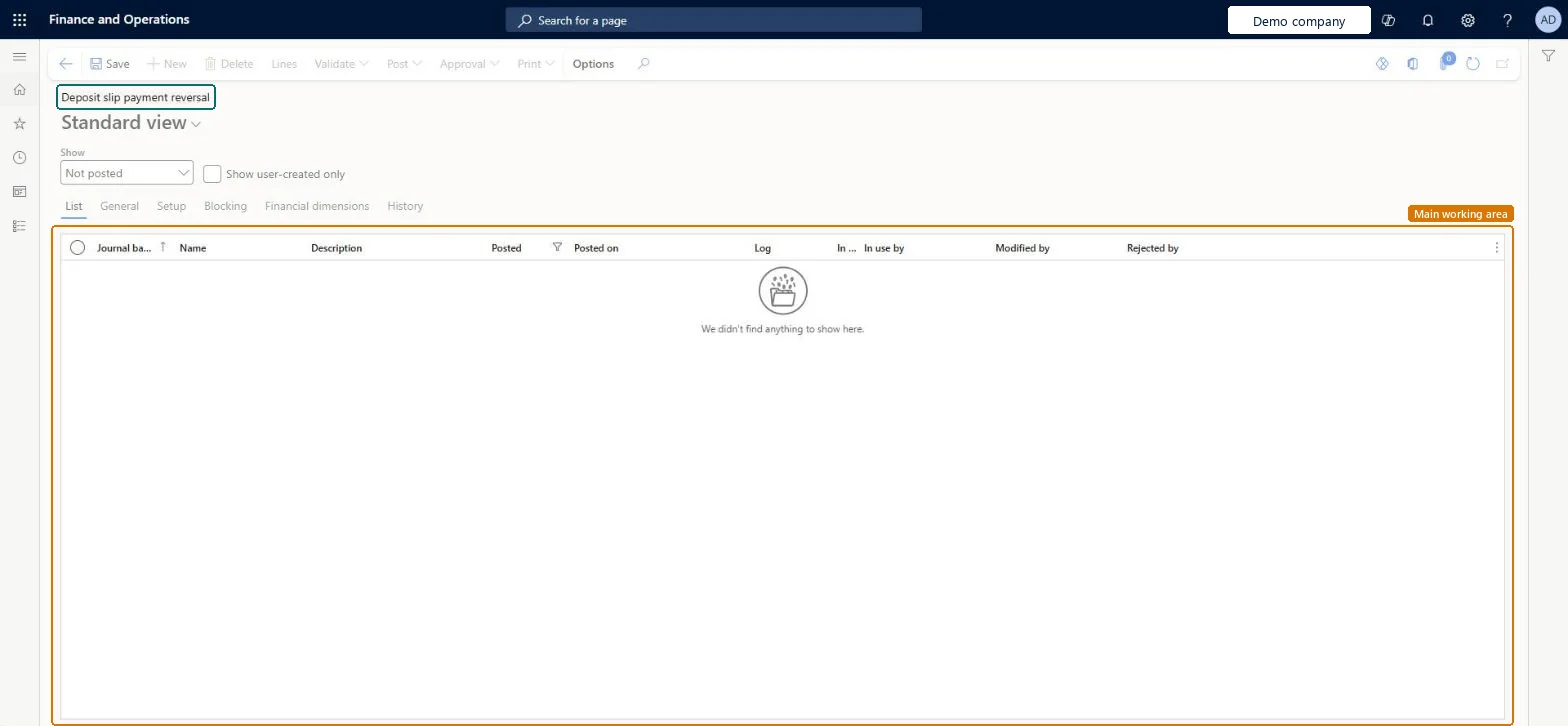
The page in Dynamics 365. page title tab to open what to set or check
About the examples: Examples and screenshots in this guide use BEAT, a demo company in a Dynamics 365 test environment. Use your own company's codes and values instead of copying them.
Setup steps on this page
Review deposit slip payment cancellations
Approve or reject deposit slip payment cancellations that wait for review.
Steps from Microsoft
Go to Cash and bank management > Payment reversal approvals > Deposit slip payment reversal.
Select the cancellation journal to review, then select Lines and check the customer, amount and reason.
To approve, validate and post the journal; the deposit slip payment is cancelled in the ledger and on the customer.
To reject, delete the journal; the payment is no longer Pending cancellation and stays on the deposit slip.
Reconcile the bank account only after every pending cancellation on the statement is posted or rejected.
The journal name of type Bank deposit slip cancellation the cancellation was created with.Microsoft Learn
Posted
Shows whether the cancellation journal is posted (approved).Microsoft Learn
Rejected by
The user who rejected the journal.Checked in Dynamics 365
Common errors and fixes
Message
What to do
The bank statement can't be reconciled
A check or deposit slip payment on the statement is still Pending cancellation. Post or reject the waiting journal on this page first. Microsoft Learn
No journal appears on this page after a cancellation
Use review process for deposit slip payment cancellations is off, so cancellations post at once; or no journal name was selected in the cancellation. Microsoft Learn
Test checklist
Set Use review process for deposit slip payment cancellations = Yes and create a journal name of type Bank deposit slip cancellation.
Cancel a deposit slip payment and check that a journal appears on this page.
Open Account reconciliation for the bank account and check that the Cleared checkbox isn't available for the pending payment.
Post the journal and check that the payment is cancelled and the account can be reconciled.
A reviewer other than the clerk who cancelled the payment posts or deletes each journal before the bank statement for that period is reconciled.A pending cancellation blocks reconciliation of the statement that lists it, so reviews must be done before the bank reconciliation.
Hard to reverse: A posted cancellation can't be undone; rejection is possible only before posting.
If you change it later
While a cancellation waits for review its status is Pending cancellation, the Cleared checkbox isn't available for it and the bank statement that lists it can't be reconciled. Microsoft Learn
Technical architect
6Technical
Menu item
LedgerJournalTable_BankDepositPaymCancelChecked in Dynamics 365
Form
LedgerJournalTableChecked in Dynamics 365
Table
LedgerJournalTableShown as “Ledger journal table” in Record infoKey field: JournalNumChecked in Dynamics 365
Who can open it
PrivilegesView deposit slip cancel payment journals LedgerJournalTable_BankDepositPayViewMaintain deposit slip cancel payment journals LedgerJournalTable_BankDepositPMaintainDutiesMaintain bank transactions BankBankTransactionsMaintainInquire into bank transaction status BankBankTransactionStatusInquireCustBankTransactionStatusInquire8 security rolesChief financial officer CompanyChiefFinancialOfficerAccountant LedgerAccountantAccounting manager LedgerAccountingManagerAccounting supervisor LedgerAccountingSupervisorFinancial controller LedgerFinancialControllerAccounts receivable centralized payments clerk PaymAccountsReceivableCentralPaymClerkAccounts receivable payments clerk PaymAccountsReceivablePaymentsClerkTreasurer PaymTreasurerChecked in Dynamics 365
Roles to set it up and use it
To set it up or change itTreasurer PaymTreasurerTo use itChief financial officer CompanyChiefFinancialOfficerAccounting manager LedgerAccountingManagerFinancial controller LedgerFinancialControllerAccountant LedgerAccountantAccounting supervisor LedgerAccountingSupervisorGive people one of these roles. On this system, 8 roles can open this page.Checked in Dynamics 365
Actions on the page
Options: Personalize, Page options, Edit, ShareChecked in Dynamics 365
Load order: A deposit slip cancellation journal has no data entity in Data management, so it can't be loaded from a file or a configuration template. These journals are created only by Cancel payment on the deposit slip, so there is nothing to load. Post or reject every pending cancellation before cut-over.Checked in Dynamics 365