SETUP GUIDEHow to set it up8 sections. Choose a role to highlight what matters to you.
Everyone
1What it is and why
What it is
A periodic dialog that creates journal entries for many leases at once from a chosen lease schedule.
What you do here
Use this dialog to create journals for payment invoices, depreciation or interest for multiple leases, limited to chosen legal entities, lease groups or lease books.
Example
For example, use it to post the initial recognition of several leases at the same time.
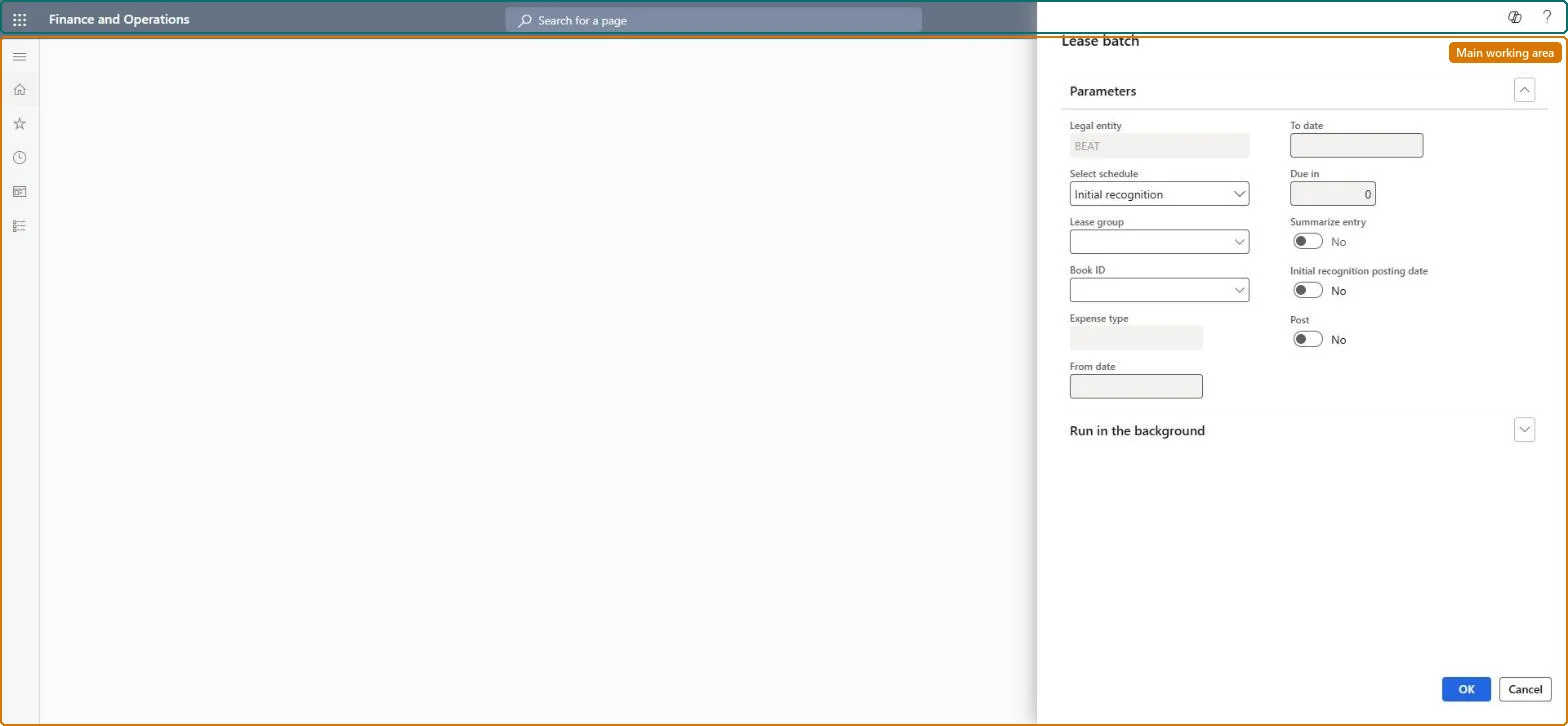
The page in Dynamics 365. page title tab to open what to set or check
About the examples: Examples and screenshots in this guide use BEAT, a demo company in a Dynamics 365 test environment. Use your own company's codes and values instead of copying them.
When to run it
When to run it
At each period end, after lease payment schedules are confirmed, to record lease payments, interest, depreciation and expenses for the period.
How often
Monthly for each lease schedule type, or whenever initial recognition or transition adjustments are needed for many leases.
Batch settings
Set it up as a batch job per schedule type, for example one for payments and one for depreciation, scoped to the legal entities or lease groups you close.
What the output shows
Asset leasing journal entries, or vendor invoice journal entries for books that pay to a vendor, for each lease in scope. A lease without entries usually has no posted initial recognition yet, because later entries are posted only after initial recognition.
Create the payment, interest, depreciation and expense journals for all leases in one run.
Steps from Microsoft
Go to Asset leasing > Periodic > Batch journal creation.
Select the schedule that the journal entries are created from, for example the payment schedule for lease payments, the liability amortization schedule for interest, or the asset depreciation schedule for depreciation.
Select the legal entities, lease groups or lease books to include, so only those leases get journal entries.
For initial recognition, select Assigning initial recognition posting date and enter the Date if the entry must be posted on a date other than the lease commencement date.
Run the process, then review the created journal entries. They aren't posted until you post them.
Posts initial recognition on the date in Date instead of the commencement date (Learn calls it Assigning initial recognition posting date).Microsoft Learn
Yes
Date
The posting date to use for initial recognition when that option is selected.Microsoft Learn
Select schedule
The schedule the journals come from: lease payments, liability amortization, right-of-use amortization, executory costs, initial recognition, transition adjustments or short-term lease liability reclass.Microsoft Learn
Liability amortization
Post
Yes posts the journals straight away; No only creates them for review in Asset leasing journals.Microsoft Learn
No
Legal entity / Lease group / Book ID
Limit the run to some legal entities, lease groups or books.Microsoft Learn
Common errors and fixes
Message
What to do
No payment, interest or depreciation journals for a lease
Its initial recognition isn't posted yet. Run the job with the initial recognition schedule first. Microsoft Learn
Journals were created but nothing posted
Post was No. Post them in Asset leasing journals, or run again with Post = Yes. Microsoft Learn
Some books were skipped
Open Inquiries and reports > Error log for the batch job, company and book. Checked in Dynamics 365
Test checklist
Each lease in scope has one journal entry for the selected schedule and period.
Leases without posted initial recognition have no later entries.
Initial recognition entries carry the Date you entered when Assigning initial recognition posting date was selected.
Run initial recognition first, then one run per schedule each month in the order payments, liability amortization, right-of-use amortization, executory costs and the short-term reclass, with Post = No so the journals are reviewed before posting.Later transactions post only after initial recognition. Creating without posting leaves the journals in Asset leasing journals for review.
Asset leasing (Must be on)Multi-company purpose (Optional)
Licence or add-in
Asset leasing must be turned on in Feature management (feature Asset leasing). Microsoft Learn describes three Asset leasing roles: Maintain lease (add, edit and post leases), View lease (view leases and schedules and run reports) and Lease clerk (create new leases only). Maintain lease users run it.
Per company, unless Cross entity batch is on in Asset leasing parameters: then journals can be created for any legal entity you have access to. Microsoft Learn
Can it be undone
Hard to reverse: Created journals can be deleted before posting; posted entries need Reverse transaction on the lease.
If you change it later
Creates journal entries for payments, interest, depreciation and expenses. Later entries are posted only for leases whose initial recognition is already posted. Microsoft Learn
Technical architect
6Technical
Menu item
AssetLeaseCreatePostJournal_BatchNewChecked in Dynamics 365
Form
DialogChecked in Dynamics 365
Roles to set it up and use it
To use itLease accountant AssetLeaseLeaseMaintainAccountant LedgerAccountantGive people one of these roles. On this system, 2 roles can run this page.Checked in Dynamics 365
Load order: Batch journal creation has no data entity in Data management, so it can't be loaded from a file or a configuration template. It creates journals from the schedules of leases already in the system; use Initial recognition posting date for leases loaded mid-life.Microsoft Learn
Checked in a working Dynamics 365 system, version 10.0.49: the menu item, form, table and security, the page.
To cite this step: AL-PER-020, Create the monthly lease journals in batch. Beyond ERP Atlas Hub, 2026-11-11. https://www.beyonderp.cloud/atlas/step/AL-PER-020