Lease accountant, Lease manager, Accountant and 1 more role
Business process
Define leasing policies
Menu item
AssetLeasePostingAccounts
Main table
AssetLeaseJournalParameters
Data entity
None for this page's own settings
Setup steps
1 on this page
Show what matters for
PAGE GUIDEWhat the page does and how to use it8 sections. Choose a role to highlight what matters to you.
Everyone
1What it is and why
What it is
A setup page that holds the general settings and posting accounts that control how Asset leasing behaves.
What you do here
Use this page to set general lease options, such as manual classification override and deletion of confirmed leases, and to assign main accounts to lease posting types and expense types.
Example
For example, link an expense type such as property tax to the finance and operating lease main accounts for each book.
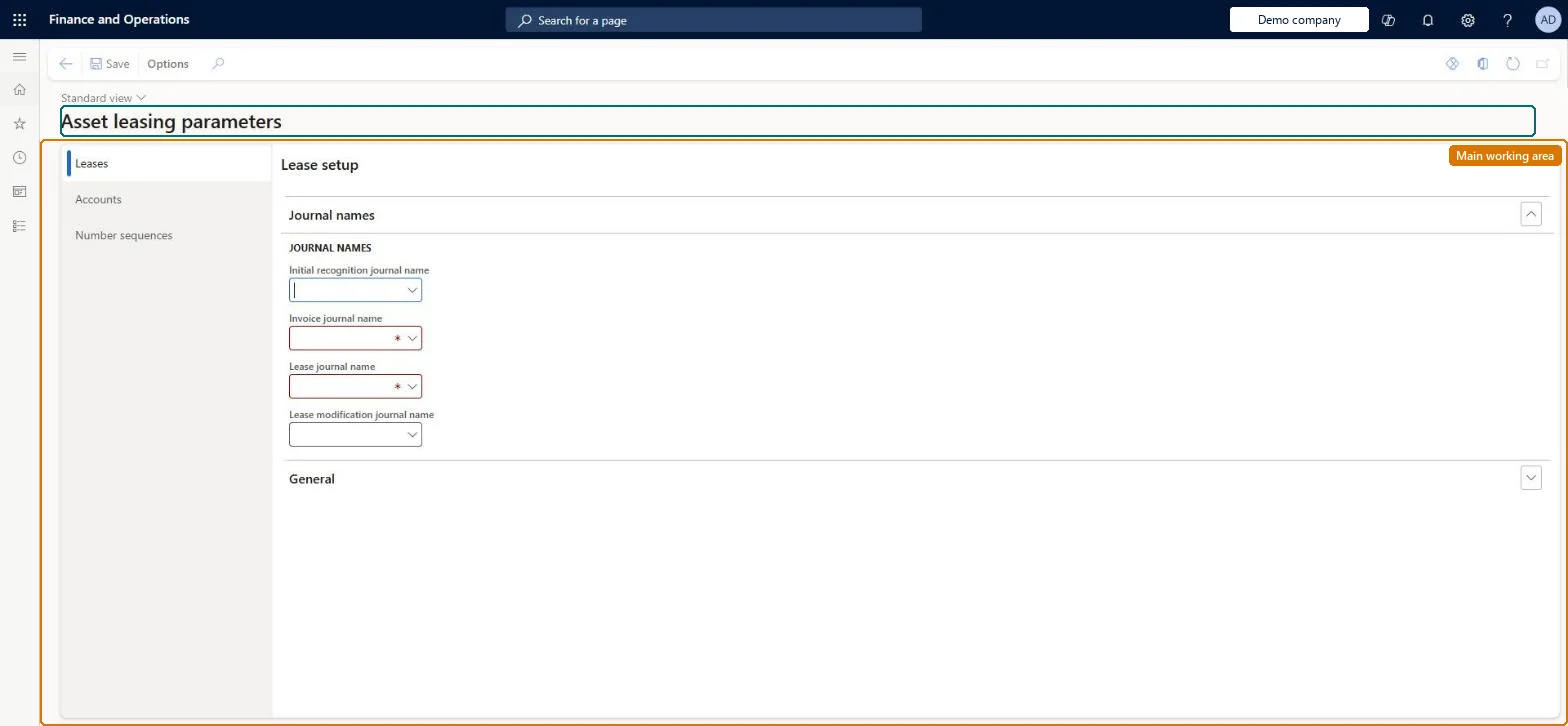
The page in Dynamics 365. page title tab to open what to set or check
About the examples: Examples and screenshots in this guide use BEAT, a demo company in a Dynamics 365 test environment. Use your own company's codes and values instead of copying them.
Setup steps on this page
Set up Asset leasing parameters
Use this page to set general lease options, such as manual classification override and deletion of confirmed leases, and to assign main accounts to lease posting types and expense types.
Steps from Microsoft
Go to Asset leasing > Setup > Asset leasing parameters.
On the Leases tab, select the General FastTab.
Set the general options, such as Allow manual classification override and Allow deletion of confirmed leases.
On the Accounts tab, open the Lease accounts FastTab and set the finance and operating lease main accounts for each posting type.
On the Executory costs FastTab, select an expense type, select Add, and set the book type and main accounts.
Controls whether you can override the lease classification before confirming the payment schedule.Microsoft Learn
OverrideLeaseType
Cross entity batch
Controls whether you can post to other legal entities from the current legal entity.Microsoft Learn
CrossEntityBatch
Allow deletion of confirmed leases
Allows deletion of leases whose payment schedules are confirmed.Microsoft Learn
No
AllowConfirmedLeaseDeletion
Allow depreciation reversals on closed book
Allows depreciation expense transactions to be reversed even when the book version is closed.Microsoft Learn
No
AllowDepreciationReverseOnCloseBook
Allow payment amount breakdown
Allows payment amounts on lease payment schedule lines to be broken down by payment amount type.Microsoft Learn
AllowPaymentAmountBreakdown
Account code
Sets whether an account line applies to all leases, a lease group, or specific leases.Microsoft Learn
Group
Expense type
The expense type on the Executory costs FastTab to which finance and operating accounts are assigned.Microsoft Learn
Initial recognition journal name
Journal name (type Asset leasing) for all initial recognition entries.Microsoft Learn
Invoice journal name
Journal name (type Vendor invoice recording) for lease and expense invoices when the book has Pay to vendor = Yes.Microsoft Learn
Lease journal name
Journal name (type Asset leasing) for depreciation, interest and the short-term reclass, and for payments when Pay to vendor = No.Microsoft Learn
Lease modification journal name
Journal name for adjustment, termination and impairment entries; it must have no workflow or approval. If blank, these entries use the Lease journal name.Microsoft Learn
Common errors and fixes
Message
What to do
Initial recognition can't be created: no journal name
Set Initial recognition journal name and Lease journal name (journal type Asset leasing) on the General tab. Microsoft Learn
The journal name isn't in the lookup
Only journal names of type Asset leasing are offered, and only type Vendor invoice recording for Invoice journal name. Check the journal type on Journal names. Microsoft Learn
An IFRS 16 company is asked for an operating lease account
The field is required. Enter an operating lease main account; IFRS 16 leases don't use it. Microsoft Learn
Impairment can't be posted: no number sequence
Set the impairment proposal number sequence on the Number sequences tab. Microsoft Learn
Test checklist
Set the parameters and journal names and save.
Create a lease, create schedules and confirm the payment schedule.
With Allow deletion of confirmed leases = No, try to delete it: deletion is refused.
Close a book version and try to reverse a depreciation transaction with the reversal option off: it is refused.
Allow depreciation reversals on closed book = No; Allow deletion of confirmed leases = No unless you need to remove wrongly confirmed leasesLearn recommends keeping depreciation reversals on closed books off as a control that protects net book value and future depreciation. A lease deleted under the deletion option can't be restored.
BEAT uses number sequence Leas_3. Checked in Dynamics 365
Index revaluation process ID
Per company
BEAT uses number sequence Leas_7. Checked in Dynamics 365
Termination proposal ID
Per company
BEAT uses number sequence Leas_11. Checked in Dynamics 365
Impairment proposal ID
Per company
BEAT uses number sequence Leas_27. Checked in Dynamics 365
Feature management and licence
Feature to turn on
Asset leasing (Must be on)
Licence or add-in
Asset leasing must be turned on in Feature management (feature Asset leasing). Microsoft Learn describes three Asset leasing roles: Maintain lease (add, edit and post leases), View lease (view leases and schedules and run reports) and Lease clerk (create new leases only). Maintain lease users set up the parameters.
Per company: each legal entity has its own Asset leasing parameters, and the Lease ID, Index revaluation process ID, Termination proposal ID and Impairment proposal ID number sequences are set per company. Checked in Dynamics 365
Can it be undone
One-way: Warning: deleting a confirmed lease can't be undone; uploaded data for it is treated as a new lease. The parameters themselves can be changed back at any time. Microsoft Learn
If you change it later
Allowing deletion of confirmed leases means a deleted lease cannot be restored; Microsoft recommends leaving depreciation reversals on closed books turned off to keep net book value accurate. Microsoft Learn
Technical architect
6Technical
Menu item
AssetLeasePostingAccountsChecked in Dynamics 365
Form
AssetLeasePostingAccountsChecked in Dynamics 365
Table
AssetLeaseJournalParametersShown as “LEASE JOURNAL PARAMETERS” in Record infoKey field: InitialRecognitionJournalNameChecked in Dynamics 365
Data entities
AssetLeasePostingParametersEntityLease journal parameters (the journal names and general settings) Checked in Dynamics 365AssetLeaseExecutoryCostsParameterDataEntityExecutory cost accounts (only the Executory costs accounts) Checked in Dynamics 365AssetLeasePostingAccountsEntityLease posting accounts (only the Lease accounts per posting type) Checked in Dynamics 365
To set it up or change itLease accountant AssetLeaseLeaseMaintainAccountant LedgerAccountantTo use itLease manager AssetLeaseLeaseViewAccounting manager LedgerAccountingManagerGive people one of these roles. On this system, 4 roles can open this page.Checked in Dynamics 365
AssetLeasePostingParametersEntity (Lease journal parameters): journal names and general settings.AssetLeasePostingAccountsEntity (Lease posting accounts): main accounts per posting type, for finance and operating leases.AssetLeaseExecutoryCostsParameterDataEntity (Executory cost accounts): accounts per expense type and book.Load order: Load the Asset leasing setup in Microsoft's order: lease books, lease groups, then the parameters (journal names, posting accounts, executory cost accounts), expense types, payment amount types, index rate types and locations, and only then the leases.Load first: Main accounts, Journal names, Lease books, Lease groups, Expense typesMicrosoft Learn