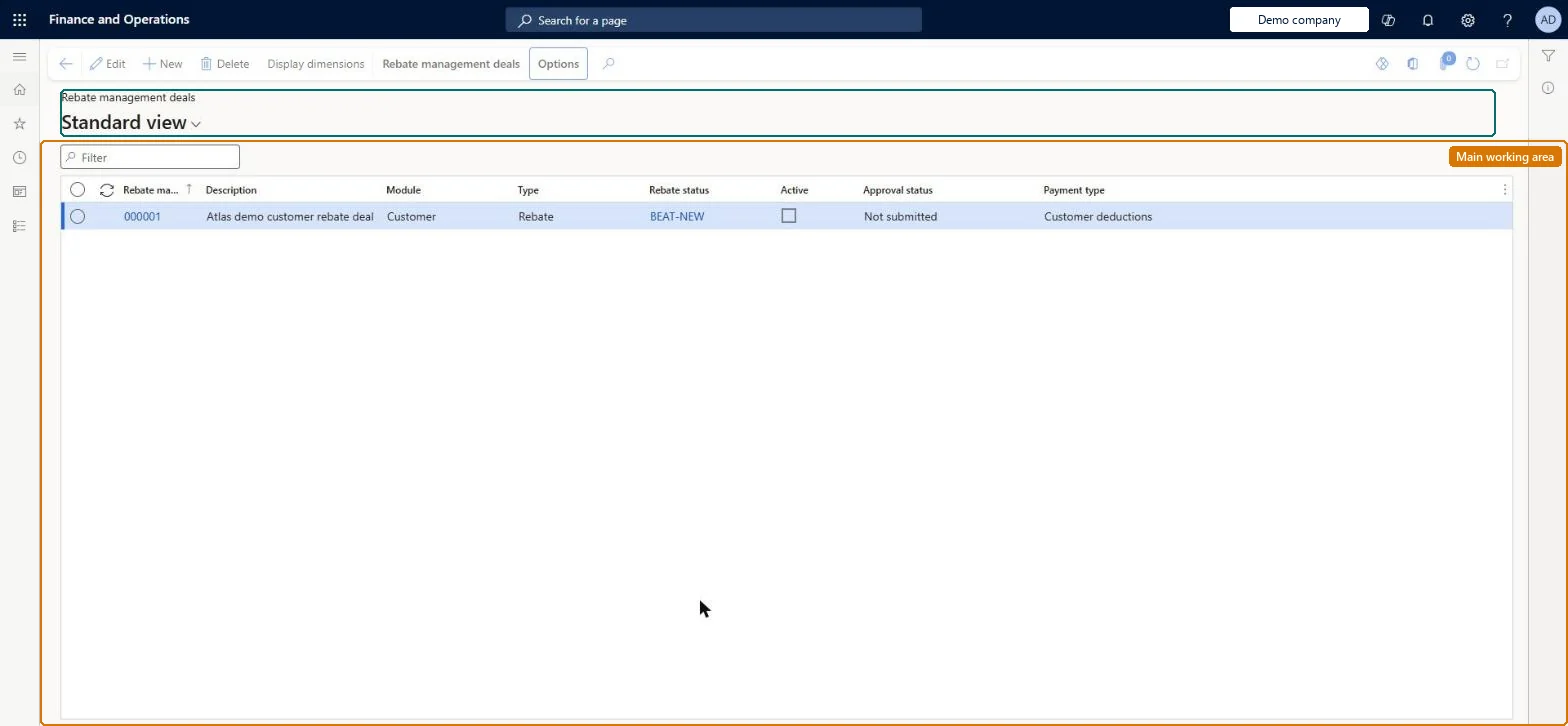
A list page that shows rebate management deals of all three types (customer rebates, customer royalties and vendor rebates) and is the main place to create and maintain the deals that control how rebates and royalties are calculated.
Accounts payable manager, Accounts receivable manager, Purchasing manager and 1 more role
Business process
Create rebate agreements in Dynamics 365 Supply Chain Management
Menu item
TAMRebateDealListPage
Main table
TAMRebateDeal
Data entity
TAMRebateAndDeductionsAgreementDealEntity
Show what matters for
PAGE GUIDEWhat the page does and how to use it8 sections. Choose a role to highlight what matters to you.
Everyone
1What it is and why
What it is
A list page that shows rebate management deals of all three types (customer rebates, customer royalties and vendor rebates) and is the main place to create and maintain the deals that control how rebates and royalties are calculated.
What you do here
Use this page to create a deal header, add deal lines that identify the customers or vendors, items, dates, basis and calculation method, submit the deal to workflow for activation, and then process, post and review the transactions the deal generates.
Example
For example, you can set up a stepped customer rebate deal line that pays 10 percent on the first $1,000 of sales value and 25 percent on the value above that, so that a $2,000 sale earns a $350 rebate.
The page in Dynamics 365. page title tab to open what to set or check
About the examples: Examples and screenshots in this guide use BEAT, a demo company in a Dynamics 365 test environment. Use your own company's codes and values instead of copying them.
Steps from Microsoft
Go to Rebate management > Rebate management deals > All rebate management deals.
On the Action Pane, select New.
In the Create new deal dialog box, set Rebate management deal, Description, Module, Type and Reconcile by.
Set Posting profile, Rebate output and Rebate currency, then select OK to create the deal header.
Open the deal and, on the Rebate management FastTab, select Add line; set Company, Account code, Account relation, Item code and Item relation.
On the Rebate management details FastTab, set the General, Dates and Lines tabs for the deal line, then select Save.
On the Action Pane, select Workflow > Submit to activate the deal.
Whether one rebate is calculated and reconciled for the whole deal, or separately for each deal line.Microsoft Learn
RebateReconciliation
Posting profile
The rebate management posting profile that determines the ledger and customer or vendor accounts used when the deal's transactions are posted; only available on the header when Reconcile by is Deal.Microsoft Learn
Rebate output
Whether the rebate is paid financially (credit note or AP debit note) or as free items on a sales order.Microsoft Learn
RebateOutputType
Rebate currency
The currency in which the rebate, deduction or royalty is paid.Microsoft Learn
RebateCurrencyCode
Calculation method
On each deal line, how the calculation lines combine (Stepped, Cumulative, Rolling or Total); this strongly affects the rebate amount.Microsoft Learn
CalculationMethod
Test checklist
Create a customer rebate deal with Reconcile by = Deal, a posting profile and Rebate output = Financial.
Add a deal line for one customer and item with Basis = Value, Transaction type = Invoice and one calculation line.
Select Workflow > Submit and check the deal becomes active after approval.
Create and invoice a qualifying sales order, then run Process > Rebate management for the period.
Open Transactions, post, and check the target transaction under Target transactions.
Hard to reverse: After a deal is activated through workflow, most setup is locked. Only Reconcile by, Cumulative guarantee, the posting profiles, document notes, currency and the from and to dates can change, and lines can be removed. Otherwise deactivate the deal and create a new one (or edit and resubmit it). Microsoft Learn
If you change it later
Once a deal has been activated through workflow, most of its setup is locked; to change it you must deactivate it and create a new deal (or deactivate, edit and resubmit it). Only a few header settings such as Reconcile by, the posting profiles, document notes, currency and the from and to dates can be changed on an active deal. Microsoft Learn
Technical architect
6Technical
Menu item
TAMRebateDealListPageChecked in Dynamics 365
Form
TAMRebateDealChecked in Dynamics 365
Table
TAMRebateDealShown as “REBATE MANAGEMENT DEALS” in Record infoKey field: DealChecked in Dynamics 365
Data entities
TAMRebateAndDeductionsAgreementDealEntityRebate management agreement deal Checked in Dynamics 365TAMRebateAndDeductionsAgreementDateSetupEntityRebate management agreement date setup Checked in Dynamics 365GUPTAMRebateAndDeductionsAgreementDateSetupCriterionEntityRebate management agreement date setup criterion - Pricing management Checked in Dynamics 365TAMRebateAndDeductionsAgreementHeaderEntityRebate management agreement header Checked in Dynamics 365GUPTAMRebateAndDeductionsAgreementHeaderV2EntityRebate management agreement header V2 - Pricing management Checked in Dynamics 365GUPRebateAmortizationScheduleDetailEntityRebate amortization schedule detail Checked in Dynamics 365
Who can open it
PrivilegesMaintain rebate management deals TAMRebateDetailsMaintainView rebate management deals TAMRebateDetailsViewDutiesMaintains customer rebate agreements PdsRebateAgreementMaintainInquire into customer rebate agreements TAMRebateCustomerAgreementsInquireInquire into customer rebates TAMRebateCustomerInquireInquire into vendor rebate agreements TAMVendRebateAgreementInquireMaintain vendor rebate agreements TAMVendRebateAgreementMaintainInquire into vendor rebates TAMVendRebateInquire4 security rolesAccounts receivable manager CustInvoiceAccountsReceivableManagerPurchasing manager TradePurchasingManagerSales manager TradeSalesManagerAccounts payable manager VendInvoiceAccountsPayableManagerChecked in Dynamics 365
Roles to set it up and use it
To set it up or change itSales manager TradeSalesManagerPurchasing manager TradePurchasingManagerTo use itAccounts payable manager VendInvoiceAccountsPayableManagerAccounts receivable manager CustInvoiceAccountsReceivableManagerGive people one of these roles. On this system, 4 roles can open this page.Checked in Dynamics 365
Actions on the page
Rebate management deals(Action Pane without tabs): New, Delete, Display dimensionsChecked in Dynamics 365