About the examples: Examples and screenshots in this guide use BEAT, a demo company in a Dynamics 365 test environment. Use your own company's codes and values instead of copying them.
Setup steps on this page
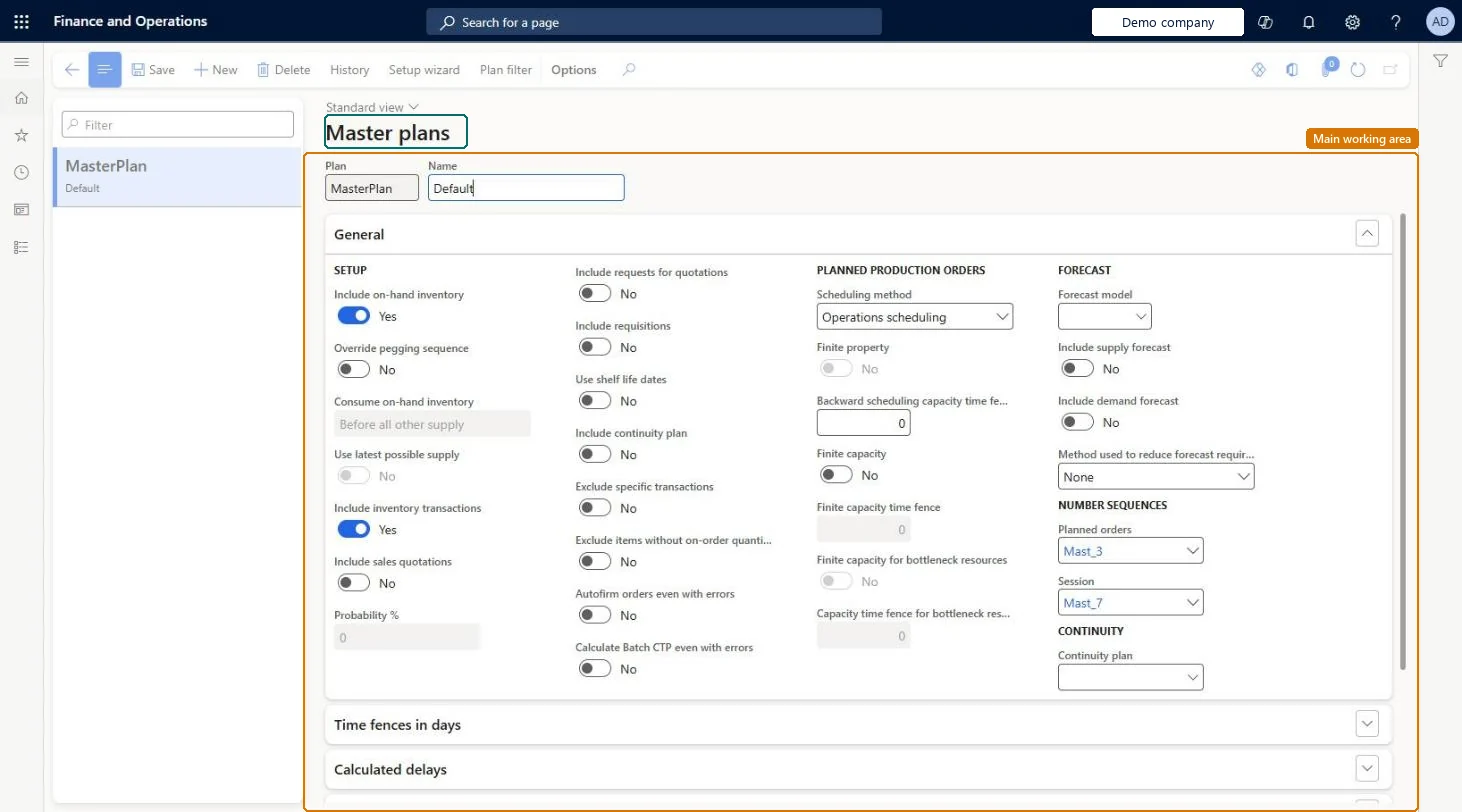
Set up Master plans
Use this page to set up the plans that support daily operations, simulate different planning strategies, and apply company policies.
Steps from Microsoft
Go to Master planning > Setup > Plans > Master plans.
Select an existing plan, or create a new one.
On the General FastTab, select the Forecast model and set Include supply forecast and Include demand forecast.
On the Time fences in days FastTab, set the options that should override the coverage group time fences, and enter the days.
Set the Action message time fence to Yes with 0 days unless planners review and apply action messages regularly; size the Coverage time fence to your planning horizon.Learn notes that calculating action messages makes master planning take longer, and that the coverage time fence should match the planning horizon for best performance.
Reversible: Change the plan settings at any time. The next run regenerates the plan; with Planning Optimization all plans are regenerative. Microsoft Learn
If you change it later
Time fences set on the plan override the coverage group time fences, and calculating action messages makes planning runs take longer. Microsoft Learn
Technical architect
6Technical
Menu item
ReqPlanSchedChecked in Dynamics 365
Form
ReqPlanSchedChecked in Dynamics 365
Table
ReqPlanShown as “PLANS” in Record infoChecked in Dynamics 365
Who can open it
PrivilegesMaintain master plans ReqPlanSchedMaintainView master plans ReqPlanSchedViewDutiesEnable intercompany planning process IntercompanyPlanningProcessEnableInquire into master scheduling policies ReqMasterSchedulingPoliciesInquireEnable master scheduling process ReqMasterSchedulingProcessEnableReview master scheduling performance ReqMasterSchedulingProcessPerfReview4 security rolesChief executive officer CompanyChiefExecutiveOfficerMaterials manager InventMaterialsManagerProduction manager ProdProductionManagerPurchasing manager TradePurchasingManagerChecked in Dynamics 365
Roles to set it up and use it
To set it up or change itProduction manager ProdProductionManagerMaterials manager InventMaterialsManagerTo use itPurchasing manager TradePurchasingManagerChief executive officer CompanyChiefExecutiveOfficerGive people one of these roles. On this system, 4 roles can open this page.Checked in Dynamics 365
Actions on the page
(Action Pane without tabs): History, Setup wizard, Plan filterChecked in Dynamics 365