Workspace page · Accounts payable
Vendor invoice automation
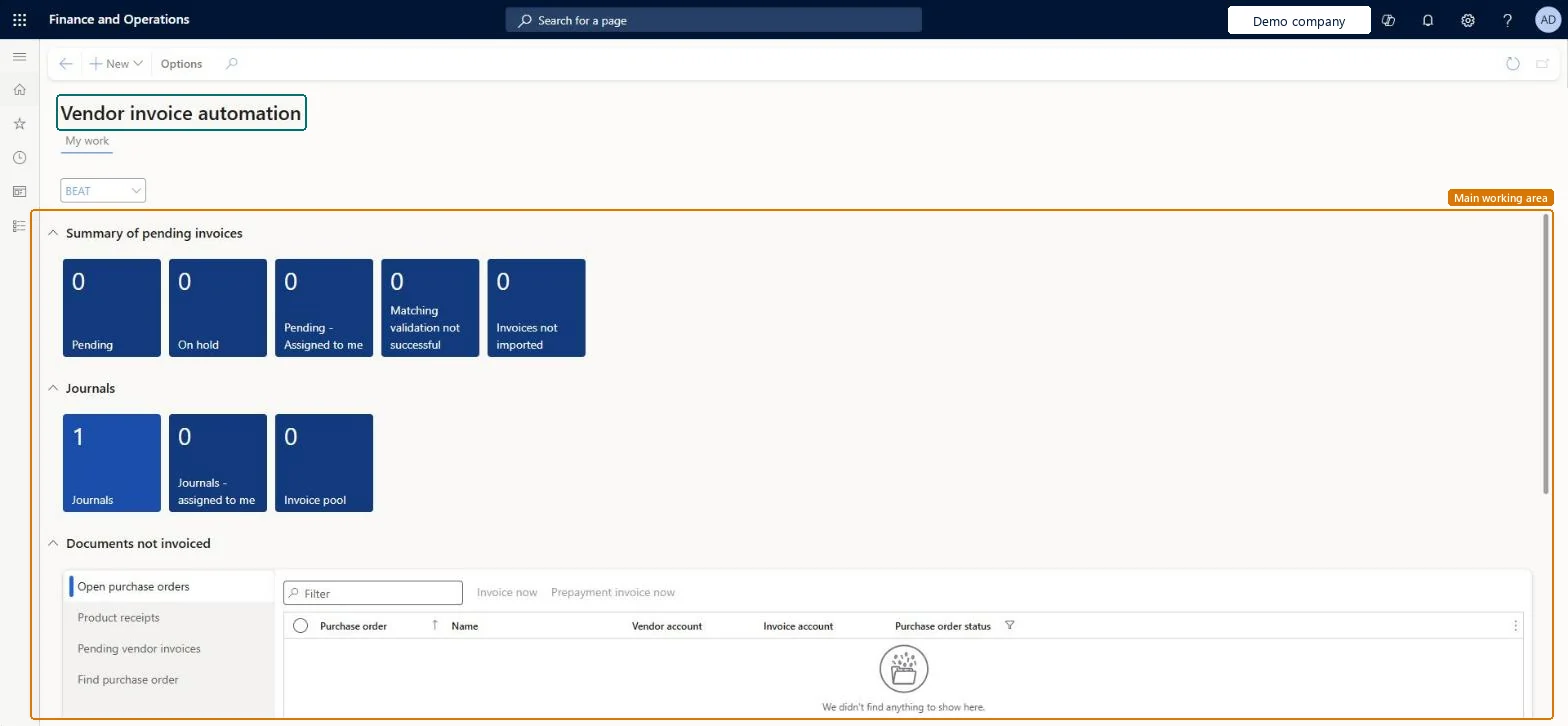
A workspace that shows information about vendor invoice processing, with a My work view (summary tiles, grids of documents not yet invoiced, related links) and an Analytics - All companies page built on Power BI.
- Used by
- Accounts payable clerk, Accounts payable manager
- Business process
- —
- Menu item
VendInvoiceAutomationWorkspace- Main table
- —
- Data entity
- —
- Setup steps
- —
Show what matters for
Everyone
1What it is and why
| What it is | A workspace that shows information about vendor invoice processing, with a My work view (summary tiles, grids of documents not yet invoiced, related links) and an Analytics - All companies page built on Power BI. |
|---|---|
| What you do here | Used to monitor pending vendor invoices (unposted journals, invoices on hold, invoices needing manual receipt match, failed matching, not submitted to workflow, not imported), create new invoice records, and review invoice automation metrics. |
| Example | From the Open purchase orders grid, select Invoice now to create a vendor invoice for a purchase order that isn't yet fully invoiced. |
Functional consultant · Solution architect
2Where it fits
| Business process | — |
|---|---|
| Menu path | Accounts payable › Workspaces › Vendor invoice automation |
| Set up first | Accounts payable workflows Microsoft Learn ↗Accounts payable parameters Microsoft Learn ↗Ledger Microsoft Learn ↗Currency exchange rates Microsoft Learn ↗ |
| Used next by | — |
| Related pages | Open vendor invoices Microsoft Learn ↗Invoice journal Microsoft Learn ↗Invoice history and matching details Microsoft Learn ↗Vendors on hold Microsoft Learn ↗All purchase orders Microsoft Learn ↗Open prepayments Microsoft Learn ↗ |
End user · Functional consultant
3How to do it
Microsoft's steps
- In the Feature management workspace, find the Vendor invoice automation feature and select Enable now.
- Set up a vendor invoice workflow in Accounts payable workflows.
- Open Accounts payable parameters and select the Vendor invoice automation tab.
- Set Automatically submit imported invoices to workflow to Yes.
- If product receipts should be matched automatically, set Automatically match product receipts to invoices lines to Yes.
- In System parameters, set the System currency and System exchange rate fields.
- On the Ledger page, set the Accounting currency and Exchange rate type fields.
- Enter exchange rates between the transaction, accounting and system currencies.
- In Entity store, find Vendor invoice automation measure and select Refresh.
Source: Microsoft Learn ↗
Field guide
| Field | What it means | Worked example | Table column |
|---|---|---|---|
| Company | Chooses which company the workspace shows and which company new records are created in.Microsoft Learn ↗ | — | — |
| Summary of pending invoices | Tiles that show journals not yet posted, invoices on hold and invoices stuck in automation.Microsoft Learn ↗ | — | — |
| Manual receipt match needed | A tile for invoices that still need to be matched to product receipts by hand.Microsoft Learn ↗ | — | — |
| Invoices not submitted to workflow | A tile for invoices that have not yet gone into the approval workflow.Microsoft Learn ↗ | — | — |
| Recover vendor invoices | A tile for releasing invoices that are locked so they can be edited again; it needs a parameter turned on.Microsoft Learn ↗ | — | — |
| Open purchase orders | A grid of purchase orders not yet fully invoiced, with buttons to invoice them now.Microsoft Learn ↗ | — | — |
| Product receipts | A grid of product receipts that are not yet fully invoiced.Microsoft Learn ↗ | — | — |
| Pending vendor invoices | A grid of vendor invoices that have not been sent to workflow yet.Microsoft Learn ↗ | — | — |
Functional consultant
4Setup decisions
| Setup step | Recommended value and why | Decision · common mistake · test |
|---|---|---|
| — No setup is made on this page. | ||
Solution architect
5Design impact
| Shared or per company | — |
|---|---|
| Can it be undone | — |
| Feature or country | — |
| If you change it later | The company chosen in the Company field changes everything shown in the workspace, and new records are created in that company rather than the one you signed in to. Microsoft Learn ↗ |
Technical architect
6Technical
| Menu item | VendInvoiceAutomationWorkspace Checked in Dynamics 365 |
|---|---|
| Form | VendInvoiceAutomationWorkspace Checked in Dynamics 365 |
| Table | — |
| Data entities | — |
| Who can open it | PrivilegesVendor invoice entry VendInvoiceWorkspaceDutiesView vendor invoice entry workspace VendInvoiceWorkspaceInquire2 security rolesAccounts payable clerkVendInvoiceAccountsPayableClerkAccounts payable manager VendInvoiceAccountsPayableManager |
| Actions on the page | Buttons: NewChecked in Dynamics 365 |
Developer
7Developer
| Open it directly | https://<your-environment>/?mi=VendInvoiceAutomationWorkspace |
|---|---|
| Integrate with | — |
| Table definition | — |
Everyone
8Sources and checks
- learn.microsoft.com/dynamics365/finance/accounts-payable/vendor-invoices-workspace
- learn.microsoft.com/dynamics365/finance/accounts-payable/vendor-invoices-workspace
- Checked in a working Dynamics 365 system, version 10.0.49: the menu item, form, table and security, the page.