BeyondERP.Newsletter
Menu

Setup step on the Slotting templates page · Warehouse management

Set up Slotting templates

Use this page to plan picking locations before orders are released and to create the replenishment work that stocks them.

Used by
Field Service Integration User, Production supervisor, Process engineer and 3 more roles
Business process
Manage warehouse operations
Menu item
WHSSlotTemplate
Main table
WHSSlotTemplate
Data entity
WHSWarehouseSlottingTemplateV2Entity
Setup steps
1 on this page
Show what matters for
SETUP GUIDEHow to set it up8 sections. Choose a role to highlight what matters to you.
Everyone

1What it is and why

What it isA setup page where you define slotting templates, which control how demand is assigned to picking locations in a warehouse.
What you do hereUse this page to plan picking locations before orders are released and to create the replenishment work that stocks them.
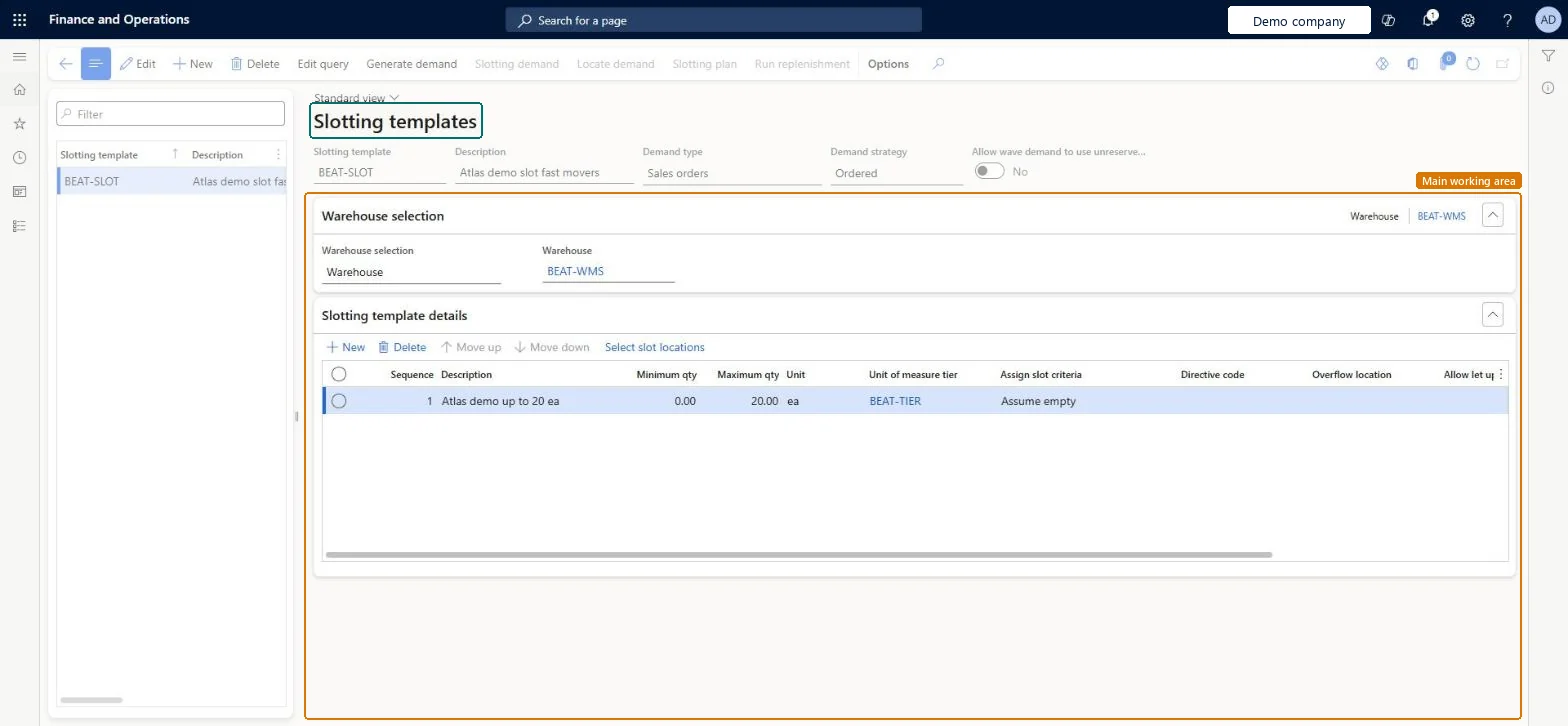
Slotting templates page in Dynamics 365
The page in Dynamics 365. page title tab to open what to set or check
Functional consultant · Solution architect

2Where it fits

End user · Functional consultant

3How to do it

About the examples: Examples and screenshots in this guide use BEAT, a demo company in a Dynamics 365 test environment. Use your own company's codes and values instead of copying them.

Setup steps on this page

Set up Slotting templates

Use this page to plan picking locations before orders are released and to create the replenishment work that stocks them.

Steps from Microsoft

  1. Go to Warehouse management > Setup > Replenishment > Slotting templates.
  2. On the Action Pane, select New.
  3. In the header, set the Slotting template, Description, Demand type and Demand strategy.
  4. On the Warehouse selection FastTab, choose All, Warehouse group or Warehouse.
  5. On the Slotting template details FastTab, select New and set the Sequence, the quantities, the Unit of measure tier, the Assign slot criteria and the Directive code.
  6. Select Save.

Source: Microsoft Learn

Fields on the page

FieldWhat it meansTable column
Demand strategyDecides which quantity on an order counts as demand: ordered, reserved or released.Microsoft Learn SlotDemandStrategy
Minimum qtyThe smallest quantity of demand that the line applies to.Microsoft Learn SlotMinQty
Unit of measure tierThe units of measure of demand that are valid for the line.Microsoft Learn SlotUOMTierId
Assign slot criteriaHow the system treats existing inventory in the picking area. Assume empty ignores it.Microsoft Learn AssignSlotCriteria
Directive codeThe location directive used to find the picking location for the replenishment work.Microsoft Learn LocDirHintCode
Overflow locationWhere inventory goes when no location can be found for the quantity.Microsoft Learn
Allow let upCreates movement work to clear locations that hold inventory when demand cannot be slotted.Microsoft Learn AllowLetUps

Test checklist

  1. Create sales orders for the template's warehouse.
  2. On the Slotting templates page, select Generate demand and review Slotting demand.
  3. Select Locate demand and open Slotting plan; check no demand is highlighted in red.
  4. Select Run replenishment and check replenishment work is created using the location directive with the line's directive code.

Source: Microsoft Learn

Functional consultant

4Setup decisions

Setup stepRecommended value and whyDecision, common mistake and test
Set up Slotting templatesAssign slot criteria: Consider qty with Allow let up set to Yes, unless you need slotting to reduce replenishment by existing on-hand (Consider on-hand)Learn says let-up works best when Assign slot criteria is Consider qty. Consider on-hand reduces the slotted demand by unreserved on-hand at the target location, but then let-ups are no longer allowed for any line in the template.Which demand strategy should the slotting template use?Setting one line to Consider on-hand without realising it switches off let-ups for every line in the template, so demand that can't be slotted stays unslotted.
Solution architect

5Design impact

Shared or per companyPer company: each legal entity has its own records. Microsoft data model
Can it be undoneReversible: Template lines can be changed at any time; the next Generate demand, Locate demand and Run replenishment cycle uses the new setup. Replenishment work already created isn't changed.
If you change it laterSetting Assign slot criteria to Consider on-hand on any line stops the system allowing let-ups for every line in the template. Microsoft Learn
Technical architect

6Technical

Menu itemWHSSlotTemplate Checked in Dynamics 365
FormWHSSlotTemplate Checked in Dynamics 365
TableWHSSlotTemplateShown as “SLOTTING TEMPLATES” in Record infoKey field: SlotTemplateIdChecked in Dynamics 365
Data entitiesWHSWarehouseSlottingTemplateV2EntitySlotting templates V2 Microsoft data model
Who can open itPrivilegesMaintain slotting templates WHSSlotTemplateMaintainView slotting templates WHSSlotTemplateViewDutiesInquire into warehouse operation master WMSWarehouseOperationMasterInquireMaintain warehouse operation master WMSWarehouseOperationMasterMaintain
6 security rolesField Service Integration User FieldServiceIntegrationUserProduction supervisor ProdProductionSupervisorProcess engineer RouteProcessEngineerProcess engineering manager RouteProcessEngineeringManagerWarehouse planner WHSWarehousePlannerWarehouse manager WMSWarehouseManager
Checked in Dynamics 365
Roles to set it up and use itTo set it up or change itWarehouse manager WMSWarehouseManagerProcess engineer RouteProcessEngineerTo use itWarehouse planner WHSWarehousePlannerProduction supervisor ProdProductionSupervisorProcess engineering manager RouteProcessEngineeringManagerField Service Integration User FieldServiceIntegrationUserGive people one of these roles. On this system, 6 roles can open this page.Checked in Dynamics 365
Actions on the page(Action Pane without tabs): Edit query, Generate demand, Slotting demand, Locate demand, Slotting plan, Run replenishmentChecked in Dynamics 365
Developer

7Developer

Open it by URLhttps://<your-environment>/?mi=WHSSlotTemplate
Integrate withWHSWarehouseSlottingTemplateV2Entity data entity Microsoft data model
Data migrationWHSWarehouseSlottingTemplateV2Entity (Slotting templates V2): loaded for each company.Microsoft Learn
Table definitionWHSSlotTemplate columns and relations Microsoft data model
Everyone

8Sources

To cite this step: WM-SETUP-180, Set up Slotting templates. Beyond ERP Atlas Hub, 2026-11-11. https://www.beyonderp.cloud/atlas/step/WM-SETUP-180