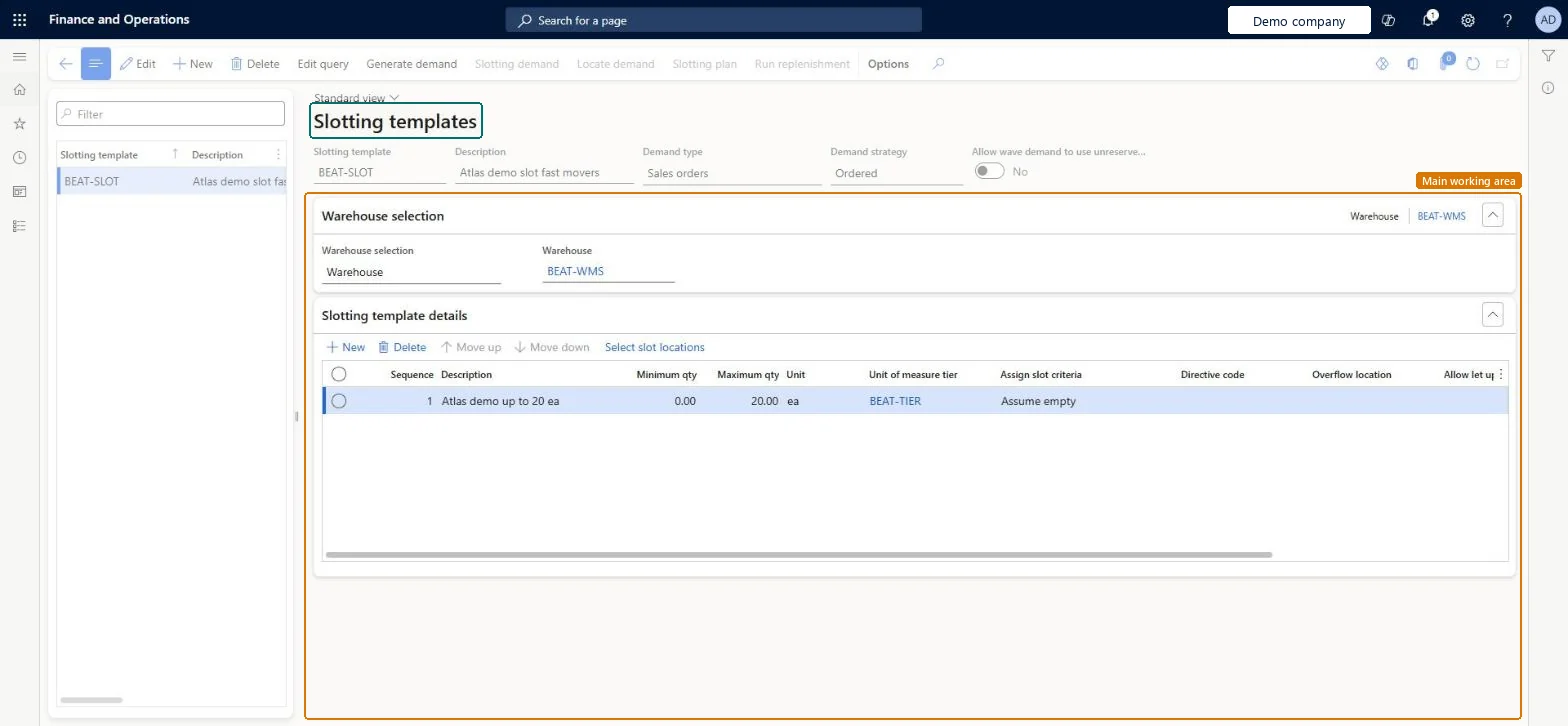
About the examples: Examples and screenshots in this guide use BEAT, a demo company in a Dynamics 365 test environment. Use your own company's codes and values instead of copying them.
Setup steps on this page
Set up Slotting templates
Use this page to plan picking locations before orders are released and to create the replenishment work that stocks them.
Steps from Microsoft
Go to Warehouse management > Setup > Replenishment > Slotting templates.
On the Action Pane, select New.
In the header, set the Slotting template, Description, Demand type and Demand strategy.
On the Warehouse selection FastTab, choose All, Warehouse group or Warehouse.
On the Slotting template details FastTab, select New and set the Sequence, the quantities, the Unit of measure tier, the Assign slot criteria and the Directive code.
Assign slot criteria: Consider qty with Allow let up set to Yes, unless you need slotting to reduce replenishment by existing on-hand (Consider on-hand)Learn says let-up works best when Assign slot criteria is Consider qty. Consider on-hand reduces the slotted demand by unreserved on-hand at the target location, but then let-ups are no longer allowed for any line in the template.
Reversible: Slotting templates can be edited at any time. Changes apply to the next slotting run; replenishment work already created from an earlier plan isn't changed. Microsoft Learn
If you change it later
Setting Assign slot criteria to Consider on-hand on any line stops the system allowing let-ups for every line in the template. Microsoft Learn
Technical architect
6Technical
Menu item
WHSSlotTemplateChecked in Dynamics 365
Form
WHSSlotTemplateChecked in Dynamics 365
Table
WHSSlotTemplateShown as “SLOTTING TEMPLATES” in Record infoKey field: SlotTemplateIdChecked in Dynamics 365
PrivilegesMaintain slotting templates WHSSlotTemplateMaintainView slotting templates WHSSlotTemplateViewDutiesInquire into warehouse operation master WMSWarehouseOperationMasterInquireMaintain warehouse operation master WMSWarehouseOperationMasterMaintain6 security rolesField Service Integration User FieldServiceIntegrationUserProduction supervisor ProdProductionSupervisorProcess engineer RouteProcessEngineerProcess engineering manager RouteProcessEngineeringManagerWarehouse planner WHSWarehousePlannerWarehouse manager WMSWarehouseManagerChecked in Dynamics 365
Roles to set it up and use it
To set it up or change itWarehouse manager WMSWarehouseManagerProcess engineer RouteProcessEngineerTo use itWarehouse planner WHSWarehousePlannerProduction supervisor ProdProductionSupervisorProcess engineering manager RouteProcessEngineeringManagerField Service Integration User FieldServiceIntegrationUserGive people one of these roles. On this system, 6 roles can open this page.Checked in Dynamics 365
Actions on the page
(Action Pane without tabs): Edit query, Generate demand, Slotting demand, Locate demand, Slotting plan, Run replenishmentChecked in Dynamics 365