Use the Sales order processing and inquiry workspace
Sales and marketingWorkspaces
SalesOrderProcessingWorkspace
Used by
Credit management clerk, Accounts receivable clerk, Accounts receivable manager and 15 more roles
Business process
Enter sales orders
Menu item
SalesOrderProcessingWorkspace
Setup steps
1 on this page
Show what matters for
SETUP GUIDEHow to set it up8 sections. Choose a role to highlight what matters to you.
Everyone
1What it is and why
What it is
A workspace for sales order processors: a starting point for creating sales orders, with lists of orders and favorites that include the delayed order lines to follow up.
What you do here
Use this workspace to start new sales orders and to work through the order lines that need follow-up, such as delayed lines for which you look for delivery alternatives.
Example
For example, a BEAT order processor opens the workspace at 08:00, sees that line 2 of SO-001234 for customer BEAT-000123 (40.00 pcs) is delayed, opens Delivery alternatives from the Delayed order lines list and moves the line to warehouse WH-21, which can ship 40.00 pcs two days earlier.
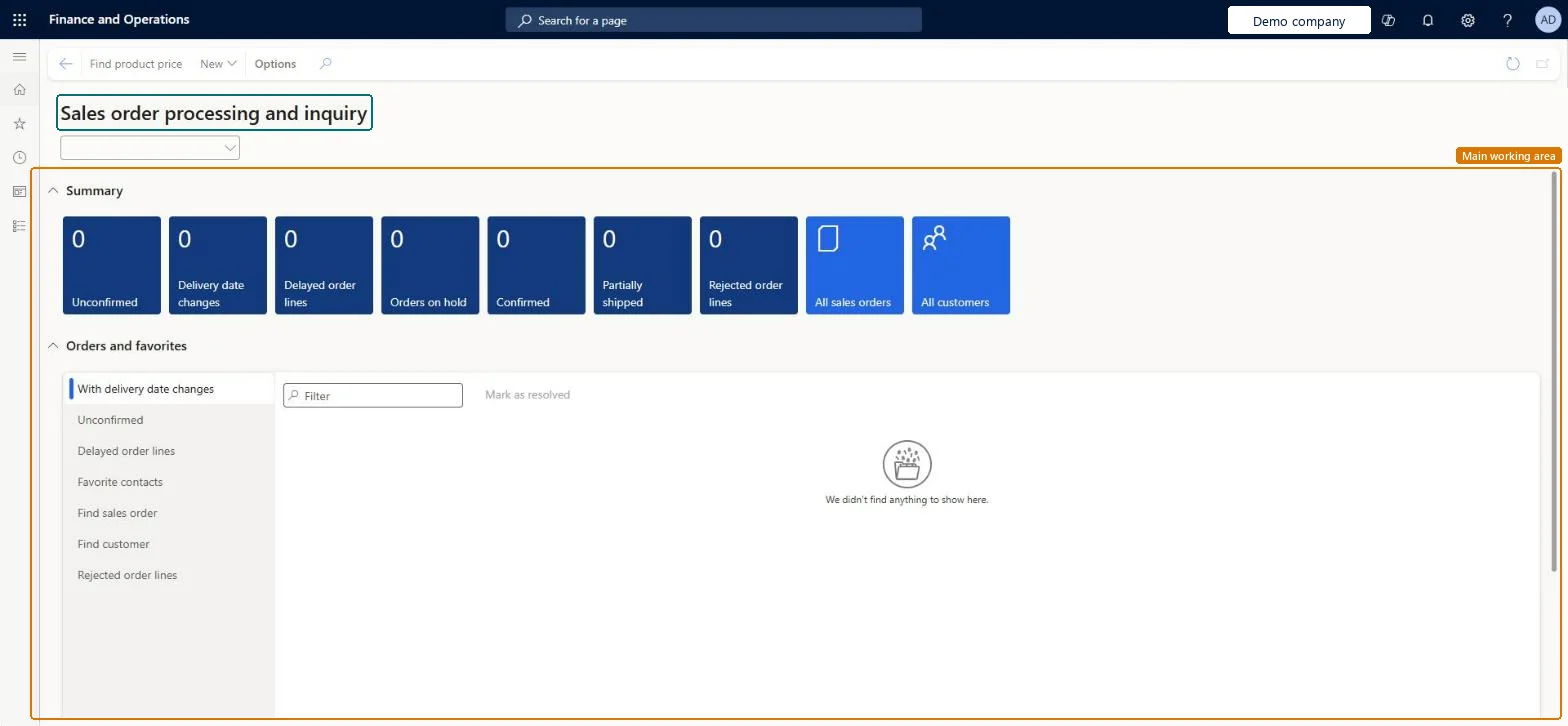
The page in Dynamics 365. page title tab to open what to set or check
About the examples: Examples and screenshots in this guide use BEAT, a demo company in a Dynamics 365 test environment. Use your own company's codes and values instead of copying them.
Setup steps on this page
Use the Sales order processing and inquiry workspace
Start sales orders and follow up delayed order lines from one workspace.
Steps from Microsoft
Go to Sales and marketing > Workspaces > Sales order processing and inquiry.
To start a new order, select New, then Sales order, select the customer account and select OK.
To follow up, open Orders and favorites and select Delayed order lines.
Select a delayed line and select Delivery alternatives. The page opens only when the line's Delivery date control is set to a value other than None.
Pick the alternative with the best receipt date and select OK to update the sales order line.
The section of the workspace that holds the order lists, including the Delayed order lines list.Microsoft Learn
Orders and favorites > Delayed order lines
Delayed order lines
A list of sales order lines that are delayed; from it you open Delivery alternatives for the selected line.Microsoft Learn
SO-001234 line 2, 40.00 pcs
Delivery alternatives
Opens the Delivery alternatives page for the selected line. It opens only when the line's mandatory information is filled in and its Delivery date control isn't None.Microsoft Learn
Common errors and fixes
Message
What to do
Delivery alternatives can't be opened for the selected line.
Fill in all mandatory line information and set Delivery date control on the line to a value other than None, then try again. Microsoft Learn
Test checklist
On a test item, set Delivery date control to ATP and create a sales order line with a requested ship date the stock can't meet.
Open the workspace and check that the line appears under Orders and favorites > Delayed order lines.
Select Delivery alternatives and check that the suggestions are sorted by receipt date.
Select a suggestion and check that the sales order line now shows the new site/warehouse and dates.
Give sales order processors this workspace as their start page and set up Delivery date control (for example ATP) on the items, so the Delayed order lines list and Delivery alternatives work.Delivery alternatives only open when the line's Delivery date control isn't None; without it the follow-up list can't offer new dates or warehouses.
On the live system, Sales manager, Accounts receivable clerk, Accounts receivable manager and Rental manager use this page.
Checked in Dynamics 365
Solution architect
5Design impact
Shared or per company
Per company: the lists show the sales orders of the legal entity you are signed in to. Microsoft Learn
Can it be undone
Reversible: The workspace changes no data; applied alternatives can be edited on the order.
If you change it later
The workspace only lists data. Changes happen when you act from it: choosing a delivery alternative updates the sales order line, and if its quantity is lower than the line quantity, a delivery schedule splits the line in two. Microsoft Learn
Technical architect
6Technical
Menu item
SalesOrderProcessingWorkspaceChecked in Dynamics 365
Form
SalesOrderProcessingWorkspaceChecked in Dynamics 365
Who can open it
PrivilegesView sales order processing workspace SalesOrderProcessingWorkspaceViewDutiesInquire into sales order progress SalesOrderProgressInquire19 security rolesCredit management clerk CredManClerkAccounts receivable clerk CustInvoiceAccountsReceivableClerkAccounts receivable manager CustInvoiceAccountsReceivableManagerMCRTestUserRoleAccounts receivable centralized payments clerk PaymAccountsReceivableCentralPaymClerkAccounts receivable payments clerk PaymAccountsReceivablePaymentsClerkProject manager ProjProjectManagerRental clerk RentalClerkRental coordinator agent RentalCoordinatorAgentRental manager RentalManagerRental purchasing manager RentalPurchasingManagerRental representative RentalRepresentativeProduction planner ReqProductionPlannerRetail service RetailServiceRetail store manager RetailStoreManagerCustomer service representative TradeCustomerServiceRepresentativeSales clerk TradeSalesClerkSales manager TradeSalesManagerSales representative TradeSalesRepresentativeChecked in Dynamics 365
Roles to set it up and use it
To use itSales manager TradeSalesManagerRental manager RentalManagerRental coordinator agent RentalCoordinatorAgentAccounts receivable clerk CustInvoiceAccountsReceivableClerkAccounts receivable manager CustInvoiceAccountsReceivableManagerGive people one of these roles. On this system, 18 roles can open this page.Checked in Dynamics 365
Actions on the page
Options: Personalize, Page options, ShareChecked in Dynamics 365
Load order: The workspace has no data entity in Data management. A workspace has no table of its own; migrate the sales orders it lists through the sales order entities (Sales order headers V2 and Sales order lines V2).Checked in Dynamics 365
Checked in a working Dynamics 365 system, version 10.0.49: the menu item, form, table and security, the page.
To cite this step: SM-ORD-010, Use the Sales order processing and inquiry workspace. Beyond ERP Atlas Hub, 2026-11-11. https://www.beyonderp.cloud/atlas/step/SM-ORD-010