PAGE GUIDEWhat the page does and how to use it8 sections. Choose a role to highlight what matters to you.
Everyone
1What it is and why
What it is
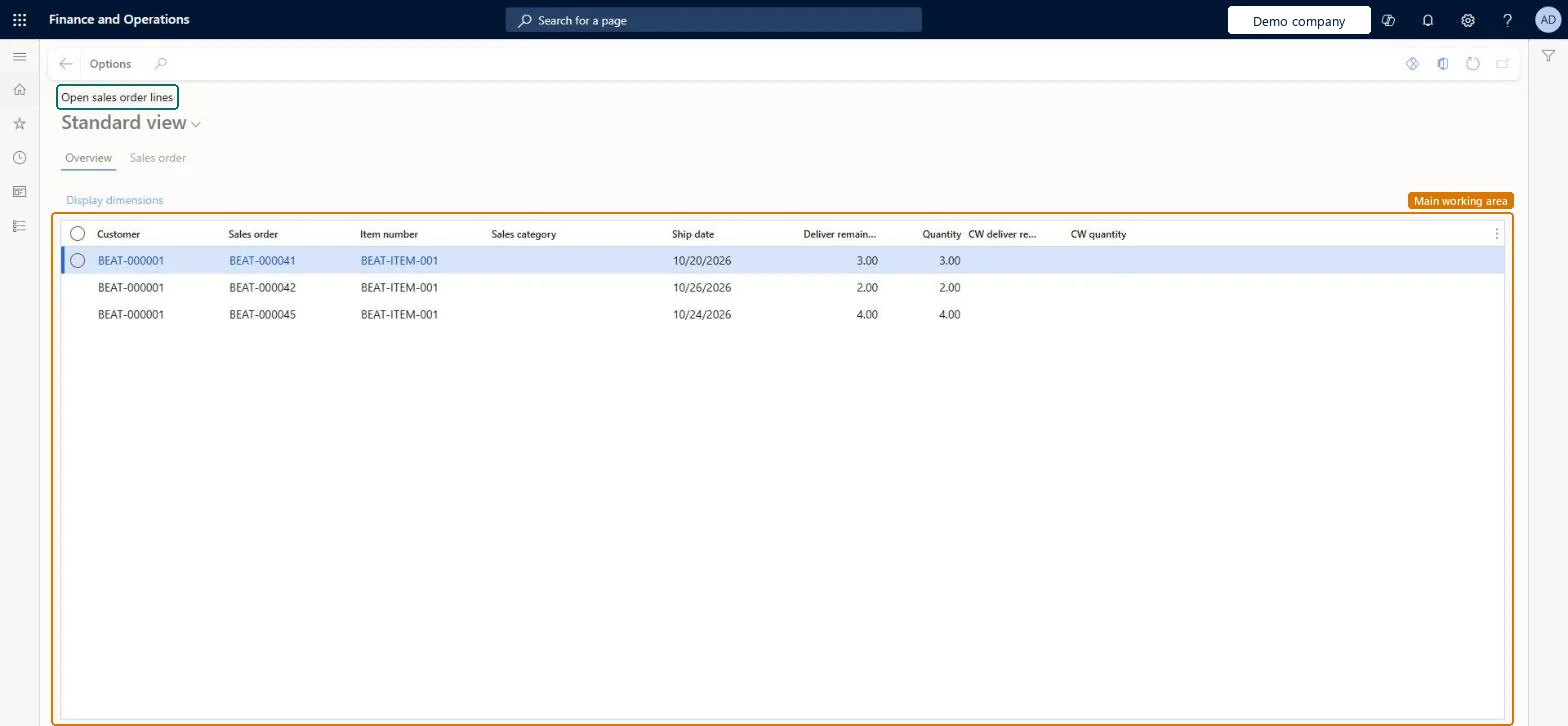
A list page that shows open sales order lines with the customer, sales order, item, ship date, deliver remainder and quantity.
What you do here
Use this page to see which sales order lines are still open across all customers and orders, and what quantity remains to be delivered.
Example
For example, BEAT's planner opens Open sales order lines on Friday, sorts by Ship date and finds 7 lines due Monday with a total Deliver remainder of 230.00 pcs, so the warehouse plans picking for them first.
The page in Dynamics 365. page title tab to open what to set or check
About the examples: Examples and screenshots in this guide use BEAT, a demo company in a Dynamics 365 test environment. Use your own company's codes and values instead of copying them.
Setup steps on this page
Plan shipments from open sales order lines
See which open lines are due and how much remains to ship.
Steps from Microsoft
Go to Sales and marketing > Sales orders > Open orders > Open sales order lines.
Sort or filter by Ship date to see the lines due next.
Compare Deliver remainder with Quantity to spot partly shipped lines.
Select Display dimensions to show the site and warehouse of each line.
Open the Sales order tab for the order and generate the picking list for the lines due.
The quantity on the line that is still to be delivered.Microsoft Learn
30.00
Ship date
The date the line is planned to ship.Checked in Dynamics 365
2026-11-16
Quantity
The ordered quantity of the line.Checked in Dynamics 365
50.00
Common errors and fixes
Message
What to do
Unable to post packing slip when stopping a sales order line after confirming the outbound shipment A quantity cannot be picked.
On the related lines set Stopped to No (Line details FastTab, General tab), post the packing slip, then handle the customer's cancellation as a return. Microsoft Learn
Test checklist
Create an order line of 50.00 pcs.
Post a packing slip with Update 20.00.
Open Open sales order lines and check Deliver remainder is 30.00.
Filter by Ship date first and show the site and warehouse dimensions.Lines from different sites ship on separate packing slips, so planning per warehouse needs the dimensions shown.
To set it up or change itRental manager RentalManagerRental coordinator agent RentalCoordinatorAgentRental sales manager RentalSalesManagerSales representative TradeSalesRepresentativeSales clerk TradeSalesClerkTo use itSales manager TradeSalesManagerAccounts receivable clerk CustInvoiceAccountsReceivableClerkAccounts receivable manager CustInvoiceAccountsReceivableManagerRental representative RentalRepresentativeAccounts receivable centralized payments clerk PaymAccountsReceivableCentralPaymClerkGive people one of these roles. On this system, 28 roles can open this page.Checked in Dynamics 365
Actions on the page
Options: Personalize, Page options, ShareChecked in Dynamics 365
SalesOrderLineV2Entity Sales order lines V2: loaded for each company.Load order: Load Sales order headers V2 first, then Sales order lines V2: the lines entity needs the header created first.Load first: Sales order headers V2Microsoft Learn