Credit management clerk, Credit management manager, Project assistant and 7 more roles
Business process
Manage sales order changes
Menu item
SalesDeleteHistory
Main table
SalesParmTable
Setup steps
1 on this page
Show what matters for
SETUP GUIDEHow to set it up8 sections. Choose a role to highlight what matters to you.
Everyone
1What it is and why
What it is
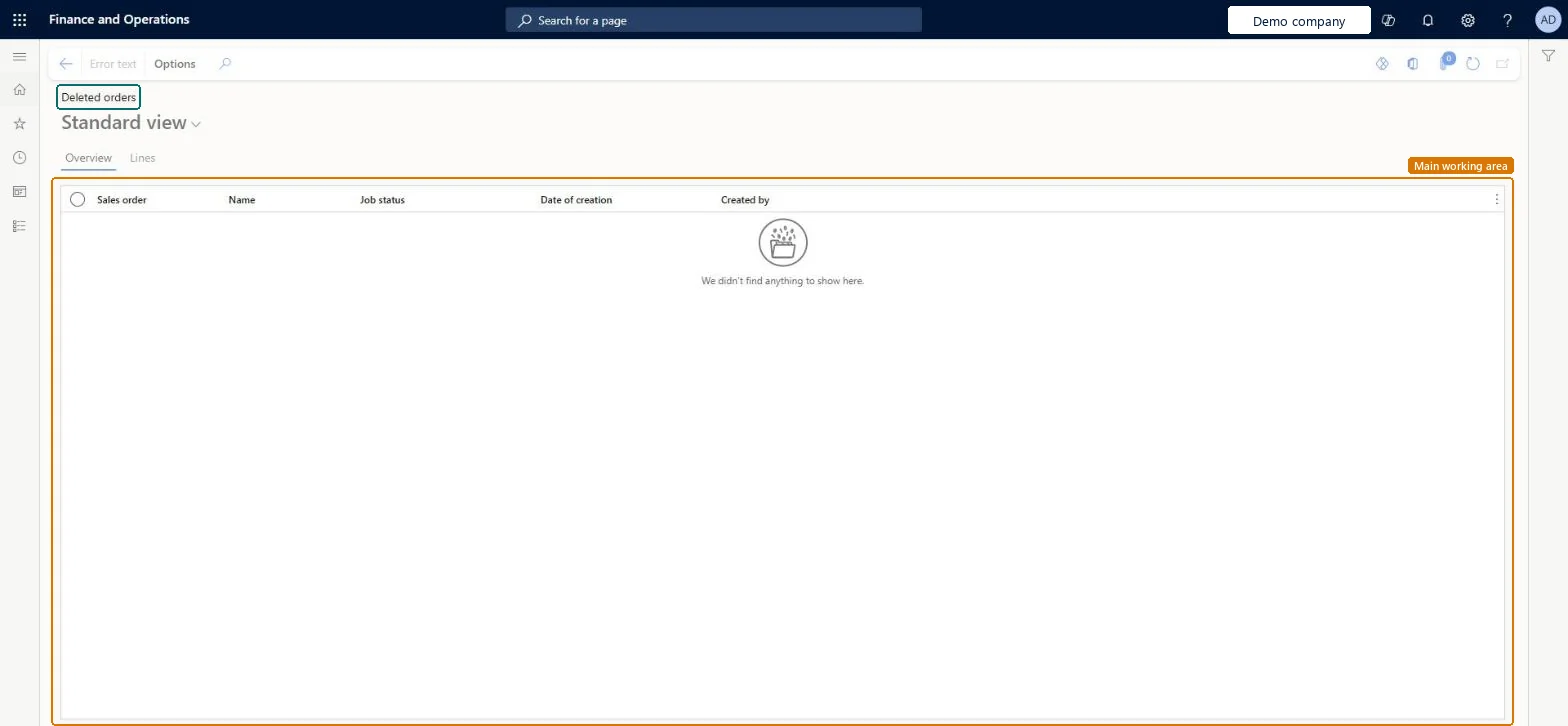
An inquiry page for deleted orders that reads the Sales order - update table (SalesParmTable), the table behind the Order posting history pages, and shows each record's sales order, job status, date of creation, creator and error text.
What you do here
Use it to check the update jobs recorded for orders that were deleted, for example whether an update had failed before the order was removed. It differs from Voided sales orders, which reads the Voided sales orders table and shows the order header and lines.
Example
For example, BEAT deleted order SO-001250 after a failed invoice update. Deleted orders shows the update record for SO-001250 with Job status in error, created on 03.11.2026 by user mia; Error text shows why the invoice update stopped.
The page in Dynamics 365. page title tab to open what to set or check
About the examples: Examples and screenshots in this guide use BEAT, a demo company in a Dynamics 365 test environment. Use your own company's codes and values instead of copying them.
Setup steps on this page
Check update jobs of deleted orders
See whether a deleted order still had an update waiting or in error.
How to use it
Go to Sales and marketing > Inquiries and reports > History > Deleted orders.
Find the deleted order by Sales order and read its Job status and Date of creation.
For a job in error, select Error text to read why the update stopped, and open the Lines tab to see the lines it covered.
Compare with Voided sales orders to see the deleted order itself, then plan how the remaining update records are cleaned up with Sales update history cleanup.
Source: Checked in Dynamics 365
Fields on the page
Field
What it means
Example
Sales order
The deleted sales order the update record belongs to.Checked in Dynamics 365
SO-001250
Job status
Whether the update was executed, ended in error or is still waiting.Microsoft Learn
Date of creation
When the update record was created.Checked in Dynamics 365
03.11.2026
Created by
The user who started the update.Checked in Dynamics 365
Common errors and fixes
Message
What to do
Job status shows an error for a deleted order.
Select Error text to read the reason. Old executed and erroneous update records are removed by Sales update history cleanup. Microsoft Learn
Test checklist
Start an invoice update for a test order and let it end in error, or leave it waiting.
Delete the test order.
Open Deleted orders and filter on the order number.
Check that one update record is listed with the Job status you expect and that Error text opens for an error.
Filter on the sales order number first, then read Job status and Error text.One order can have several update records, one per confirmation, picking list, packing slip or invoice run; the number shows them all together.
On the live system, Rental manager, Rental coordinator agent, Rental sales manager, Sales clerk and Retail service use this page; 10 roles can open it in total. No Feature management feature is needed to open it.
Checked in Dynamics 365
Solution architect
5Design impact
Shared or per company
Per company: the update records belong to the legal entity of the deleted order. Microsoft data model
Can it be undone
Reversible: Running the inquiry or report changes no data.
If you change it later
Sales update history cleanup deletes executed, erroneous or all update records older than the age or date you set, so records shown here disappear after that job runs. Microsoft Learn
Technical architect
6Technical
Menu item
SalesDeleteHistoryChecked in Dynamics 365
Form
SalesDeleteHistoryChecked in Dynamics 365
Table
SalesParmTableShown as “Sales order - update table” in Record infoKey field: SalesIdChecked in Dynamics 365
To set it up or change itRental manager RentalManagerRental coordinator agent RentalCoordinatorAgentRental sales manager RentalSalesManagerSales clerk TradeSalesClerkRetail service RetailServiceGive people one of these roles. On this system, 10 roles can open this page.Checked in Dynamics 365
Actions on the page
Options: Personalize, Page options, ShareChecked in Dynamics 365
Developer
7Developer
Open it by URL
https://<your-environment>/?mi=SalesDeleteHistory
Data migration
Load order: Deleted orders has no data entity in Data management. No standard entity is backed by its table (SalesParmTable). The records are update history created by posting, so there is nothing to migrate.Load first: Sales update historyChecked in Dynamics 365
Checked in a working Dynamics 365 system, version 10.0.49: the menu item, form, table and security, the page.
To cite this step: SM-INQ-030, Check update jobs of deleted orders. Beyond ERP Atlas Hub, 2026-11-11. https://www.beyonderp.cloud/atlas/step/SM-INQ-030