Credit management clerk, Accounts receivable clerk, Accounts receivable manager and 15 more roles
Business process
Manage sales order changes
Menu item
SalesTableDelete
Main table
SalesTableDelete
Data entity
SalesVoidedSalesOrderHeaderEntity
Setup steps
1 on this page
Show what matters for
SETUP GUIDEHow to set it up8 sections. Choose a role to highlight what matters to you.
Everyone
1What it is and why
What it is
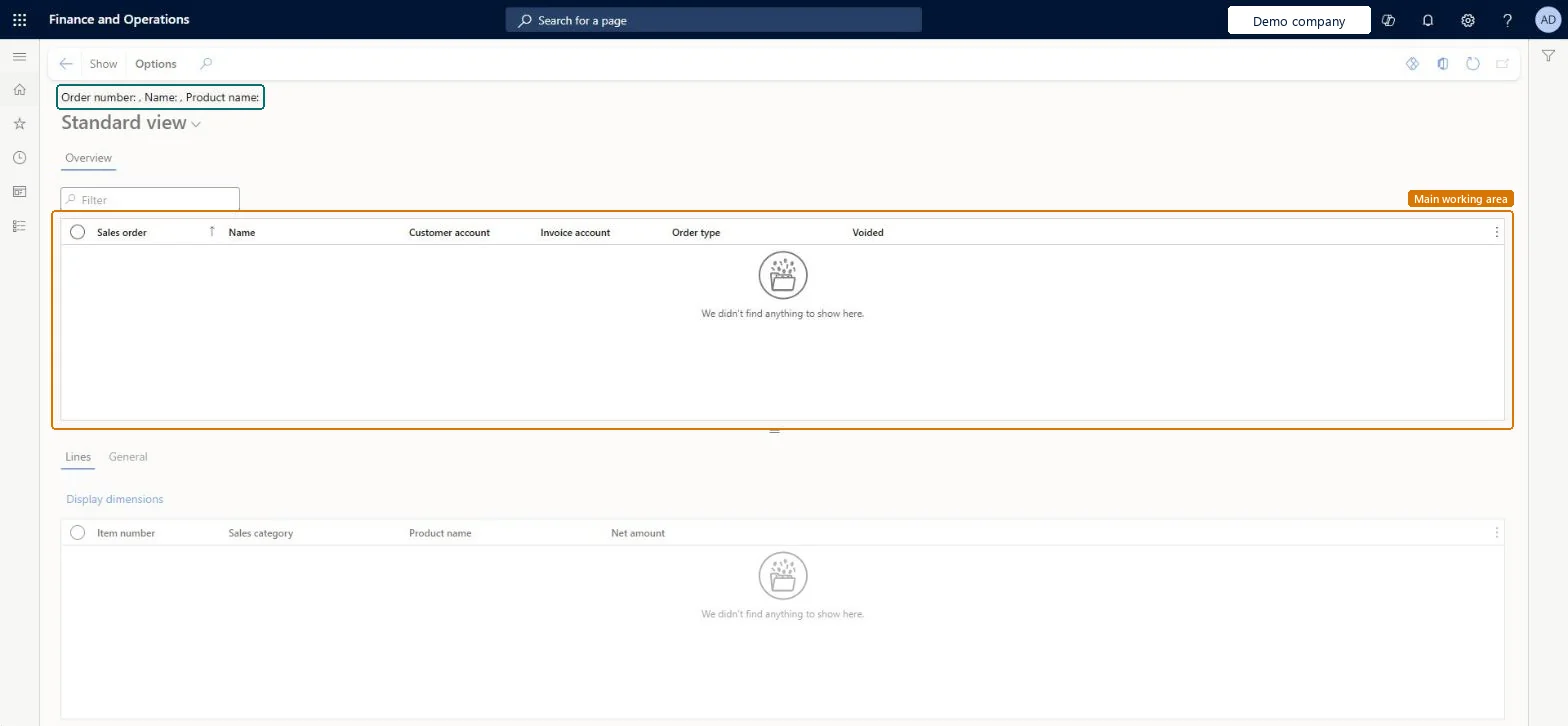
An inquiry page that lists voided sales orders, kept in the Voided sales orders table (SalesTableDelete), with their customer account, invoice account and order type, and the lines of each order.
What you do here
Use it to look back at a voided sales order: who it was for, what type it was and which items and net amounts it held. It differs from Deleted orders, which reads the sales update table (the same table as the Order posting history pages); this page holds the voided order header and its lines.
Example
For example, customer BEAT-000123 asks why order SO-001234 for 40 chairs disappeared. Voided sales orders shows SO-001234 with order type Sales order and Voided set, and the Lines tab shows item CHAIR-01 with a net amount of 3,960.00, so customer service can confirm the order was deleted, not shipped.
The page in Dynamics 365. page title tab to open what to set or check
About the examples: Examples and screenshots in this guide use BEAT, a demo company in a Dynamics 365 test environment. Use your own company's codes and values instead of copying them.
Setup steps on this page
Look up a deleted sales order
Find what a deleted sales order contained and who it was for.
How to use it
Go to Sales and marketing > Inquiries and reports > History > Voided sales orders.
Find the order by its Sales order number or Customer account and check its Order type and Invoice account.
On the Lines tab, read the Item number, Sales category, Product name and Net amount of each line to see what the customer had ordered.
If the customer still wants the goods, create a new sales order for them in All sales orders, using the voided lines as the list of items.
Source: Checked in Dynamics 365
Fields on the page
Field
What it means
Example
Sales order
The number the order had before it was deleted.Checked in Dynamics 365
The sales order type the order had, such as Sales order or Journal.Microsoft Learn
Voided
Shows that the order was voided when it was deleted.Checked in Dynamics 365
Net amount
On the Lines tab: the net amount of each line of the deleted order.Checked in Dynamics 365
3,960.00
Common errors and fixes
Message
What to do
An invoiced sales order was deleted by mistake and must be found again.
Go to the customer account, Transactions > Original document > View details, find the invoice and open its details; they include the sales order reference. Microsoft Learn
Test checklist
Create a sales order for BEAT-000123 with one line and note its number.
Delete the order from All sales orders.
Open Voided sales orders and filter on the order number.
Check that the order is listed with Voided set and that the Lines tab shows the one line with its net amount.
Search on the sales order number first; if the customer doesn't know it, filter on Customer account and the order type.Order numbers are unique, so the number finds the one order; a customer filter can return several voided orders of different types.
On the live system, Sales manager, Rental manager, Rental coordinator agent, Accounts receivable clerk and Accounts receivable manager use this page; 18 roles can open it in total. No Feature management feature is needed to open it.
Reversible: Running the inquiry or report changes no data.
If you change it later
Delete sales orders is the cleanup routine that deletes selected sales orders. Before running it in bulk, agree which deleted orders must stay traceable, and check afterwards that they are listed here. Microsoft Learn
Technical architect
6Technical
Menu item
SalesTableDeleteChecked in Dynamics 365
Form
SalesTableDeleteChecked in Dynamics 365
Table
SalesTableDeleteShown as “Voided sales orders” in Record infoKey field: SalesIdChecked in Dynamics 365
PrivilegesView deleted sales orders SalesTableDeleteViewDutiesInquire into rental sales order progress RentalSalesOrderProgressInquireInquire into sales order progress SalesOrderProgressInquire19 security rolesCredit management clerk CredManClerkAccounts receivable clerk CustInvoiceAccountsReceivableClerkAccounts receivable manager CustInvoiceAccountsReceivableManagerMCRTestUserRoleAccounts receivable centralized payments clerk PaymAccountsReceivableCentralPaymClerkAccounts receivable payments clerk PaymAccountsReceivablePaymentsClerkProject manager ProjProjectManagerRental clerk RentalClerkRental coordinator agent RentalCoordinatorAgentRental manager RentalManagerRental purchasing manager RentalPurchasingManagerRental representative RentalRepresentativeProduction planner ReqProductionPlannerRetail service RetailServiceRetail store manager RetailStoreManagerCustomer service representative TradeCustomerServiceRepresentativeSales clerk TradeSalesClerkSales manager TradeSalesManagerSales representative TradeSalesRepresentativeChecked in Dynamics 365
Roles to set it up and use it
To use itSales manager TradeSalesManagerRental manager RentalManagerRental coordinator agent RentalCoordinatorAgentAccounts receivable clerk CustInvoiceAccountsReceivableClerkAccounts receivable manager CustInvoiceAccountsReceivableManagerGive people one of these roles. On this system, 18 roles can open this page.Checked in Dynamics 365
Actions on the page
Options: Personalize, Page options, ShareChecked in Dynamics 365
SalesVoidedSalesOrderHeaderEntity Voided order headers. Most projects don't migrate them; export them only if the history is needed for audit.Load order: Load customers first, because each voided order points to an ordering and an invoice customer; then voided order headers.Load first: CustomersMicrosoft data model