SETUP GUIDEHow to set it up8 sections. Choose a role to highlight what matters to you.
Everyone
1What it is and why
What it is
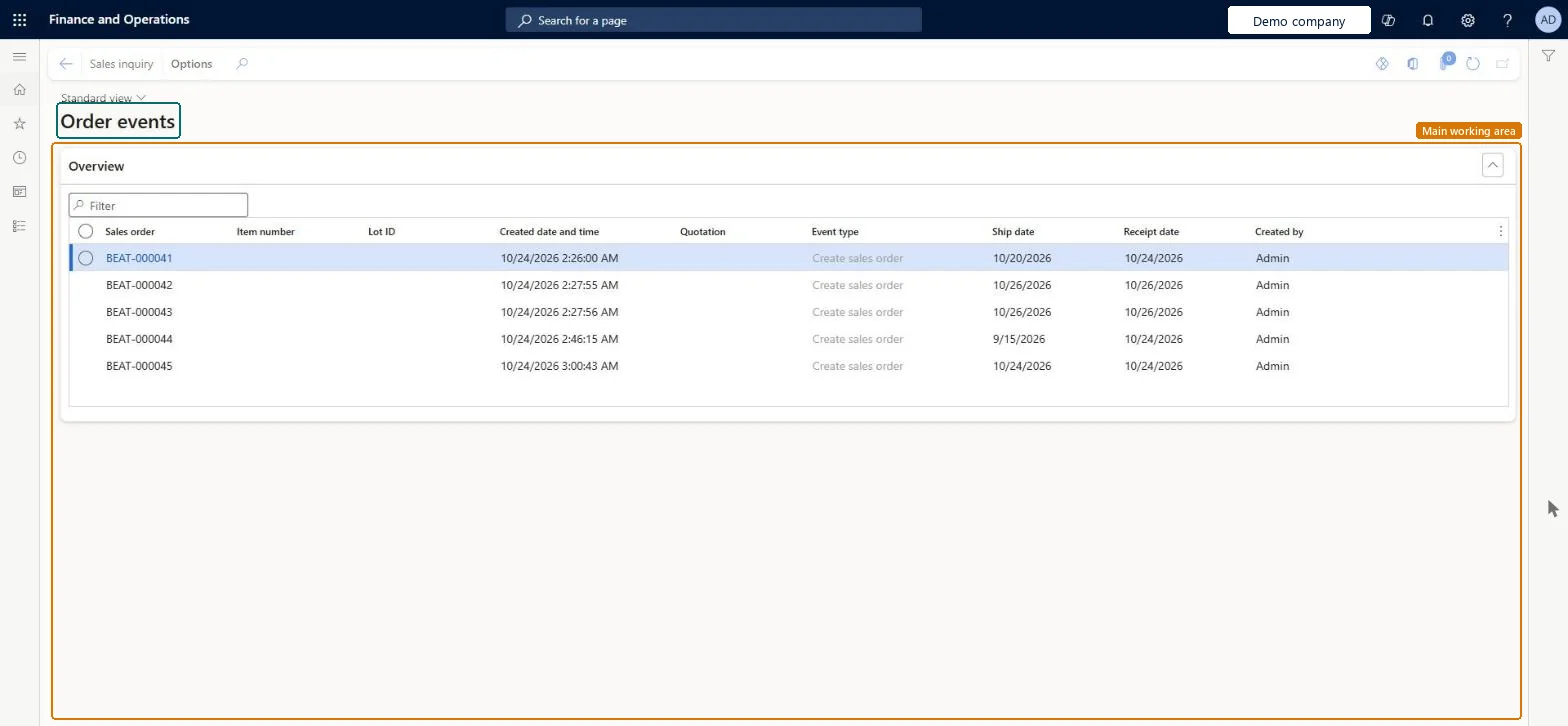
An inquiry page that lists the order events recorded on sales orders and quotations, such as order created, order modified, hold removed or price overridden, with the user and time of each event.
What you do here
Use it to audit what happened to an order during its life, or what one user did, for the event types switched on in Order event setup.
Example
For example, BEAT's sales manager wants to know who overrode the price on order SO-001310. Order events, filtered on SO-001310, shows a Sales line price override event created on 05.11.2026 at 10:12 by user tom on item DESK-02.
The page in Dynamics 365. page title tab to open what to set or check
About the examples: Examples and screenshots in this guide use BEAT, a demo company in a Dynamics 365 test environment. Use your own company's codes and values instead of copying them.
Setup steps on this page
Audit order events
Trace the actions taken on one sales order or by one user.
Steps from Microsoft
Go to Sales and marketing > Inquiries and reports > History > Order events.
Filter on the Sales order you are auditing, or on Created by to follow one user.
Read Event type and Created date and time in order, and open the Details section for the hold, price override, direct delivery or delivery date information of an event.
Select Sales inquiry to open the order. When the list grows too long, run Order events cleanup and then clear the event types you don't need in Order event setup.
The order the event was recorded on.Checked in Dynamics 365
SO-001310
Event type
What happened, for example Create sales order, Modify sales order, Remove order hold or Sales line price override; only types switched on in Order event setup are recorded.Microsoft data model
Created date and time
When the event was recorded.Checked in Dynamics 365
Created by
The user who caused the event.Checked in Dynamics 365
Item number
The item of the order line the event concerns, when the event is on a line.Checked in Dynamics 365
Common errors and fixes
Message
What to do
No events are listed for an order that was changed.
Only the event types selected in Order event setup are recorded. Select the event types you need there; earlier changes are not recorded afterwards. Microsoft Learn
Test checklist
In Order event setup, check that the event for modifying a sales order is switched on.
Change the quantity on a line of a test order.
Open Order events and filter on the order.
Check that one new event with your user and the current time is listed.
Filter on the sales order number, then sort by Created date and time.Events are recorded per action, so one busy order can have many rows; the order filter and time order show the story of that order.
On the live system, Sales manager, Rental manager, Sales clerk, Accounts receivable clerk and Accounts receivable manager use this page; 19 roles can open it in total. No Feature management feature is needed to open it.
Reversible: Running the inquiry or report changes no data.
If you change it later
Order events cleanup deletes order events; after it, clear the check boxes in Order event setup for events that aren't required, so the list stays small. Microsoft Learn
Technical architect
6Technical
Menu item
MCROrderEventTableChecked in Dynamics 365
Form
MCROrderEventTableChecked in Dynamics 365
Table
MCROrderEventTableShown as “Order event” in Record infoChecked in Dynamics 365
Roles to set it up and use it
To set it up or change itSales manager TradeSalesManagerRental manager RentalManagerRental coordinator agent RentalCoordinatorAgentSales representative TradeSalesRepresentativeSales clerk TradeSalesClerkTo use itAccounts receivable clerk CustInvoiceAccountsReceivableClerkAccounts receivable manager CustInvoiceAccountsReceivableManagerRental representative RentalRepresentativeAccounts receivable centralized payments clerk PaymAccountsReceivableCentralPaymClerkAccounts receivable payments clerk PaymAccountsReceivablePaymentsClerkGive people one of these roles. On this system, 19 roles can open this page.Checked in Dynamics 365
Actions on the page
Options: Personalize, Page options, ShareChecked in Dynamics 365
Developer
7Developer
Open it by URL
https://<your-environment>/?mi=MCROrderEventTable
Data migration
Load order: Order events has no data entity in Data management. No standard entity is backed by its table (MCROrderEventTable). Events are written by the system as orders change, so there is nothing to migrate.Load first: Order event setupChecked in Dynamics 365