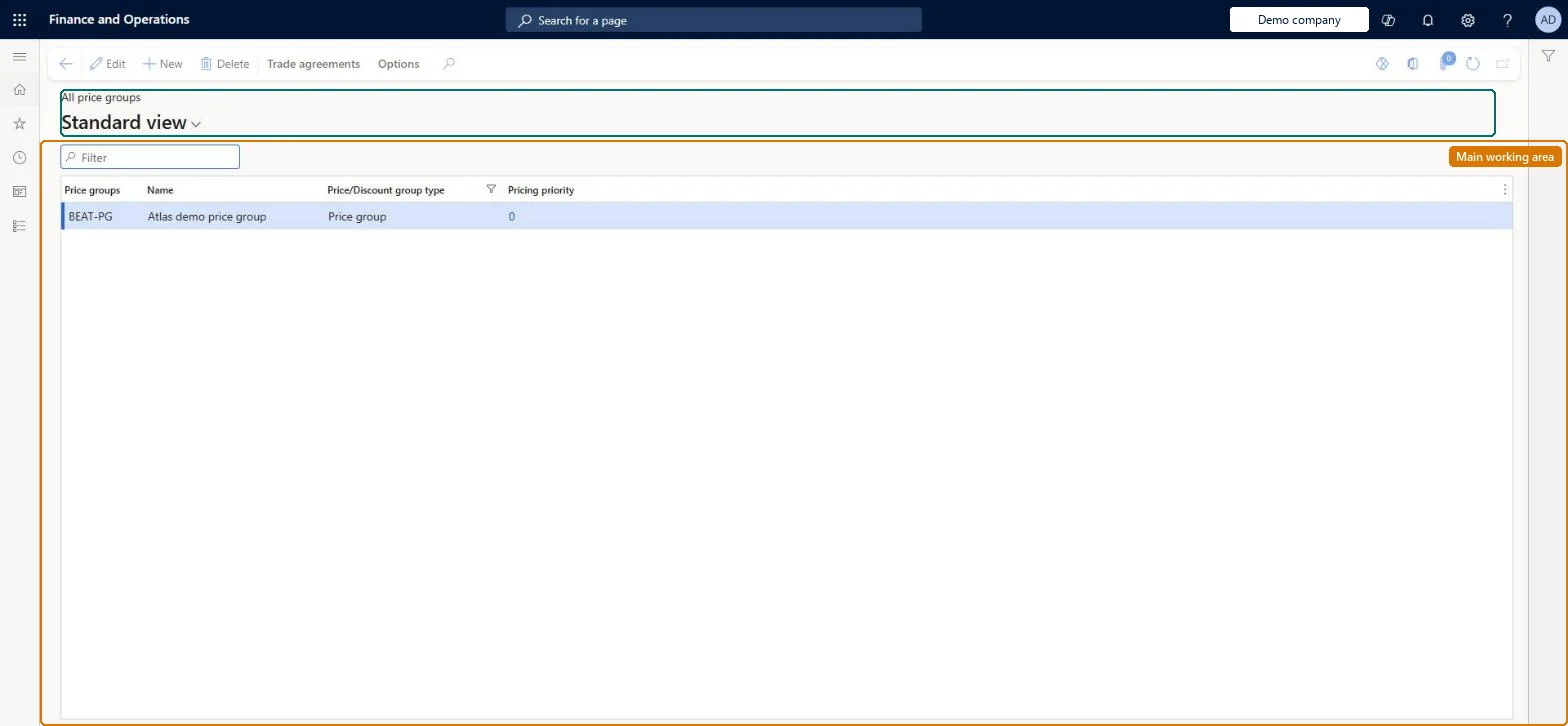
Setup step on the All price groups page · Retail and Commerce
Set up All price groups
Use this page to create the price groups you will later assign to channels, catalogs, affiliations or loyalty programs and to trade agreements, price adjustments and discounts.
Retail catalog manager, Retail operations manager, Retail service and 3 more roles
Business process
Manage sales channels
Menu item
RetailPriceDiscGroup
Main table
PriceDiscGroup
Data entity
PriceDiscLineDiscountCustomerGroupEntity
Setup steps
1 on this page
Show what matters for
SETUP GUIDEHow to set it up8 sections. Choose a role to highlight what matters to you.
Everyone
1What it is and why
What it is
A list page where you create and maintain price groups, each a name, description and optional pricing priority that links prices and discounts to channels, catalogs, affiliations and loyalty programs.
What you do here
Use this page to create the price groups you will later assign to channels, catalogs, affiliations or loyalty programs and to trade agreements, price adjustments and discounts.
Example
For example, create a channel price group named 1-Houston and a catalog price group named 2-Spring so the prefix shows which entity type each group serves.
The page in Dynamics 365. page title tab to open what to set or check
About the examples: Examples and screenshots in this guide use BEAT, a demo company in a Dynamics 365 test environment. Use your own company's codes and values instead of copying them.
Setup steps on this page
Set up All price groups
Use this page to create the price groups you will later assign to channels, catalogs, affiliations or loyalty programs and to trade agreements, price adjustments and discounts.
Steps from Microsoft
Go to Retail and Commerce > Pricing and discounts > All price groups.
Select New.
In the Price groups field, type the price group ID.
One set of price groups per entity type (channels, catalogs, affiliations, loyalty programs), with a prefix or suffix that shows the type; no price groups set directly on customersMicrosoft's best practice is not to use one price group for several entity types, and to use affiliations rather than customer price groups, because a customer price group only brings sales price trade agreements.
Hard to reverse: A price group is only a name, but every trade agreement, price adjustment and discount points to it. Redesigning the groups later means re-linking all of those records and the channels, catalogs, affiliations and loyalty programs.
If you change it later
Because one price group can drive prices and discounts for several entities, reusing a group across entity types makes it hard to trace why a price or discount applied; plan the groups before creating them. Microsoft Learn
Technical architect
6Technical
Menu item
RetailPriceDiscGroupChecked in Dynamics 365
Form
PriceDiscGroupChecked in Dynamics 365
Table
PriceDiscGroupShown as “PRICE GROUPS” in Record infoKey field: GroupIdChecked in Dynamics 365
Data entities
PriceDiscLineDiscountCustomerGroupEntityLine discount customer groups Microsoft data model PriceDiscLineDiscountProductGroupEntityLine discount item groups Microsoft data model PriceDiscLineDiscountVendorGroupEntityLine discount vendor groups Microsoft data model PriceDiscMultilineDiscountCustomerGroupEntityMultiline discount customer groups Microsoft data model PriceDiscPriceCustomerGroupEntityPrice customer groups Microsoft data model PriceDiscPriceVendorGroupEntityPrice vendor groups Microsoft data model PriceDiscTotalDiscountCustomerGroupEntityTotal discount customer groups Microsoft data model PriceDiscTotalDiscountVendorGroupEntityTotal discount vendor groups Microsoft data model PriceDiscMultilineDiscountProductGroupEntityMultiline discount item groups Microsoft data model PriceDiscMultilineDiscountVendorGroupEntityMultiline discount vendor groups Microsoft data model MCRPostageDiscountCustomerGroupEntityPostage discount customer groups Microsoft data model
Who can open it
PrivilegesMaintain retail channels RetailChannelsMaintainView retail channels RetailChannelsViewRetail trial channels maintain privilege RetailTrialChannelsMaintainDutiesMaintain retail channels RetailChannelsMaintainView retail channels RetailChannelsViewRetail trial channels maintain privilege RetailTrialChannelsMaintain6 security rolesRetail catalog manager RetailCatalogManagerRetail operations manager RetailOperationsManagerRetail service RetailServiceRetail store IT RetailStoreITRetail store manager RetailStoreManagerInformation technology manager SysServerITManagerChecked in Dynamics 365
Roles to set it up and use it
To set it up or change itRetail service RetailServiceRetail operations manager RetailOperationsManagerRetail store manager RetailStoreManagerRetail store IT RetailStoreITTo use itInformation technology manager SysServerITManagerRetail catalog manager RetailCatalogManagerGive people one of these roles. On this system, 6 roles can open this page.Checked in Dynamics 365
Actions on the page
Trade agreements: Sales, Project, Purchase, CreateChecked in Dynamics 365
PriceDiscLineDiscountCustomerGroupEntity (Line discount customer groups): loaded for each company, in Microsoft's default template 140 - Accounts receivable.PriceDiscLineDiscountProductGroupEntity (Line discount item groups): loaded for each company, in Microsoft's default template 300 - Inventory.PriceDiscLineDiscountVendorGroupEntity (Line discount vendor groups): loaded for each company, in Microsoft's default template 120 - Accounts payable.Load order: Microsoft's default template 140 - Accounts receivable loads Line discount customer groups at execution unit 1, level 30, sequence 10. Lower levels load first, and entities at the same level load in sequence order.Load first: the default templates at lower levels (System setup to General ledger)Microsoft Learn