Retail and CommercePricing and discountsPrice groups
RetailPriceDiscGroupLoyalty
Used by
Retail catalog manager, Retail operations manager, Retail service and 3 more roles
Business process
Manage sales channels
Menu item
RetailPriceDiscGroupLoyalty
Main table
PriceDiscGroup
Data entity
PriceDiscLineDiscountCustomerGroupEntity
Setup steps
1 on this page
Show what matters for
PAGE GUIDEWhat the page does and how to use it8 sections. Choose a role to highlight what matters to you.
Everyone
1What it is and why
What it is
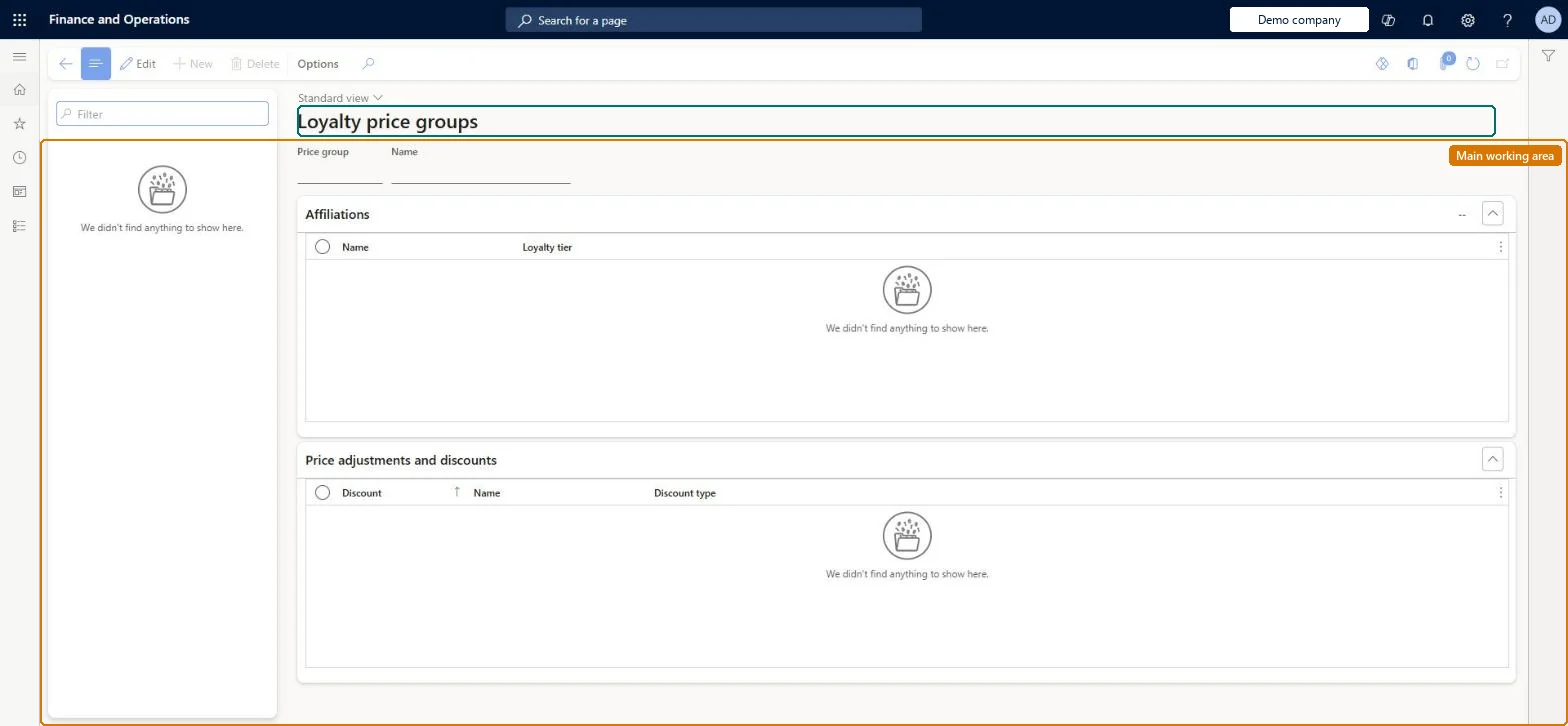
An inquiry page that lists, for each price group, the loyalty programs and the discounts linked to it.
What you do here
Use this page to see which price groups give loyalty programs and their tiers their member prices and discounts.
Example
For example, a gold-tier price group can carry a larger discount than the base program price group so frequent shoppers earn bigger rewards automatically.
The page in Dynamics 365. page title tab to open what to set or check
About the examples: Examples and screenshots in this guide use BEAT, a demo company in a Dynamics 365 test environment. Use your own company's codes and values instead of copying them.
Setup steps on this page
Set up Loyalty price groups
Use this page to see which price groups give loyalty programs and their tiers their member prices and discounts.
How to use it
Go to Retail and Commerce > Pricing and discounts > Price groups > Loyalty price groups.
Use the Filter box to find a price group; the list shows the price groups of this type.
Under Affiliations, review which affiliations the price group is assigned to.
Under Price adjustments and discounts, review the discounts and price adjustments that use the price group.
Price groups are created on All price groups; New and Delete are disabled here.
Source: Checked in Dynamics 365
Test checklist
Link a loyalty price group to a discount and enable it.
Ring up the product in POS without a loyalty card and check no loyalty discount applies.
Add a loyalty card for the program and check the discount applies.
Separate loyalty price groups, at tier level when members should get different discounts per tierLoyalty programs work like affiliations for pricing, and tiers can carry different discounts so frequent customers get larger rewards without manual grouping.
Testing loyalty pricing without a loyalty card on the transaction. Loyalty prices and discounts apply only when a loyalty card is added.
Reversible: Inquiry page. Links are maintained on the loyalty program and the discount; changes apply to later transactions. Microsoft Learn
If you change it later
Discounts in the program-level price group reach every member when no tiers are defined; with tiers, the tier price groups decide who gets which discount. Microsoft Learn
Technical architect
6Technical
Menu item
RetailPriceDiscGroupLoyaltyChecked in Dynamics 365
Form
RetailPriceDiscGroupChecked in Dynamics 365
Table
PriceDiscGroupShown as “PRICE GROUPS” in Record infoKey field: GroupIdChecked in Dynamics 365
Data entities
PriceDiscLineDiscountCustomerGroupEntityLine discount customer groups Microsoft data model PriceDiscLineDiscountProductGroupEntityLine discount item groups Microsoft data model PriceDiscLineDiscountVendorGroupEntityLine discount vendor groups Microsoft data model PriceDiscMultilineDiscountCustomerGroupEntityMultiline discount customer groups Microsoft data model PriceDiscPriceCustomerGroupEntityPrice customer groups Microsoft data model PriceDiscPriceVendorGroupEntityPrice vendor groups Microsoft data model PriceDiscTotalDiscountCustomerGroupEntityTotal discount customer groups Microsoft data model PriceDiscTotalDiscountVendorGroupEntityTotal discount vendor groups Microsoft data model PriceDiscMultilineDiscountProductGroupEntityMultiline discount item groups Microsoft data model PriceDiscMultilineDiscountVendorGroupEntityMultiline discount vendor groups Microsoft data model MCRPostageDiscountCustomerGroupEntityPostage discount customer groups Microsoft data model
Who can open it
PrivilegesMaintain retail channels RetailChannelsMaintainView retail channels RetailChannelsViewRetail trial channels maintain privilege RetailTrialChannelsMaintainDutiesMaintain retail channels RetailChannelsMaintainView retail channels RetailChannelsViewRetail trial channels maintain privilege RetailTrialChannelsMaintain6 security rolesRetail catalog manager RetailCatalogManagerRetail operations manager RetailOperationsManagerRetail service RetailServiceRetail store IT RetailStoreITRetail store manager RetailStoreManagerInformation technology manager SysServerITManagerChecked in Dynamics 365
Roles to set it up and use it
To set it up or change itRetail service RetailServiceRetail operations manager RetailOperationsManagerRetail store manager RetailStoreManagerRetail store IT RetailStoreITTo use itInformation technology manager SysServerITManagerRetail catalog manager RetailCatalogManagerGive people one of these roles. On this system, 6 roles can open this page.Checked in Dynamics 365