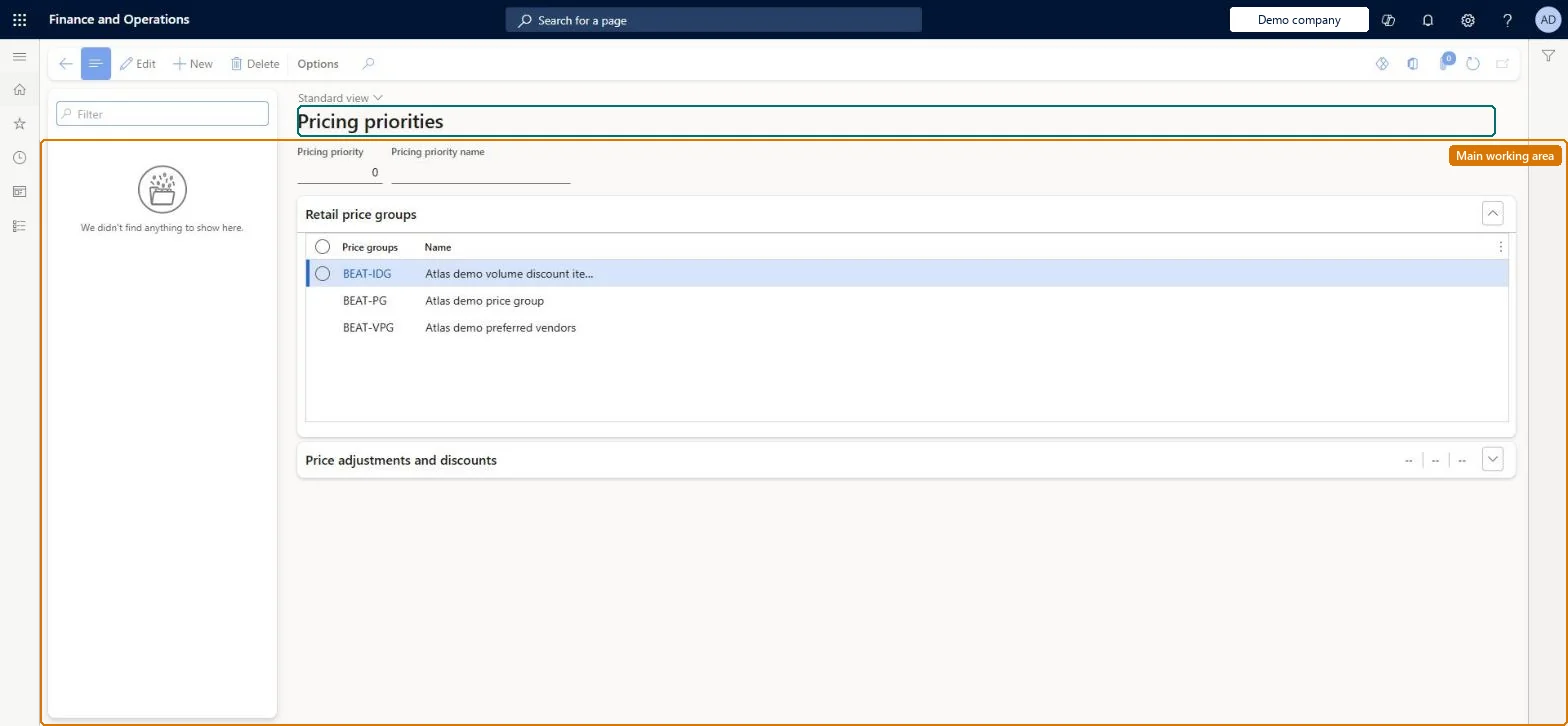
A setup page where you define pricing priorities, each a number and description, that can be assigned to price groups or directly to discounts to control the order in which prices and discounts are evaluated.
Retail and CommercePricing and discountsPrice groups
RetailPricingPriorityTable
Used by
Retail catalog manager, Retail merchandising manager, Retail operations manager and 6 more roles
Business process
Manage sales channels
Menu item
RetailPricingPriorityTable
Main table
RetailPricingPriorityTable
Data entity
RetailPricingPriorityEntity
Setup steps
1 on this page
Show what matters for
PAGE GUIDEWhat the page does and how to use it8 sections. Choose a role to highlight what matters to you.
Everyone
1What it is and why
What it is
A setup page where you define pricing priorities, each a number and description, that can be assigned to price groups or directly to discounts to control the order in which prices and discounts are evaluated.
What you do here
Use this page to create priority numbers so that, for example, store-level prices are applied before regional prices instead of the usual best-price rule.
Example
For example, a High cost priority of 5 on the NYC price group and a Store prices priority of 10 ensure Manhattan jeans ring up at $70 even though the Northeast price is $50.
The page in Dynamics 365. page title tab to open what to set or check
About the examples: Examples and screenshots in this guide use BEAT, a demo company in a Dynamics 365 test environment. Use your own company's codes and values instead of copying them.
Setup steps on this page
Set up Pricing priorities
Use this page to create priority numbers so that, for example, store-level prices are applied before regional prices instead of the usual best-price rule.
How to use it
Go to Retail and Commerce > Pricing and discounts > Price groups > Pricing priorities.
Use the Filter box to find a priority.
Select New and enter the Pricing priority number and Pricing priority name; a higher number wins over a lower one.
Under Retail price groups, review the price groups that use the priority; under Price adjustments and discounts, the discounts that use it.
Select Save; select Delete to remove a selected priority.
Source: Checked in Dynamics 365
Test checklist
Create a priority with number 10 and assign it to a store price group; leave the regional price group at 0.
Post a regional price and a higher store price for the same product.
Run the Price simulator for the store.
Check that the higher store price is used, not the lower regional price.
As few priorities as possible: leave regional price groups at the default 0 and give store-level price groups a higher numberA higher number is evaluated first and lower priorities are then ignored, so store prices win over regional prices. Each priority needs a full pass of the pricing engine, so Microsoft advises using them sparingly.
Creating many priorities. Each one adds a full pass through the pricing logic and slows price and discount calculation.Test: Store price overrides regional price
Solution architect
5Design impact
Can it be undone
Reversible: A priority can be changed or removed on a price group or discount at any time. Calculations after the change use the new order. Microsoft Learn
If you change it later
Each priority adds a full pass through the pricing engine, so adding priorities slows price and discount calculation; once a price or discount is found at a priority, lower priorities are ignored. Microsoft Learn
Technical architect
6Technical
Menu item
RetailPricingPriorityTableChecked in Dynamics 365
Form
RetailPricingPriorityTableChecked in Dynamics 365
Table
RetailPricingPriorityTableShown as “PRICING PRIORITY” in Record infoChecked in Dynamics 365
PrivilegesMaintain price groups and pricing priorities GUPPriceGroupApplicabilityMaintainView price groups and pricing priorities GUPPriceGroupApplicabilityViewMaintain retail discounts RetailDiscountsMaintainView retail discounts RetailDiscountsViewDutiesMaintain price groups and pricing priorities GUPPriceGroupApplicabilityMaintainView price groups and pricing priorities GUPPriceGroupApplicabilityViewMaintain retail channels RetailChannelsMaintainView retail channels RetailChannelsViewMaintain retail campaign discounts RetailDiscountOfferMaintainMaintain retail campaign discounts RetailDiscountOfferViewRetail trial channels maintain privilege RetailTrialChannelsMaintain10 security rolesMCRTestUserRoleRetail catalog manager RetailCatalogManagerRetail merchandising manager RetailMerchandisingManagerRetail operations manager RetailOperationsManagerRetail service RetailServiceRetail store IT RetailStoreITRetail store manager RetailStoreManagerInformation technology manager SysServerITManagerSales clerk TradeSalesClerkSales manager TradeSalesManagerChecked in Dynamics 365
Roles to set it up and use it
To set it up or change itRetail service RetailServiceRetail operations manager RetailOperationsManagerRetail store manager RetailStoreManagerRetail merchandising manager RetailMerchandisingManagerSales manager TradeSalesManagerTo use itInformation technology manager SysServerITManagerSales clerk TradeSalesClerkRetail catalog manager RetailCatalogManagerGive people one of these roles. On this system, 9 roles can open this page.Checked in Dynamics 365