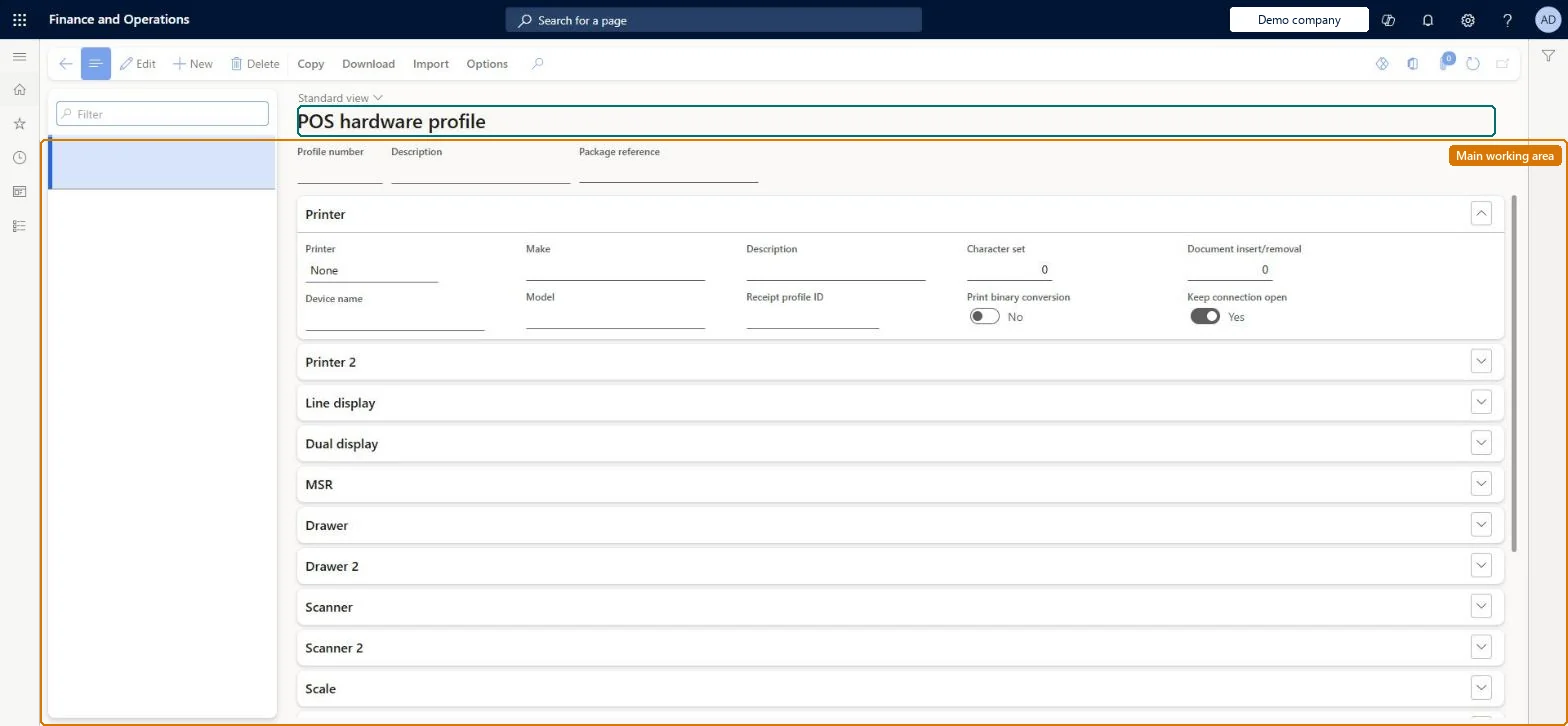
Setup step on the Hardware profiles page · Retail and Commerce
Set up Hardware profiles
Use this page to create profiles that describe each device type, its connection type and name, the receipt profile for printers, shared-shift cash drawers, EFT and payment SDK settings and fiscal peripherals; then assign the profile to registers or shared hardware stations and run job 1090.
Retail and CommerceChannel setupPOS setupPOS profiles
RetailHardwareProfile
Used by
Retail operations manager, Retail service, Retail store IT and 1 more role
Business process
Manage sales channels
Menu item
RetailHardwareProfile
Main table
RetailHardwareProfile
Data entity
RetailHardwareProfileEntity
Setup steps
1 on this page
Show what matters for
SETUP GUIDEHow to set it up8 sections. Choose a role to highlight what matters to you.
Everyone
1What it is and why
What it is
A setup page where a hardware profile lists the peripherals (printer, cash drawer, scanner, payment terminal and so on) and payment settings used by a POS register or a hardware station.
What you do here
Use this page to create profiles that describe each device type, its connection type and name, the receipt profile for printers, shared-shift cash drawers, EFT and payment SDK settings and fiscal peripherals; then assign the profile to registers or shared hardware stations and run job 1090.
Example
For example, for a network Epson or Star printer you set the printer type to Network, enter the device name and assign a Receipt profile ID.
The page in Dynamics 365. page title tab to open what to set or check
About the examples: Examples and screenshots in this guide use BEAT, a demo company in a Dynamics 365 test environment. Use your own company's codes and values instead of copying them.
Setup steps on this page
Set up Hardware profiles
Use this page to create profiles that describe each device type, its connection type and name, the receipt profile for printers, shared-shift cash drawers, EFT and payment SDK settings and fiscal peripherals; then assign the profile to registers or shared hardware stations and run job 1090.
Steps from Microsoft
Go to Retail and Commerce > Channel setup > POS setup > POS profiles > Hardware profiles.
Select New.
Assign a hardware profile number and enter a description.
On the FastTab for each device type, set the type, device name and details (for example a Receipt profile ID for the printer, or Use shared shift for a shared cash drawer).
Select Save.
Assign the profile to the register, or to a shared hardware station on the store.
One hardware profile per till configuration, assigned to the register for a dedicated hardware station or to the shared hardware station; give each printer its own receipt profile (for example 40-column thermal versus full-page)Different printers can use different receipt profiles, and when no profile is on a shared hardware station the register's profile is used.
Changing cash drawer settings and not opening a new shift; some hardware changes only apply after a new shift once synced.
Solution architect
5Design impact
Can it be undone
Reversible: Profiles can be changed at any time; run job 1090 and, for some devices, open a new shift.
If you change it later
Some hardware profile changes, such as cash drawers, need a new shift after sync; if no profile is set on a shared hardware station the register's profile is used. Microsoft Learn
Technical architect
6Technical
Menu item
RetailHardwareProfileChecked in Dynamics 365
Form
RetailHardwareProfileChecked in Dynamics 365
Table
RetailHardwareProfileShown as “POS HARDWARE PROFILES” in Record infoKey field: profileIdChecked in Dynamics 365
PrivilegesRetail deployment self service RetailDeploymentSelfServiceMaintain retail hardware profile RetailHardwareProfileMaintainDutiesRetail deployment self service RetailDeploymentSelfServiceMaintain retail register profiles RetailTerminalProfilesMaintainMaintain terminal profiles for retail trial. RetailTrialTerminalProfilesMaintain4 security rolesRetail operations manager RetailOperationsManagerRetail service RetailServiceRetail store IT RetailStoreITInformation technology manager SysServerITManagerChecked in Dynamics 365
Roles to set it up and use it
To set it up or change itRetail service RetailServiceRetail operations manager RetailOperationsManagerInformation technology manager SysServerITManagerTo use itRetail store IT RetailStoreITGive people one of these roles. On this system, 4 roles can open this page.Checked in Dynamics 365
Actions on the page
CopyDownload: DownloadImport: ImportChecked in Dynamics 365
RetailHardwareProfileEntity (POS hardware profiles): shared by all companies.RetailHardwareProfileMerchantInfoEntity (Hardware profile merchant info): shared by all companies.Microsoft Learn