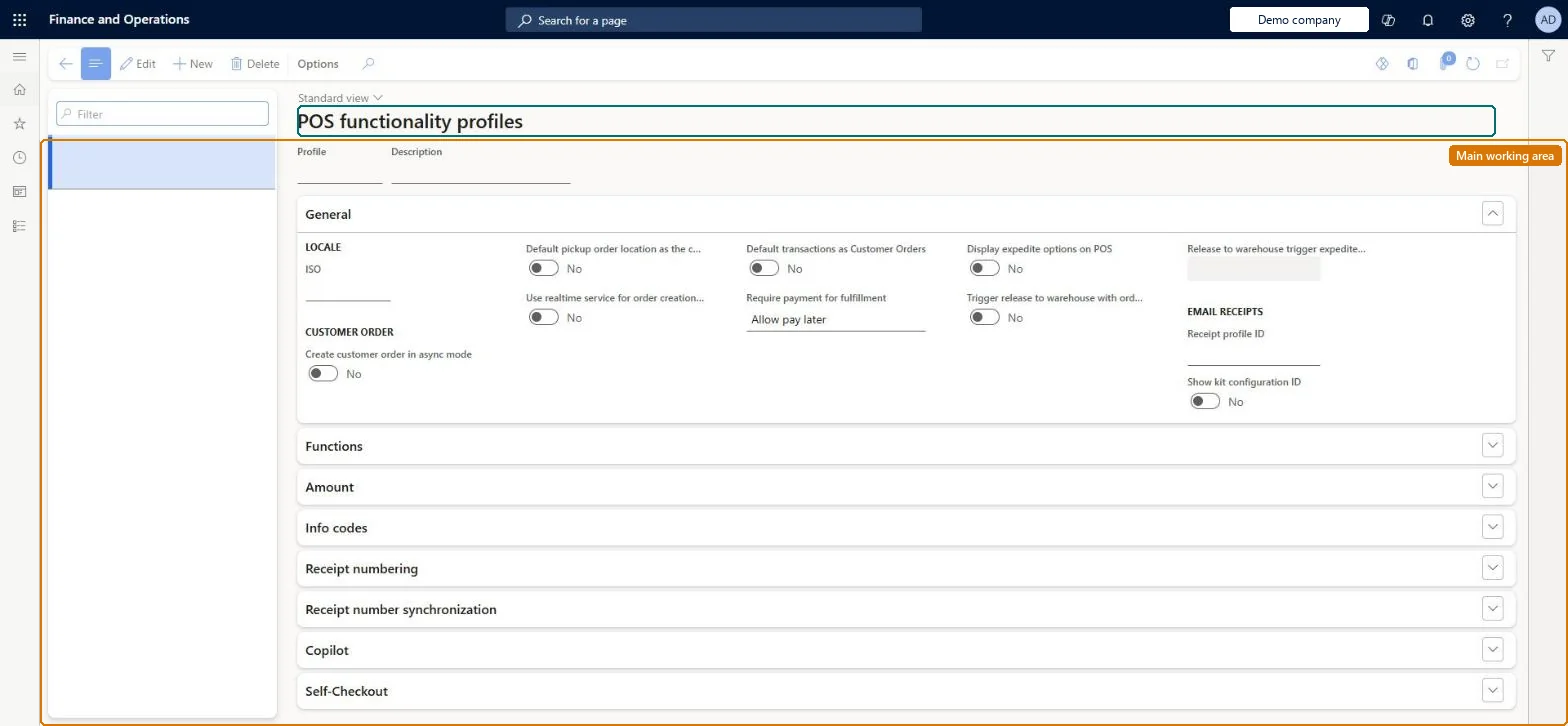
Setup step on the Functionality profiles page · Retail and Commerce
Set up Functionality profiles
Use this page to create a profile with an ID and description, set the ISO locale and the receipt profile for email receipts, adjust the Functions, Amount, Info codes and Receipt numbering settings, and assign fiscal registration entities; every channel must have one.
Retail and CommerceChannel setupPOS setupPOS profiles
RetailFunctionalityProfile
Used by
Retail operations manager, Retail service, Information technology manager
Business process
Manage sales channels
Menu item
RetailFunctionalityProfile
Main table
RetailFunctionalityProfile
Data entity
RetailFunctionalityProfileEntity
Setup steps
1 on this page
Show what matters for
SETUP GUIDEHow to set it up8 sections. Choose a role to highlight what matters to you.
Everyone
1What it is and why
What it is
A setup page, assigned at store level, holding store-wide settings for what the POS can do: locale, sign-in, pricing and currency rules, receipt numbering, info codes, offline customer creation, the email receipt profile and the fiscal registration process.
What you do here
Use this page to create a profile with an ID and description, set the ISO locale and the receipt profile for email receipts, adjust the Functions, Amount, Info codes and Receipt numbering settings, and assign fiscal registration entities; every channel must have one.
Example
For example, the Receipt numbering FastTab lets you build number masks from store number, terminal number and constants, and decide whether sales and returns share one sequence.
The page in Dynamics 365. page title tab to open what to set or check
About the examples: Examples and screenshots in this guide use BEAT, a demo company in a Dynamics 365 test environment. Use your own company's codes and values instead of copying them.
Setup steps on this page
Set up Functionality profiles
Use this page to create a profile with an ID and description, set the ISO locale and the receipt profile for email receipts, adjust the Functions, Amount, Info codes and Receipt numbering settings, and assign fiscal registration entities; every channel must have one.
Steps from Microsoft
Go to Retail and Commerce > Channel setup > POS setup > POS profiles > Functionality profiles.
On the action pane, select New.
Enter an ID in the Profile field and a Description.
In the General section, select a country/region for the ISO locale and a Receipt profile ID for email receipts.
Modify the Functions, Amount, Info Codes and Receipt numbering sections as needed.
Assign the profile to the store and run the Channel configuration (1070) job.
One profile per group of stores with the same rules, ISO set to the stores' country, and receipt masks that include dynamic date characters when Independent sequence is usedEvery channel must have a functionality profile, and country-specific features depend on the ISO code. Learn advises date characters in masks to prevent duplicate receipt IDs.
Scheduling a receipt number reset in production. Microsoft recommends not using the reset feature in production yet, and a reset whose date has passed can't be undone.Test: Receipt numbering on the functionality profile
Solution architect
5Design impact
Can it be undone
One-way: Warning: once a receipt number reset date has passed, the reset can't be undone and still happens on every register that hasn't reset yet. Other settings can be changed.
If you change it later
Changes to a functionality profile reach the POS only after the Channel configuration and Registers distribution schedules run. Microsoft Learn
Technical architect
6Technical
Menu item
RetailFunctionalityProfileChecked in Dynamics 365
Form
RetailFunctionalityProfileChecked in Dynamics 365
Table
RetailFunctionalityProfileShown as “POS FUNCTIONALITY PROFILE” in Record infoKey field: profileIdChecked in Dynamics 365
PrivilegesMaintain retail functionality profile RetailFunctionalityProfileMaintainDutiesMaintain retail register profiles RetailTerminalProfilesMaintainMaintain terminal profiles for retail trial. RetailTrialTerminalProfilesMaintain3 security rolesRetail operations manager RetailOperationsManagerRetail service RetailServiceInformation technology manager SysServerITManagerChecked in Dynamics 365
Roles to set it up and use it
To set it up or change itRetail service RetailServiceRetail operations manager RetailOperationsManagerInformation technology manager SysServerITManagerGive people one of these roles. On this system, 3 roles can open this page.Checked in Dynamics 365