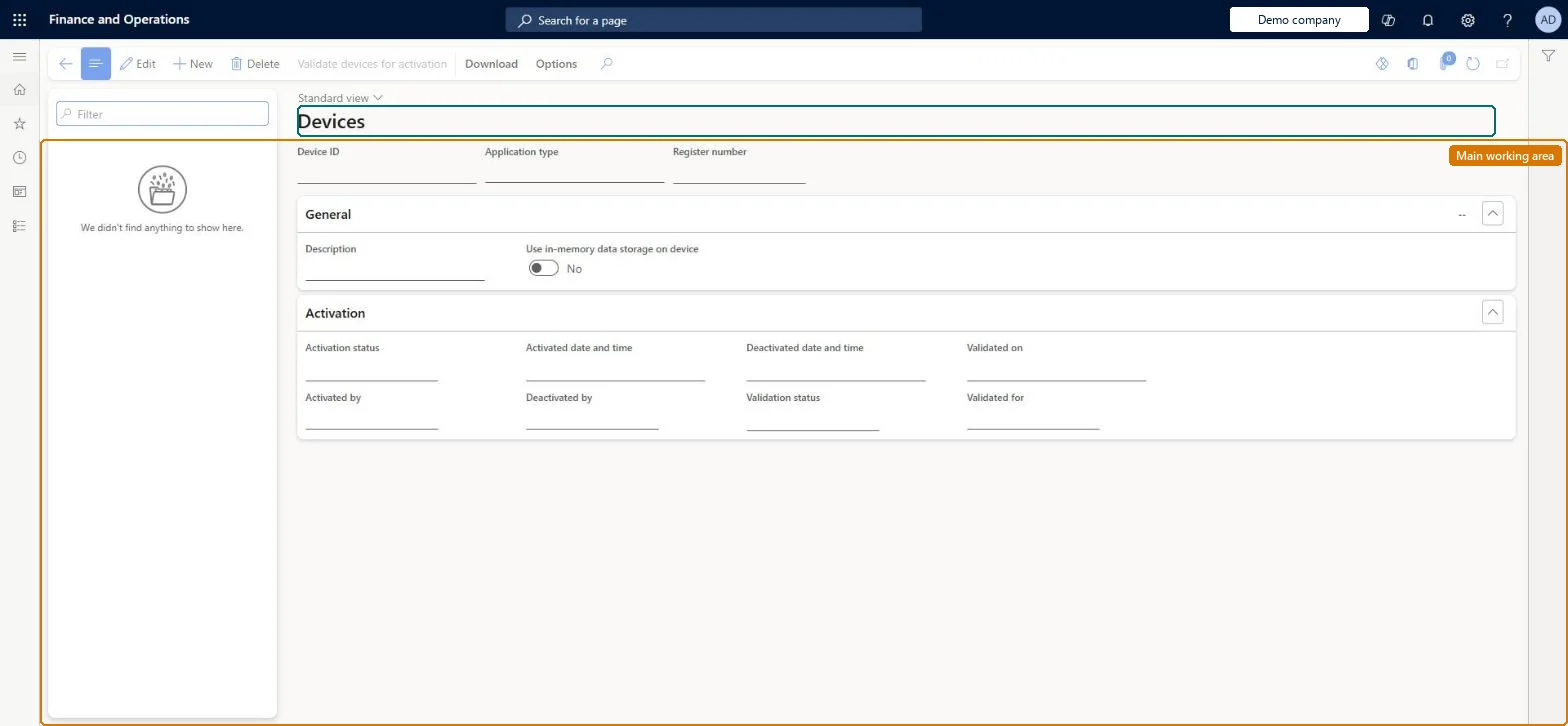
Setup step on the Devices page · Retail and Commerce
Set up Devices
Use this page to create devices and link them to registers, choose the application type (Store Commerce, Store Commerce for web and so on), validate a device for activation, download installers and configuration files, and deactivate lost or stolen devices.
Retail operations manager, Retail service, Retail store IT and 2 more roles
Business process
Manage sales channels
Menu item
RetailDevices
Main table
RetailDevice
Data entity
RetailDeviceEntity
Setup steps
1 on this page
Show what matters for
SETUP GUIDEHow to set it up8 sections. Choose a role to highlight what matters to you.
Everyone
1What it is and why
What it is
A setup page that records each physical device (PC, tablet, phone or browser) mapped to a POS register, with its application type, activation status and the package to deploy.
What you do here
Use this page to create devices and link them to registers, choose the application type (Store Commerce, Store Commerce for web and so on), validate a device for activation, download installers and configuration files, and deactivate lost or stolen devices.
Example
For example, before giving an activation account to a worker you select the device and run Validate devices for activation to catch problems early.
The page in Dynamics 365. page title tab to open what to set or check
About the examples: Examples and screenshots in this guide use BEAT, a demo company in a Dynamics 365 test environment. Use your own company's codes and values instead of copying them.
Setup steps on this page
Set up Devices
Use this page to create devices and link them to registers, choose the application type (Store Commerce, Store Commerce for web and so on), validate a device for activation, download installers and configuration files, and deactivate lost or stolen devices.
Steps from Microsoft
Go to Retail and Commerce > Channel setup > POS setup > Devices.
Select the device to validate for device activation, and then select Validate devices for activation.
In the dialog box, select the worker the device is validated for.
Select OK and check that the message reports Validation: Passed.
Select Download to get the configuration file and installer for the device, then activate the POS on the device.
One device per physical till with Application type Store Commerce (or Store Commerce for web), and run Validate devices for activation for the activating worker before handing overValidation finds activation failures in advance, such as a missing hardware profile or screen layout. Store Commerce includes a built-in hardware station; Store Commerce for web needs a hardware station for peripherals beyond keyboard-wedge scanners.
Choosing Store Commerce for web for a till with printers and drawers but no hardware station, or skipping validation and finding activation errors in the store.
Solution architect
5Design impact
Can it be undone
Reversible: Devices can be deactivated and reactivated; activation status changes take effect without a distribution job.
If you change it later
Changes to activation status take effect without a distribution job; every other POS client change must be synced with the Registers and Channel configuration schedules. Microsoft Learn
Technical architect
6Technical
Menu item
RetailDevicesChecked in Dynamics 365
Form
RetailDeviceChecked in Dynamics 365
Table
RetailDeviceShown as “RETAIL DEVICES” in Record infoKey field: DeviceIdChecked in Dynamics 365
PrivilegesRetail deployment self service RetailDeploymentSelfServiceMaintain retail POS terminals RetailPosTerminalsMaintainRetailStoreManagementWorkspaceMaintainMaintain store management workspace for retail trial. RetailTrialStoreManagementWorkspaceMaintainDutiesRetail deployment self service RetailDeploymentSelfServiceRetailStoreManagementWorkspaceMaintainMaintain retail registers RetailTerminalsMaintainMaintain store management workspace for retail trial. RetailTrialStoreManagementWorkspaceMaintain5 security rolesRetail operations manager RetailOperationsManagerRetail service RetailServiceRetail store IT RetailStoreITRetail store manager RetailStoreManagerInformation technology manager SysServerITManagerChecked in Dynamics 365
Roles to set it up and use it
To set it up or change itRetail service RetailServiceRetail operations manager RetailOperationsManagerRetail store manager RetailStoreManagerInformation technology manager SysServerITManagerRetail store IT RetailStoreITGive people one of these roles. On this system, 5 roles can open this page.Checked in Dynamics 365
Actions on the page
Download: Download(Action Pane without tabs): Validate devices for activationChecked in Dynamics 365