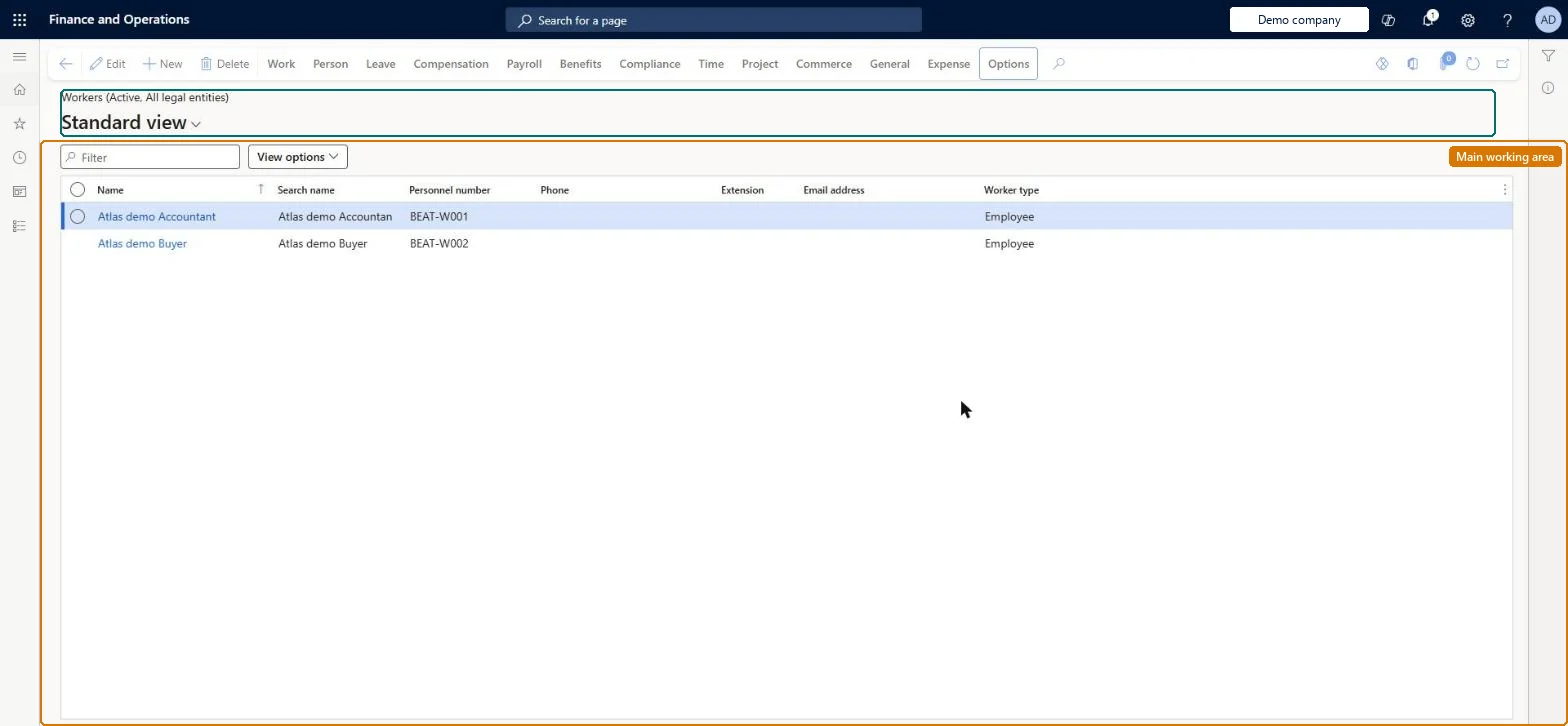
A list page of workers (employees and contractors) from which you open a worker's details and, on the Commerce tab, maintain the store-related settings such as POS permissions, POS notifications, default sales group and the external identity used to activate Store Commerce devices.
Accounts payable manager, Auditor, Chief executive officer and 23 more roles
Business process
Create and manage shifts in Dynamics 365 Commerce
Menu item
HcmWorkerListPage
Main table
HcmWorker
Data entity
HcmWorkerEntity
Show what matters for
PAGE GUIDEWhat the page does and how to use it7 sections. Choose a role to highlight what matters to you.
Everyone
1What it is and why
What it is
A list page of workers (employees and contractors) from which you open a worker's details and, on the Commerce tab, maintain the store-related settings such as POS permissions, POS notifications, default sales group and the external identity used to activate Store Commerce devices.
What you do here
Use this page to give a worker the POS permissions and manager rights they need, link them to a Microsoft Entra account for device activation, set their default commission sales group, and subscribe them to POS notifications; then run the Staff (1060) distribution job to send the changes to the stores.
Example
For example, before a new store manager can activate a register, an IT administrator opens the worker here, checks that Manage Devices is Yes under POS permissions and associates the worker's Entra account under External identity.
The page in Dynamics 365. page title tab to open what to set or check
About the examples: Examples and screenshots in this guide use BEAT, a demo company in a Dynamics 365 test environment. Use your own company's codes and values instead of copying them.
Steps from Microsoft
Go to Retail and Commerce > Employees > Workers.
Find and select the worker, then select the link in the row to open the details.
Select the Commerce tab and select Edit.
Set the Default group (sales group) if the worker earns commission.
Select POS permissions to check the permission group, Manage Devices and notification subscriptions.
Under External identity, use Commerce > Associate existing identity to map the worker's Microsoft Entra account.
Select Save, then run the 1060 Staff distribution schedule job.
Reversible: Commerce settings such as POS permissions, notifications and the associated Microsoft Entra identity can be changed at any time; stores only see the change after the 1060 (Staff) job runs. Worker-level POS permission values override the permission group. Microsoft Learn
If you change it later
Changes to a worker's Commerce settings reach the stores only after the Staff distribution job runs; the mapped Entra account becomes the worker's activation account for Store Commerce. Microsoft Learn
Technical architect
5Technical
Menu item
HcmWorkerListPageChecked in Dynamics 365
Form
HcmWorkerV2Checked in Dynamics 365
Table
HcmWorkerShown as “WORKER” in Record infoKey field: Person_NameChecked in Dynamics 365
PrivilegesView limited workers HcmLimitedWorkerViewEdit workers HcmWorkerEditMaintain workers HcmWorkerMaintainView workers HcmWorkerViewMaintain time registration workers JmgLimitedWorkerMaintainView limited workers JmgLimitedWorkerViewView workers RetailLimitedWorkerViewRetailStoreManagementWorkspaceMaintainMaintain store management workspace for retail trial. RetailTrialStoreManagementWorkspaceMaintainDutiesMaintain audit policies AuditPolicyMaintainCreate maintenance requests EntAssetRequestCreateMaintain maintenance requests EntAssetRequestMaintainMaintain Asset Management setup EntAssetSetupMaintainView Enterprise Asset Management setup EntAssetSetupViewInquire into benefits process HcmBenefitInquireInquire into limited worker information HcmLimitedWorkerInquireInquire into workers HcmWorkerInquireInquire into workers for CEO HcmWorkerInquireCEOMaintain worker master HcmWorkerMaintainView information about workers HcmWorkerViewInquire into time registration workers JmgLimitedWorkerInquireMaintain time registration workers JmgLimitedWorkerMaintainInquire into payroll position and worker setup PayrollPositionWorkerSetupInquireSet up payroll positions and workers PayrollPositionWorkerSetupMaintainEnable project accounting process ProjProjectAccountingProcessEnableMaintain project master ProjProjectMasterMaintainRetailStoreManagementWorkspaceMaintainMaintain store management workspace for retail trial. RetailTrialStoreManagementWorkspaceMaintainMaintain retail worker RetailWorkerMaintainTrvEmployeeCreditCardMaintainEnable expense management process TrvTravelAndExpenseProcessEnableInquire into expense management reference data TrvTravelAndExpenseReferenceDataInquire27 security rolesAuditor AuditPolicyManagerChief executive officer CompanyChiefExecutiveOfficerMaintenance clerk EntAssetMaintenanceClerkMaintenance manager EntAssetMaintenanceManagerMaintenance requester EntAssetMaintenanceRequesterExpense administrator ExpenseAdministratorField Service Integration User FieldServiceIntegrationUserCompensation and benefits manager HcmCompensationAndBenefitsManagerHuman resource assistant HcmHumanResourceAssistantHuman resource manager HcmHumanResourceManagerPayroll administrator HcmPayrollAdministratorPayroll manager HcmPayrollManagerRecruiter HcmRecruiterTraining manager HcmTrainingManagerIoT messaging service role IoTIntMessagingServiceRoleShop supervisor JmgShopSupervisorProduction manager ProdProductionManagerProject accountant ProjProjectAccountantProject manager ProjProjectManagerProject supervisor ProjProjectSupervisorRetail operations manager RetailOperationsManagerRetail service RetailServiceRetail store manager RetailStoreManagerService delivery manager SMAServiceDeliveryManagerTestRoleJmgLimitedWorkerMaintainSales manager TradeSalesManagerAccounts payable manager VendInvoiceAccountsPayableManagerChecked in Dynamics 365
Roles to set it up and use it
To set it up or change itRetail operations manager RetailOperationsManagerRetail store manager RetailStoreManagerHuman resource assistant HcmHumanResourceAssistantRecruiter HcmRecruiterCompensation and benefits manager HcmCompensationAndBenefitsManagerTo use itRetail service RetailServiceSales manager TradeSalesManagerProject manager ProjProjectManagerShop supervisor JmgShopSupervisorProduction manager ProdProductionManagerGive people one of these roles. On this system, 26 roles can open this page.Checked in Dynamics 365
Actions on the page
WorkPerson: Personal information, Competencies, DevelopmentLeave: Manage leave, Set upCompensation: Employee compensation, Bank accounts, Labor unions, CommissionPayroll: Taxes, Payroll, Ready to pay, GenerateBenefits: Benefits, Enrollment, Eligibility, ReportsCompliance: ComplianceTime: Maintain, Reports, Inquiries, Time assignment, Flex, Worker balancesProject: Set up, Project control, Transactions, ViewCommerce: Set up, Media, View, External identity, POSGeneral: Cases, CAPA, Set up, Registration, WarehousesExpense: Edit(Action Pane without tabs): New, DeleteChecked in Dynamics 365