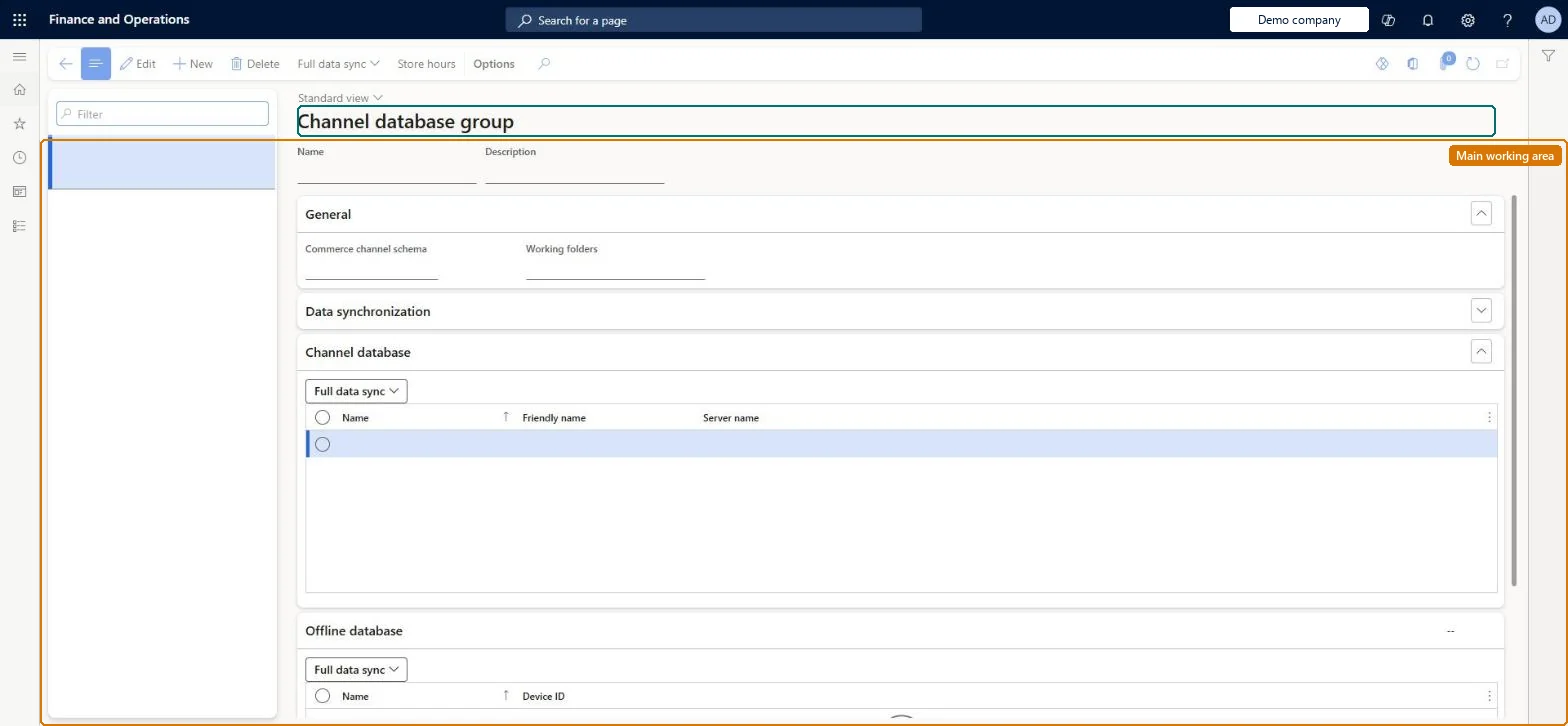
Setup step on the Channel database group page · Retail and Commerce
Set up Channel database group
Use this page to create groups such as one for the cloud Commerce Scale Unit and one for store offline databases, to pick their channel schema and working folders, and to run a full data sync for every database in a group.
Retail and CommerceHeadquarters setupCommerce scheduler
RetailCDXDataGroup
Used by
Retail operations manager, Retail service, Retail store IT and 1 more role
Business process
Manage sales channels
Menu item
RetailCDXDataGroup
Main table
RetailCDXDataGroup
Data entity
RetailCdxDataGroupEntity
Setup steps
1 on this page
Show what matters for
SETUP GUIDEHow to set it up8 sections. Choose a role to highlight what matters to you.
Everyone
1What it is and why
What it is
A setup page where you define groups of channel and offline databases that need the same data; each group references a channel schema and gathers the data packages that all its member databases require.
What you do here
Use this page to create groups such as one for the cloud Commerce Scale Unit and one for store offline databases, to pick their channel schema and working folders, and to run a full data sync for every database in a group.
Example
For example, Microsoft recommends a dummy group with no distribution schedule jobs for newly created terminals, so that no data is generated until they are ready to use.
The page in Dynamics 365. page title tab to open what to set or check
About the examples: Examples and screenshots in this guide use BEAT, a demo company in a Dynamics 365 test environment. Use your own company's codes and values instead of copying them.
Setup steps on this page
Set up Channel database group
Use this page to create groups such as one for the cloud Commerce Scale Unit and one for store offline databases, to pick their channel schema and working folders, and to run a full data sync for every database in a group.
Steps from Microsoft
Go to Retail and Commerce > Headquarters setup > Commerce scheduler > Channel database group.
On the action pane, select New.
In the Name field, enter a name (for example Default) and optionally a Description.
In the Channel schema field, select AX7.
In the Working folders field, select File storage.
At least two groups (one for the cloud Commerce Scale Unit, one for offline databases) plus a group with no distribution schedule jobs for new databases until they are neededLearn says at a minimum two groups should exist and highly recommends a group not linked to any job (or Pause offline synchronization) so data is generated only when required.
Reversible: Databases can be moved between groups; moving them back triggers data generation for the new group.
If you change it later
Adding a database to a group makes it inherit every download session since the last full sync, which can generate huge numbers of sessions at once and hurt performance if done at busy times. Microsoft Learn
Technical architect
6Technical
Menu item
RetailCDXDataGroupChecked in Dynamics 365
Form
RetailCDXDataGroupChecked in Dynamics 365
Table
RetailCDXDataGroupShown as “COMMERCE DATA EXCHANGE CHANNEL DATABASE GROUP” in Record infoKey field: NameChecked in Dynamics 365
Data entities
RetailCdxDataGroupEntityCommerce Data Exchange channel database group Checked in Dynamics 365
Who can open it
PrivilegesMaintain Retail Commerce Data Exchange RetailCDXMaintainDutiesManage Commerce Data Exchange: Synch Service RetailCDXMaintain4 security rolesRetail operations manager RetailOperationsManagerRetail service RetailServiceRetail store IT RetailStoreITRetail store manager RetailStoreManagerChecked in Dynamics 365
Roles to set it up and use it
To set it up or change itRetail service RetailServiceRetail operations manager RetailOperationsManagerRetail store manager RetailStoreManagerRetail store IT RetailStoreITGive people one of these roles. On this system, 4 roles can open this page.Checked in Dynamics 365
Actions on the page
(Action Pane without tabs): Full data sync, Store hoursChecked in Dynamics 365
Developer
7Developer
Open it by URL
https://<your-environment>/?mi=RetailCDXDataGroup
Integrate with
RetailCdxDataGroupEntity data entity Checked in Dynamics 365