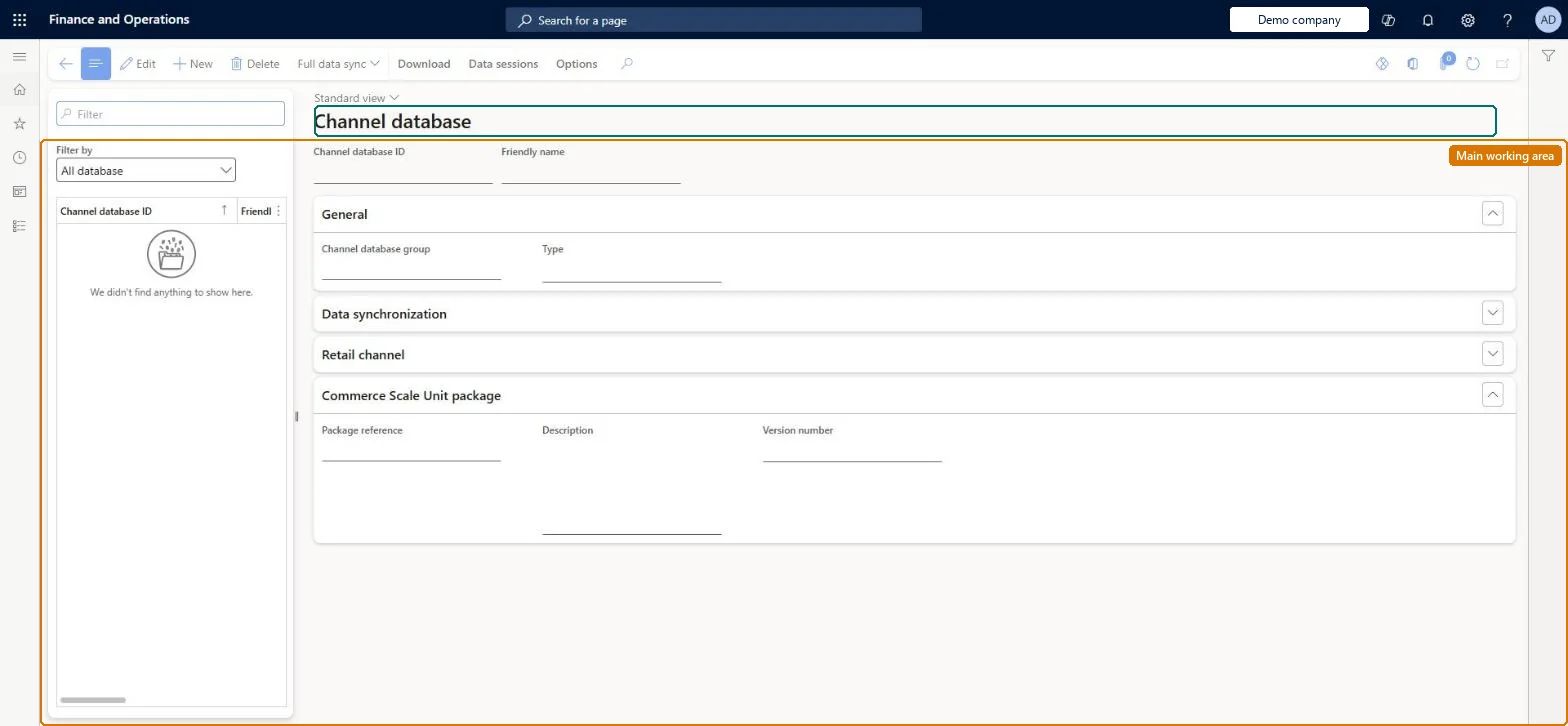
A setup page where each physical channel database (cloud or self-hosted Commerce Scale Unit) and each Store Commerce offline database is registered, assigned to a channel database group and linked to the channels it serves.
Retail and CommerceHeadquarters setupCommerce scheduler
RetailCDXDataStore
Used by
Retail operations manager, Retail service, Retail store IT and 1 more role
Business process
Manage sales channels
Menu item
RetailCDXDataStore
Main table
RetailConnDatabaseProfile
Data entity
RetailConnDatabaseProfileEntity
Setup steps
1 on this page
Show what matters for
PAGE GUIDEWhat the page does and how to use it8 sections. Choose a role to highlight what matters to you.
Everyone
1What it is and why
What it is
A setup page where each physical channel database (cloud or self-hosted Commerce Scale Unit) and each Store Commerce offline database is registered, assigned to a channel database group and linked to the channels it serves.
What you do here
Use this page to create channel database records, map stores and online channels to them, optionally set a data sync interval, and start a full data sync of a distribution schedule (for example 9999 or 1040) to a selected database.
Example
For example, after adding the online store channels to the Commerce Scale Unit's channel database you run Full data sync with job 9999 so the channel receives all data.
The page in Dynamics 365. page title tab to open what to set or check
About the examples: Examples and screenshots in this guide use BEAT, a demo company in a Dynamics 365 test environment. Use your own company's codes and values instead of copying them.
Setup steps on this page
Set up Channel database
Use this page to create channel database records, map stores and online channels to them, optionally set a data sync interval, and start a full data sync of a distribution schedule (for example 9999 or 1040) to a selected database.
Steps from Microsoft
Go to Retail and Commerce > Headquarters setup > Commerce scheduler > Channel database.
On the action pane, select New.
In the Channel database ID field, enter a unique value.
In the Channel data group field, select the group (for example Default) and leave Type as Channel database.
Optionally select a Data sync interval.
On the Retail channel FastTab, select Add and pick each channel that uses this database.
Select Save, and confirm the Mapping a New Retail Channel warning if it appears.
One record per physical database, linked to a channel database group, with its stores on the Retail channel FastTab, followed by a full data sync of job 9999Learn says each record maps 1:1 to a physical database and must belong to a group, and uses Full data sync with 9999 to prepare all data for a new channel database.
Leaving the old default database in the Default data group after moving stores to a self-hosted scale unit. Learn says this can cause data sync errors later.
Solution architect
5Design impact
Can it be undone
Reversible: Stores can be remapped and data resynced. Full data sync runs once only; recurrence can't be used from this page. Microsoft Learn
If you change it later
A full data sync started from this page can only be run once (no recurrence), and if a job excluded from offline databases is fully synced the matching offline tables are emptied. Microsoft Learn
Technical architect
6Technical
Menu item
RetailCDXDataStoreChecked in Dynamics 365
Form
RetailCDXDataStoreChecked in Dynamics 365
Table
RetailConnDatabaseProfileShown as “DATABASE CONNECTION PROFILE” in Record infoKey field: NameChecked in Dynamics 365
Data entities
RetailConnDatabaseProfileEntityDatabase connection profile Checked in Dynamics 365
Who can open it
PrivilegesMaintain Retail Commerce Data Exchange RetailCDXMaintainDutiesManage Commerce Data Exchange: Synch Service RetailCDXMaintain4 security rolesRetail operations manager RetailOperationsManagerRetail service RetailServiceRetail store IT RetailStoreITRetail store manager RetailStoreManagerChecked in Dynamics 365
Roles to set it up and use it
To set it up or change itRetail service RetailServiceRetail operations manager RetailOperationsManagerRetail store manager RetailStoreManagerRetail store IT RetailStoreITGive people one of these roles. On this system, 4 roles can open this page.Checked in Dynamics 365
Actions on the page
Download: DownloadData sessions: Data sessions(Action Pane without tabs): Full data syncChecked in Dynamics 365
Developer
7Developer
Open it by URL
https://<your-environment>/?mi=RetailCDXDataStore
Integrate with
RetailConnDatabaseProfileEntity data entity Checked in Dynamics 365